> ## Documentation Index
> Fetch the complete documentation index at: https://docs.digifist.com/llms.txt
> Use this file to discover all available pages before exploring further.
# Plans & limits
> Free vs Pro in Galantis Discount Flow — campaign and usage limits, what happens when a Free shop hits its monthly cap, and how to change plans through Shopify.
Galantis Discount Flow has two plans: **Free** and **Pro**. Every feature is available on both plans — the difference is capacity: how many campaigns can be active at once, and how much monthly discount usage your store can run. Billing is handled entirely by Shopify.
## Plan comparison
| | Free | Pro |
| ----------------------------- | :---: | :----------------------------: |
| Active campaigns | 3 max | Unlimited |
| Discounted orders / month | 25 | Unmetered |
| Discount applications / month | 1,000 | Unmetered |
| Features | All | All |
| Billing | — | Monthly or annual, via Shopify |
There is no feature gating. Free and Pro shops use the same campaign builder, discount types, analytics, and storefront embed — Pro removes the caps.
## Free plan limits
The Free plan has one structural limit and two monthly usage caps:
* **3 active campaigns** — you can create as many campaigns as you like, but at most 3 can be active at the same time. Trying to activate a fourth shows: "FREE plan allows a maximum of 3 active campaigns. Upgrade to activate more."
* **25 discounted orders per month** — orders where a Galantis Discount Flow discount was applied.
* **1,000 discount applications per month** — times a discount was applied in checkout.
### The monthly period
Usage caps reset on a monthly period **anchored to your install date**, not the calendar month. If you installed on the 14th, each usage period runs from the 14th to the 13th of the following month.
### What happens when you hit a cap
When either cap is reached, all of the store's discounts are paused — campaigns stop applying at checkout for the rest of the period.
A usage-paused banner is shown on the dashboard so you know why discounts stopped.
At the start of the next monthly period, discounts reactivate on their own — no action needed. Upgrading to Pro lifts the pause **immediately** instead.
While usage is paused, customers see no Galantis Discount Flow discounts at checkout. If your campaigns drive meaningful revenue, treat the usage-paused banner as a prompt to upgrade rather than wait out the period.
 ## Pro plan
Pro removes all caps: unlimited active campaigns and unmetered usage. Pro is available as a monthly or an **annual** subscription.
## Changing your plan
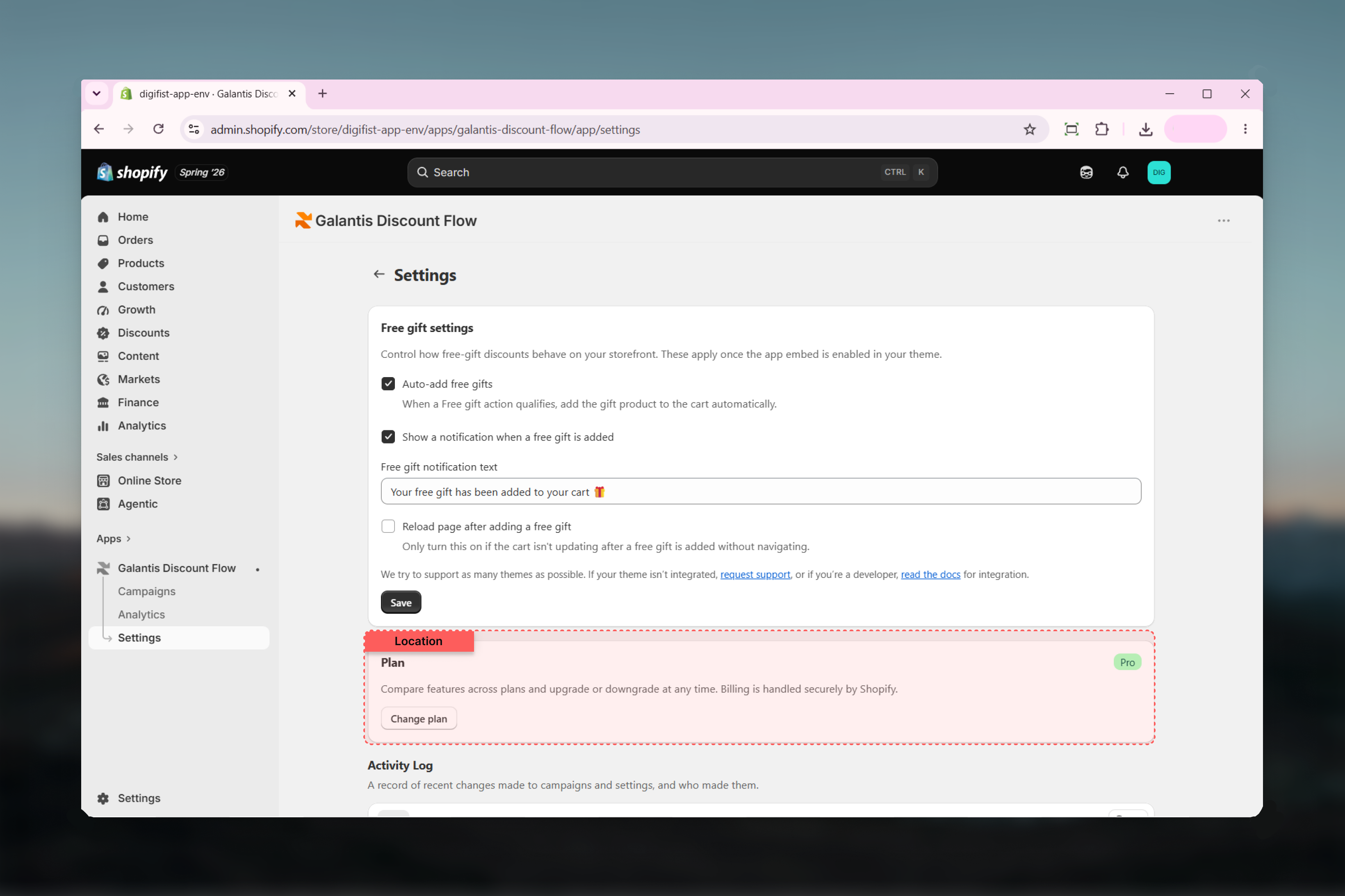
In Galantis Discount Flow, go to **Settings**. The **Plan** card shows your current plan badge and notes that billing is handled securely by Shopify.
You're taken to a Shopify-hosted page where the subscription is managed. Confirm the change there — no payment details are ever entered in Galantis Discount Flow.
### Upgrade behavior
Upgrading to Pro takes effect right away. If your store was usage-paused on Free, the pause is lifted **immediately** and discounts start applying again.
### Downgrade behavior
Downgrading from Pro to Free re-applies the 3-active-campaign limit. If more than 3 campaigns are active at the time, campaigns beyond the limit are **auto-paused** — the oldest 3 are kept active. You can choose which 3 stay active by pausing and activating campaigns yourself afterwards.
## Related guides
* [Settings](/galantis/discount/settings) — the Plan card and the Activity Log, where plan changes and usage events are recorded
* [Troubleshooting](/galantis/discount/support/troubleshooting) — the usage-paused banner and activation limit errors explained
## Pro plan
Pro removes all caps: unlimited active campaigns and unmetered usage. Pro is available as a monthly or an **annual** subscription.
## Changing your plan
In Galantis Discount Flow, go to **Settings**. The **Plan** card shows your current plan badge and notes that billing is handled securely by Shopify.
You're taken to a Shopify-hosted page where the subscription is managed. Confirm the change there — no payment details are ever entered in Galantis Discount Flow.
### Upgrade behavior
Upgrading to Pro takes effect right away. If your store was usage-paused on Free, the pause is lifted **immediately** and discounts start applying again.
### Downgrade behavior
Downgrading from Pro to Free re-applies the 3-active-campaign limit. If more than 3 campaigns are active at the time, campaigns beyond the limit are **auto-paused** — the oldest 3 are kept active. You can choose which 3 stay active by pausing and activating campaigns yourself afterwards.
## Related guides
* [Settings](/galantis/discount/settings) — the Plan card and the Activity Log, where plan changes and usage events are recorded
* [Troubleshooting](/galantis/discount/support/troubleshooting) — the usage-paused banner and activation limit errors explained