> ## Documentation Index
> Fetch the complete documentation index at: https://docs.digifist.com/llms.txt
> Use this file to discover all available pages before exploring further.
# Combinations
> How campaigns in Galantis Discount Flow stack with other discounts — the three combination classes and the best-discount rule on shared cart lines.
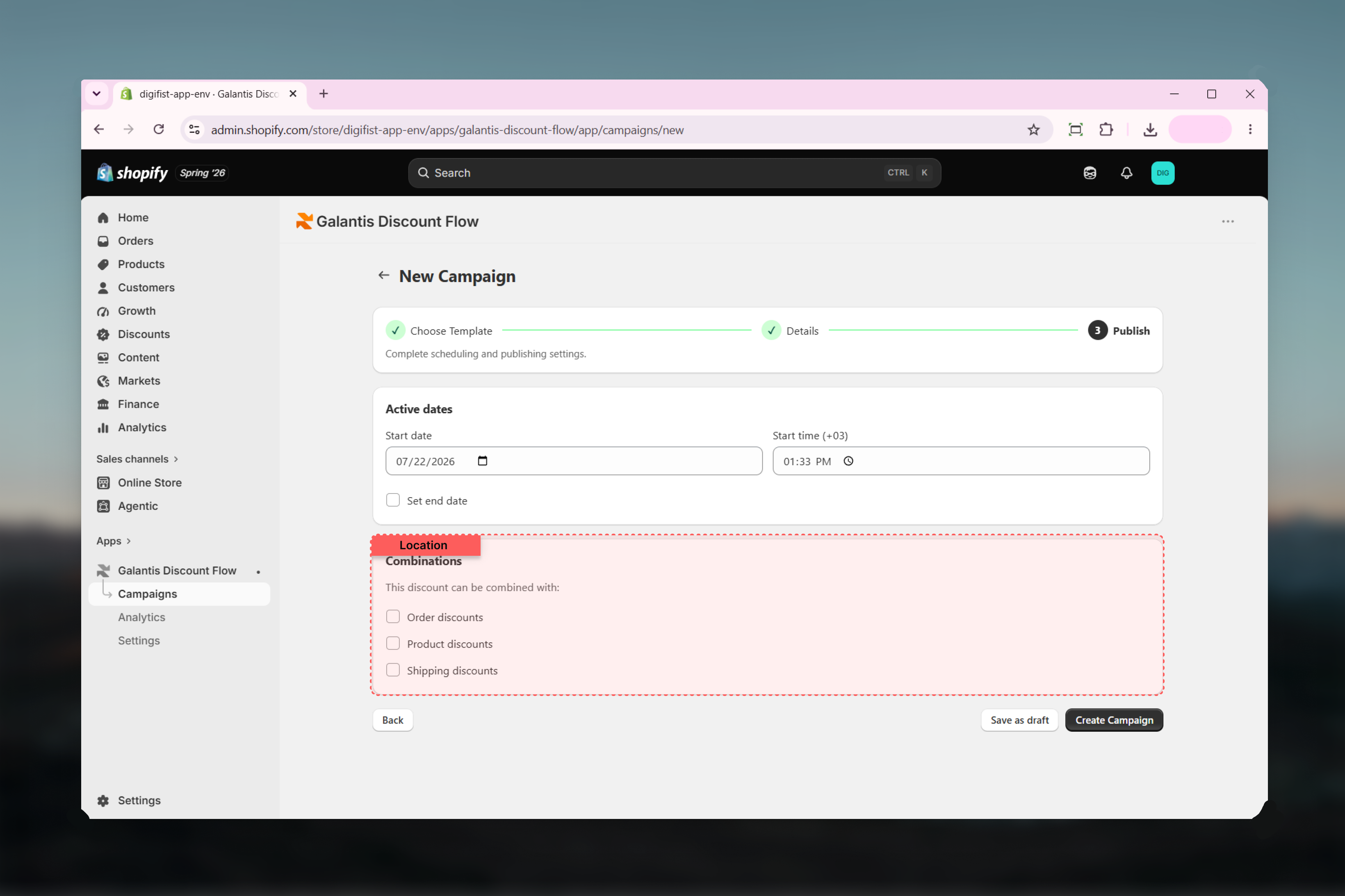
By default, a Shopify cart applies one discount at a time. The **Combinations** card in Galantis Discount Flow lets a campaign opt in to stacking with other discounts, using the same combination system Shopify applies to its native discounts.
Getting combinations right matters twice over: too restrictive and a customer's free-shipping code silently cancels your sale price; too permissive and discounts pile up beyond what you budgeted.
## The Combinations card
The card appears in step 3 of the creation wizard and on the campaign detail page. Under the heading **"This discount can be combined with:"** are three checkboxes:
* **Order discounts** — discounts applied to the whole order total
* **Product discounts** — discounts applied to specific products or cart lines
* **Shipping discounts** — free or reduced shipping
Each checkbox corresponds to one of Shopify's discount classes. Ticking a class means your campaign is willing to apply alongside discounts of that class — leaving all three unticked means the campaign never stacks with anything.
 Combination is mutual. Your campaign stacks with another discount only when both sides allow the other's class — your settings alone can't force stacking with a discount that doesn't permit it.
## The best-discount rule on shared lines
There is one rule that combination settings cannot override: on the same cart line, **only the best product discount applies** among competing product discounts. Two product discounts can coexist in one cart — each applying to different lines — but where they both target the same line, the customer gets the better of the two, not both.
## Scenarios
A 20% storewide campaign runs alongside a free-shipping campaign for carts over 150.
Tick **Shipping discounts** on the percentage campaign and **Product discounts** on the free-shipping campaign. A qualifying cart then gets both: 20% off the products and free delivery. If either side leaves the other's class unticked, only one of the two applies.
A 30% end-of-season campaign covers your whole catalog, and a Buy 1 Get 1 Free campaign covers one collection — both allowing **Product discounts**.
On lines only the seasonal sale targets, 30% applies. On lines where both compete, the best-discount rule picks whichever benefits the customer more on that line — they never stack on the same line.
A deep 50% clearance campaign shouldn't combine with anything.
Leave all three checkboxes unticked. The clearance discount then applies on its own, and no order, product, or shipping discount joins it in the same cart.
A fixed 25-off order campaign (an order discount) allows **Product discounts**, and a 10% product campaign allows **Order discounts**.
Both apply to a qualifying cart: the product discount reduces line prices, and the order discount reduces the total. Different classes never compete under the best-discount rule — that rule only arbitrates between product discounts on the same line.
Review combinations before every major sale. Stacked discounts multiply quickly — a 30% campaign combining with a 20% order discount gives away far more margin than either does alone.
## Quick reference
| Setting | Effect |
| ----------------------------- | ------------------------------------------------------------------------------- |
| **Order discounts** ticked | Can apply together with order-level discounts |
| **Product discounts** ticked | Can apply together with product-level discounts (best one wins per shared line) |
| **Shipping discounts** ticked | Can apply together with shipping discounts |
| Nothing ticked | The campaign never stacks with any other discount |
## Related guides
* [Creating campaigns](/galantis/discount/campaigns/creating-campaigns) — where the Combinations card appears in the wizard
* [Managing campaigns](/galantis/discount/campaigns/managing-campaigns) — changing combinations on a live campaign
* [Campaigns overview](/galantis/discount/campaigns/index) — how campaigns map to Shopify discounts
Combination is mutual. Your campaign stacks with another discount only when both sides allow the other's class — your settings alone can't force stacking with a discount that doesn't permit it.
## The best-discount rule on shared lines
There is one rule that combination settings cannot override: on the same cart line, **only the best product discount applies** among competing product discounts. Two product discounts can coexist in one cart — each applying to different lines — but where they both target the same line, the customer gets the better of the two, not both.
## Scenarios
A 20% storewide campaign runs alongside a free-shipping campaign for carts over 150.
Tick **Shipping discounts** on the percentage campaign and **Product discounts** on the free-shipping campaign. A qualifying cart then gets both: 20% off the products and free delivery. If either side leaves the other's class unticked, only one of the two applies.
A 30% end-of-season campaign covers your whole catalog, and a Buy 1 Get 1 Free campaign covers one collection — both allowing **Product discounts**.
On lines only the seasonal sale targets, 30% applies. On lines where both compete, the best-discount rule picks whichever benefits the customer more on that line — they never stack on the same line.
A deep 50% clearance campaign shouldn't combine with anything.
Leave all three checkboxes unticked. The clearance discount then applies on its own, and no order, product, or shipping discount joins it in the same cart.
A fixed 25-off order campaign (an order discount) allows **Product discounts**, and a 10% product campaign allows **Order discounts**.
Both apply to a qualifying cart: the product discount reduces line prices, and the order discount reduces the total. Different classes never compete under the best-discount rule — that rule only arbitrates between product discounts on the same line.
Review combinations before every major sale. Stacked discounts multiply quickly — a 30% campaign combining with a 20% order discount gives away far more margin than either does alone.
## Quick reference
| Setting | Effect |
| ----------------------------- | ------------------------------------------------------------------------------- |
| **Order discounts** ticked | Can apply together with order-level discounts |
| **Product discounts** ticked | Can apply together with product-level discounts (best one wins per shared line) |
| **Shipping discounts** ticked | Can apply together with shipping discounts |
| Nothing ticked | The campaign never stacks with any other discount |
## Related guides
* [Creating campaigns](/galantis/discount/campaigns/creating-campaigns) — where the Combinations card appears in the wizard
* [Managing campaigns](/galantis/discount/campaigns/managing-campaigns) — changing combinations on a live campaign
* [Campaigns overview](/galantis/discount/campaigns/index) — how campaigns map to Shopify discounts