> ## Documentation Index
> Fetch the complete documentation index at: https://docs.digifist.com/llms.txt
> Use this file to discover all available pages before exploring further.
# Templates
> The six ready-made campaign templates in Galantis Discount Flow — what each one prefills and how to customize it after selecting.
Templates are ready-made campaigns covering the six most common discount patterns in e-commerce. Selecting one in the first step of the wizard prefills the campaign name and the entire Rule Builder flow, so a working promotion is one click away — and every part of it remains editable.
Templates are starting points, not constraints. Swap the amounts, tighten the conditions, extend the flow — the result is an ordinary campaign like any built from scratch.
## The template gallery
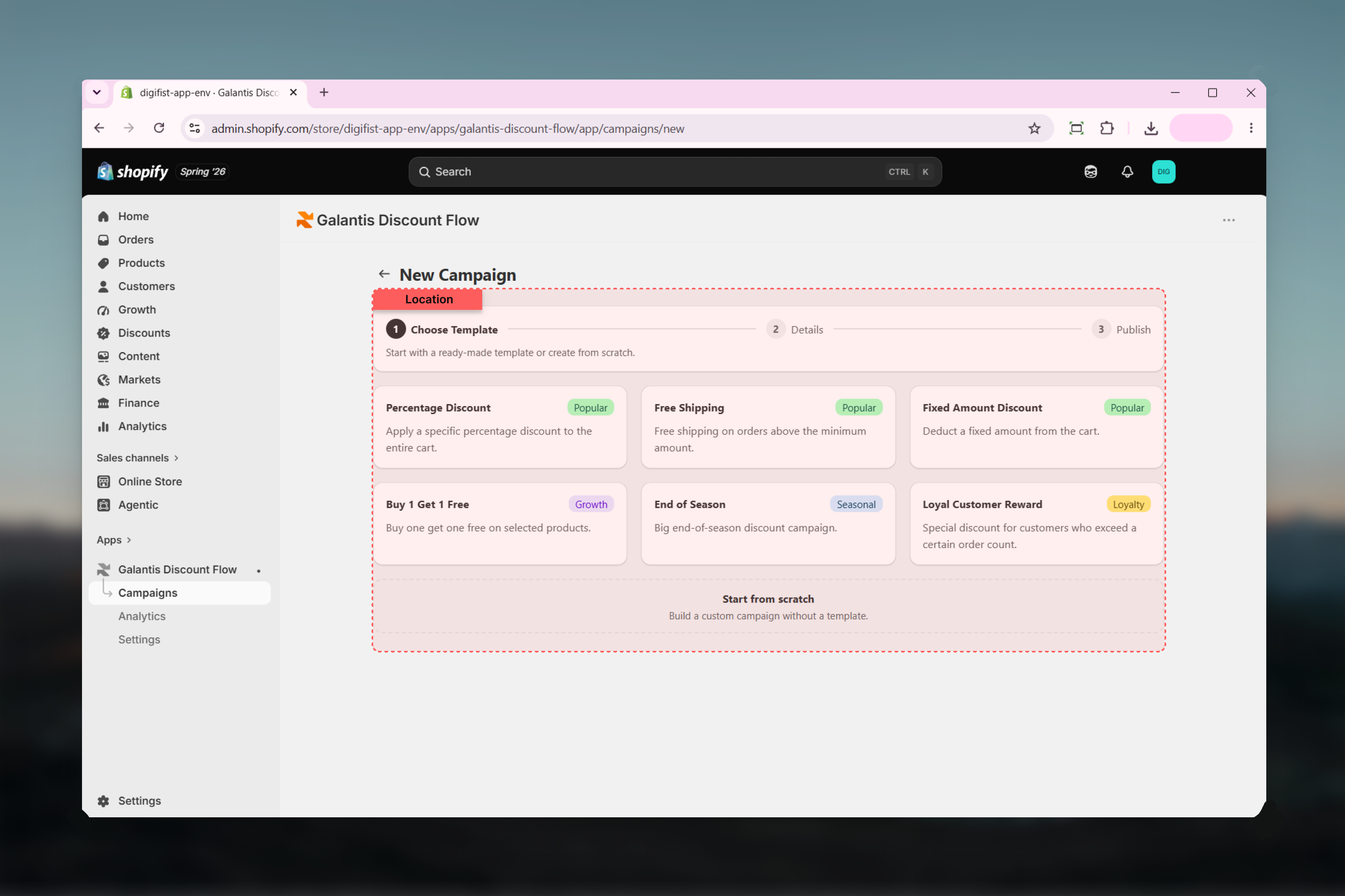
The gallery is step 1 of the creation wizard (**Campaigns** → **Create Campaign**). Each template shows its name, a short description, and a category badge; below the grid, **Start from scratch** begins with an empty canvas instead.
 ## The six templates
**Popular** — "Apply a specific percentage discount to the entire cart." Prefills a flat 10% off the whole cart.
**Popular** — "Free shipping on orders above the minimum amount." Prefills free shipping when the cart total reaches 150.
**Popular** — "Deduct a fixed amount from the cart." Prefills 25 off when the cart total reaches 100.
**Growth** — "Buy one get one free on selected products." Prefills a BOGO flow for products you select.
**Seasonal** — "Big end-of-season discount campaign." Prefills a 30% discount for clearing out a season's stock.
**Retention** — "Special discount for customers who exceed a certain order count." Prefills 50 off for customers with more than 5 orders.
All template amounts are in your store's own currency — the "25 off" in Fixed Amount Discount means 25 of whatever your store sells in.
## At a glance
| Template | Category | Prefilled flow |
| --------------------- | --------- | ------------------------------------------------ |
| Percentage Discount | Popular | Flat 10% off the entire cart |
| Free Shipping | Popular | Free shipping when the cart total is 150 or more |
| Fixed Amount Discount | Popular | 25 off when the cart total is 100 or more |
| Buy 1 Get 1 Free | Growth | Buy one, get one free on selected products |
| End of Season | Seasonal | 30% off for a seasonal clearance |
| Loyal Customer Reward | Retention | 50 off after more than 5 orders |
## Customizing after selecting
Selecting a template jumps you to step 2 of the wizard with everything prefilled:
The **Campaign Name** field is prefilled with the template's name. Replace it with something specific — "Summer Sale 20%" tells you more in the Campaigns list than "Percentage Discount".
Change the discount value, raise or lower thresholds, pick different products, or add further conditions — such as a **Discount code** condition to make the campaign code-based. The template's flow is fully editable, and a badge above the canvas shows which template you started from, with a **Change template** option to pick another.
Continue to step 3 to set [Active dates](/galantis/discount/campaigns/scheduling) and [Combinations](/galantis/discount/campaigns/combinations), then **Create Campaign** to publish or **Save as draft** to keep working later.
Templates pair naturally with schedules: start End of Season with a seasonal end date, or run Loyal Customer Reward with no end date as an evergreen retention offer.
## Related guides
* [Creating campaigns](/galantis/discount/campaigns/creating-campaigns) — the full 3-step wizard walkthrough
* [Scheduling](/galantis/discount/campaigns/scheduling) — putting a time window around a templated campaign
* [Combinations](/galantis/discount/campaigns/combinations) — how a templated campaign stacks with your other discounts
## The six templates
**Popular** — "Apply a specific percentage discount to the entire cart." Prefills a flat 10% off the whole cart.
**Popular** — "Free shipping on orders above the minimum amount." Prefills free shipping when the cart total reaches 150.
**Popular** — "Deduct a fixed amount from the cart." Prefills 25 off when the cart total reaches 100.
**Growth** — "Buy one get one free on selected products." Prefills a BOGO flow for products you select.
**Seasonal** — "Big end-of-season discount campaign." Prefills a 30% discount for clearing out a season's stock.
**Retention** — "Special discount for customers who exceed a certain order count." Prefills 50 off for customers with more than 5 orders.
All template amounts are in your store's own currency — the "25 off" in Fixed Amount Discount means 25 of whatever your store sells in.
## At a glance
| Template | Category | Prefilled flow |
| --------------------- | --------- | ------------------------------------------------ |
| Percentage Discount | Popular | Flat 10% off the entire cart |
| Free Shipping | Popular | Free shipping when the cart total is 150 or more |
| Fixed Amount Discount | Popular | 25 off when the cart total is 100 or more |
| Buy 1 Get 1 Free | Growth | Buy one, get one free on selected products |
| End of Season | Seasonal | 30% off for a seasonal clearance |
| Loyal Customer Reward | Retention | 50 off after more than 5 orders |
## Customizing after selecting
Selecting a template jumps you to step 2 of the wizard with everything prefilled:
The **Campaign Name** field is prefilled with the template's name. Replace it with something specific — "Summer Sale 20%" tells you more in the Campaigns list than "Percentage Discount".
Change the discount value, raise or lower thresholds, pick different products, or add further conditions — such as a **Discount code** condition to make the campaign code-based. The template's flow is fully editable, and a badge above the canvas shows which template you started from, with a **Change template** option to pick another.
Continue to step 3 to set [Active dates](/galantis/discount/campaigns/scheduling) and [Combinations](/galantis/discount/campaigns/combinations), then **Create Campaign** to publish or **Save as draft** to keep working later.
Templates pair naturally with schedules: start End of Season with a seasonal end date, or run Loyal Customer Reward with no end date as an evergreen retention offer.
## Related guides
* [Creating campaigns](/galantis/discount/campaigns/creating-campaigns) — the full 3-step wizard walkthrough
* [Scheduling](/galantis/discount/campaigns/scheduling) — putting a time window around a templated campaign
* [Combinations](/galantis/discount/campaigns/combinations) — how a templated campaign stacks with your other discounts