> ## Documentation Index
> Fetch the complete documentation index at: https://docs.digifist.com/llms.txt
> Use this file to discover all available pages before exploring further.
# Settings
> The Galantis Discount Flow Settings page — manage your plan through Shopify and audit everything that happened in your account with the Activity Log.
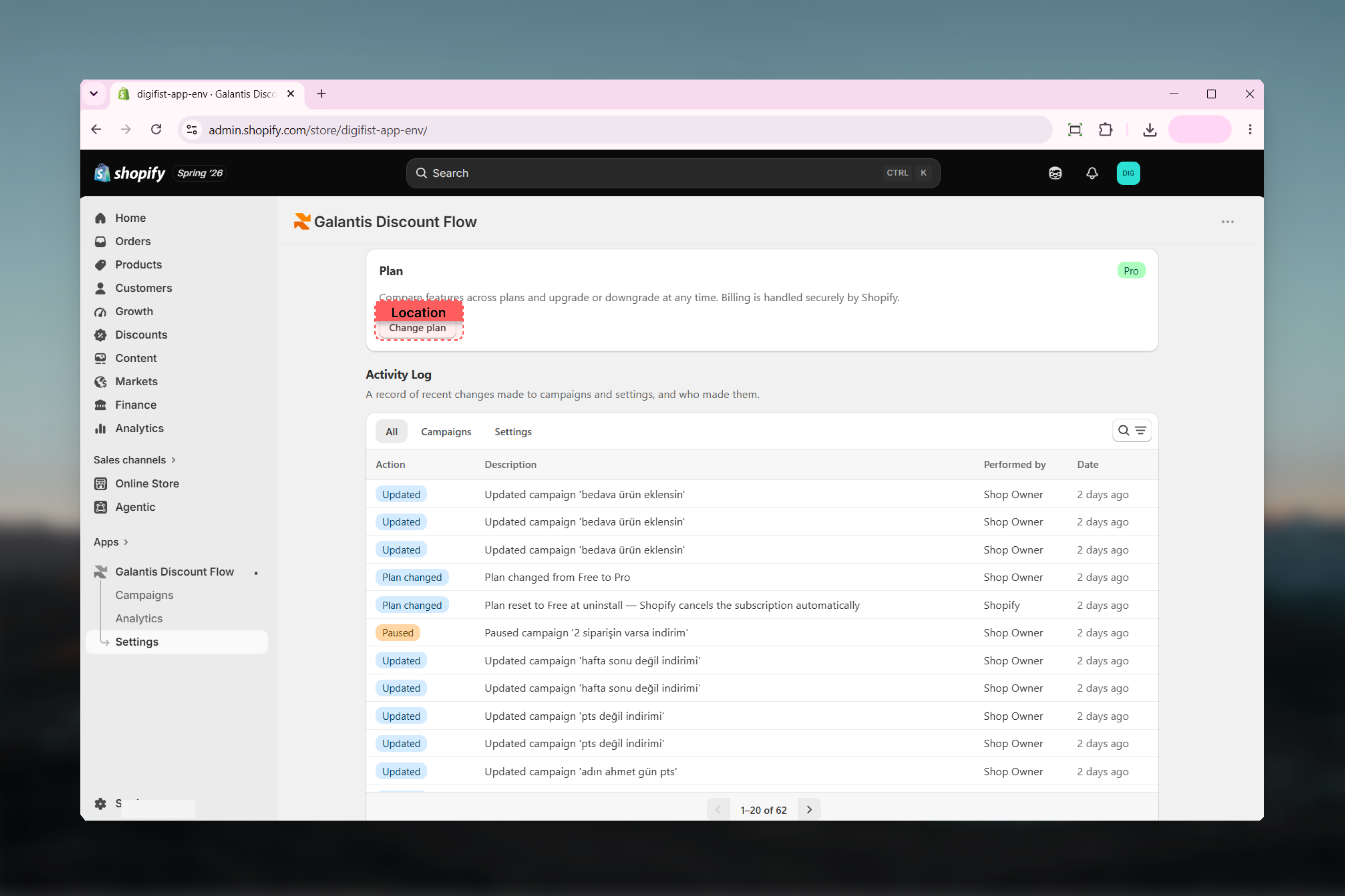
The Settings page in Galantis Discount Flow has two parts: a **Plan** card for managing your subscription, and an **Activity Log** that records every meaningful change made in the app. Together they answer "what plan am I on?" and "who changed what, and when?".
## Plan card
The Plan card at the top of Settings shows:
* Your current plan badge (**Free** or **Pro**)
* A note that billing is handled securely by Shopify
* A **Change plan** button
Clicking **Change plan** takes you to a Shopify-hosted page where the subscription is managed — payment details never pass through Galantis Discount Flow. For plan differences, caps, and upgrade/downgrade behavior, see [Plans & limits](/galantis/discount/billing/plans-limits).
 ## Activity Log
The Activity Log is a paginated, searchable audit trail of your account — useful when a campaign changed unexpectedly, when you're checking who paused something, or when you need to see when a usage limit was hit.
### Layout
* **Tabs** — **All**, **Campaigns**, and **Settings** filter entries by category.
* **Search** — filter entries by keyword.
* **Pagination** — 20 entries per page.
Each entry has four columns:
| Column | Contents |
| ------------ | ---------------------------------------------------- |
| Action | The type of event (for example, campaign activated). |
| Description | What specifically happened. |
| Performed by | Who (or what) triggered the event. |
| Date | When it happened. |
### What gets logged
| Category | Logged events |
| --------- | --------------------------------------------------------------------------------- |
| Campaigns | Created, updated, activated, paused, archived, restored — including bulk actions. |
| Plan | Plan changes (upgrades and downgrades). |
| Usage | Usage limit reached, usage limit reset. |
| Privacy | Privacy requests. |
If discounts stopped applying and you're not sure why, check the Activity Log for a **usage limit reached** entry — it pins down exactly when the store's Free-plan cap was hit. See [Plans & limits](/galantis/discount/billing/plans-limits) for how the pause works.
Bulk campaign actions are logged too, so a mass pause or archive shows up as auditable entries rather than silently changing many campaigns.
## Related guides
* [Plans & limits](/galantis/discount/billing/plans-limits) — what the Plan card controls, and what happens on upgrade or downgrade
* [Troubleshooting](/galantis/discount/support/troubleshooting) — using the Activity Log to diagnose paused or missing discounts
## Activity Log
The Activity Log is a paginated, searchable audit trail of your account — useful when a campaign changed unexpectedly, when you're checking who paused something, or when you need to see when a usage limit was hit.
### Layout
* **Tabs** — **All**, **Campaigns**, and **Settings** filter entries by category.
* **Search** — filter entries by keyword.
* **Pagination** — 20 entries per page.
Each entry has four columns:
| Column | Contents |
| ------------ | ---------------------------------------------------- |
| Action | The type of event (for example, campaign activated). |
| Description | What specifically happened. |
| Performed by | Who (or what) triggered the event. |
| Date | When it happened. |
### What gets logged
| Category | Logged events |
| --------- | --------------------------------------------------------------------------------- |
| Campaigns | Created, updated, activated, paused, archived, restored — including bulk actions. |
| Plan | Plan changes (upgrades and downgrades). |
| Usage | Usage limit reached, usage limit reset. |
| Privacy | Privacy requests. |
If discounts stopped applying and you're not sure why, check the Activity Log for a **usage limit reached** entry — it pins down exactly when the store's Free-plan cap was hit. See [Plans & limits](/galantis/discount/billing/plans-limits) for how the pause works.
Bulk campaign actions are logged too, so a mass pause or archive shows up as auditable entries rather than silently changing many campaigns.
## Related guides
* [Plans & limits](/galantis/discount/billing/plans-limits) — what the Plan card controls, and what happens on upgrade or downgrade
* [Troubleshooting](/galantis/discount/support/troubleshooting) — using the Activity Log to diagnose paused or missing discounts