> ## Documentation Index
> Fetch the complete documentation index at: https://docs.digifist.com/llms.txt
> Use this file to discover all available pages before exploring further.
# Theme app embed
> Enable the Galantis Discount Flow app embed in your theme to auto-add free gifts to the cart, show gift notifications, and debug storefront evaluation.
The **Galantis Discount Flow** theme app embed is a small script that runs on your storefront. It evaluates your active campaigns against the live cart, automatically adds free gift products when a flow qualifies, removes them when the cart no longer qualifies, and can show customers a notification when a gift lands in their cart.
The embed does **not** apply price discounts. Percentage, fixed-amount, BOGO, bundle, and shipping discounts are applied at checkout by the discount Function whether or not the embed is enabled. The embed only powers storefront behavior — most importantly, free gifts. See [How discounts apply at checkout](/galantis/discount/storefront/how-discounts-apply).
## What the embed does — and doesn't
| The embed does | The embed does not |
| --------------------------------------------------------------- | ------------------------------------------ |
| Evaluate active campaigns on the storefront | Apply percentage or fixed-amount discounts |
| Auto-add free gift products to the cart when the flow qualifies | Apply BOGO, bundle, or shipping discounts |
| Remove gifts when the cart stops qualifying | Change prices in the cart |
| Show a notification when a gift is added | Affect checkout in any way |
| Log evaluation details when Debug mode is on | |
## Enabling the embed
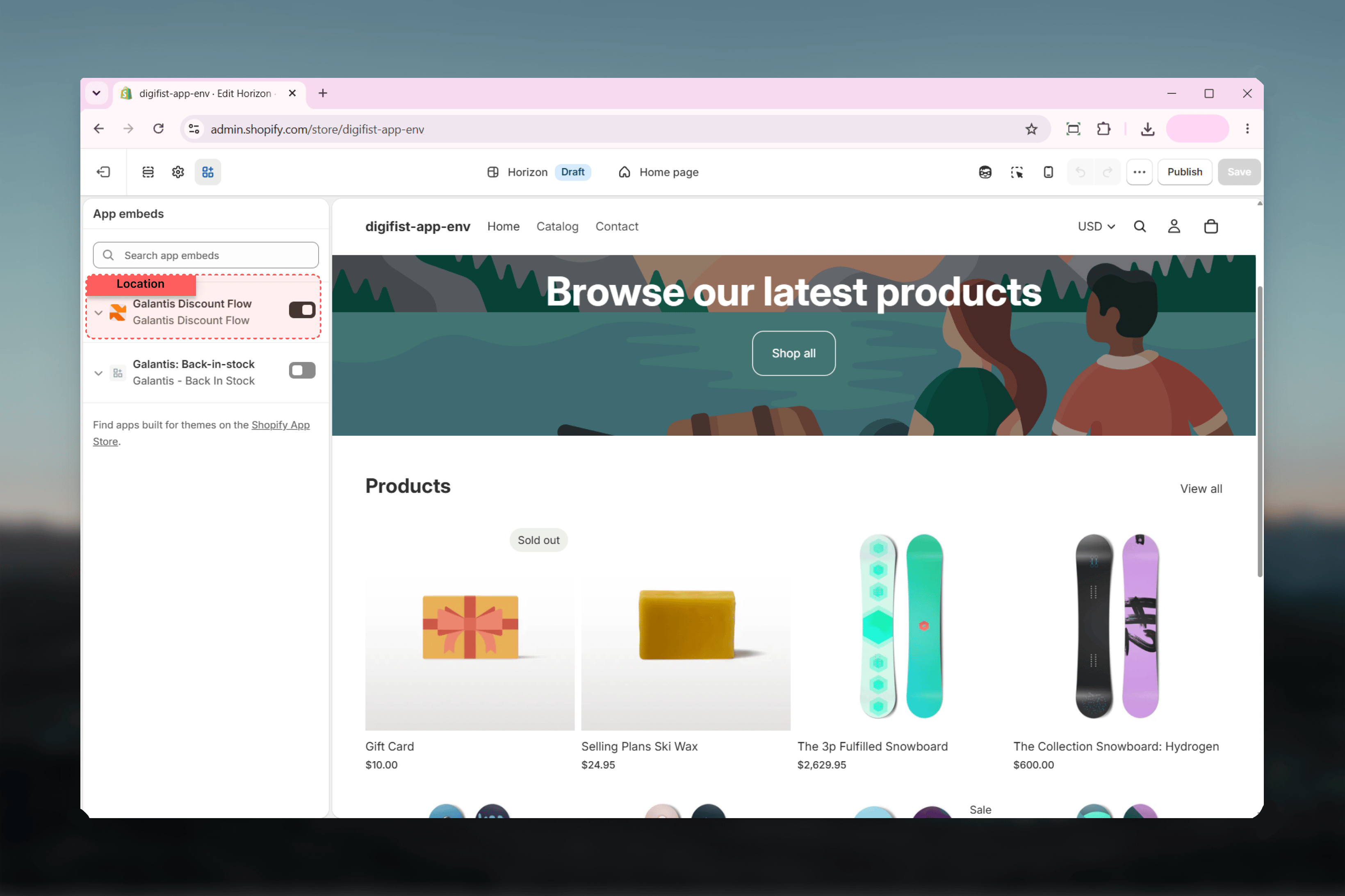
In your Shopify admin, go to **Online Store → Themes** and click **Customize** on your live theme.
In the theme editor sidebar, select **App embeds**.
Find **Galantis Discount Flow** in the list and toggle it on. **Enable Galantis Discount Flow** is on by default once the embed itself is activated.
Click **Save**. The embed starts evaluating campaigns on your storefront immediately.
 ## Embed settings
Default: **on**. The master switch for the embed. When off, no storefront evaluation happens — free gifts are not auto-added and no notifications are shown. Checkout discounts still apply normally.
Default: **off**. When on, the embed logs its campaign evaluation to the browser console — which campaigns were checked, whether the cart qualified, and what actions were taken. Useful when a free gift isn't behaving as expected. Turn it off again once you're done troubleshooting.
Default: **on**. When the cart qualifies for a free-gift flow, the gift product is added to the cart automatically. When the cart changes and no longer qualifies, the gift is removed again. Turn this off if you prefer gifts not to be added on the storefront.
Default: **on**. Displays a brief on-page notification the moment a gift is added, so customers understand why a new item appeared in their cart.
Default: "Your free gift has been added to your cart 🎁". Customize the message customers see when a gift is added — for example, to translate it or match your brand voice.
## How free-gift behavior works
When **Auto-add free gifts** is on, the embed watches the cart and reacts in both directions:
* **Cart qualifies** — the gift product is added automatically, and the notification appears (if enabled).
* **Cart stops qualifying** — for example, the customer removes the qualifying item — the gift is removed automatically, so customers can't keep gifts they no longer earned.
If a free gift isn't appearing, the two most common causes are the theme embed being disabled and **Auto-add free gifts** being turned off. Check both before digging deeper — see [Troubleshooting](/galantis/discount/support/troubleshooting).
## Debugging with Debug mode
Turn on **Debug mode**, open your storefront, and open your browser's developer console. The embed prints its evaluation of each active campaign against the current cart, which usually makes it obvious why a flow did or didn't qualify. Remember to turn Debug mode off afterwards so shoppers' consoles stay clean.
## Related guides
* [How discounts apply at checkout](/galantis/discount/storefront/how-discounts-apply) — the checkout side of the picture
* [Troubleshooting](/galantis/discount/support/troubleshooting) — free gift not appearing, and other common issues
## Embed settings
Default: **on**. The master switch for the embed. When off, no storefront evaluation happens — free gifts are not auto-added and no notifications are shown. Checkout discounts still apply normally.
Default: **off**. When on, the embed logs its campaign evaluation to the browser console — which campaigns were checked, whether the cart qualified, and what actions were taken. Useful when a free gift isn't behaving as expected. Turn it off again once you're done troubleshooting.
Default: **on**. When the cart qualifies for a free-gift flow, the gift product is added to the cart automatically. When the cart changes and no longer qualifies, the gift is removed again. Turn this off if you prefer gifts not to be added on the storefront.
Default: **on**. Displays a brief on-page notification the moment a gift is added, so customers understand why a new item appeared in their cart.
Default: "Your free gift has been added to your cart 🎁". Customize the message customers see when a gift is added — for example, to translate it or match your brand voice.
## How free-gift behavior works
When **Auto-add free gifts** is on, the embed watches the cart and reacts in both directions:
* **Cart qualifies** — the gift product is added automatically, and the notification appears (if enabled).
* **Cart stops qualifying** — for example, the customer removes the qualifying item — the gift is removed automatically, so customers can't keep gifts they no longer earned.
If a free gift isn't appearing, the two most common causes are the theme embed being disabled and **Auto-add free gifts** being turned off. Check both before digging deeper — see [Troubleshooting](/galantis/discount/support/troubleshooting).
## Debugging with Debug mode
Turn on **Debug mode**, open your storefront, and open your browser's developer console. The embed prints its evaluation of each active campaign against the current cart, which usually makes it obvious why a flow did or didn't qualify. Remember to turn Debug mode off afterwards so shoppers' consoles stay clean.
## Related guides
* [How discounts apply at checkout](/galantis/discount/storefront/how-discounts-apply) — the checkout side of the picture
* [Troubleshooting](/galantis/discount/support/troubleshooting) — free gift not appearing, and other common issues