> ## Documentation Index
> Fetch the complete documentation index at: https://docs.digifist.com/llms.txt
> Use this file to discover all available pages before exploring further.
# Opt-in & Consent
> How Galantis captures, tracks, and enforces customer marketing consent — the foundation Meta requires before any marketing message can be sent.
WhatsApp's Business Platform is a permission-based channel. Meta's [Business Messaging Policy](https://business.whatsapp.com/policy) requires explicit opt-in before any marketing message reaches a customer: *"You may only contact people on WhatsApp if (a) they have given you their mobile phone number; and (b) you have received opt-in permission."*
Galantis enforces this at the platform level. Every campaign, automation, and Back-in-Stock notification validates consent before a send is queued — customers without `SUBSCRIBED` status are excluded automatically. You can't accidentally message a non-opted-in customer through Galantis.
Sending marketing messages to non-opted-in customers is a Meta policy violation. It drives high block rates, damages your phone number's quality rating, and can result in throttling or suspension. Manual imports of unconsented "customer lists" are the most common cause of this — see [Manual import](#manual-import) for the rules.
## Consent states
Galantis tracks consent per customer using the `marketing_state` field. Every customer has exactly one state at any time:
| State | Meaning | Can receive marketing? |
| ---------------- | ----------------------------------------------------------------- | --------------------------- |
| `SUBSCRIBED` | Customer has explicitly opted in | ✅ Yes |
| `PENDING` | Consent captured, awaiting confirmation (e.g. double opt-in flow) | ❌ No |
| `NOT_SUBSCRIBED` | No opt-in on record | ❌ No |
| `UNSUBSCRIBED` | Previously opted in, now opted out | ❌ No |
| `UNKNOWN` | No consent information available | ❌ No |
| `INVALID` | Bad or unverifiable data | ❌ No |
| `REDACTED` | GDPR / data deletion applied | ❌ No (permanently excluded) |
Only `SUBSCRIBED` customers are eligible for marketing-category sends. Campaigns and automations filter the audience automatically — there's no manual override.
**Utility, authentication, and service messages** to existing customers don't require marketing opt-in but still need the customer to have provided their phone number for a legitimate business reason (e.g. checkout, shipping confirmation). See [Templates vs session messages](/galantis/whatsapp/compliance/templates-vs-session) for which message categories require what consent.
## How consent is collected
Galantis supports four collection methods. Each results in a `SUBSCRIBED` or `PENDING` state being recorded with a timestamp and source — the **proof of consent** you'll want if Meta or a regulator ever asks.
An opt-in checkbox at checkout. When the customer checks the box and the order completes, Shopify fires the `customers/marketing_consent_updated` webhook and Galantis records the consent with `source: shopify_checkout`, the timestamp, and the order ID.
Most stores rely on this as their primary capture method. The checkbox text and position are configured in your Shopify checkout settings.
Use plain, specific opt-in language ("I want to receive WhatsApp messages about my orders and offers from \[Store]") rather than a generic "marketing updates." Specific language drives lower block rates after the first send.
When a customer submits their WhatsApp number through the Back-in-Stock subscription widget, the act of submission constitutes explicit consent for restock notifications and (optionally, if your widget config asks) general marketing. Galantis records `source: back_in_stock_widget`, the timestamp, and the product they subscribed to.
Back-in-Stock captures consent from high-intent customers — they're actively asking to be contacted.
When a customer starts a conversation from your storefront chat widget, the inbound message itself establishes a service-window context. This is not the same as marketing opt-in — a customer who messages you about a shipping question hasn't agreed to receive promotional messages. The 24-hour service window lets you reply, but marketing messages still require separate explicit opt-in.
Galantis records `source: storefront_widget` and the conversation reference.
Customers can be imported manually into Galantis with explicit consent confirmation at the time of import — for example, consent that was collected through an in-store sign-up form, a printed flyer with QR code, or a third-party form.
Manual import as `SUBSCRIBED` requires verifiable proof of opt-in. Importing customers without a valid opt-in record (purchased lists, scraped numbers, "they bought from us so they must want marketing") is a Meta policy violation and almost always results in phone-number quality damage within days.
Required fields on import: source description, opt-in date, and a brief reference to the consent record (form ID, location, etc.). These are stored alongside the customer for audit purposes.
## Collecting WhatsApp consent at checkout
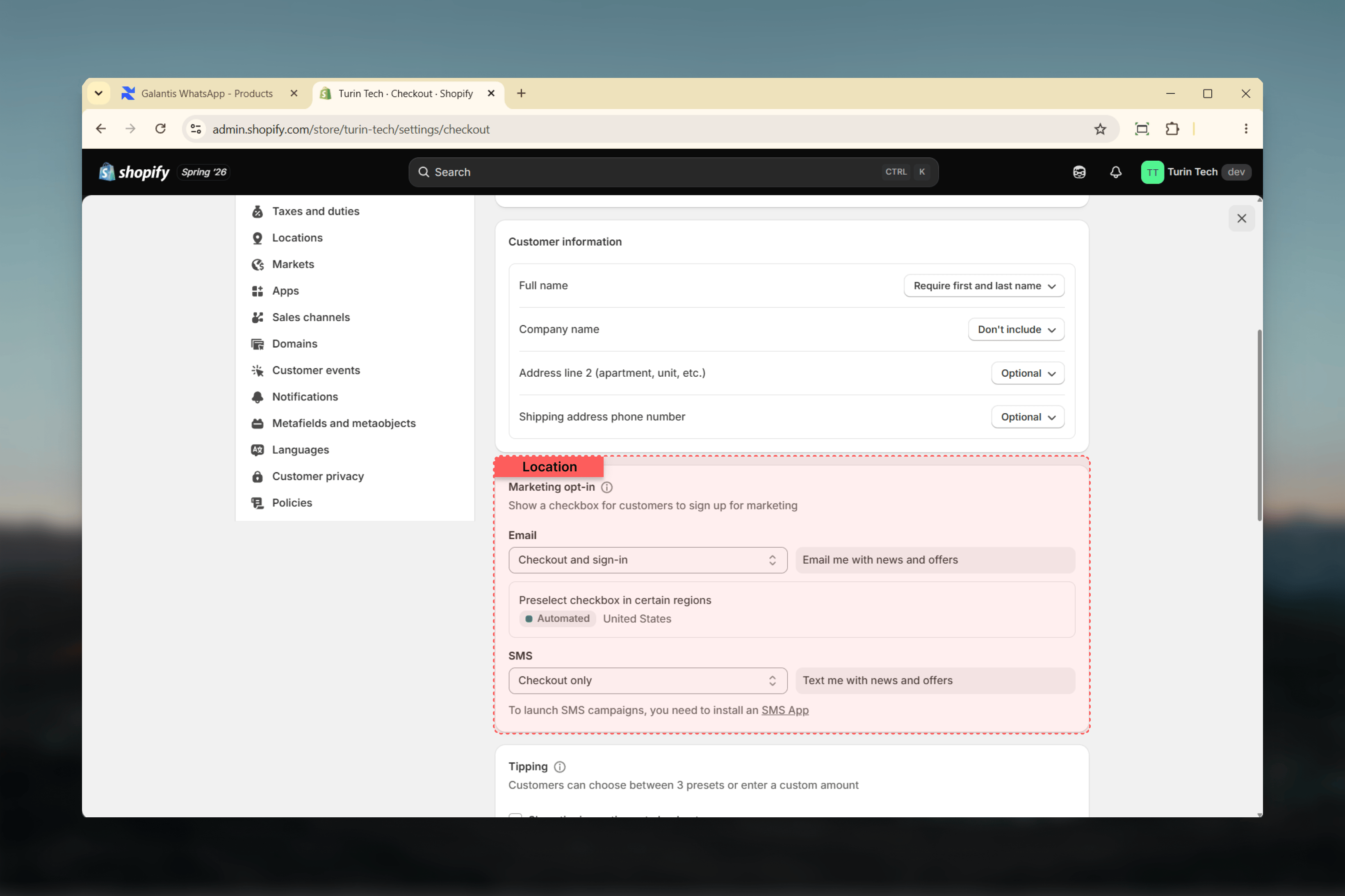
WhatsApp marketing requires customers to opt in. Until Shopify's native WhatsApp consent is available, you can collect consent by repurposing the checkout **SMS marketing opt-in** checkbox and relabeling it to clearly mention WhatsApp.
In Shopify admin, go to **Settings → Checkout → Marketing opt-in** and find the **SMS** option. You can edit the label under **Online Store → Themes → Theme content → Checkout marketing → Accept SMS checkbox label**.
Set the SMS marketing opt-in to **Checkout only** so the checkbox appears.
Change the label so it clearly refers to WhatsApp, not SMS. Keep it short, and translate it into your store's language. Example:
*Send me order updates and offers on WhatsApp*
The label must clearly say WhatsApp so customers know what they are opting in to. Mentioning offers keeps the consent valid for marketing. Shopify still records this as SMS marketing consent in its data model; that is expected with this interim setup.
This is a temporary approach. Shopify is adding native WhatsApp consent through its API. Once it is available, switch to that instead of repurposing the SMS checkbox.
 ## Proof of consent — keep your audit trail
If Meta investigates a quality issue, or a regulator asks under GDPR / LGPD / CCPA, you'll need to show how each customer consented. Galantis retains:
* **Consent source** (Shopify checkout, BIS widget, chat widget, manual import)
* **Timestamp** of opt-in
* **Reference identifier** (Shopify order ID, BIS subscription ID, chat thread ID, manual-import reference)
* **Opt-in language shown** to the customer at the time (where applicable, captured automatically for Shopify checkout)
Access this per-customer in **Audience → Contacts → \[Customer Name] → Consent history**. It's exportable from the same screen for legal or audit responses.
## Where consent is enforced
Consent validation runs automatically in three places:
The campaign send job filters the final audience to `SUBSCRIBED` only. Customers in any other state are excluded from the send, even if they appear in a selected list or segment.
Before an automation's message action dispatches, Galantis validates the customer's state. `UNSUBSCRIBED` and `REDACTED` customers are skipped and the skip is recorded in the automation's activity log.
Restock notifications are sent only to subscribers whose state is `SUBSCRIBED` (or who subscribed specifically via the BIS widget, even without broader marketing opt-in).
## Opt-outs
When a customer replies **STOP** (or a localized equivalent like "PARE", "ARRÊT", "STOPPEN") to any WhatsApp message, Meta and Galantis both immediately mark them as opted-out. Their `marketing_state` becomes `UNSUBSCRIBED`. From that moment:
* They're excluded from all campaign sends
* They're skipped in every automation message action
* They don't receive Back-in-Stock notifications, even on active subscriptions
**Re-subscription requires a new explicit opt-in event from the customer** — re-submitting through the BIS widget, completing checkout with the opt-in box again, or a clearly logged in-store sign-up. Galantis does not allow a manual override from `UNSUBSCRIBED` back to `SUBSCRIBED` — this is intentional, to prevent accidental re-engagement of opted-out customers.
## Regional regulatory overlays
Meta's opt-in rule is a global baseline. On top of that, regional regulations add specific requirements:
Marketing consent must be **freely given, specific, informed, and unambiguous**. Pre-ticked checkboxes are not valid. Consent must be granular (the customer should know they're opting in to WhatsApp specifically, not "marketing in general"). Customers have a right to withdraw consent at any time as easily as they gave it — Galantis's STOP handling satisfies this, but your own opt-in flow must not bury withdrawal options.
Lei Geral de Proteção de Dados follows GDPR closely. Explicit purpose, granular consent, easy withdrawal. Records of consent and purpose must be maintained.
California's framework focuses on the right to know, delete, and opt out of sale or sharing of personal information. While not strictly a consent regime for marketing in the way GDPR is, California residents can request deletion via Galantis's standard GDPR flow — see [GDPR & data privacy](/galantis/whatsapp/compliance/gdpr-data-privacy).
Similar rules apply in many other jurisdictions: PDPA (Singapore, Thailand), POPIA (South Africa), PIPL (China — note WhatsApp itself is restricted there), KVKK (Turkey). When in doubt, the GDPR-aligned approach (explicit, specific, withdrawable opt-in with audit trail) covers most other regimes.
## Best practices
* **Use specific language** at the opt-in point — "Receive WhatsApp messages about orders and offers" beats "Receive marketing communications"
* **Capture separate opt-ins per category** where possible (transactional updates vs promotional offers). Meta's policy explicitly recommends this for lower block rates.
* **Stay close to the opt-in event**: contacts who opt in and receive their first message within 24-48 hours engage at much higher rates than contacts who opt in then hear nothing for weeks
* **Honor STOP everywhere**: never re-engage `UNSUBSCRIBED` customers through other channels or by re-importing them
* **Keep the consent log** — export it before any major audit or Meta investigation
***
How the `REDACTED` state is applied and what other data rights customers have.
How sending to non-opted-in contacts damages your phone number rating.
Managing consent at the audience level — bulk export, audit, and consent history.
The canonical rulebook.
## Proof of consent — keep your audit trail
If Meta investigates a quality issue, or a regulator asks under GDPR / LGPD / CCPA, you'll need to show how each customer consented. Galantis retains:
* **Consent source** (Shopify checkout, BIS widget, chat widget, manual import)
* **Timestamp** of opt-in
* **Reference identifier** (Shopify order ID, BIS subscription ID, chat thread ID, manual-import reference)
* **Opt-in language shown** to the customer at the time (where applicable, captured automatically for Shopify checkout)
Access this per-customer in **Audience → Contacts → \[Customer Name] → Consent history**. It's exportable from the same screen for legal or audit responses.
## Where consent is enforced
Consent validation runs automatically in three places:
The campaign send job filters the final audience to `SUBSCRIBED` only. Customers in any other state are excluded from the send, even if they appear in a selected list or segment.
Before an automation's message action dispatches, Galantis validates the customer's state. `UNSUBSCRIBED` and `REDACTED` customers are skipped and the skip is recorded in the automation's activity log.
Restock notifications are sent only to subscribers whose state is `SUBSCRIBED` (or who subscribed specifically via the BIS widget, even without broader marketing opt-in).
## Opt-outs
When a customer replies **STOP** (or a localized equivalent like "PARE", "ARRÊT", "STOPPEN") to any WhatsApp message, Meta and Galantis both immediately mark them as opted-out. Their `marketing_state` becomes `UNSUBSCRIBED`. From that moment:
* They're excluded from all campaign sends
* They're skipped in every automation message action
* They don't receive Back-in-Stock notifications, even on active subscriptions
**Re-subscription requires a new explicit opt-in event from the customer** — re-submitting through the BIS widget, completing checkout with the opt-in box again, or a clearly logged in-store sign-up. Galantis does not allow a manual override from `UNSUBSCRIBED` back to `SUBSCRIBED` — this is intentional, to prevent accidental re-engagement of opted-out customers.
## Regional regulatory overlays
Meta's opt-in rule is a global baseline. On top of that, regional regulations add specific requirements:
Marketing consent must be **freely given, specific, informed, and unambiguous**. Pre-ticked checkboxes are not valid. Consent must be granular (the customer should know they're opting in to WhatsApp specifically, not "marketing in general"). Customers have a right to withdraw consent at any time as easily as they gave it — Galantis's STOP handling satisfies this, but your own opt-in flow must not bury withdrawal options.
Lei Geral de Proteção de Dados follows GDPR closely. Explicit purpose, granular consent, easy withdrawal. Records of consent and purpose must be maintained.
California's framework focuses on the right to know, delete, and opt out of sale or sharing of personal information. While not strictly a consent regime for marketing in the way GDPR is, California residents can request deletion via Galantis's standard GDPR flow — see [GDPR & data privacy](/galantis/whatsapp/compliance/gdpr-data-privacy).
Similar rules apply in many other jurisdictions: PDPA (Singapore, Thailand), POPIA (South Africa), PIPL (China — note WhatsApp itself is restricted there), KVKK (Turkey). When in doubt, the GDPR-aligned approach (explicit, specific, withdrawable opt-in with audit trail) covers most other regimes.
## Best practices
* **Use specific language** at the opt-in point — "Receive WhatsApp messages about orders and offers" beats "Receive marketing communications"
* **Capture separate opt-ins per category** where possible (transactional updates vs promotional offers). Meta's policy explicitly recommends this for lower block rates.
* **Stay close to the opt-in event**: contacts who opt in and receive their first message within 24-48 hours engage at much higher rates than contacts who opt in then hear nothing for weeks
* **Honor STOP everywhere**: never re-engage `UNSUBSCRIBED` customers through other channels or by re-importing them
* **Keep the consent log** — export it before any major audit or Meta investigation
***
How the `REDACTED` state is applied and what other data rights customers have.
How sending to non-opted-in contacts damages your phone number rating.
Managing consent at the audience level — bulk export, audit, and consent history.
The canonical rulebook.