> ## Documentation Index
> Fetch the complete documentation index at: https://docs.digifist.com/llms.txt
> Use this file to discover all available pages before exploring further.
# Choose Your Connection
> The two ways to connect WhatsApp to Galantis — the full WhatsApp Platform for campaigns and automations, or a simple click-to-chat button — and which one to pick so you don't have to reconnect later.
When you connect WhatsApp during onboarding, you choose between two paths. They look similar, but they unlock very different things. Picking the right one on day one saves you from reconnecting later.
The chat-button-only option adds a clickable WhatsApp button to your store, but it **cannot send campaigns, automations, or templates**. If you installed Galantis to recover abandoned carts or run WhatsApp marketing, choose the full WhatsApp Platform connection.
## The two options at a glance
| | Full WhatsApp Platform | Chat button only |
| ------------------------------------------------------------------ | -------------------------------------------------------- | ------------------------- |
| Clickable WhatsApp button on your store | Yes | Yes |
| Campaigns and broadcasts | Yes | No |
| Automations (abandoned checkout, back-in-stock, welcome, win-back) | Yes | No |
| Message templates | Yes | No |
| Catalog and product messages | Yes | No |
| Shared Inbox with full Shopify context | Yes | Inbound only |
| What it connects | WhatsApp Business Platform (Cloud API) via Meta | A wa.me link only |
| Setup | Meta Embedded Signup, register a number, about 5 minutes | Instant, just your number |
| Cost | Paid plan plus Meta conversation charges | Free |
## Which one is right for you?
Choose this if you want to send campaigns, recover abandoned carts, or run any automation. This is the full Galantis product.
Choose this only if you just want a clickable WhatsApp button on your storefront and do not need campaigns or automations.
## Full WhatsApp Platform (recommended)
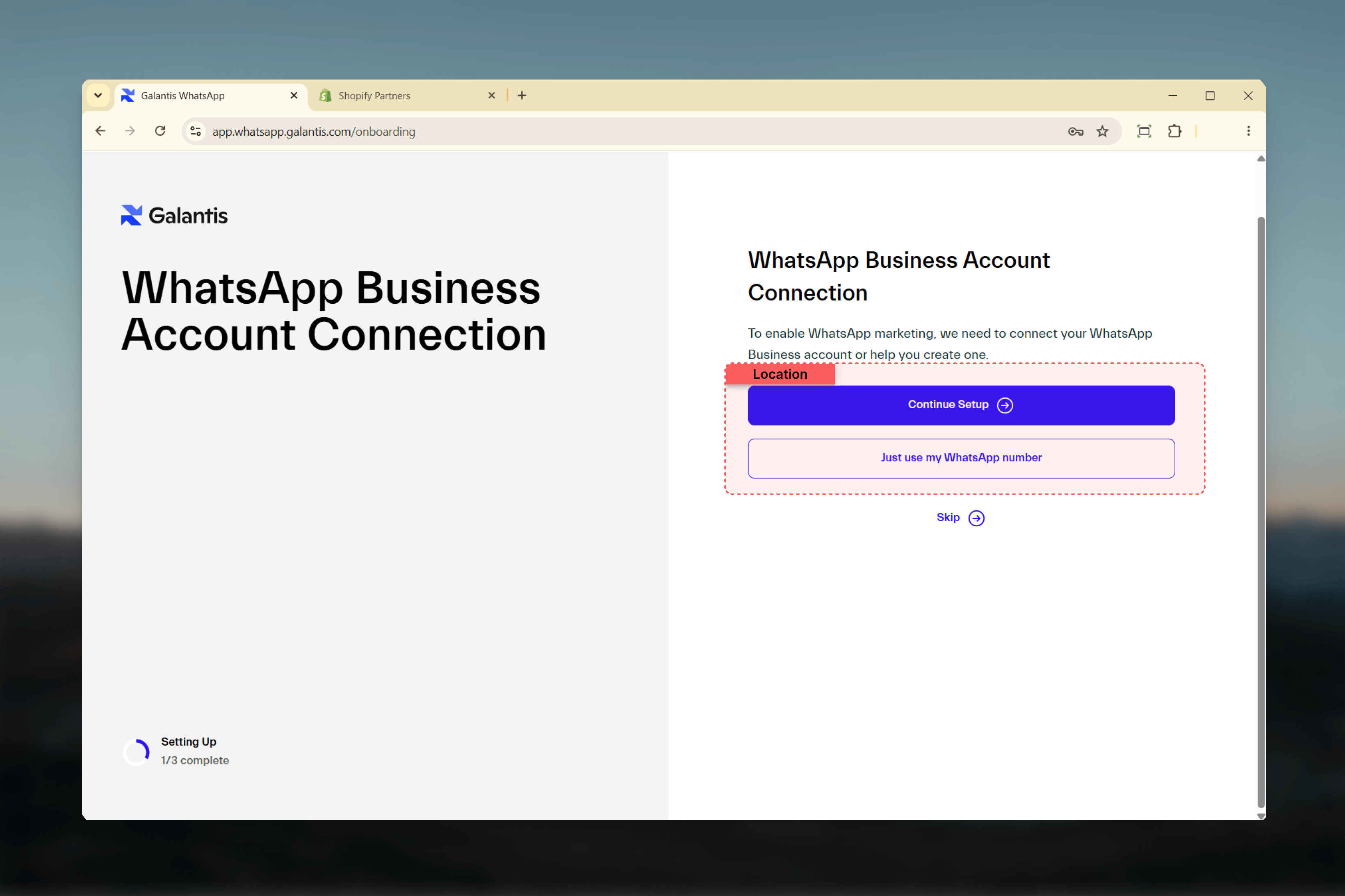
This connects your store to the **WhatsApp Business Platform (Cloud API)** through Meta's official Embedded Signup, right inside Galantis. On the connect screen, choose **"Continue setup"**. It unlocks everything Galantis is built for:
* **Campaigns** to segmented audiences with approved templates
* **Automations** that fire on Shopify events: abandoned checkout, new order, new customer, product restock
* **Message templates** and **catalog / product messages**
* The **shared Inbox** with full Shopify customer context
You will need a phone number to register. A new dedicated number is recommended for the cleanest quality rating.
Already using the WhatsApp Business app? You can keep it. See [Choose a Phone Number](/galantis/whatsapp/getting-started/choose-phone-number) for connecting your existing number with coexistence.
Walk through Meta's Embedded Signup modal step by step.
Use a new number, an existing one, or your WhatsApp Business app number with coexistence.
 Marketing-category messages require Meta to approve your display name, which usually clears in 1 to 2 business days. You can send utility messages as soon as your number is verified.
## Chat button only
This adds a click-to-chat (wa.me) button to your storefront so customers can start a WhatsApp conversation with you. On the connect screen, this is the **"Use my number only"** option. It does **not** connect the WhatsApp Business Platform, so the marketing and automation features stay locked.
With the chat button only, you cannot:
* Send campaigns or broadcasts
* Run any automation (abandoned cart, back-in-stock, welcome, win-back)
* Use message templates
* Send catalog or product messages
You receive inbound chats only.
**When this is enough:** a store that only wants a simple "message us on WhatsApp" button and has no plans to send marketing or automated messages.
**Upgrading later:** you can switch to the full platform at any time from [Connect WhatsApp](/galantis/whatsapp/getting-started/whatsapp-connection). Your store keeps running while you connect.
## FAQ
Yes. Open **Connect WhatsApp** and run the full setup whenever you are ready. Nothing you have already configured is lost.
Campaigns, automations, and templates run on the WhatsApp Business Platform (Cloud API) through Meta. The chat-button option does not set that up. WhatsApp also requires pre-approved templates and customer opt-in before any marketing message can be sent. See [Opt-in & Consent](/galantis/whatsapp/compliance/opt-in-consent) and [Templates](/galantis/whatsapp/templates/index).
For the full platform, a new dedicated number is recommended for the cleanest quality rating and easiest scaling. See [Choose a Phone Number](/galantis/whatsapp/getting-started/choose-phone-number).
***
Get the app installed on your store, then connect WhatsApp.
Connect the full WhatsApp Platform through Meta's Embedded Signup.
Marketing-category messages require Meta to approve your display name, which usually clears in 1 to 2 business days. You can send utility messages as soon as your number is verified.
## Chat button only
This adds a click-to-chat (wa.me) button to your storefront so customers can start a WhatsApp conversation with you. On the connect screen, this is the **"Use my number only"** option. It does **not** connect the WhatsApp Business Platform, so the marketing and automation features stay locked.
With the chat button only, you cannot:
* Send campaigns or broadcasts
* Run any automation (abandoned cart, back-in-stock, welcome, win-back)
* Use message templates
* Send catalog or product messages
You receive inbound chats only.
**When this is enough:** a store that only wants a simple "message us on WhatsApp" button and has no plans to send marketing or automated messages.
**Upgrading later:** you can switch to the full platform at any time from [Connect WhatsApp](/galantis/whatsapp/getting-started/whatsapp-connection). Your store keeps running while you connect.
## FAQ
Yes. Open **Connect WhatsApp** and run the full setup whenever you are ready. Nothing you have already configured is lost.
Campaigns, automations, and templates run on the WhatsApp Business Platform (Cloud API) through Meta. The chat-button option does not set that up. WhatsApp also requires pre-approved templates and customer opt-in before any marketing message can be sent. See [Opt-in & Consent](/galantis/whatsapp/compliance/opt-in-consent) and [Templates](/galantis/whatsapp/templates/index).
For the full platform, a new dedicated number is recommended for the cleanest quality rating and easiest scaling. See [Choose a Phone Number](/galantis/whatsapp/getting-started/choose-phone-number).
***
Get the app installed on your store, then connect WhatsApp.
Connect the full WhatsApp Platform through Meta's Embedded Signup.