> ## Documentation Index
> Fetch the complete documentation index at: https://docs.digifist.com/llms.txt
> Use this file to discover all available pages before exploring further.
# Rich Text
> Configure Everest's rich text section and its main settings, content structure, and styling controls.
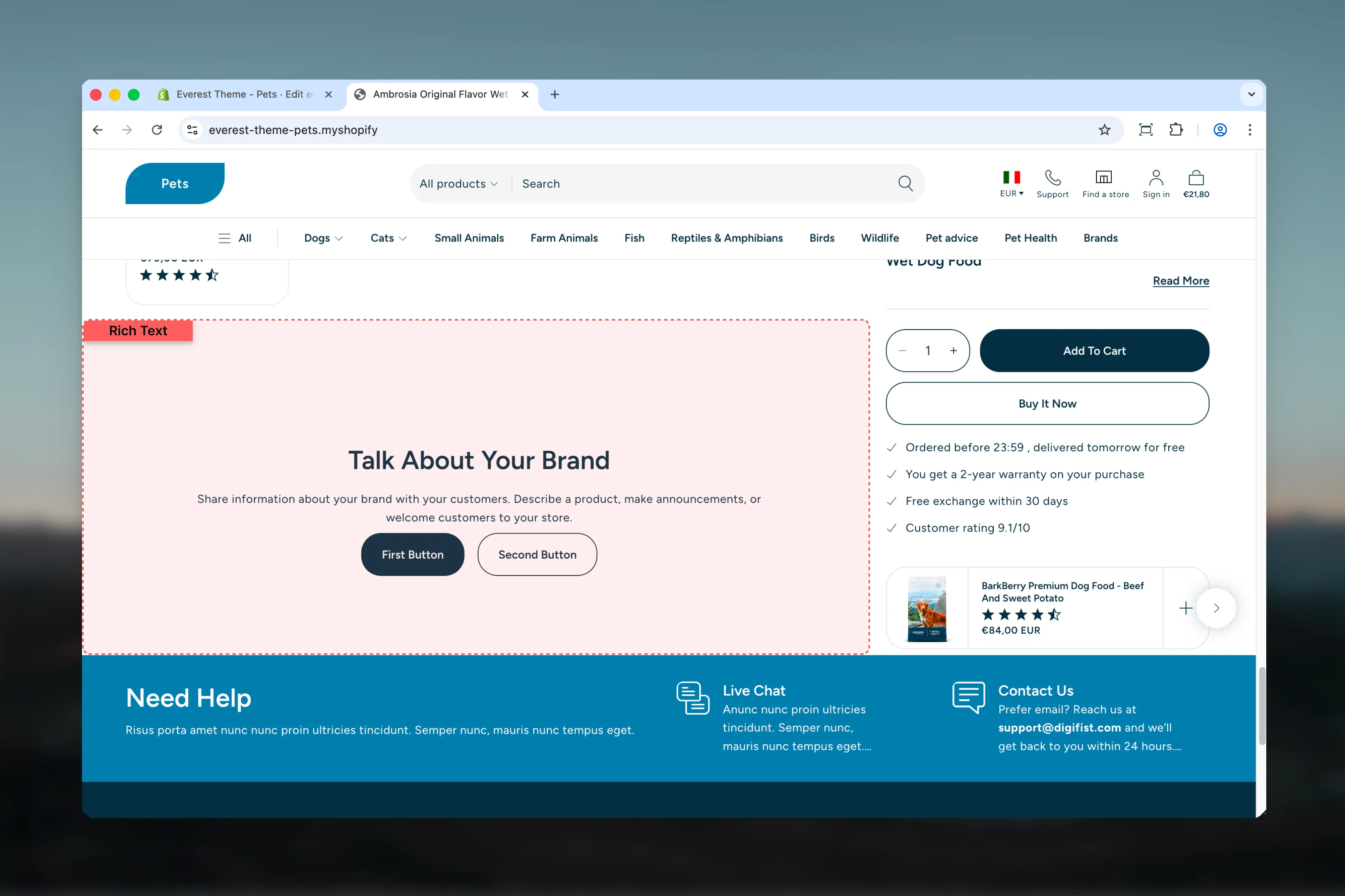
The Rich Text section lets you control the content, layout, and presentation of this part of the Everest storefront. Most changes happen directly in the Theme Customizer, so you can adjust structure first and then refine styling, spacing, and supporting blocks with confidence.
 ## What this section controls
* Headings, text content, and on-page messaging
* Layout structure, width, alignment, and spacing
* Color schemes, contrast, and shared visual styling
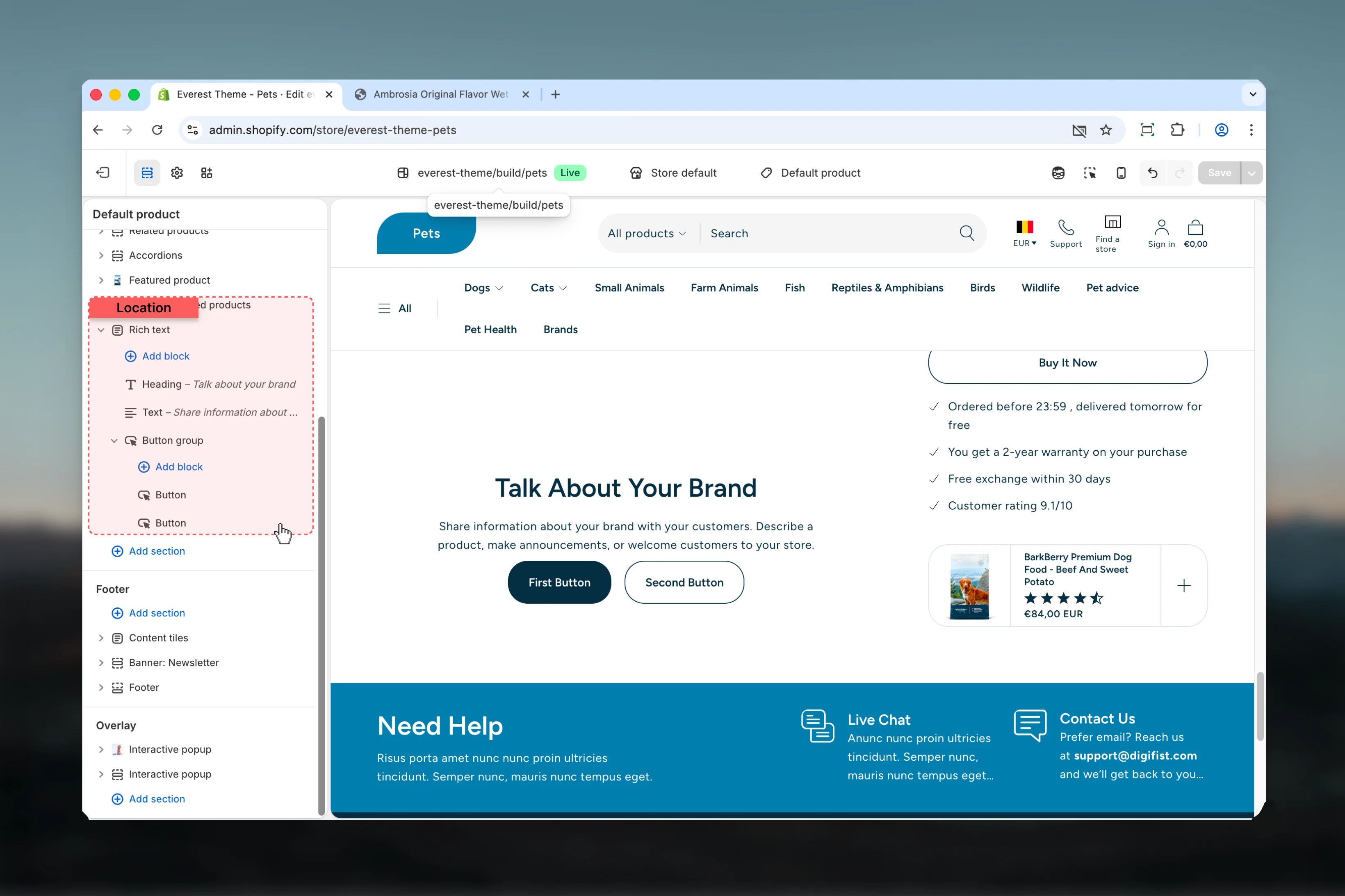
* Block types such as Heading, Text, Button Group
## Getting started
In Shopify admin, go to **Online Store** -> **Themes** -> **Customize**.
Add the **Rich Text** section to a compatible template or select the existing section from the left sidebar.
Start with the structural settings such as layout, width, color scheme, spacing, or content source before refining smaller details.
Add, remove, or reorder blocks after the main layout feels right so content hierarchy stays easier to manage.
## What this section controls
* Headings, text content, and on-page messaging
* Layout structure, width, alignment, and spacing
* Color schemes, contrast, and shared visual styling
* Block types such as Heading, Text, Button Group
## Getting started
In Shopify admin, go to **Online Store** -> **Themes** -> **Customize**.
Add the **Rich Text** section to a compatible template or select the existing section from the left sidebar.
Start with the structural settings such as layout, width, color scheme, spacing, or content source before refining smaller details.
Add, remove, or reorder blocks after the main layout feels right so content hierarchy stays easier to manage.
 ## Section settings
### Content
## Section settings
### Content
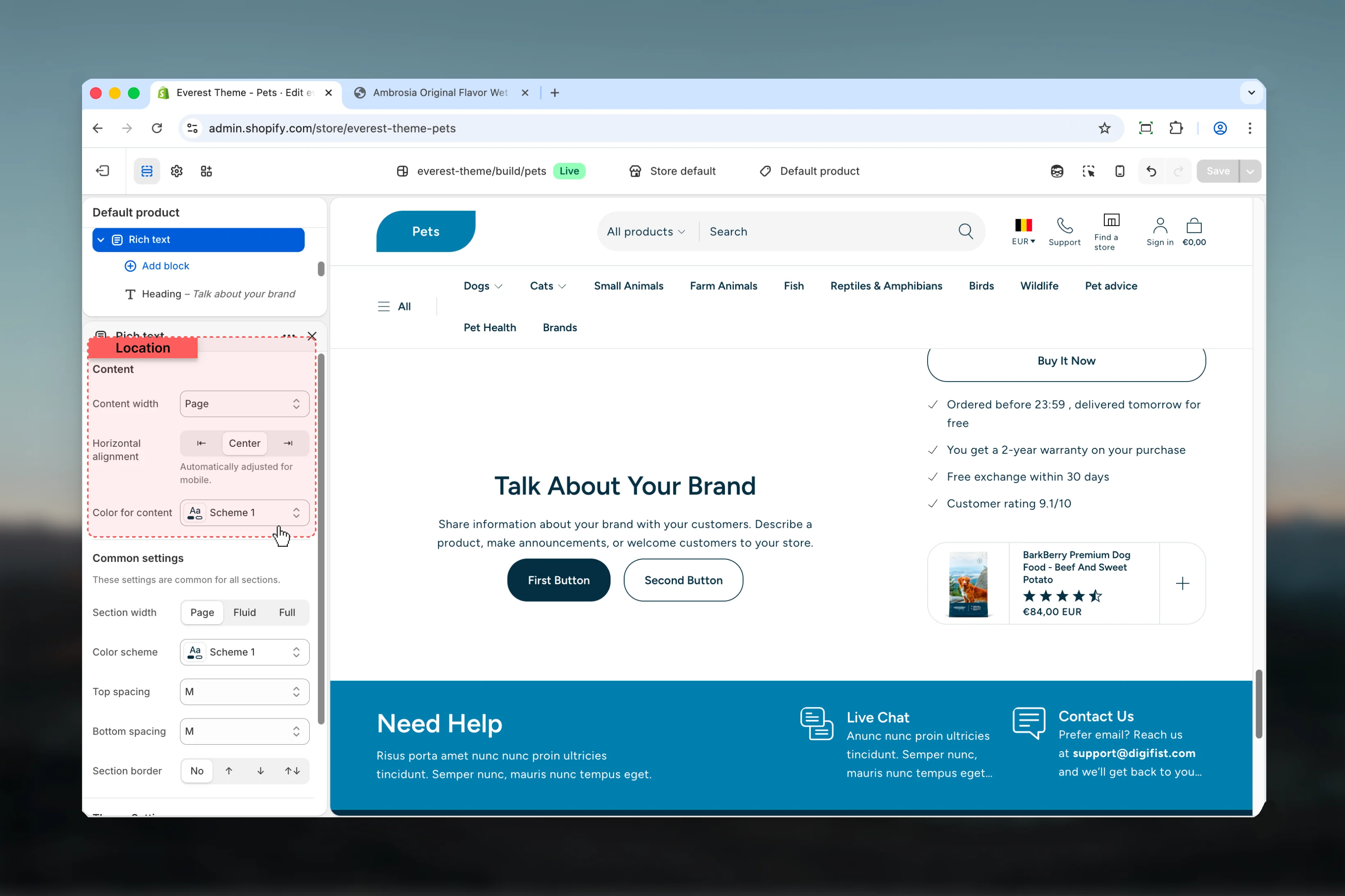 Choose how **Content width** behaves in the section.
It has the strongest effect on layout balance and visual hierarchy.
**Available options:** Small, Medium, Large, Page, Fluid, Full.
**Default:** `page`
Choose how **Horizontal alignment** behaves in the section.
It has the strongest effect on layout balance and visual hierarchy.
**Available options:** ⇤, Center, ⇥.
**Default:** `center`
Automatically adjusted for mobile.
Select the color scheme used for **color for content**.
Use this to keep contrast and branding consistent with the rest of the store.
**Default:** `scheme-1`
### Common settings
Choose how **Content width** behaves in the section.
It has the strongest effect on layout balance and visual hierarchy.
**Available options:** Small, Medium, Large, Page, Fluid, Full.
**Default:** `page`
Choose how **Horizontal alignment** behaves in the section.
It has the strongest effect on layout balance and visual hierarchy.
**Available options:** ⇤, Center, ⇥.
**Default:** `center`
Automatically adjusted for mobile.
Select the color scheme used for **color for content**.
Use this to keep contrast and branding consistent with the rest of the store.
**Default:** `scheme-1`
### Common settings
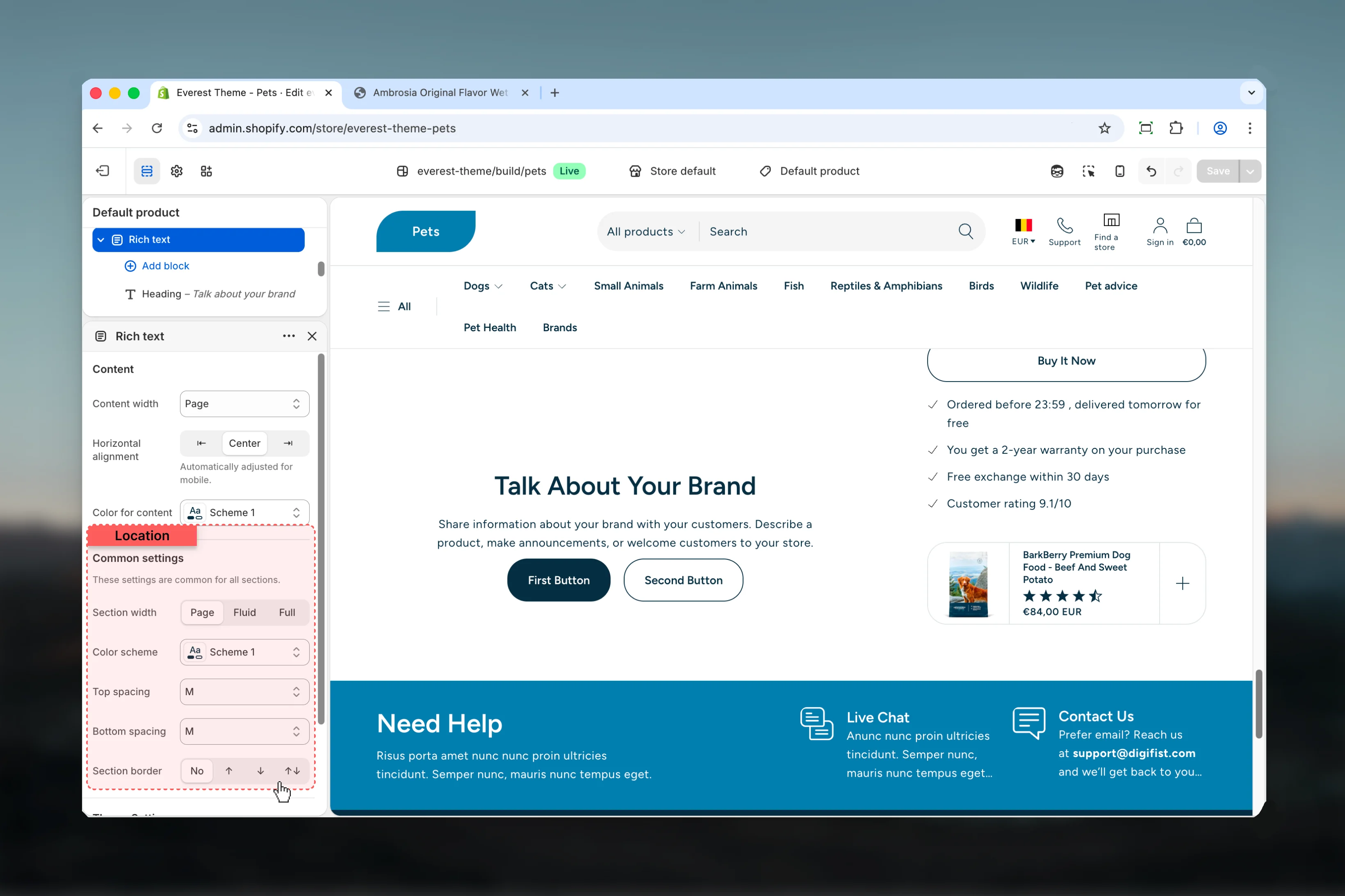 Choose how **Section width** behaves in the section.
This setting shapes the section container and how it sits against surrounding content.
**Available options:** Page, Fluid, Full.
**Default:** `page`
Select the color scheme used for **color scheme**.
Use this to keep contrast and branding consistent with the rest of the store.
**Default:** `scheme-1`
Choose how **Top spacing** behaves in the section.
This setting shapes the section container and how it sits against surrounding content.
**Available options:** No, S, M, L, XL.
**Default:** `2`
Choose how **Bottom spacing** behaves in the section.
This setting shapes the section container and how it sits against surrounding content.
**Available options:** No, S, M, L, XL.
**Default:** `2`
Choose how **Section border** behaves in the section.
This setting shapes the section container and how it sits against surrounding content.
**Available options:** None, Top, Bottom, Both.
**Default:** `none`
## Block settings
### Heading
Choose how **Section width** behaves in the section.
This setting shapes the section container and how it sits against surrounding content.
**Available options:** Page, Fluid, Full.
**Default:** `page`
Select the color scheme used for **color scheme**.
Use this to keep contrast and branding consistent with the rest of the store.
**Default:** `scheme-1`
Choose how **Top spacing** behaves in the section.
This setting shapes the section container and how it sits against surrounding content.
**Available options:** No, S, M, L, XL.
**Default:** `2`
Choose how **Bottom spacing** behaves in the section.
This setting shapes the section container and how it sits against surrounding content.
**Available options:** No, S, M, L, XL.
**Default:** `2`
Choose how **Section border** behaves in the section.
This setting shapes the section container and how it sits against surrounding content.
**Available options:** None, Top, Bottom, Both.
**Default:** `none`
## Block settings
### Heading
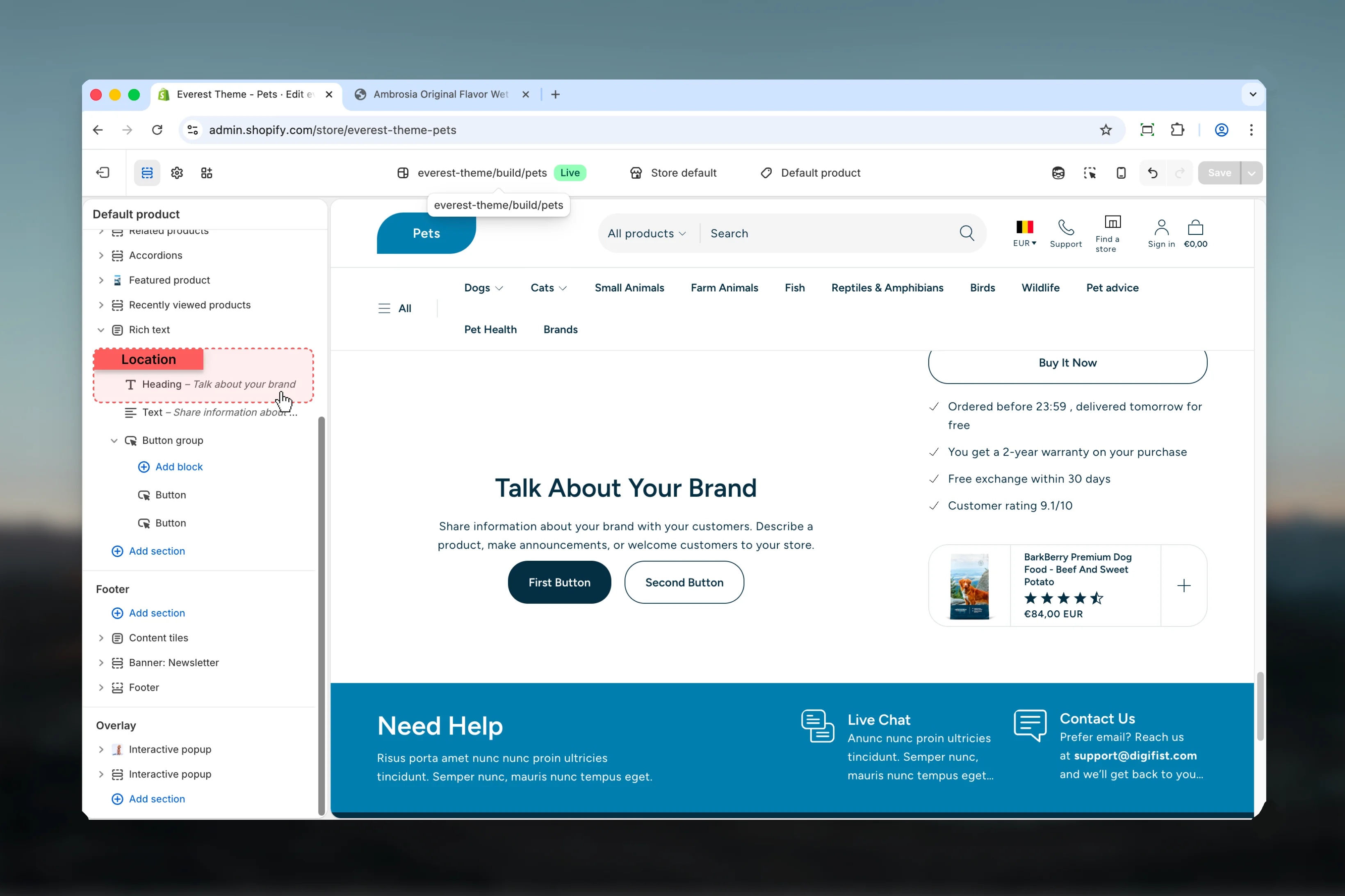 This block controls the **heading** content used inside the Rich Text section.
### Settings
This block controls the **heading** content used inside the Rich Text section.
### Settings
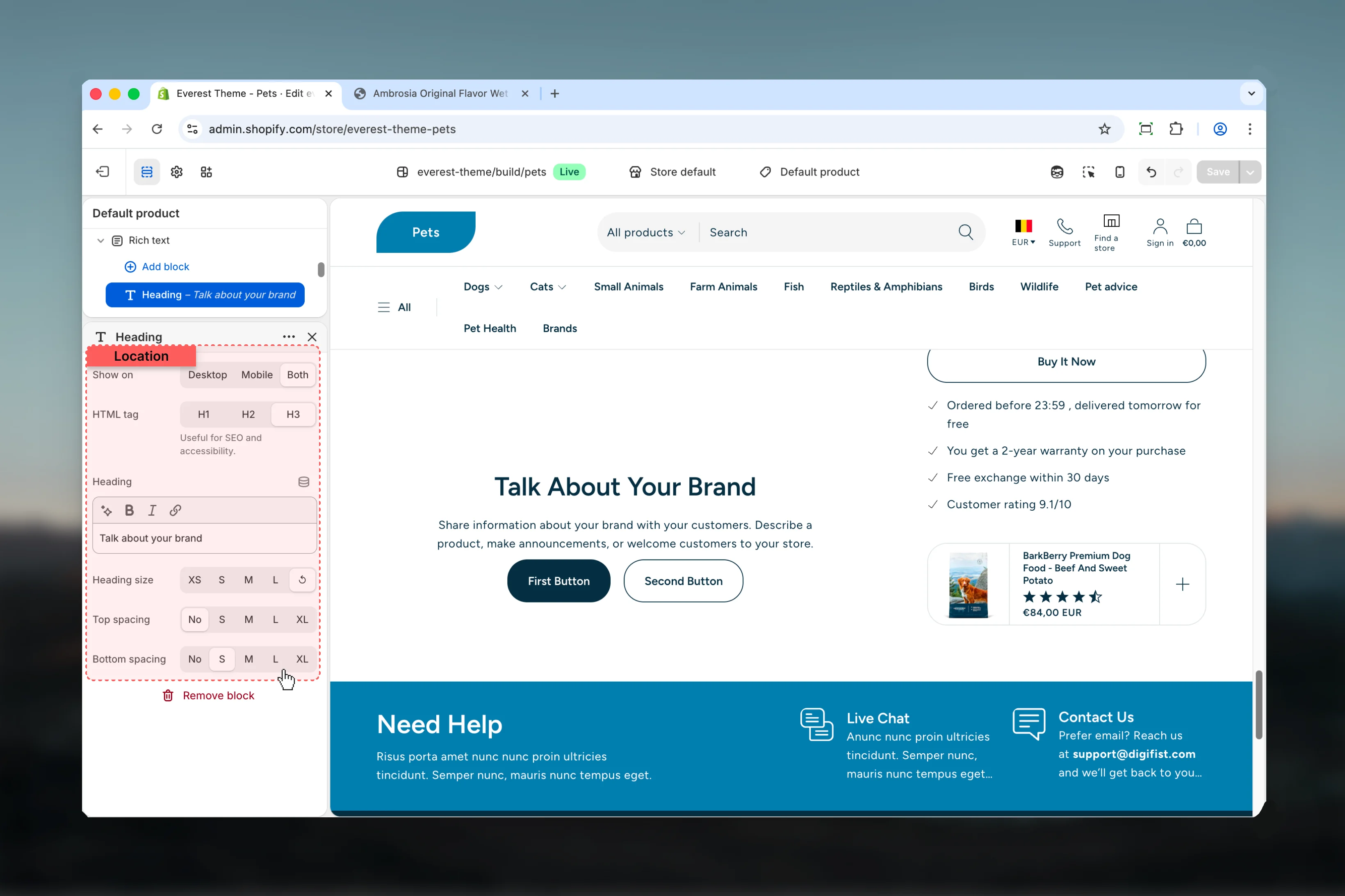 Choose how **Show on** behaves in the section.
**Available options:** Desktop, Mobile, Both.
**Default:** `both`
Choose how **HTML tag** behaves in the section.
**Available options:** H1, H2, H3.
**Default:** `h3`
Useful for SEO and accessibility.
Enter the content used for **heading**.
Choose how **Heading size** behaves in the section.
**Available options:** XS, S, M, L, ↺.
**Default:** `default`
Choose how **Top spacing** behaves in the section.
This setting shapes the section container and how it sits against surrounding content.
**Available options:** No, S, M, L, XL.
**Default:** `0`
Choose how **Bottom spacing** behaves in the section.
This setting shapes the section container and how it sits against surrounding content.
**Available options:** No, S, M, L, XL.
**Default:** `sm`
### Text
Choose how **Show on** behaves in the section.
**Available options:** Desktop, Mobile, Both.
**Default:** `both`
Choose how **HTML tag** behaves in the section.
**Available options:** H1, H2, H3.
**Default:** `h3`
Useful for SEO and accessibility.
Enter the content used for **heading**.
Choose how **Heading size** behaves in the section.
**Available options:** XS, S, M, L, ↺.
**Default:** `default`
Choose how **Top spacing** behaves in the section.
This setting shapes the section container and how it sits against surrounding content.
**Available options:** No, S, M, L, XL.
**Default:** `0`
Choose how **Bottom spacing** behaves in the section.
This setting shapes the section container and how it sits against surrounding content.
**Available options:** No, S, M, L, XL.
**Default:** `sm`
### Text
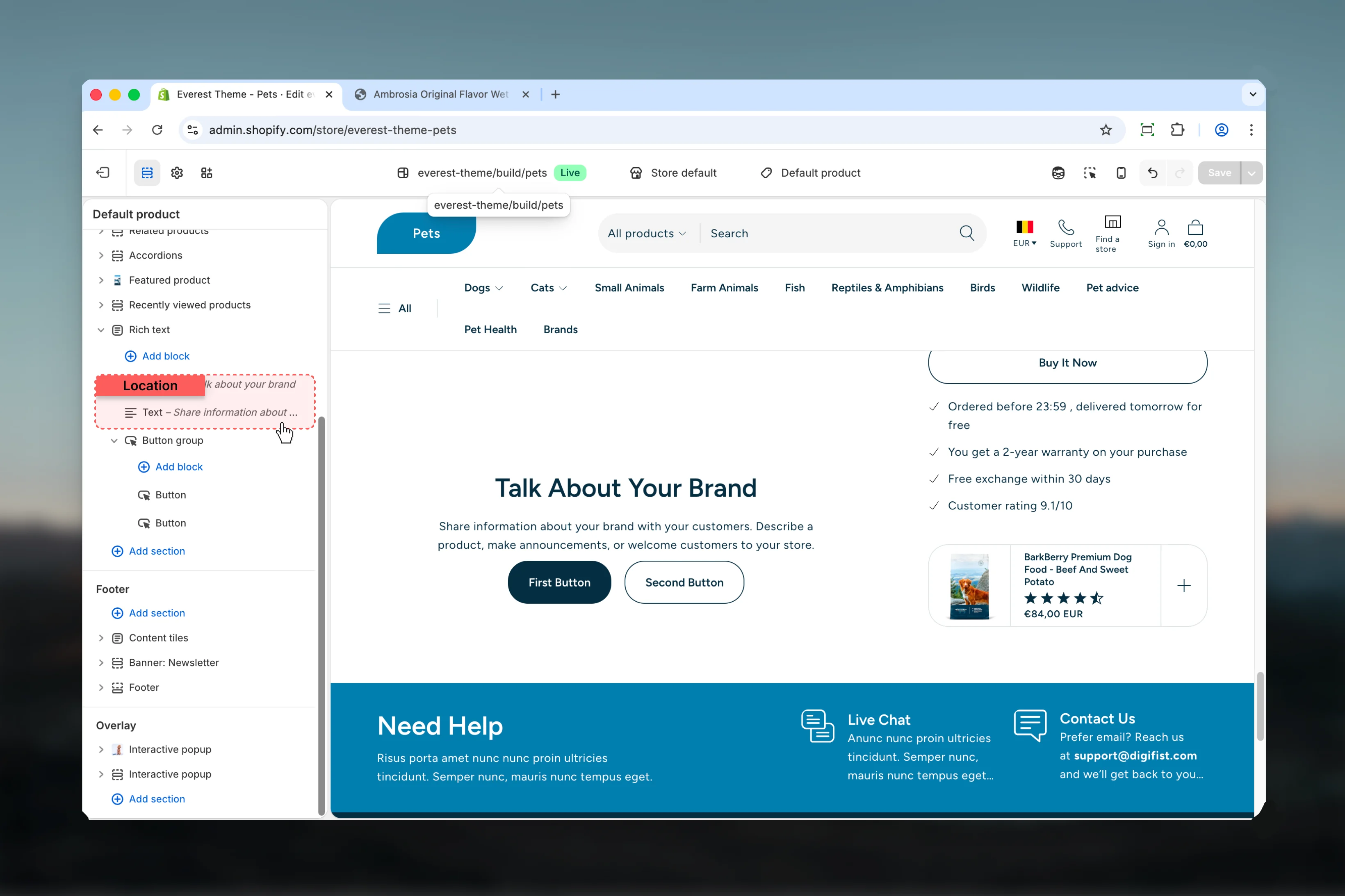 This block controls the **text** content used inside the Rich Text section.
### Settings
This block controls the **text** content used inside the Rich Text section.
### Settings
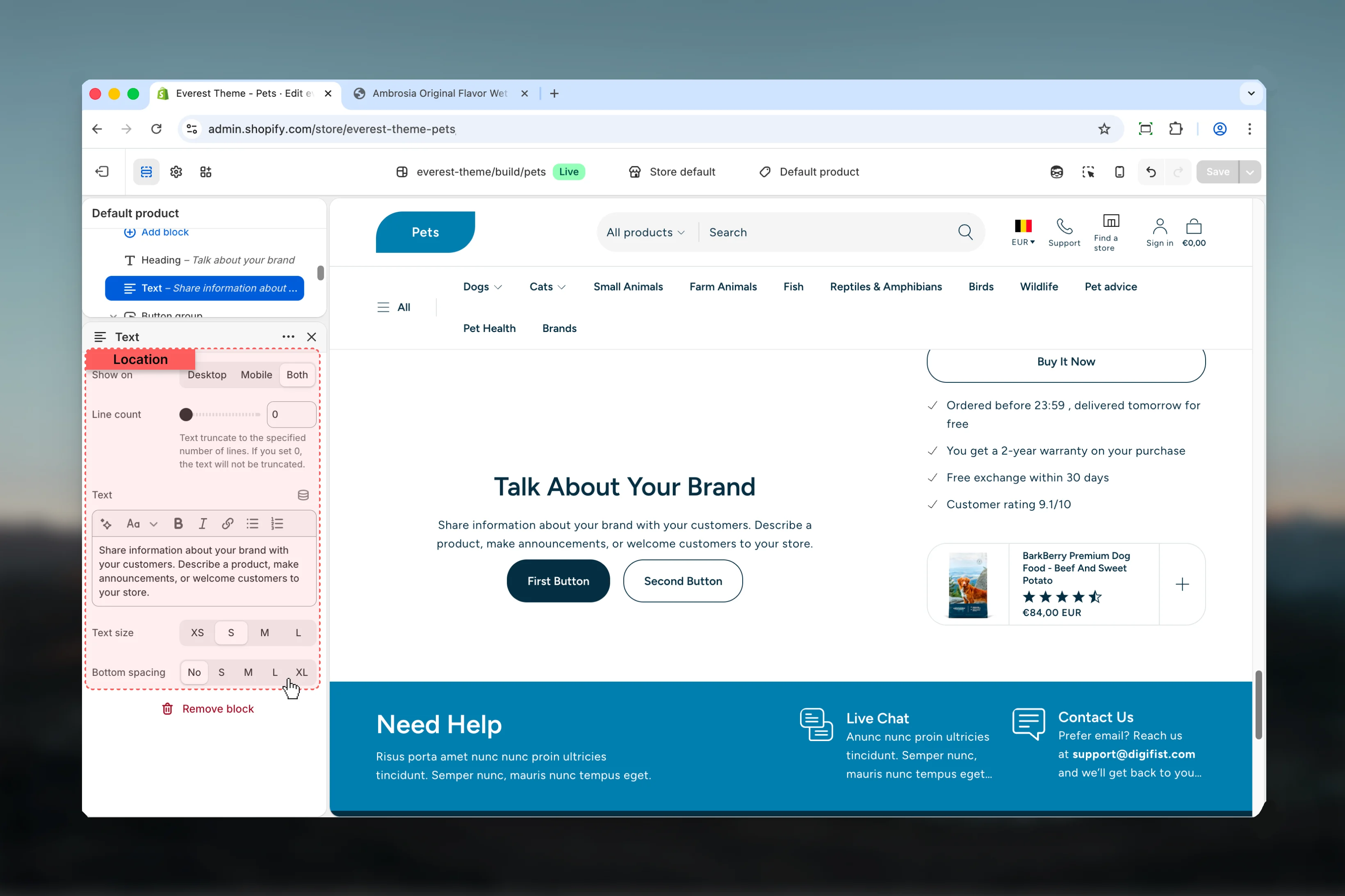 Choose how **Show on** behaves in the section.
**Available options:** Desktop, Mobile, Both.
**Default:** `both`
Adjust **Line count** with a slider-based control.
**Range:** `0` to `10` **Default:** `0`
Text truncate to the specified number of lines. If you set 0, the text will not be truncated.
Enter the content used for **text**.
Choose how **Text size** behaves in the section.
**Available options:** XS, S, M, L.
**Default:** `sm`
Choose how **Bottom spacing** behaves in the section.
This setting shapes the section container and how it sits against surrounding content.
**Available options:** No, S, M, L, XL.
**Default:** `0`
### Button Group
Choose how **Show on** behaves in the section.
**Available options:** Desktop, Mobile, Both.
**Default:** `both`
Adjust **Line count** with a slider-based control.
**Range:** `0` to `10` **Default:** `0`
Text truncate to the specified number of lines. If you set 0, the text will not be truncated.
Enter the content used for **text**.
Choose how **Text size** behaves in the section.
**Available options:** XS, S, M, L.
**Default:** `sm`
Choose how **Bottom spacing** behaves in the section.
This setting shapes the section container and how it sits against surrounding content.
**Available options:** No, S, M, L, XL.
**Default:** `0`
### Button Group
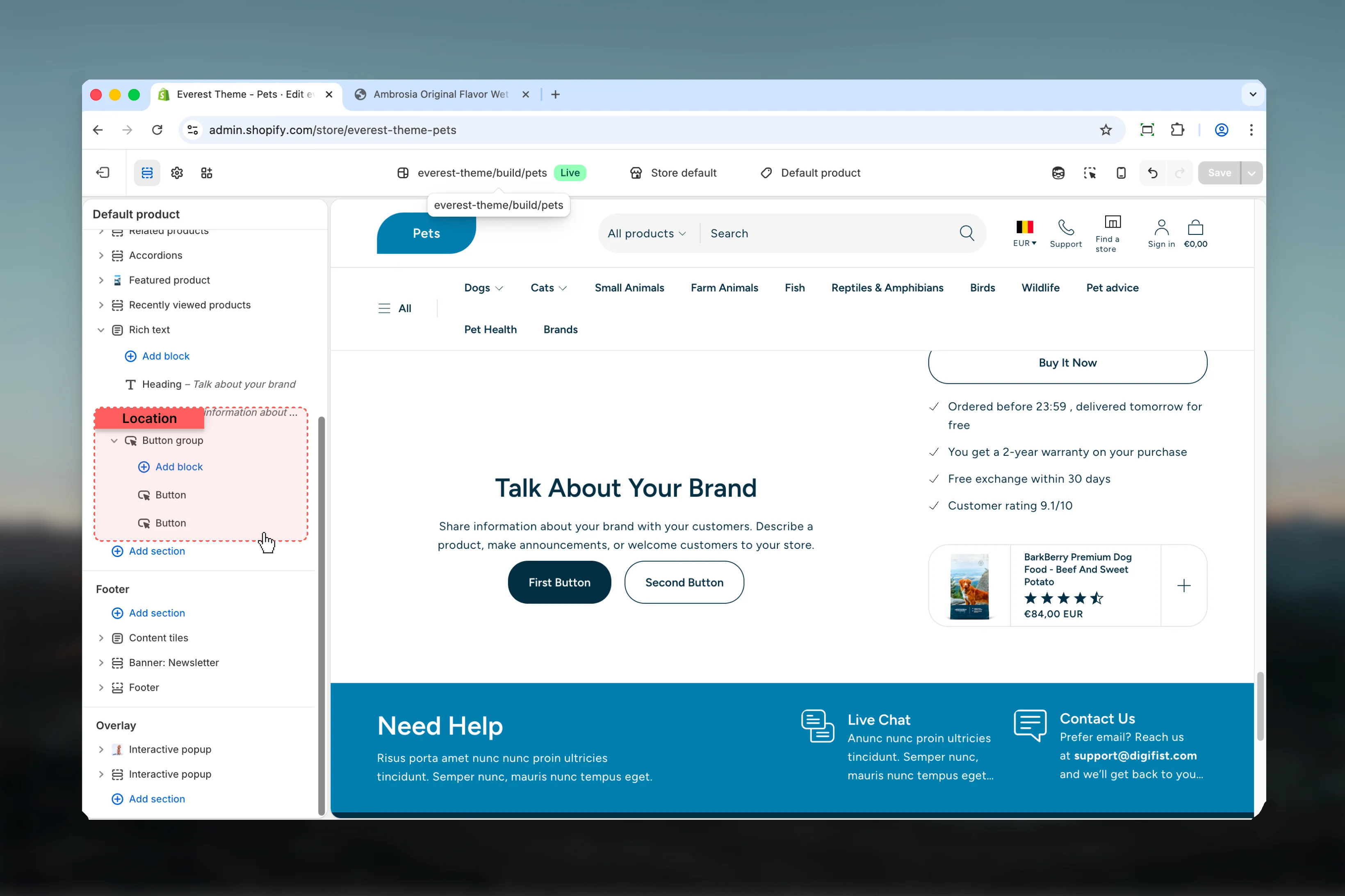 This block controls the **button group** content used inside the Rich Text section.
### Settings
This block controls the **button group** content used inside the Rich Text section.
### Settings
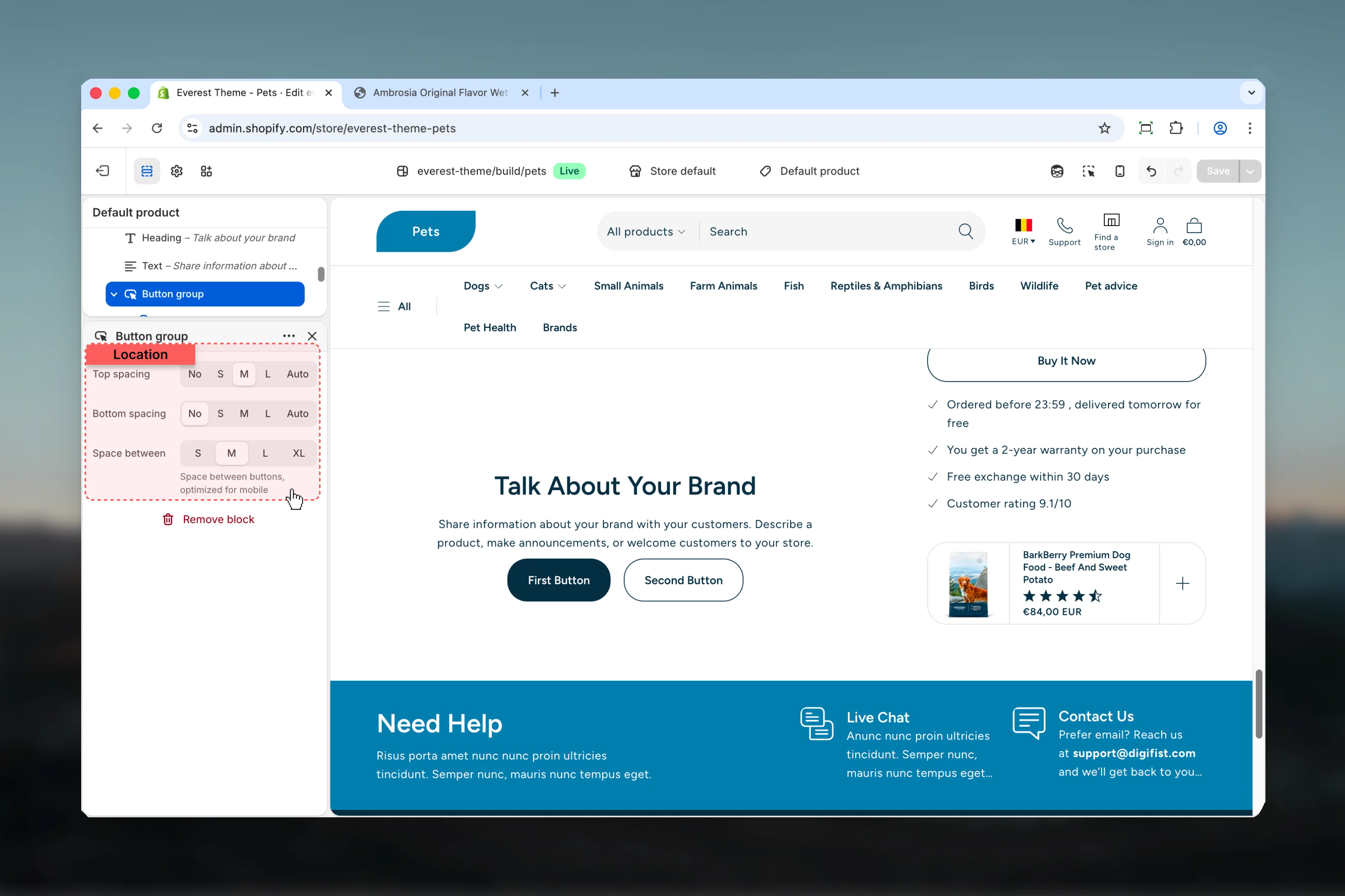 Choose how **Top spacing** behaves in the section.
This setting shapes the section container and how it sits against surrounding content.
**Available options:** No, S, M, L, Auto.
**Default:** `2`
Choose how **Bottom spacing** behaves in the section.
This setting shapes the section container and how it sits against surrounding content.
**Available options:** No, S, M, L, Auto.
**Default:** `0`
Choose how **Space between** behaves in the section.
**Available options:** S, M, L, XL.
**Default:** `4`
Space between buttons, optimized for mobile
**Supports nested blocks:**
* **Button** for more granular content inside this block.
## Best practices
* Check contrast after changing color schemes so text and controls remain easy to read.
* Adjust layout changes alongside neighboring sections so page rhythm stays consistent.
* Start with the structural settings first, then refine decorative styling after the layout feels settled.
* Preview the section with realistic content length to catch spacing and wrapping issues early.
## Related guides
* [Everest Theme Overview](/themes/everest/index)
* [Everest Header](/themes/everest/header/header)
Choose how **Top spacing** behaves in the section.
This setting shapes the section container and how it sits against surrounding content.
**Available options:** No, S, M, L, Auto.
**Default:** `2`
Choose how **Bottom spacing** behaves in the section.
This setting shapes the section container and how it sits against surrounding content.
**Available options:** No, S, M, L, Auto.
**Default:** `0`
Choose how **Space between** behaves in the section.
**Available options:** S, M, L, XL.
**Default:** `4`
Space between buttons, optimized for mobile
**Supports nested blocks:**
* **Button** for more granular content inside this block.
## Best practices
* Check contrast after changing color schemes so text and controls remain easy to read.
* Adjust layout changes alongside neighboring sections so page rhythm stays consistent.
* Start with the structural settings first, then refine decorative styling after the layout feels settled.
* Preview the section with realistic content length to catch spacing and wrapping issues early.
## Related guides
* [Everest Theme Overview](/themes/everest/index)
* [Everest Header](/themes/everest/header/header)