> ## Documentation Index
> Fetch the complete documentation index at: https://docs.digifist.com/llms.txt
> Use this file to discover all available pages before exploring further.
# Product Recommendations
> Display Shopify's AI-powered product recommendations based on the current product for intelligent cross-selling and upselling on product pages
## What this section does
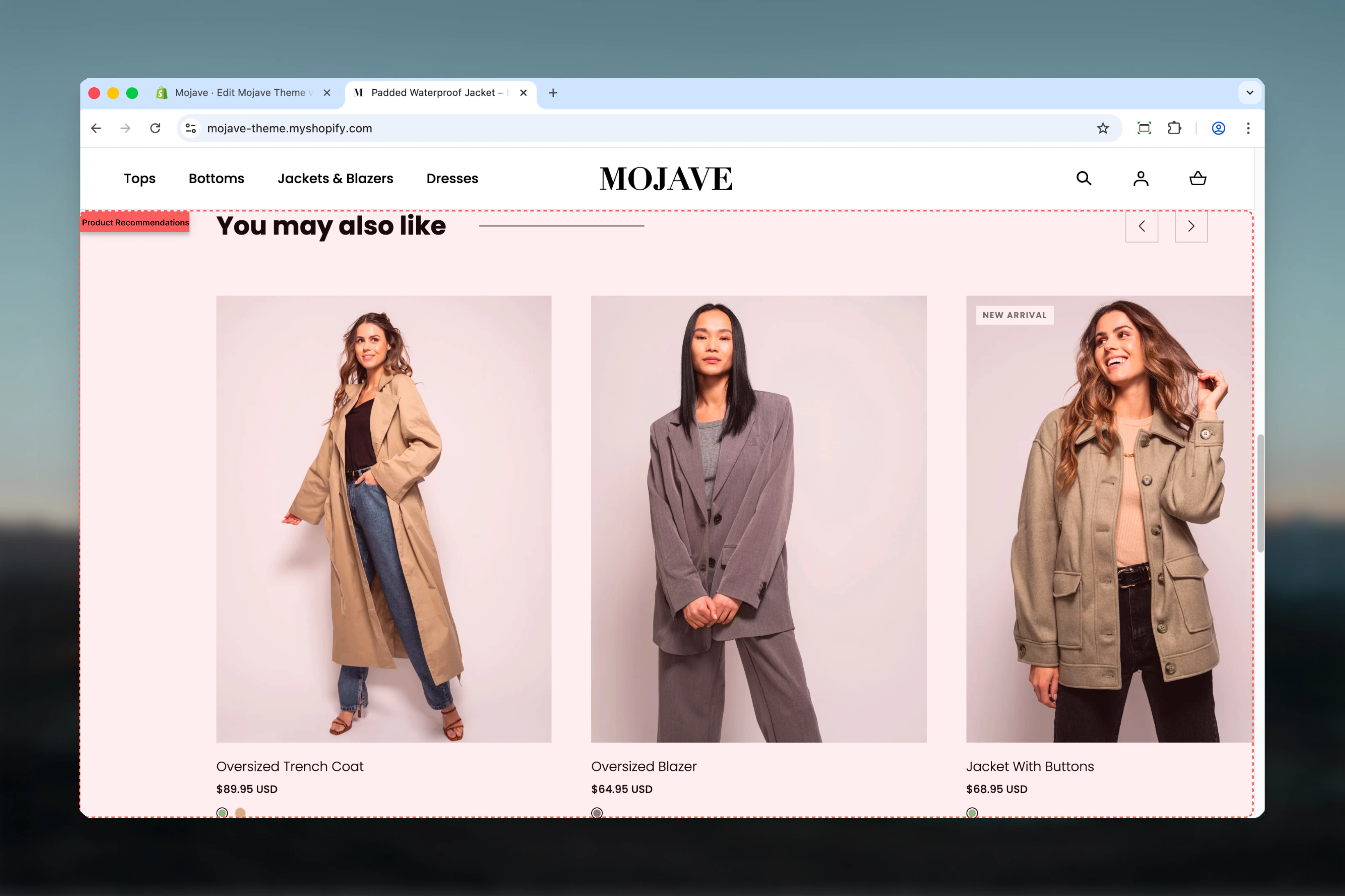
The **Product recommendations** section displays automatically-generated product suggestions powered by Shopify's native recommendation engine. Features include:
* **AI-powered recommendations**: Shopify analyzes product relationships, purchase patterns, and customer behavior
* **Dynamic content**: Recommendations change based on the current product being viewed
* **Customizable display**: 2-10 products, adjustable heading, heading size
* **Automatic updates**: No manual product selection—recommendations improve over time
* Template-only section (usable on Product page template only)
Perfect for PDP cross-selling, "You may also like" sections, and increasing average order value through intelligent product discovery.
 ## Getting started
In Theme Customizer, navigate to **Product** template, then click **Add section** and select **Product recommendations**
Adjust heading text (e.g., "You may also like", "Customers also bought"), heading size, and products to show (2-10)
Typically placed below product details or at bottom of PDP for maximum visibility after viewing main product
This section only works on the Product template (main-product). It will not display on other templates as it requires a product context to generate recommendations.
## Section settings
**Text field** (default: "You may also like")
Section title displayed above recommended products.
Popular alternatives:
* "You may also like" (default, general)
* "Customers also bought"
* "Complete the look"
* "Recommended for you"
* "Similar products"
* "Pair with"
Match tone to your brand voice and product relationships.
**Dropdown** (default: h4)
Controls heading prominence:
* **h4**: Small/subtle (default)
* **h3**: Medium
* **h2**: Large
* **h1**: Extra large (rarely used for secondary sections)
Smaller sizes (h4, h3) work best for PDP sections—keeps focus on main product while offering suggestions.
**Range**: 2-10 (default: 10)
Maximum number of recommended products to display:
* Shopify API returns up to this many recommendations
* If fewer recommendations available, section displays available count
* Grid layout adjusts to product count (typically 4-5 per row on desktop)
**Recommendation**: 4-6 products optimal for most stores. Shows variety without overwhelming user.
**Paragraph content**: "Recommendations are customizable. [Read more.](https://help.shopify.com/en/manual/online-store/search-and-discovery/product-recommendations)"
Informational only—displayed in Theme Customizer for reference.
Shopify's recommendation algorithm considers:
* Products frequently bought together
* Products viewed in same session
* Similar product attributes (type, vendor, tags)
* Store-wide purchase patterns
## Best practices
Place after Add to Cart button and product description. Capitalizes on users ready to buy—suggests complementary items.
Show 4-6 recommendations. Provides choice without decision paralysis. More products = more scrolling, lower engagement.
Don't overthink heading text. Focus on product data quality (tags, types, collections) for better recommendations.
Use descriptive headings that set expectations: "You may also like" (general) vs "Complete the outfit" (specific).
Track click-through rates and add-to-cart from recommendations. Adjust product count and heading based on data.
Improve recommendations by properly tagging products, setting product types, and organizing collections logically.
Keep default h4 or h3. Recommendations are supplementary—dominant heading pulls focus from main product.
Recommendations work best when main product has sufficient history. New products may show generic suggestions initially.
## Common use cases
**Standard PDP cross-sell** — Below product description, heading "You may also like", 4-6 products for additional purchase suggestions
**Fashion/apparel completion** — After "Add to Cart", heading "Complete the look", shows coordinating items (shoes with dress, belt with jeans)
**Electronics accessories** — Bottom of PDP, heading "Customers also bought", suggests cases, chargers, screen protectors for phones/laptops
**Home goods coordination** — "Pairs well with", suggests complementary decor items, matching furniture, coordinating colors
**Beauty product regimens** — "Build your routine", suggests complementary skincare steps, matching shades, full regimens
**Gift bundles** — "Frequently bought together", encourages multiple-item purchases for gifting or personal use
## How recommendations work
**Shopify's recommendation engine**:
* **Machine learning algorithm**: Analyzes store-wide purchase patterns, view history, cart additions
* **Product relationships**: Identifies products frequently bought together or viewed in sequence
* **Contextual relevance**: Considers current product's type, vendor, tags, collections, price range
* **Real-time updates**: Recommendations improve as more customer data accumulates
**Recommendation sources**:
1. **Purchase history**: Products bought together in past orders
2. **Browsing behavior**: Products viewed in same browsing sessions
3. **Product similarity**: Matching attributes (type, tags, vendor, collection)
4. **Fallback logic**: If insufficient data, shows products from same collection or vendor
**Timeline for accuracy**:
* **New stores**: Generic recommendations initially (same collection, random)
* **Growing stores**: Improves after 20-50 orders with those products
* **Mature stores**: Highly accurate after months of data collection
## Layout behavior
**Desktop**:
* Horizontal product grid (typically 4-5 products per row)
* Products displayed as cards: image, title, price, quick view/add button
* Section full-width or contained depending on theme defaults
* Heading centered or left-aligned above grid
**Mobile**:
* Horizontal scrollable carousel OR 2-column grid (theme-dependent)
* Swipe to see additional products
* Compact product cards optimized for touch
* Heading above grid/carousel
**Empty state**:
* If no recommendations available, section doesn't display (hidden automatically)
* Common for brand-new products with no data
* Section remains in template but invisible to customers
## Maximizing recommendation quality
**Product data optimization**:
* **Accurate product types**: Set consistent product types (e.g., "Tops", "Dresses", not random text)
* **Strategic tagging**: Use tags for attributes (color, size, style, season)
* **Logical collections**: Group related products in collections (algorithm notices patterns)
* **Vendor consistency**: Standardize vendor names for brand-based recommendations
**Store strategies**:
* **Bundle suggestions**: Create bundles/kits to train algorithm on complementary items
* **Related products**: Manually link products via "Related Products" apps to influence recommendations
* **Order history**: Encourage repeat purchases—more data = better recommendations
**Testing approaches**:
* Test different heading text to see what drives clicks ("You may also like" vs "Complete the look")
* Experiment with product count (4 vs 6 vs 8) and track engagement
* Monitor which recommendations get clicked most—inform manual curation elsewhere
## Related sections
* **Recommended Products** — Manual or API-powered recommendations (more control, custom products)
* **Featured Products** — Manually curated product showcases
* **Recently Viewed** — Browser-based recently viewed products section
* **Complementary Products** — Shopify Plus feature for curated complementary items
## Technical notes
**Shopify Recommendations API**: This section uses Shopify's `recommendations/products` API endpoint. Completely server-side, no merchant configuration needed beyond section settings.
**Template requirement**: Only functions on Product template (`main-product.liquid` or equivalent). Other templates lack product context for recommendations.
**Recommendation limits**: Shopify API can return 0-10 products per request. Empty response = section hidden automatically.
**Performance**: API call is server-side during page render. No client-side JavaScript delays. Recommendations rendered同步 with page load.
**Intent types**: Shopify's API supports `related` (default, most common) and `complementary` intent types. This section typically uses `related`—products similar or frequently bought together.
**Fallback behavior**: If recommendations unavailable (new product, insufficient data), API returns empty array. Theme handles gracefully by hiding section.
**No configuration required**: Unlike apps, no backend setup, no manual product linking. Fully automatic based on store data.
**Shopify Plus note**: Shopify Plus stores have access to additional recommendation features and customization via App extensions and API customization.
## Customization beyond settings
**Liquid customization** (for developers):
* Adjust product card design (image ratio, show/hide elements)
* Change grid layout (products per row, gaps)
* Customize empty state messaging
* Add custom intent types (`related` vs `complementary`)
**CSS customization**:
* Style product cards, hover states, buttons
* Adjust heading typography, colors, spacing
* Modify grid gaps, responsive breakpoints
**JavaScript enhancements**:
* Add quick view modals for recommended products
* Track recommendation click analytics
* Implement custom product card interactions
## Troubleshooting
**No recommendations showing**:
* **New product**: Requires purchase/view history to generate recommendations
* **Insufficient data**: Store needs more orders for algorithm to identify patterns
* **Product mismatch**: No similar products in catalog for algorithm to match
* **Template placement**: Confirm section is on Product template, not other templates
**Poor recommendation quality**:
* **Improve product data**: Add/fix product types, tags, collections
* **Increase catalog**: Larger catalogs provide more recommendation opportunities
* **Wait for data**: New stores need time to accumulate behavioral data
* **Check related apps**: Some apps interfere with Shopify's recommendations
**Section displaying incorrectly**:
* **Theme compatibility**: Ensure theme supports native product recommendations
* **Customization conflicts**: Custom code may override section styling
* **Product count**: Try adjusting product count setting (some themes handle counts differently)
## Getting started
In Theme Customizer, navigate to **Product** template, then click **Add section** and select **Product recommendations**
Adjust heading text (e.g., "You may also like", "Customers also bought"), heading size, and products to show (2-10)
Typically placed below product details or at bottom of PDP for maximum visibility after viewing main product
This section only works on the Product template (main-product). It will not display on other templates as it requires a product context to generate recommendations.
## Section settings
**Text field** (default: "You may also like")
Section title displayed above recommended products.
Popular alternatives:
* "You may also like" (default, general)
* "Customers also bought"
* "Complete the look"
* "Recommended for you"
* "Similar products"
* "Pair with"
Match tone to your brand voice and product relationships.
**Dropdown** (default: h4)
Controls heading prominence:
* **h4**: Small/subtle (default)
* **h3**: Medium
* **h2**: Large
* **h1**: Extra large (rarely used for secondary sections)
Smaller sizes (h4, h3) work best for PDP sections—keeps focus on main product while offering suggestions.
**Range**: 2-10 (default: 10)
Maximum number of recommended products to display:
* Shopify API returns up to this many recommendations
* If fewer recommendations available, section displays available count
* Grid layout adjusts to product count (typically 4-5 per row on desktop)
**Recommendation**: 4-6 products optimal for most stores. Shows variety without overwhelming user.
**Paragraph content**: "Recommendations are customizable. [Read more.](https://help.shopify.com/en/manual/online-store/search-and-discovery/product-recommendations)"
Informational only—displayed in Theme Customizer for reference.
Shopify's recommendation algorithm considers:
* Products frequently bought together
* Products viewed in same session
* Similar product attributes (type, vendor, tags)
* Store-wide purchase patterns
## Best practices
Place after Add to Cart button and product description. Capitalizes on users ready to buy—suggests complementary items.
Show 4-6 recommendations. Provides choice without decision paralysis. More products = more scrolling, lower engagement.
Don't overthink heading text. Focus on product data quality (tags, types, collections) for better recommendations.
Use descriptive headings that set expectations: "You may also like" (general) vs "Complete the outfit" (specific).
Track click-through rates and add-to-cart from recommendations. Adjust product count and heading based on data.
Improve recommendations by properly tagging products, setting product types, and organizing collections logically.
Keep default h4 or h3. Recommendations are supplementary—dominant heading pulls focus from main product.
Recommendations work best when main product has sufficient history. New products may show generic suggestions initially.
## Common use cases
**Standard PDP cross-sell** — Below product description, heading "You may also like", 4-6 products for additional purchase suggestions
**Fashion/apparel completion** — After "Add to Cart", heading "Complete the look", shows coordinating items (shoes with dress, belt with jeans)
**Electronics accessories** — Bottom of PDP, heading "Customers also bought", suggests cases, chargers, screen protectors for phones/laptops
**Home goods coordination** — "Pairs well with", suggests complementary decor items, matching furniture, coordinating colors
**Beauty product regimens** — "Build your routine", suggests complementary skincare steps, matching shades, full regimens
**Gift bundles** — "Frequently bought together", encourages multiple-item purchases for gifting or personal use
## How recommendations work
**Shopify's recommendation engine**:
* **Machine learning algorithm**: Analyzes store-wide purchase patterns, view history, cart additions
* **Product relationships**: Identifies products frequently bought together or viewed in sequence
* **Contextual relevance**: Considers current product's type, vendor, tags, collections, price range
* **Real-time updates**: Recommendations improve as more customer data accumulates
**Recommendation sources**:
1. **Purchase history**: Products bought together in past orders
2. **Browsing behavior**: Products viewed in same browsing sessions
3. **Product similarity**: Matching attributes (type, tags, vendor, collection)
4. **Fallback logic**: If insufficient data, shows products from same collection or vendor
**Timeline for accuracy**:
* **New stores**: Generic recommendations initially (same collection, random)
* **Growing stores**: Improves after 20-50 orders with those products
* **Mature stores**: Highly accurate after months of data collection
## Layout behavior
**Desktop**:
* Horizontal product grid (typically 4-5 products per row)
* Products displayed as cards: image, title, price, quick view/add button
* Section full-width or contained depending on theme defaults
* Heading centered or left-aligned above grid
**Mobile**:
* Horizontal scrollable carousel OR 2-column grid (theme-dependent)
* Swipe to see additional products
* Compact product cards optimized for touch
* Heading above grid/carousel
**Empty state**:
* If no recommendations available, section doesn't display (hidden automatically)
* Common for brand-new products with no data
* Section remains in template but invisible to customers
## Maximizing recommendation quality
**Product data optimization**:
* **Accurate product types**: Set consistent product types (e.g., "Tops", "Dresses", not random text)
* **Strategic tagging**: Use tags for attributes (color, size, style, season)
* **Logical collections**: Group related products in collections (algorithm notices patterns)
* **Vendor consistency**: Standardize vendor names for brand-based recommendations
**Store strategies**:
* **Bundle suggestions**: Create bundles/kits to train algorithm on complementary items
* **Related products**: Manually link products via "Related Products" apps to influence recommendations
* **Order history**: Encourage repeat purchases—more data = better recommendations
**Testing approaches**:
* Test different heading text to see what drives clicks ("You may also like" vs "Complete the look")
* Experiment with product count (4 vs 6 vs 8) and track engagement
* Monitor which recommendations get clicked most—inform manual curation elsewhere
## Related sections
* **Recommended Products** — Manual or API-powered recommendations (more control, custom products)
* **Featured Products** — Manually curated product showcases
* **Recently Viewed** — Browser-based recently viewed products section
* **Complementary Products** — Shopify Plus feature for curated complementary items
## Technical notes
**Shopify Recommendations API**: This section uses Shopify's `recommendations/products` API endpoint. Completely server-side, no merchant configuration needed beyond section settings.
**Template requirement**: Only functions on Product template (`main-product.liquid` or equivalent). Other templates lack product context for recommendations.
**Recommendation limits**: Shopify API can return 0-10 products per request. Empty response = section hidden automatically.
**Performance**: API call is server-side during page render. No client-side JavaScript delays. Recommendations rendered同步 with page load.
**Intent types**: Shopify's API supports `related` (default, most common) and `complementary` intent types. This section typically uses `related`—products similar or frequently bought together.
**Fallback behavior**: If recommendations unavailable (new product, insufficient data), API returns empty array. Theme handles gracefully by hiding section.
**No configuration required**: Unlike apps, no backend setup, no manual product linking. Fully automatic based on store data.
**Shopify Plus note**: Shopify Plus stores have access to additional recommendation features and customization via App extensions and API customization.
## Customization beyond settings
**Liquid customization** (for developers):
* Adjust product card design (image ratio, show/hide elements)
* Change grid layout (products per row, gaps)
* Customize empty state messaging
* Add custom intent types (`related` vs `complementary`)
**CSS customization**:
* Style product cards, hover states, buttons
* Adjust heading typography, colors, spacing
* Modify grid gaps, responsive breakpoints
**JavaScript enhancements**:
* Add quick view modals for recommended products
* Track recommendation click analytics
* Implement custom product card interactions
## Troubleshooting
**No recommendations showing**:
* **New product**: Requires purchase/view history to generate recommendations
* **Insufficient data**: Store needs more orders for algorithm to identify patterns
* **Product mismatch**: No similar products in catalog for algorithm to match
* **Template placement**: Confirm section is on Product template, not other templates
**Poor recommendation quality**:
* **Improve product data**: Add/fix product types, tags, collections
* **Increase catalog**: Larger catalogs provide more recommendation opportunities
* **Wait for data**: New stores need time to accumulate behavioral data
* **Check related apps**: Some apps interfere with Shopify's recommendations
**Section displaying incorrectly**:
* **Theme compatibility**: Ensure theme supports native product recommendations
* **Customization conflicts**: Custom code may override section styling
* **Product count**: Try adjusting product count setting (some themes handle counts differently)