> ## Documentation Index
> Fetch the complete documentation index at: https://docs.digifist.com/llms.txt
> Use this file to discover all available pages before exploring further.
# Recently Viewed
> Display products customers recently browsed using browser localStorage tracking for personalized product discovery and easy return navigation
## What this section does
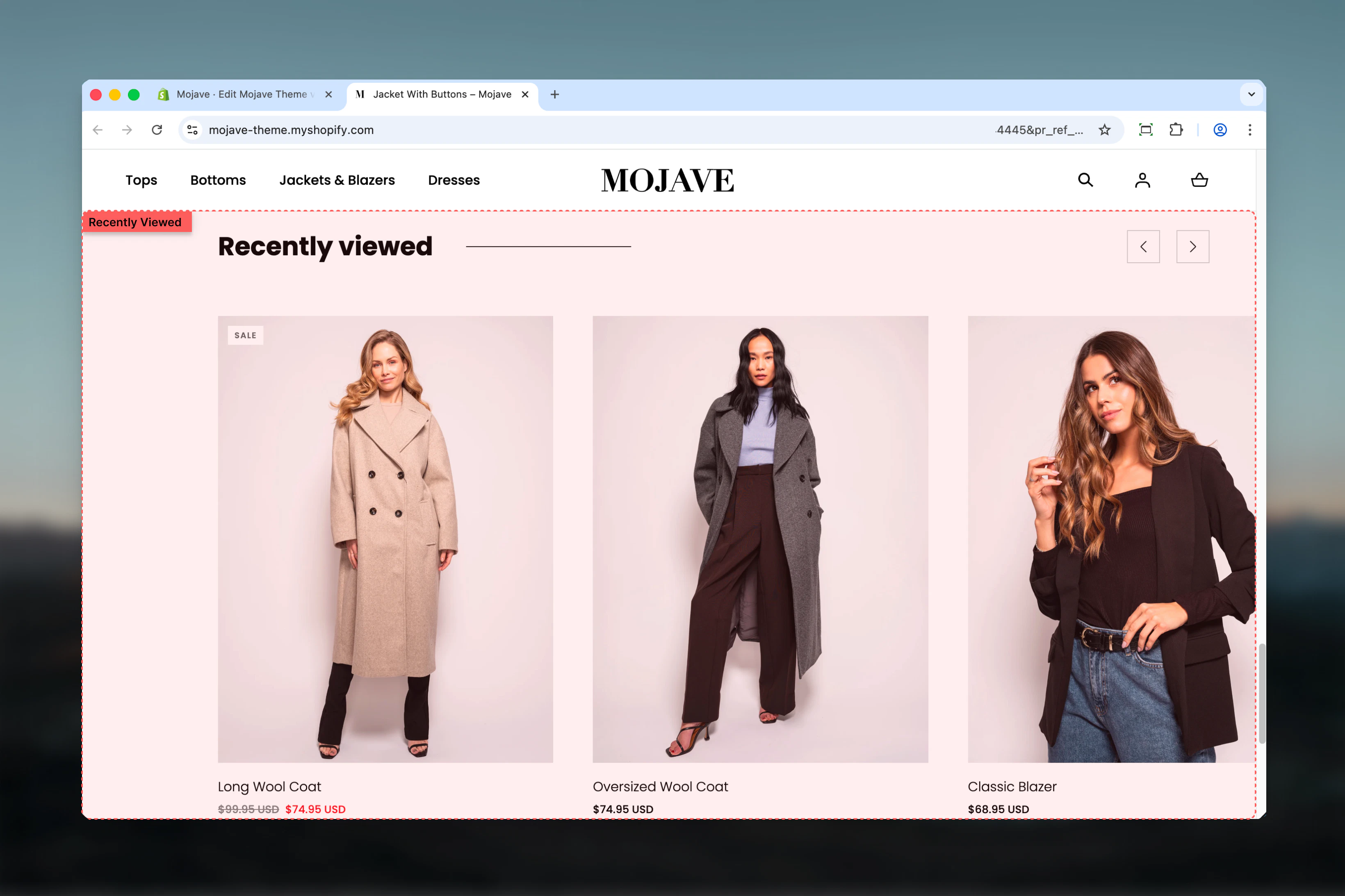
The **Recently viewed** section automatically tracks and displays products customers have recently browsed on your store, enabling easy return to previously viewed items. Features include:
* **Automatic tracking**: Browser localStorage records viewed products (no cookies)
* **Personalized display**: Each visitor sees their own browsing history
* **Persistent across sessions**: Tracked products persist even after browser close (until cleared)
* **Minimal configuration**: Only heading customizable—tracking is automatic
* Works on any template
Perfect for improving product discovery, reducing bounce rates, enabling easy product comparison, and recovering abandoned browsing sessions.
 ## Getting started
From Theme Customizer (any template), click **Add section** and select **Recently viewed**
Adjust heading text (default: "Recently viewed") to match your brand voice
Common placements: bottom of PDP, homepage, cart page, or thank-you page for continued browsing
View multiple products on your storefront. Return to page with section—recently viewed products now display.
Recently viewed tracking begins immediately. The section will be empty on first visit until customer browses products. Track persists across sessions via browser localStorage.
## Section settings
**Text field** (default: "Recently viewed")
Section heading displayed above products.
Alternative heading options:
* "Recently viewed" (default, clear)
* "You recently viewed"
* "Continue browsing"
* "Your browsing history"
* "Items you viewed"
* "Back to browsing"
Keep concise and descriptive—sets expectation for personalized content.
This section has **only one setting** (title). All tracking, product display, and limits are handled automatically by theme JavaScript.
## How it works
**Automatic product tracking**:
1. Customer views any product page (PDP)
2. JavaScript records product ID to browser's localStorage
3. localStorage maintains list of recently viewed product IDs (typically 10-20 products)
4. Recently Viewed section reads localStorage and displays products from that list
**Tracking method**:
* **localStorage** (not cookies)—larger capacity, persists after browser close
* **Client-side** tracking—no server requests, instant updates
* **Privacy-friendly**—data stored locally in customer's browser, not sent to servers
**Persistence**:
* Tracked products persist across browsing sessions
* Survives browser close/reopen
* Only clears when: customer clears browser data, localStorage quota exceeded, or manual script clearing
**Display order**:
* Most recently viewed product appears first
* Older products appear after
* Chronological reverse order (newest → oldest)
## Best practices
Place at bottom of product pages. Customers can easily return to previously viewed items for comparison after viewing details.
Add to homepage. Returning customers see personalized browsing history immediately—faster reengagement.
Include on cart page. Customers comparing options can revisit viewed products before finalizing purchase.
Use descriptive heading. "Recently viewed" immediately signals personalized content vs generic product displays.
Browse multiple products yourself. Verify section populates correctly and ordering makes sense (most recent first).
Section is empty for first-time visitors or after localStorage clear. Consider placing where empty state isn't jarring.
Stack with Product Recommendations or Featured Products. Recently Viewed (personalized) + Recommendations (algorithmic) = comprehensive discovery.
Bottom-of-page placement works best on mobile. Doesn't interrupt primary content, provides continued browsing after main content.
## Common use cases
**PDP bottom placement** — After product details, show "Recently viewed" to enable easy comparison with just-viewed product
**Homepage personalization** — Returning visitors see recent browsing history immediately, creating personalized homepage experience
**Cart page browsing** — On cart page, show recently viewed items so customers can reconsider alternatives before checkout
**Collection page discovery** — Bottom of collection pages, help customers revisit individual products from browsing session
**Thank-you page continuation** — Post-purchase, show "Continue browsing" with recently viewed items for next order
**Search page support** — Bottom of search results, remind customers of products viewed before searching
## Layout behavior
**Desktop**:
* Horizontal product grid (typically 4-5 products per row)
* Product cards: image, title, price, optional quick-view
* Section full-width or contained (theme-dependent)
* Heading centered or left-aligned
* Displays up to N products (theme defines limit, typically 8-12)
**Mobile**:
* Horizontal scrollable carousel OR 2-column grid (theme-dependent)
* Swipe to view more products
* Compact product cards
* Touch-optimized
* Typically shows 4-8 products
**Empty state**:
* Section hidden if no products in localStorage (no awkward empty display)
* Appears only after customer has viewed at least one product
* First-time visitors won't see section at all
**Product limit**:
* Theme defines maximum products to display (e.g., 8, 10, 12)
* localStorage may track 20+ products, but section shows most recent N only
* Ensures section doesn't become overwhelmingly long
## Tracking behavior
**What triggers tracking**:
* **Product page view**: Simply visiting any /products/\[handle] page adds product to localStorage
* **Automatic**: No click, no add-to-cart required—just page load
**What's NOT tracked**:
* Collection page views (only individual product pages)
* Quick-view modal views (unless theme implements custom tracking)
* Product images clicked in other sections (unless they link to PDP)
**Data stored**:
* Product IDs (numerical Shopify product IDs)
* Possibly variant IDs (theme-specific)
* Timestamp (for ordering, theme-specific)
**Storage limits**:
* localStorage capacity: \~5-10MB per origin (plenty for product IDs)
* Typical storage: 10-20 product IDs = few KB
* If quota exceeded: oldest entries removed (FIFO - first in, first out)
## Technical details
**JavaScript implementation**:
* Theme JavaScript listens for PDP page loads
* On load, extracts product ID from page or meta tags
* Writes product ID to localStorage array
* Recently Viewed section reads localStorage on page render
* Fetches product data via Shopify Ajax API
* Renders product cards dynamically
**localStorage key**:
* Typically `theme.recentlyViewed` or similar custom key
* Stores JSON array of product IDs: `[12345, 67890, 24680]`
**Product data fetching**:
* Section reads IDs from localStorage
* Makes Ajax API requests to `/products/[id].js` or GraphQL
* Retrieves product title, price, images, URLs
* Renders product cards client-side
**Performance**:
* **Initial load**: Section may be empty, filled after JS executes (async)
* **Cache-friendly**: Product data cached by browser for repeat views
* **No server rendering**: Products loaded client-side after page render
## Privacy & data considerations
**GDPR/privacy compliance**:
* **localStorage is not a cookie**—different regulations
* **No personal data**: Only product IDs stored, no customer identifiable information
* **Local only**: Data never transmitted to servers (unless deliberately implemented)
* **User control**: Users can clear localStorage via browser settings
**Privacy policy**:
* Disclose use of localStorage for product tracking
* Explain purpose: improve browsing experience, personalize content
* Provide instructions for clearing (standard browser methods)
**Opt-out options**:
* Some themes provide "Clear recently viewed" button
* Users can manually clear via browser: Developer Tools → Application → Local Storage → Clear
## Customization tips
**For PDP (product comparison)**:
* Place at bottom of product page
* Heading: "Recently viewed"
* Allows quick return to previous products for comparison
**For homepage (returning visitors)**:
* Place mid-page or bottom
* Heading: "Continue where you left off", "Your recent browsing"
* Creates personalized homepage experience
**For cart page (decision support)**:
* Place below cart items or after recommendations
* Heading: "Still deciding?", "Compare these items"
* Helps indecisive customers revisit alternatives
**For thank-you page (re-engagement)**:
* Place at bottom of post-purchase page
* Heading: "Continue browsing", "Shop more items"
* Encourages next purchase or wishlist building
## Related sections
* **Product Recommendations** — AI-powered product suggestions (algorithmic vs browsing history)
* **Recommended Products** — Manual or API-driven recommendations (curated vs personalized)
* **Featured Products** — Static curated product showcases (universal vs personalized)
* **Collection Products** — Collection-based product displays (category vs history)
## Comparison: Recently Viewed vs Recommendations
| Feature | Recently Viewed | Product Recommendations |
| ------------------- | -------------------------------------- | ------------------------------------------ |
| **Source** | Customer's browsing history | Shopify's AI algorithm |
| **Personalization** | 100% personalized (unique per visitor) | Contextual (based on current product/cart) |
| **Data required** | None (works immediately) | Requires order history, view data |
| **Control** | Automatic (no curation) | Automatic (algorithm decides) |
| **Empty state** | Empty for new visitors | Empty for new products/stores |
| **Purpose** | Return to browsing,comparison | Discovery, cross-sell, upsell |
| **Best placement** | PDP bottom, homepage, cart | PDP, cart, post-purchase |
**When to use both**:
* Stack Recently Viewed + Product Recommendations on PDP
* Recently Viewed: Helps comparison
* Recommendations: Encourages discovery
* Together: Maximum product exposure and engagement
## Troubleshooting
**Section not appearing**:
* **No products viewed yet**: Browse some products first
* **JavaScript disabled**: Tracking requires JavaScript enabled
* **localStorage disabled**: Browser may block localStorage (privacy settings)
* **Theme compatibility**: Ensure theme includes recently-viewed JavaScript
**Wrong products showing**:
* **Cache issue**: Clear browser cache and localStorage
* **Multiple stores**: localStorage shared per domain—test on unique domain
* **Product availability**: Out-of-stock or deleted products may still appear (until localStorage cleared)
**Order incorrect (not most recent first)**:
* **Theme implementation**: Check theme's JS sorting logic
* **Timestamp missing**: Some themes don't store timestamps, affecting order
* **localStorage corruption**: Clear and rebuild data
**Products not updating**:
* **Cache aggressive**: Browser caching product data too long
* **JS errors**: Check browser console for JavaScript errors preventing updates
* **Conflicting apps**: Third-party apps may interfere with localStorage
**Empty after browser close/reopen**:
* **localStorage being cleared**: Check browser settings (incognito mode clears on close)
* **Theme using sessionStorage**: sessionStorage clears on close (not localStorage)
* **Privacy extensions**: Browser extensions may auto-clear storage
## Advanced implementation notes
**Custom tracking**:
* Developers can extend tracking to capture variants, timestamps, scroll depth
* Custom events: Track clicks on recently viewed items for analytics
* External storage: Save to customer metafields for cross-device persistence (requires Shopify API)
**Product limit configuration**:
* Theme may expose setting for max products (typically theme settings, not section settings)
* Check `theme settings > Product > Recently viewed limit`
* If not exposed, requires theme code modification
**Styling customization**:
* CSS targets: `.recently-viewed`, `.recently-viewed__product-card` (class names vary)
* Adjust grid layout, card styling, hover effects via CSS
* Responsive breakpoints for mobile optimization
**JavaScript hooks**:
* Listen for `theme:recentlyviewed:updated` custom events (theme-specific)
* Track analytics when recently viewed products are clicked
* Implement "Remove from recently viewed" functionality
## Getting started
From Theme Customizer (any template), click **Add section** and select **Recently viewed**
Adjust heading text (default: "Recently viewed") to match your brand voice
Common placements: bottom of PDP, homepage, cart page, or thank-you page for continued browsing
View multiple products on your storefront. Return to page with section—recently viewed products now display.
Recently viewed tracking begins immediately. The section will be empty on first visit until customer browses products. Track persists across sessions via browser localStorage.
## Section settings
**Text field** (default: "Recently viewed")
Section heading displayed above products.
Alternative heading options:
* "Recently viewed" (default, clear)
* "You recently viewed"
* "Continue browsing"
* "Your browsing history"
* "Items you viewed"
* "Back to browsing"
Keep concise and descriptive—sets expectation for personalized content.
This section has **only one setting** (title). All tracking, product display, and limits are handled automatically by theme JavaScript.
## How it works
**Automatic product tracking**:
1. Customer views any product page (PDP)
2. JavaScript records product ID to browser's localStorage
3. localStorage maintains list of recently viewed product IDs (typically 10-20 products)
4. Recently Viewed section reads localStorage and displays products from that list
**Tracking method**:
* **localStorage** (not cookies)—larger capacity, persists after browser close
* **Client-side** tracking—no server requests, instant updates
* **Privacy-friendly**—data stored locally in customer's browser, not sent to servers
**Persistence**:
* Tracked products persist across browsing sessions
* Survives browser close/reopen
* Only clears when: customer clears browser data, localStorage quota exceeded, or manual script clearing
**Display order**:
* Most recently viewed product appears first
* Older products appear after
* Chronological reverse order (newest → oldest)
## Best practices
Place at bottom of product pages. Customers can easily return to previously viewed items for comparison after viewing details.
Add to homepage. Returning customers see personalized browsing history immediately—faster reengagement.
Include on cart page. Customers comparing options can revisit viewed products before finalizing purchase.
Use descriptive heading. "Recently viewed" immediately signals personalized content vs generic product displays.
Browse multiple products yourself. Verify section populates correctly and ordering makes sense (most recent first).
Section is empty for first-time visitors or after localStorage clear. Consider placing where empty state isn't jarring.
Stack with Product Recommendations or Featured Products. Recently Viewed (personalized) + Recommendations (algorithmic) = comprehensive discovery.
Bottom-of-page placement works best on mobile. Doesn't interrupt primary content, provides continued browsing after main content.
## Common use cases
**PDP bottom placement** — After product details, show "Recently viewed" to enable easy comparison with just-viewed product
**Homepage personalization** — Returning visitors see recent browsing history immediately, creating personalized homepage experience
**Cart page browsing** — On cart page, show recently viewed items so customers can reconsider alternatives before checkout
**Collection page discovery** — Bottom of collection pages, help customers revisit individual products from browsing session
**Thank-you page continuation** — Post-purchase, show "Continue browsing" with recently viewed items for next order
**Search page support** — Bottom of search results, remind customers of products viewed before searching
## Layout behavior
**Desktop**:
* Horizontal product grid (typically 4-5 products per row)
* Product cards: image, title, price, optional quick-view
* Section full-width or contained (theme-dependent)
* Heading centered or left-aligned
* Displays up to N products (theme defines limit, typically 8-12)
**Mobile**:
* Horizontal scrollable carousel OR 2-column grid (theme-dependent)
* Swipe to view more products
* Compact product cards
* Touch-optimized
* Typically shows 4-8 products
**Empty state**:
* Section hidden if no products in localStorage (no awkward empty display)
* Appears only after customer has viewed at least one product
* First-time visitors won't see section at all
**Product limit**:
* Theme defines maximum products to display (e.g., 8, 10, 12)
* localStorage may track 20+ products, but section shows most recent N only
* Ensures section doesn't become overwhelmingly long
## Tracking behavior
**What triggers tracking**:
* **Product page view**: Simply visiting any /products/\[handle] page adds product to localStorage
* **Automatic**: No click, no add-to-cart required—just page load
**What's NOT tracked**:
* Collection page views (only individual product pages)
* Quick-view modal views (unless theme implements custom tracking)
* Product images clicked in other sections (unless they link to PDP)
**Data stored**:
* Product IDs (numerical Shopify product IDs)
* Possibly variant IDs (theme-specific)
* Timestamp (for ordering, theme-specific)
**Storage limits**:
* localStorage capacity: \~5-10MB per origin (plenty for product IDs)
* Typical storage: 10-20 product IDs = few KB
* If quota exceeded: oldest entries removed (FIFO - first in, first out)
## Technical details
**JavaScript implementation**:
* Theme JavaScript listens for PDP page loads
* On load, extracts product ID from page or meta tags
* Writes product ID to localStorage array
* Recently Viewed section reads localStorage on page render
* Fetches product data via Shopify Ajax API
* Renders product cards dynamically
**localStorage key**:
* Typically `theme.recentlyViewed` or similar custom key
* Stores JSON array of product IDs: `[12345, 67890, 24680]`
**Product data fetching**:
* Section reads IDs from localStorage
* Makes Ajax API requests to `/products/[id].js` or GraphQL
* Retrieves product title, price, images, URLs
* Renders product cards client-side
**Performance**:
* **Initial load**: Section may be empty, filled after JS executes (async)
* **Cache-friendly**: Product data cached by browser for repeat views
* **No server rendering**: Products loaded client-side after page render
## Privacy & data considerations
**GDPR/privacy compliance**:
* **localStorage is not a cookie**—different regulations
* **No personal data**: Only product IDs stored, no customer identifiable information
* **Local only**: Data never transmitted to servers (unless deliberately implemented)
* **User control**: Users can clear localStorage via browser settings
**Privacy policy**:
* Disclose use of localStorage for product tracking
* Explain purpose: improve browsing experience, personalize content
* Provide instructions for clearing (standard browser methods)
**Opt-out options**:
* Some themes provide "Clear recently viewed" button
* Users can manually clear via browser: Developer Tools → Application → Local Storage → Clear
## Customization tips
**For PDP (product comparison)**:
* Place at bottom of product page
* Heading: "Recently viewed"
* Allows quick return to previous products for comparison
**For homepage (returning visitors)**:
* Place mid-page or bottom
* Heading: "Continue where you left off", "Your recent browsing"
* Creates personalized homepage experience
**For cart page (decision support)**:
* Place below cart items or after recommendations
* Heading: "Still deciding?", "Compare these items"
* Helps indecisive customers revisit alternatives
**For thank-you page (re-engagement)**:
* Place at bottom of post-purchase page
* Heading: "Continue browsing", "Shop more items"
* Encourages next purchase or wishlist building
## Related sections
* **Product Recommendations** — AI-powered product suggestions (algorithmic vs browsing history)
* **Recommended Products** — Manual or API-driven recommendations (curated vs personalized)
* **Featured Products** — Static curated product showcases (universal vs personalized)
* **Collection Products** — Collection-based product displays (category vs history)
## Comparison: Recently Viewed vs Recommendations
| Feature | Recently Viewed | Product Recommendations |
| ------------------- | -------------------------------------- | ------------------------------------------ |
| **Source** | Customer's browsing history | Shopify's AI algorithm |
| **Personalization** | 100% personalized (unique per visitor) | Contextual (based on current product/cart) |
| **Data required** | None (works immediately) | Requires order history, view data |
| **Control** | Automatic (no curation) | Automatic (algorithm decides) |
| **Empty state** | Empty for new visitors | Empty for new products/stores |
| **Purpose** | Return to browsing,comparison | Discovery, cross-sell, upsell |
| **Best placement** | PDP bottom, homepage, cart | PDP, cart, post-purchase |
**When to use both**:
* Stack Recently Viewed + Product Recommendations on PDP
* Recently Viewed: Helps comparison
* Recommendations: Encourages discovery
* Together: Maximum product exposure and engagement
## Troubleshooting
**Section not appearing**:
* **No products viewed yet**: Browse some products first
* **JavaScript disabled**: Tracking requires JavaScript enabled
* **localStorage disabled**: Browser may block localStorage (privacy settings)
* **Theme compatibility**: Ensure theme includes recently-viewed JavaScript
**Wrong products showing**:
* **Cache issue**: Clear browser cache and localStorage
* **Multiple stores**: localStorage shared per domain—test on unique domain
* **Product availability**: Out-of-stock or deleted products may still appear (until localStorage cleared)
**Order incorrect (not most recent first)**:
* **Theme implementation**: Check theme's JS sorting logic
* **Timestamp missing**: Some themes don't store timestamps, affecting order
* **localStorage corruption**: Clear and rebuild data
**Products not updating**:
* **Cache aggressive**: Browser caching product data too long
* **JS errors**: Check browser console for JavaScript errors preventing updates
* **Conflicting apps**: Third-party apps may interfere with localStorage
**Empty after browser close/reopen**:
* **localStorage being cleared**: Check browser settings (incognito mode clears on close)
* **Theme using sessionStorage**: sessionStorage clears on close (not localStorage)
* **Privacy extensions**: Browser extensions may auto-clear storage
## Advanced implementation notes
**Custom tracking**:
* Developers can extend tracking to capture variants, timestamps, scroll depth
* Custom events: Track clicks on recently viewed items for analytics
* External storage: Save to customer metafields for cross-device persistence (requires Shopify API)
**Product limit configuration**:
* Theme may expose setting for max products (typically theme settings, not section settings)
* Check `theme settings > Product > Recently viewed limit`
* If not exposed, requires theme code modification
**Styling customization**:
* CSS targets: `.recently-viewed`, `.recently-viewed__product-card` (class names vary)
* Adjust grid layout, card styling, hover effects via CSS
* Responsive breakpoints for mobile optimization
**JavaScript hooks**:
* Listen for `theme:recentlyviewed:updated` custom events (theme-specific)
* Track analytics when recently viewed products are clicked
* Implement "Remove from recently viewed" functionality