> ## Documentation Index
> Fetch the complete documentation index at: https://docs.digifist.com/llms.txt
> Use this file to discover all available pages before exploring further.
# Recommended Products
> Display curated product recommendations using Shopify's API or manual product selection with customizable heading and call-to-action
## What this section does
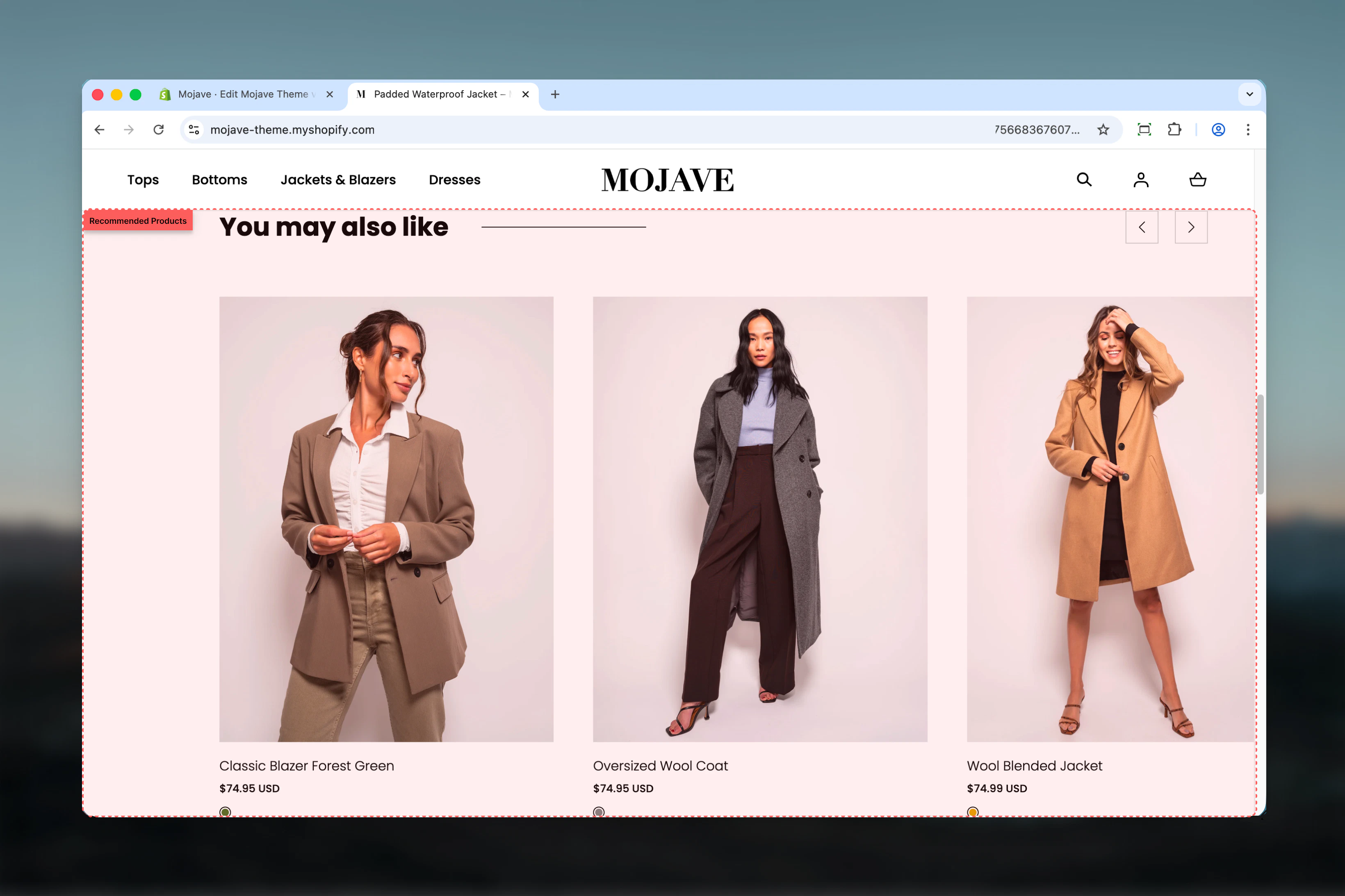
The **Recommended products** section showcases product suggestions with flexible sourcing: automatic Shopify recommendations OR manual product selection. Features include:
* **Two modes**: Shopify recommendation API (automatic) or manual product blocks
* **API mode**: AI-powered recommendations based on first product added to cart
* **Manual mode**: Curate specific products via product blocks
* **1-10 product limit** (configurable)
* Heading, link/CTA button
* Works on any template (not restricted to Product template)
Perfect for cart page upsells, post-cart recommendations, homepage suggestions, or any page where you want flexible product showcasing.
 ## Getting started
From the Theme Customizer (any template), click **Add section** and select **Recommended products**
**Enable recommended API** (checked) = Automatic Shopify recommendations. Unchecked = Manual product blocks.
Set product limit (1-10), heading, link text/URL. If manual mode, add product blocks.
Common placements: cart page, post-purchase page, homepage, collection pages for cross-selling
## Section settings
**Checkbox** (default: checked)
Controls product sourcing method:
* **Checked (default)**: Uses Shopify recommendation API—automatic product suggestions
* **Unchecked**: Uses manual product blocks—you select specific products
**Info**: "When enabled, product blocks from this section are ignored. Instead, automatically-generated list of product recommendations are displayed, based on the first product, that was added to cart. [More details](https://help.shopify.com/en/manual/online-store/search-and-discovery/product-recommendations)."
**API mode** = intelligent, hands-off recommendations.\
**Manual mode** = full control, curated selection.
**Range**: 1-10 (default: 4)
Maximum number of products to display:
* **API mode**: Requests this many recommendations from Shopify
* **Manual mode**: Limits how many product blocks are displayed (even if more blocks exist)
Typical sweet spot: 3-6 products for balanced display without overwhelming.
**Textarea** (default: "You may also like")
Section title above products.
Context-specific suggestions:
* Cart page: "Complete your order", "Don't forget these"
* Homepage: "Trending now", "Staff picks"
* Post-purchase: "Customers also bought", "Recommended for you"
* Collection page: "You might also love"
**Link text** (text field, default: "Shop all")
* CTA button text below products
**Link URL** (URL field, default: /collections)
* Button destination
Use to drive users to broader catalog: "View all products" → /collections/all, "Shop more" → /collections/bestsellers.
## Block: Product
**Type**: product (unlimited blocks, but limited by "Recommended products limit" setting)
Only used when "Enable recommended API" is **unchecked** (manual mode).
**Product picker** (required)
Select specific product to feature in this block.
Manual product blocks are ignored when API mode is enabled. When API is disabled, these blocks define which products display (up to the Products Limit).
**Example**: Limit set to 4, but you add 6 product blocks → only first 4 blocks display.
## Best practices
Enable API mode on cart page. Shopify's algorithm suggests products based on what's already in cart—intelligent upselling.
Use manual mode for curated selections: bestsellers, new arrivals, seasonal must-haves where you control exact products.
Display 3-6 products optimal. Provides choice without scroll fatigue. More products = diluted focus, lower conversion.
Match heading to page context. Cart: "Complete your order". Homepage: "Trending now". Makes intent clear.
Link button drives broader discovery. "Shop all" → full catalog. Use when recommendations serve as teaser, not complete selection.
A/B test API vs manual on same template. API learns from data, manual reflects your merchandising strategy.
If using manual mode, refresh product blocks seasonally or monthly. Stale recommendations reduce effectiveness.
API recommendations improve over time. New stores: manual mode initially, switch to API as data accumulates.
## Common use cases
**Cart page upsells** — API mode enabled, heading "Complete your order", 4 products based on cart contents
**Post-add-to-cart popup** — After customer adds product, show "Customers also bought" with API recommendations (requires theme support)
**Homepage trending products** — Manual mode, heading "Trending now", hand-picked bestsellers or new arrivals (4-6 products)
**Collection page cross-sell** — Manual mode, heading "You might also love", complementary products from related collections
**Checkout page recommendations** — API mode, "Don't forget these", last-chance upsell items based on order contents
**Thank-you page follow-up** — Manual or API, "For your next order", encourages repeat purchase with relevant products
## API mode vs Manual mode
### API Mode (Enable recommended API: **checked**)
**How it works**:
* Shopify analyzes **first product added to cart**
* Generates recommendations based on purchase patterns, product relationships, browsing data
* Returns up to Products Limit products dynamically
**Pros**:
* Hands-free—no manual product management
* Intelligent—learns from store data
* Contextual—relevant to cart contents
**Cons**:
* Requires cart context (works best on cart/checkout pages)
* New stores have limited data = generic recommendations
* Less control over exact products shown
**Best for**: Cart page, post-add-to-cart, checkout upsells
### Manual Mode (Enable recommended API: **unchecked**)
**How it works**:
* You add product blocks, selecting specific products
* Section displays products from blocks (up to Products Limit)
* Static—same products for all visitors
**Pros**:
* Full control—handpick exact products
* Merchandising strategy—showcase what YOU want to sell
* Consistent—reliable product selection
**Cons**:
* Manual maintenance—requires updating
* Not contextual—same for everyone
* No learning—doesn't adapt to customer behavior
**Best for**: Homepage features, seasonal promotions, curated collections
## Layout behavior
**Desktop**:
* Horizontal product grid (typically 3-4 products per row)
* Product cards: image, title, price, optional quick-add button
* Heading centered or left-aligned above grid
* Link button below grid (centered)
* Full-width or contained section (theme-dependent)
**Mobile**:
* 2-column grid OR horizontal scrollable carousel (theme-dependent)
* Compact product cards
* Heading above products
* Link button below products
* Touch-optimized interactions
**Empty state**:
* **API mode**: If no recommendations available, section hidden automatically
* **Manual mode**: If no product blocks added (or all hidden), section may show empty or hide
## API mode behavior
**Cart context requirement**:
* API returns recommendations **based on first product in cart**
* If cart is empty, recommendations may be generic or empty
* Works best on Cart template, Cart drawer, Checkout pages
**Recommendation logic**:
* Shopify analyzes first cart item
* Finds products frequently bought together or viewed with that product
* Returns up to Products Limit recommendations
* Falls back to similar products if insufficient data
**Data requirements**:
* **New stores**: Limited data = generic or empty recommendations
* **Growing stores**: Recommendations improve after 50-100 orders
* **Mature stores**: Accurate, intelligent suggestions based on patterns
**Real-world example**:
* Customer adds "Blue Denim Jacket" to cart
* API recommends: "White T-Shirt", "Black Jeans", "Brown Boots" (items frequently bought with jackets)
## Manual mode workflow
**Setting up manual products**:
1. Uncheck "Enable recommended API"
2. Click "Add product" block
3. Select product from picker
4. Repeat for desired products (add more than limit for flexibility)
5. Rearrange blocks to control display order
**Product limit interaction**:
* **Limit = 4, Blocks = 6**: First 4 blocks display, last 2 ignored
* **Limit = 8, Blocks = 3**: All 3 display, section requests more but none available
**Updating products**:
* Seasonal refresh: Swap products every quarter
* Performance-based: Remove low-performers, add high-margin items
* Stock awareness: Hide/remove out-of-stock products
## Customization tips
**For cart page (API mode)**:
* Enable API: Checked
* Products limit: 4-6
* Heading: "Complete your order", "Customers also bought"
* Link: "Continue shopping" → /collections
**For homepage (Manual mode)**:
* Enable API: Unchecked
* Products limit: 6
* Heading: "Trending now", "Bestsellers"
* Link: "Shop all" → /collections/all
* Products: Hand-picked new arrivals, bestsellers, high-margin
**For collection page (Manual mode)**:
* Enable API: Unchecked
* Products limit: 4
* Heading: "You might also love"
* Link: "View related" → complementary collection
* Products: Related products from other collections
**For post-purchase page (API mode)**:
* Enable API: Checked (recommendations based on order)
* Products limit: 4
* Heading: "For your next order", "Recommended for you"
* Link: "Keep shopping" → /collections
## Related sections
* **Product Recommendations** — Shopify's native PDP-specific recommendation section
* **Featured Products** — Collection-based or manual product showcases
* **Recently Viewed** — Browser-based recently viewed tracking
* **Cart Recommendations** — Cart-drawer-specific product suggestions (theme-dependent)
## Technical notes
**API endpoint**: Uses Shopify's `/recommendations/products` API, same as Product Recommendations section. Difference: accepts cart context, not just single product.
**Template flexibility**: Unlike Product Recommendations (PDP only), this section works on ANY template—cart, homepage, collection, pages, etc.
**Product block limit**: Unlimited product blocks can be added, but only up to "Products limit" setting will display. Add extras for flexibility and A/B testing.
**API vs blocks precedence**: When API mode is enabled, product blocks are completely ignored—doesn't matter if they exist. When API disabled, blocks take over.
**Cart dependency (API mode)**: API mode effectiveness depends on cart state. Empty cart = no/generic recommendations. Single item in cart = recommendations for that item.
**Manual block order**: Product blocks display in the order they appear in Theme Customizer (top to bottom). Drag blocks to reorder.
**Empty state handling**: Theme determines empty state behavior—some hide section, others show "No recommendations" message.
**Performance**: API calls are server-side (fast). Manual mode has no API overhead (even faster).
## Troubleshooting
**API mode shows no products**:
* **Empty cart**: Add item to cart to trigger recommendations
* **New store**: Insufficient data for recommendations to generate
* **Products limit too high**: API returns fewer than requested
* **Template mismatch**: Some templates may not pass cart context properly
**Manual mode not working**:
* **API still enabled**: Uncheck "Enable recommended API"
* **No product blocks**: Add at least one product block
* **Products limit = 0 or very low**: Increase limit to at least 3-4
* **Blocks hidden**: Check product block visibility settings
**Products displaying incorrectly**:
* **Theme styling**: Check theme's product card CSS
* **Product limit mismatch**: Verify limit matches desired product count
* **Responsive issues**: Test on multiple devices, adjust theme layout settings
**API recommendations poor quality**:
* **Low order volume**: New stores need 50-100+ orders for good data
* **Product data quality**: Improve product types, tags, collections
* **Unrelated cart items**: API struggles with very diverse cart contents
* **Switch to manual**: Temporarily use manual mode until data improves
## Getting started
From the Theme Customizer (any template), click **Add section** and select **Recommended products**
**Enable recommended API** (checked) = Automatic Shopify recommendations. Unchecked = Manual product blocks.
Set product limit (1-10), heading, link text/URL. If manual mode, add product blocks.
Common placements: cart page, post-purchase page, homepage, collection pages for cross-selling
## Section settings
**Checkbox** (default: checked)
Controls product sourcing method:
* **Checked (default)**: Uses Shopify recommendation API—automatic product suggestions
* **Unchecked**: Uses manual product blocks—you select specific products
**Info**: "When enabled, product blocks from this section are ignored. Instead, automatically-generated list of product recommendations are displayed, based on the first product, that was added to cart. [More details](https://help.shopify.com/en/manual/online-store/search-and-discovery/product-recommendations)."
**API mode** = intelligent, hands-off recommendations.\
**Manual mode** = full control, curated selection.
**Range**: 1-10 (default: 4)
Maximum number of products to display:
* **API mode**: Requests this many recommendations from Shopify
* **Manual mode**: Limits how many product blocks are displayed (even if more blocks exist)
Typical sweet spot: 3-6 products for balanced display without overwhelming.
**Textarea** (default: "You may also like")
Section title above products.
Context-specific suggestions:
* Cart page: "Complete your order", "Don't forget these"
* Homepage: "Trending now", "Staff picks"
* Post-purchase: "Customers also bought", "Recommended for you"
* Collection page: "You might also love"
**Link text** (text field, default: "Shop all")
* CTA button text below products
**Link URL** (URL field, default: /collections)
* Button destination
Use to drive users to broader catalog: "View all products" → /collections/all, "Shop more" → /collections/bestsellers.
## Block: Product
**Type**: product (unlimited blocks, but limited by "Recommended products limit" setting)
Only used when "Enable recommended API" is **unchecked** (manual mode).
**Product picker** (required)
Select specific product to feature in this block.
Manual product blocks are ignored when API mode is enabled. When API is disabled, these blocks define which products display (up to the Products Limit).
**Example**: Limit set to 4, but you add 6 product blocks → only first 4 blocks display.
## Best practices
Enable API mode on cart page. Shopify's algorithm suggests products based on what's already in cart—intelligent upselling.
Use manual mode for curated selections: bestsellers, new arrivals, seasonal must-haves where you control exact products.
Display 3-6 products optimal. Provides choice without scroll fatigue. More products = diluted focus, lower conversion.
Match heading to page context. Cart: "Complete your order". Homepage: "Trending now". Makes intent clear.
Link button drives broader discovery. "Shop all" → full catalog. Use when recommendations serve as teaser, not complete selection.
A/B test API vs manual on same template. API learns from data, manual reflects your merchandising strategy.
If using manual mode, refresh product blocks seasonally or monthly. Stale recommendations reduce effectiveness.
API recommendations improve over time. New stores: manual mode initially, switch to API as data accumulates.
## Common use cases
**Cart page upsells** — API mode enabled, heading "Complete your order", 4 products based on cart contents
**Post-add-to-cart popup** — After customer adds product, show "Customers also bought" with API recommendations (requires theme support)
**Homepage trending products** — Manual mode, heading "Trending now", hand-picked bestsellers or new arrivals (4-6 products)
**Collection page cross-sell** — Manual mode, heading "You might also love", complementary products from related collections
**Checkout page recommendations** — API mode, "Don't forget these", last-chance upsell items based on order contents
**Thank-you page follow-up** — Manual or API, "For your next order", encourages repeat purchase with relevant products
## API mode vs Manual mode
### API Mode (Enable recommended API: **checked**)
**How it works**:
* Shopify analyzes **first product added to cart**
* Generates recommendations based on purchase patterns, product relationships, browsing data
* Returns up to Products Limit products dynamically
**Pros**:
* Hands-free—no manual product management
* Intelligent—learns from store data
* Contextual—relevant to cart contents
**Cons**:
* Requires cart context (works best on cart/checkout pages)
* New stores have limited data = generic recommendations
* Less control over exact products shown
**Best for**: Cart page, post-add-to-cart, checkout upsells
### Manual Mode (Enable recommended API: **unchecked**)
**How it works**:
* You add product blocks, selecting specific products
* Section displays products from blocks (up to Products Limit)
* Static—same products for all visitors
**Pros**:
* Full control—handpick exact products
* Merchandising strategy—showcase what YOU want to sell
* Consistent—reliable product selection
**Cons**:
* Manual maintenance—requires updating
* Not contextual—same for everyone
* No learning—doesn't adapt to customer behavior
**Best for**: Homepage features, seasonal promotions, curated collections
## Layout behavior
**Desktop**:
* Horizontal product grid (typically 3-4 products per row)
* Product cards: image, title, price, optional quick-add button
* Heading centered or left-aligned above grid
* Link button below grid (centered)
* Full-width or contained section (theme-dependent)
**Mobile**:
* 2-column grid OR horizontal scrollable carousel (theme-dependent)
* Compact product cards
* Heading above products
* Link button below products
* Touch-optimized interactions
**Empty state**:
* **API mode**: If no recommendations available, section hidden automatically
* **Manual mode**: If no product blocks added (or all hidden), section may show empty or hide
## API mode behavior
**Cart context requirement**:
* API returns recommendations **based on first product in cart**
* If cart is empty, recommendations may be generic or empty
* Works best on Cart template, Cart drawer, Checkout pages
**Recommendation logic**:
* Shopify analyzes first cart item
* Finds products frequently bought together or viewed with that product
* Returns up to Products Limit recommendations
* Falls back to similar products if insufficient data
**Data requirements**:
* **New stores**: Limited data = generic or empty recommendations
* **Growing stores**: Recommendations improve after 50-100 orders
* **Mature stores**: Accurate, intelligent suggestions based on patterns
**Real-world example**:
* Customer adds "Blue Denim Jacket" to cart
* API recommends: "White T-Shirt", "Black Jeans", "Brown Boots" (items frequently bought with jackets)
## Manual mode workflow
**Setting up manual products**:
1. Uncheck "Enable recommended API"
2. Click "Add product" block
3. Select product from picker
4. Repeat for desired products (add more than limit for flexibility)
5. Rearrange blocks to control display order
**Product limit interaction**:
* **Limit = 4, Blocks = 6**: First 4 blocks display, last 2 ignored
* **Limit = 8, Blocks = 3**: All 3 display, section requests more but none available
**Updating products**:
* Seasonal refresh: Swap products every quarter
* Performance-based: Remove low-performers, add high-margin items
* Stock awareness: Hide/remove out-of-stock products
## Customization tips
**For cart page (API mode)**:
* Enable API: Checked
* Products limit: 4-6
* Heading: "Complete your order", "Customers also bought"
* Link: "Continue shopping" → /collections
**For homepage (Manual mode)**:
* Enable API: Unchecked
* Products limit: 6
* Heading: "Trending now", "Bestsellers"
* Link: "Shop all" → /collections/all
* Products: Hand-picked new arrivals, bestsellers, high-margin
**For collection page (Manual mode)**:
* Enable API: Unchecked
* Products limit: 4
* Heading: "You might also love"
* Link: "View related" → complementary collection
* Products: Related products from other collections
**For post-purchase page (API mode)**:
* Enable API: Checked (recommendations based on order)
* Products limit: 4
* Heading: "For your next order", "Recommended for you"
* Link: "Keep shopping" → /collections
## Related sections
* **Product Recommendations** — Shopify's native PDP-specific recommendation section
* **Featured Products** — Collection-based or manual product showcases
* **Recently Viewed** — Browser-based recently viewed tracking
* **Cart Recommendations** — Cart-drawer-specific product suggestions (theme-dependent)
## Technical notes
**API endpoint**: Uses Shopify's `/recommendations/products` API, same as Product Recommendations section. Difference: accepts cart context, not just single product.
**Template flexibility**: Unlike Product Recommendations (PDP only), this section works on ANY template—cart, homepage, collection, pages, etc.
**Product block limit**: Unlimited product blocks can be added, but only up to "Products limit" setting will display. Add extras for flexibility and A/B testing.
**API vs blocks precedence**: When API mode is enabled, product blocks are completely ignored—doesn't matter if they exist. When API disabled, blocks take over.
**Cart dependency (API mode)**: API mode effectiveness depends on cart state. Empty cart = no/generic recommendations. Single item in cart = recommendations for that item.
**Manual block order**: Product blocks display in the order they appear in Theme Customizer (top to bottom). Drag blocks to reorder.
**Empty state handling**: Theme determines empty state behavior—some hide section, others show "No recommendations" message.
**Performance**: API calls are server-side (fast). Manual mode has no API overhead (even faster).
## Troubleshooting
**API mode shows no products**:
* **Empty cart**: Add item to cart to trigger recommendations
* **New store**: Insufficient data for recommendations to generate
* **Products limit too high**: API returns fewer than requested
* **Template mismatch**: Some templates may not pass cart context properly
**Manual mode not working**:
* **API still enabled**: Uncheck "Enable recommended API"
* **No product blocks**: Add at least one product block
* **Products limit = 0 or very low**: Increase limit to at least 3-4
* **Blocks hidden**: Check product block visibility settings
**Products displaying incorrectly**:
* **Theme styling**: Check theme's product card CSS
* **Product limit mismatch**: Verify limit matches desired product count
* **Responsive issues**: Test on multiple devices, adjust theme layout settings
**API recommendations poor quality**:
* **Low order volume**: New stores need 50-100+ orders for good data
* **Product data quality**: Improve product types, tags, collections
* **Unrelated cart items**: API struggles with very diverse cart contents
* **Switch to manual**: Temporarily use manual mode until data improves