> ## Documentation Index
> Fetch the complete documentation index at: https://docs.digifist.com/llms.txt
> Use this file to discover all available pages before exploring further.
# Age Verification Popup
> Modal popup requiring age verification before site access.
The Age Verification Popup displays a modal requiring visitors to confirm their age before accessing the site. Commonly used for stores selling age-restricted products.
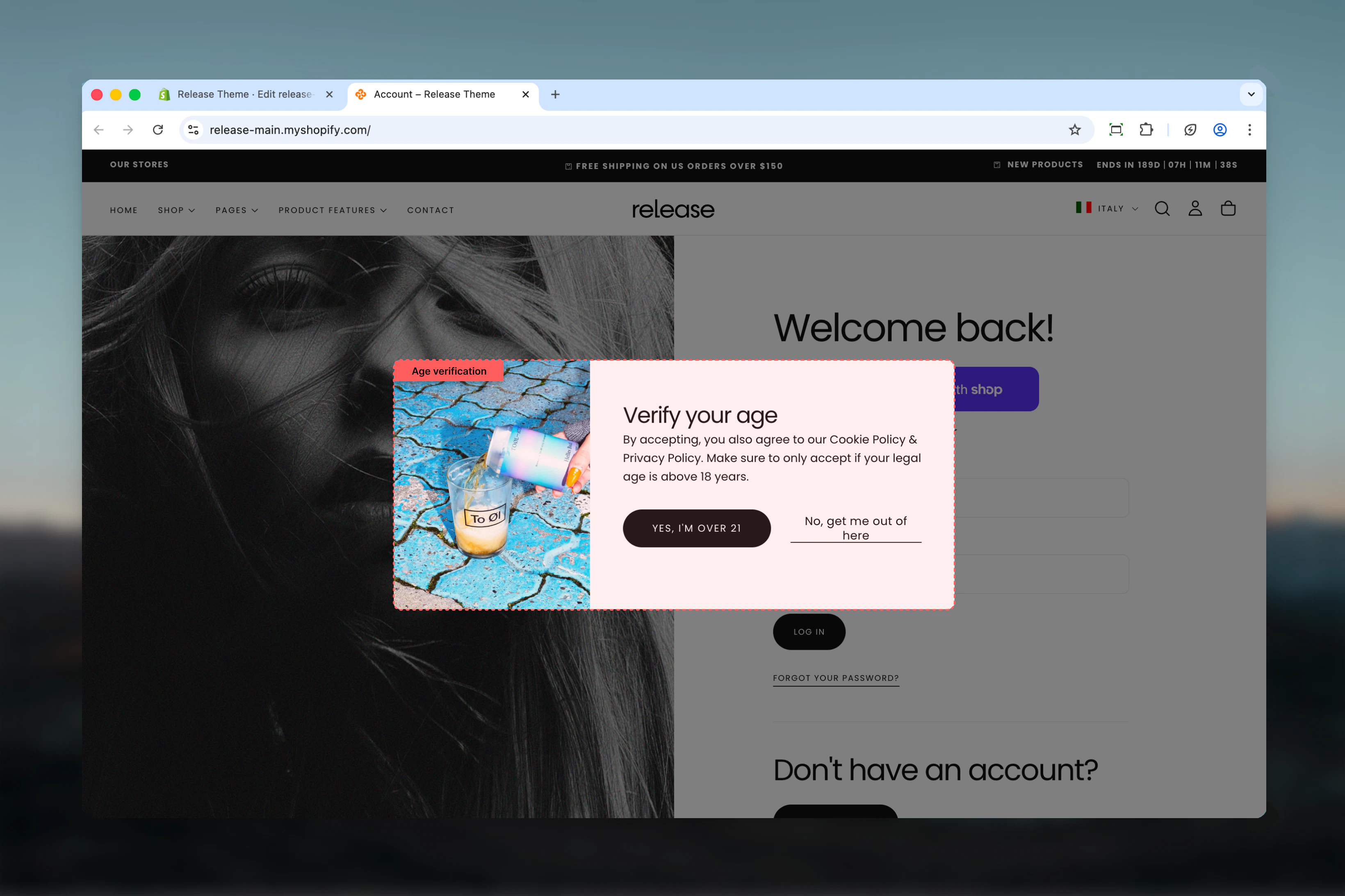 ## What this section controls
* Age verification modal overlay
* Confirm and decline buttons
* Background image and backdrop effects
* Verification messaging
## Section settings
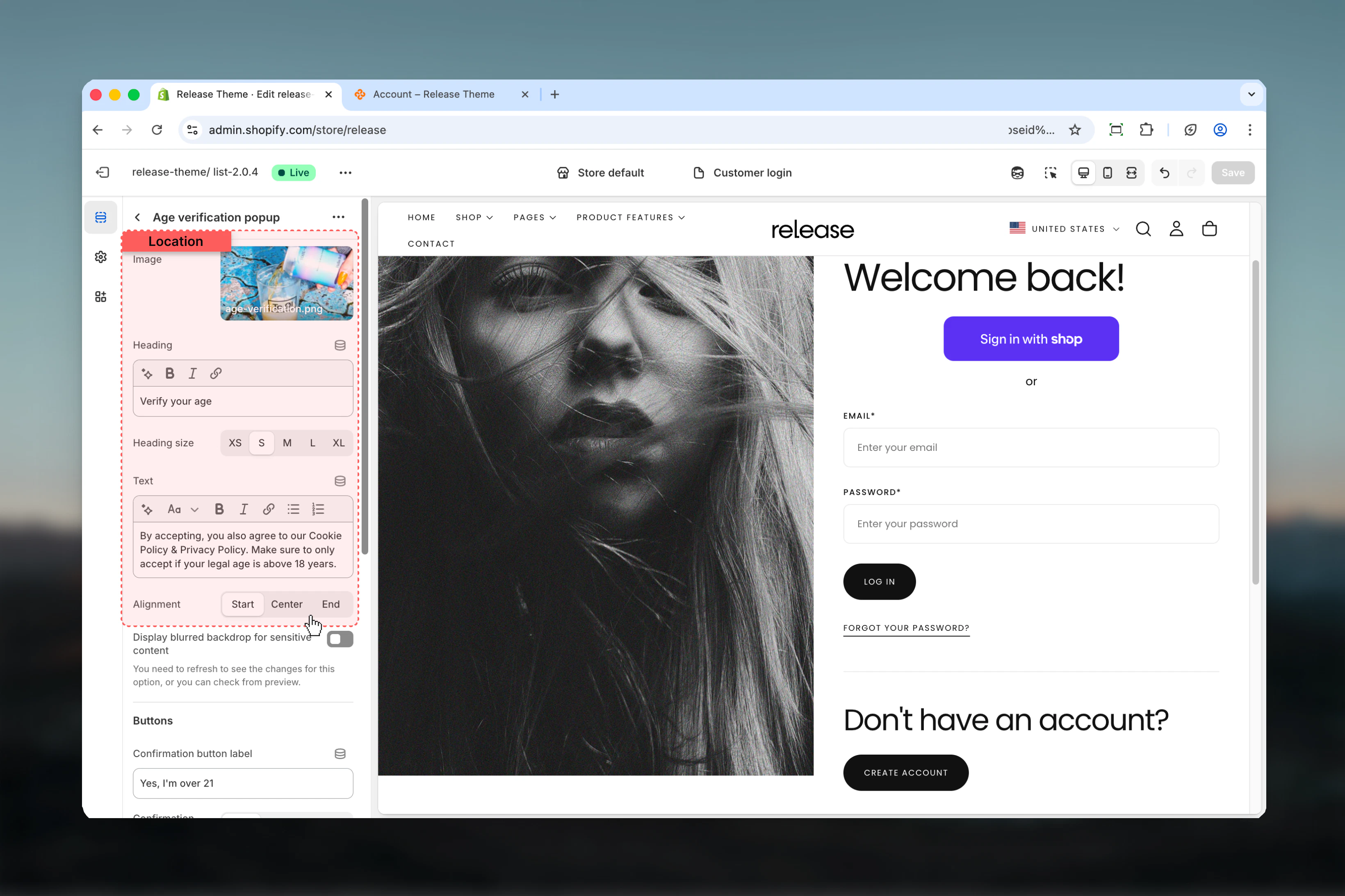
### Image
Background image displayed in the popup.
### Heading
Main heading text for the verification prompt.
* **Default:** "Verify your age"
### Heading size
**Options:** XS (h6), S (h5), M (h4), L (h3), XL (h2)
* **Default:** S (h5)
### Text
Description text explaining age requirements.
* **Default:** "You must be 18 years of age or older to enter this site. Please verify your age."
### Content alignment
**Options:** Start, Center, End
* **Default:** Center
## What this section controls
* Age verification modal overlay
* Confirm and decline buttons
* Background image and backdrop effects
* Verification messaging
## Section settings
### Image
Background image displayed in the popup.
### Heading
Main heading text for the verification prompt.
* **Default:** "Verify your age"
### Heading size
**Options:** XS (h6), S (h5), M (h4), L (h3), XL (h2)
* **Default:** S (h5)
### Text
Description text explaining age requirements.
* **Default:** "You must be 18 years of age or older to enter this site. Please verify your age."
### Content alignment
**Options:** Start, Center, End
* **Default:** Center
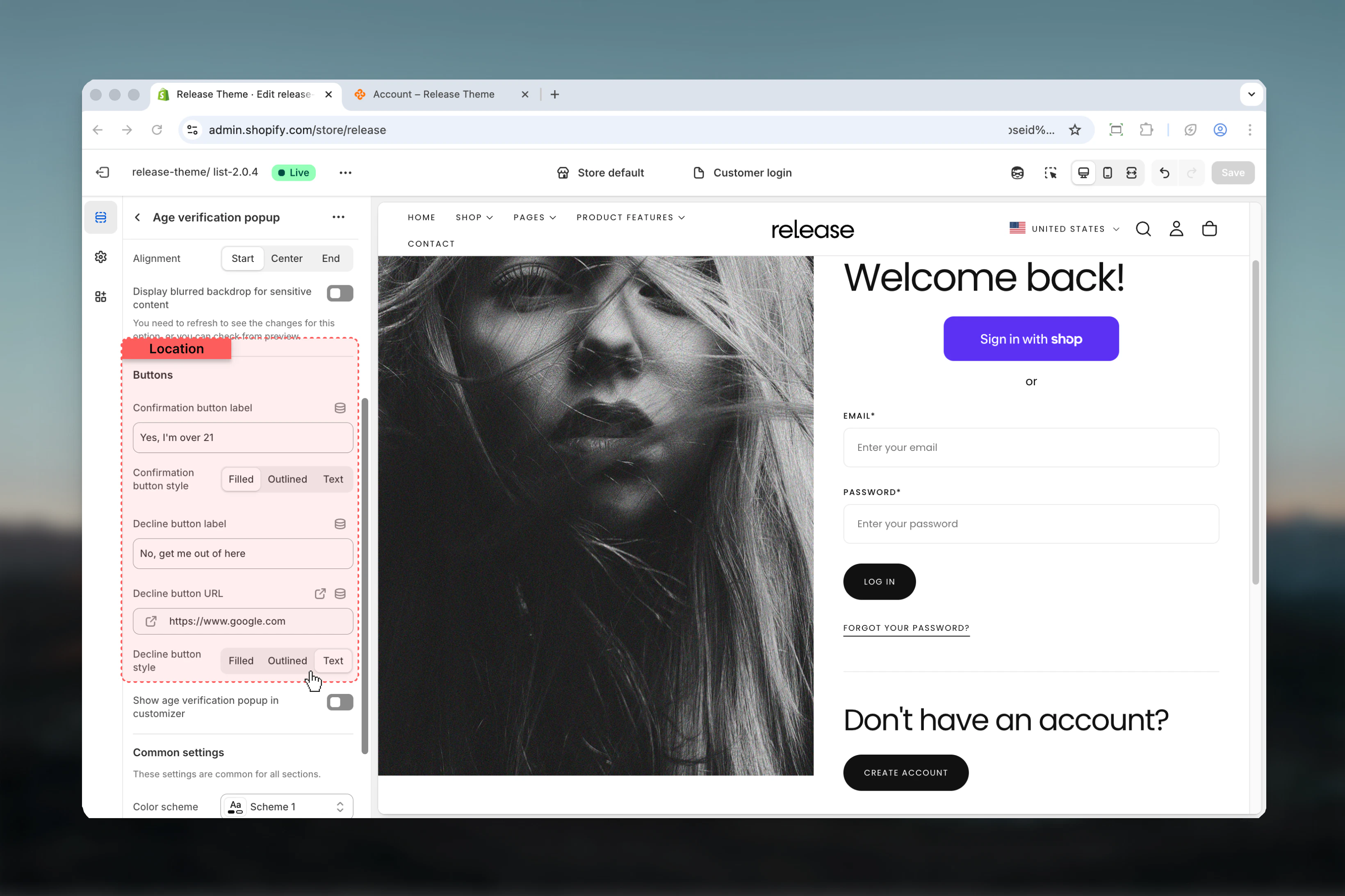
 ### Confirm button
**Label** - Text for confirm button (Default: "Yes")
**Style** - Button appearance
* **Options:** Filled, Outlined, Text
* **Default:** Filled
### Decline button
**Label** - Text for decline button (Default: "No")
**URL** - Redirect destination when declined
* **Default:** `/`
**Style** - Button appearance
* **Options:** Filled, Outlined, Text
* **Default:** Text
Use contrasting button styles (filled for confirm, text for decline) to guide user choice.
### Confirm button
**Label** - Text for confirm button (Default: "Yes")
**Style** - Button appearance
* **Options:** Filled, Outlined, Text
* **Default:** Filled
### Decline button
**Label** - Text for decline button (Default: "No")
**URL** - Redirect destination when declined
* **Default:** `/`
**Style** - Button appearance
* **Options:** Filled, Outlined, Text
* **Default:** Text
Use contrasting button styles (filled for confirm, text for decline) to guide user choice.
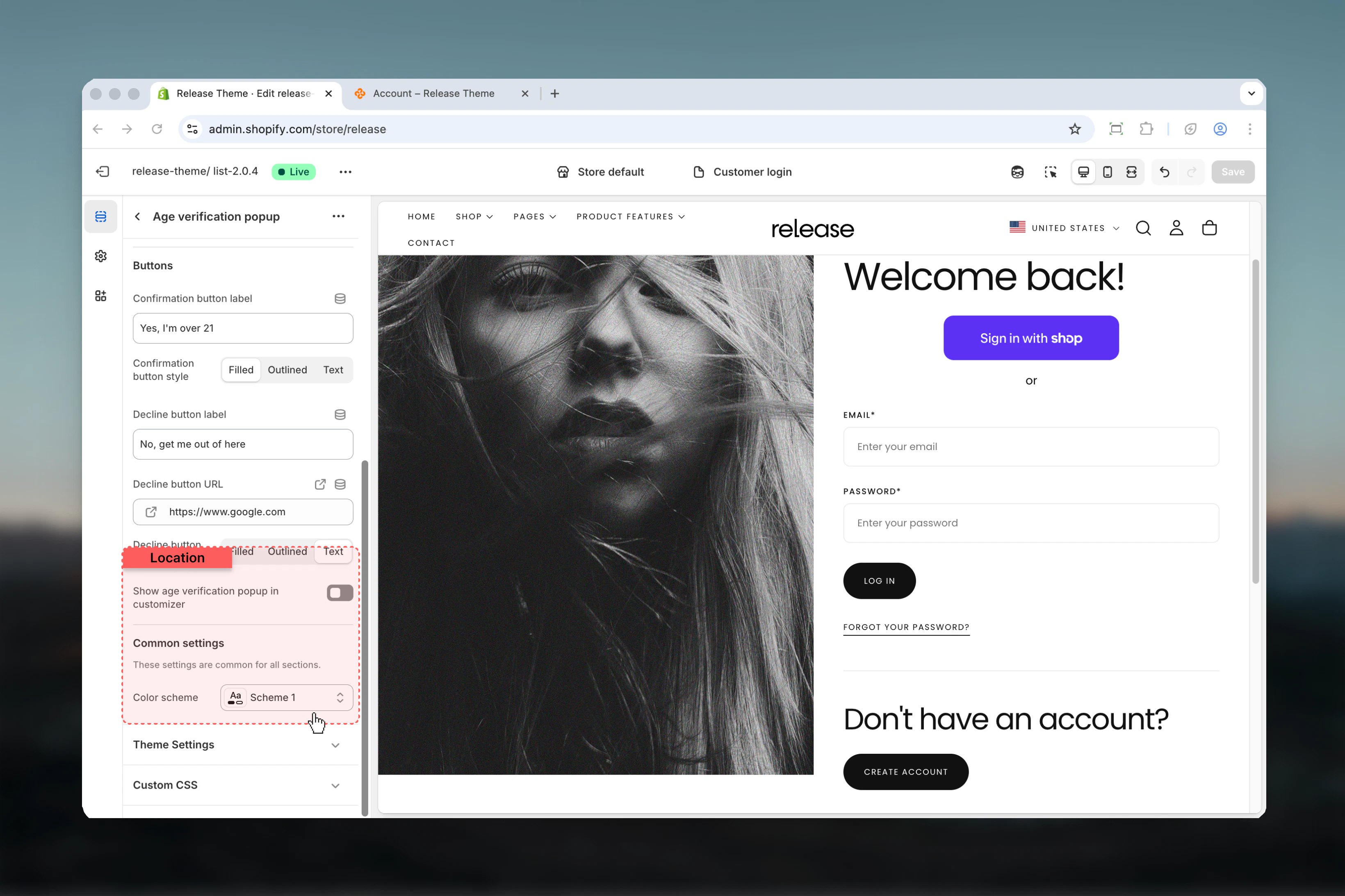
 ### Show blurred backdrop
Blurs the page content behind the popup for visual focus.
* **Default:** Disabled
Refresh the page to see backdrop blur changes.
### Show popup on customizer
Display popup in Theme Customizer for preview.
* **Default:** Disabled
### Color scheme
Select color scheme for the popup.
* **Default:** scheme-1
### Show blurred backdrop
Blurs the page content behind the popup for visual focus.
* **Default:** Disabled
Refresh the page to see backdrop blur changes.
### Show popup on customizer
Display popup in Theme Customizer for preview.
* **Default:** Disabled
### Color scheme
Select color scheme for the popup.
* **Default:** scheme-1
 ## Best practices
* **Clear messaging:** Keep text concise - state age requirement clearly
* **Button contrast:** Use filled button for confirm, text/outlined for decline
* **Backdrop blur:** Enable for better focus on verification prompt
* **Decline link:** Link to appropriate external page or homepage
* **Legal compliance:** Ensure age requirements match your jurisdiction
* **Mobile friendly:** Test popup display and buttons on mobile devices
* **Session storage:** Popup uses session storage - users verify once per session
## Common use cases
* **Alcohol stores** - Verify 21+ (US) or 18+ (other regions) age requirements
* **Tobacco/Vaping** - Age gate for tobacco product sales
* **CBD products** - Age verification for regulated cannabisproducts
* **Adult content** - 18+ verification for mature content
* **Gaming/Gambling** - Age verification for betting or gambling sites
## Related guides
Configure password-protected store pages
## Best practices
* **Clear messaging:** Keep text concise - state age requirement clearly
* **Button contrast:** Use filled button for confirm, text/outlined for decline
* **Backdrop blur:** Enable for better focus on verification prompt
* **Decline link:** Link to appropriate external page or homepage
* **Legal compliance:** Ensure age requirements match your jurisdiction
* **Mobile friendly:** Test popup display and buttons on mobile devices
* **Session storage:** Popup uses session storage - users verify once per session
## Common use cases
* **Alcohol stores** - Verify 21+ (US) or 18+ (other regions) age requirements
* **Tobacco/Vaping** - Age gate for tobacco product sales
* **CBD products** - Age verification for regulated cannabisproducts
* **Adult content** - 18+ verification for mature content
* **Gaming/Gambling** - Age verification for betting or gambling sites
## Related guides
Configure password-protected store pages