> ## Documentation Index
> Fetch the complete documentation index at: https://docs.digifist.com/llms.txt
> Use this file to discover all available pages before exploring further.
# Recently Viewed Products
> Display products that customers have previously viewed to help them quickly return to items of interest.
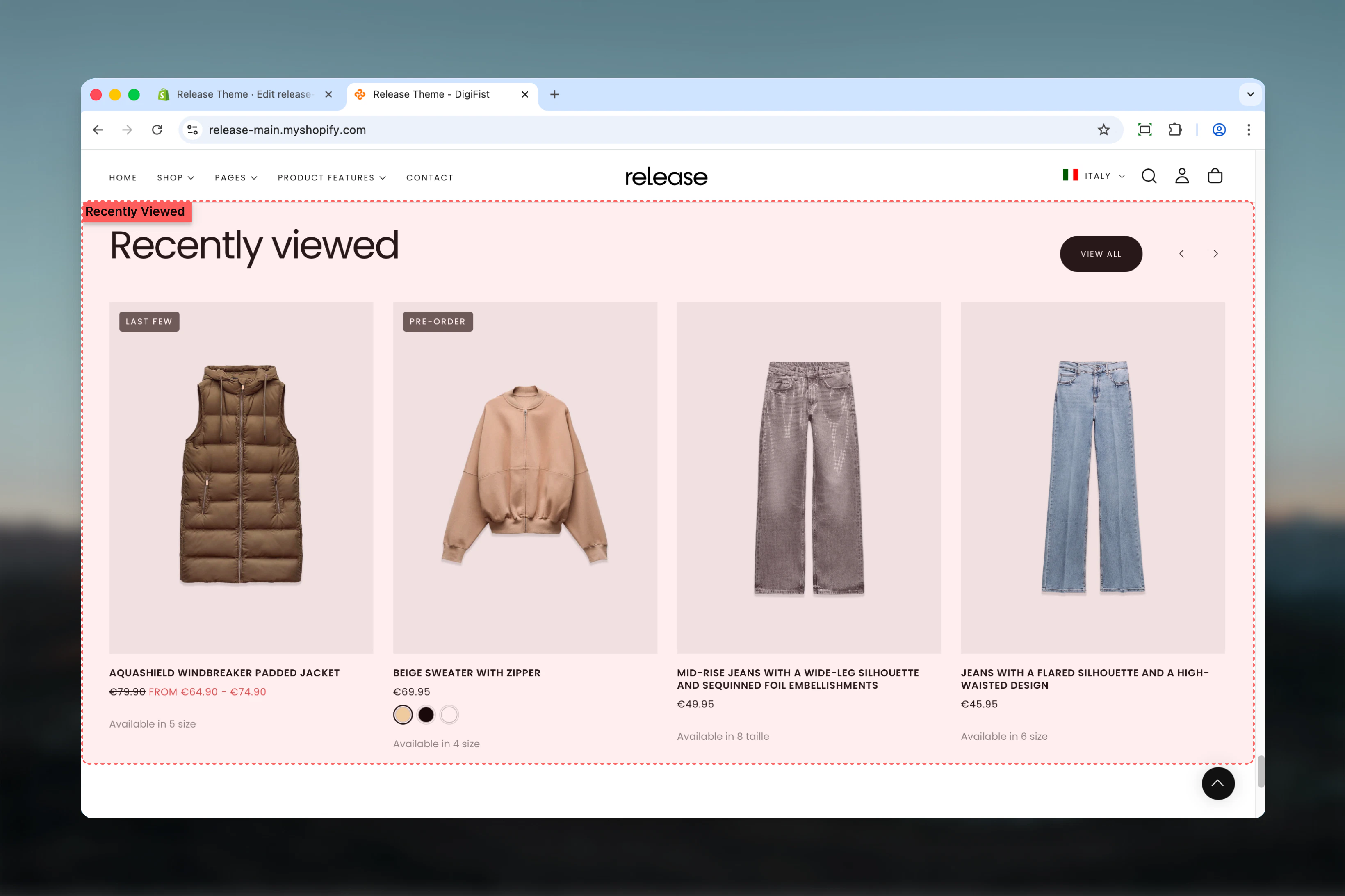
The Recently Viewed Products section displays products that the customer has previously viewed during their browsing session. It uses browser storage to track and show personalized product history, helping customers quickly return to items they're interested in.
This section leverages browser local storage to remember customer browsing patterns, creating a personalized shopping experience that persists across multiple visits.
 ## What this section controls
This section controls recently viewed product displays with the following capabilities:
* Browser-based product viewing history tracking
* Up to 12 recently viewed products
* Carousel-style display with navigation
* Tab-style filtering options
* Stock status visibility control
* Automatic section hiding when empty
## How the Recently Viewed Products section works
The Recently Viewed Products section uses local storage to track browsing history:
* Automatically tracks product page visits
* Stores product history in browser
* Displays up to 12 recently viewed products
* Carousel-style display with optional navigation
* Excludes currently viewed product
* Hidden when no products have been viewed
## Getting started
From Shopify admin, access the Theme Customizer.
Add the section to a product page template or homepage.
Set maximum products, autoplay interval, and layout preferences.
Browse multiple product pages to populate the recently viewed list.
## What this section controls
This section controls recently viewed product displays with the following capabilities:
* Browser-based product viewing history tracking
* Up to 12 recently viewed products
* Carousel-style display with navigation
* Tab-style filtering options
* Stock status visibility control
* Automatic section hiding when empty
## How the Recently Viewed Products section works
The Recently Viewed Products section uses local storage to track browsing history:
* Automatically tracks product page visits
* Stores product history in browser
* Displays up to 12 recently viewed products
* Carousel-style display with optional navigation
* Excludes currently viewed product
* Hidden when no products have been viewed
## Getting started
From Shopify admin, access the Theme Customizer.
Add the section to a product page template or homepage.
Set maximum products, autoplay interval, and layout preferences.
Browse multiple product pages to populate the recently viewed list.
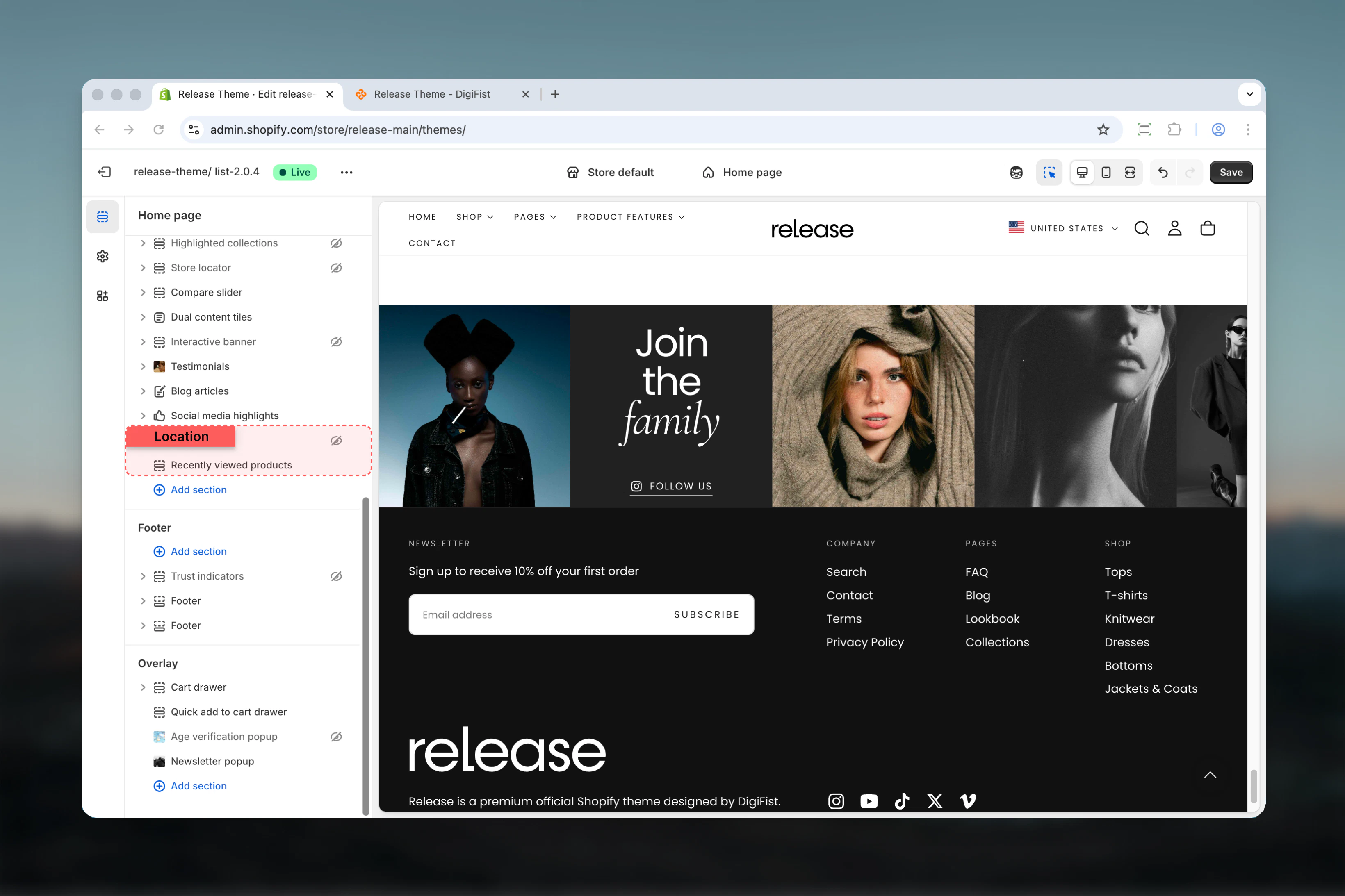 The section automatically hides when no products have been viewed yet.
## Section settings
Section settings control styling, slideshow behavior, and product display options.
### Layout
Controls the visual style of the section.
**Available options:**
* **Layout 1:** Standard layout
* **Layout 2:** Alternative layout
**Default:** Layout 1
### Enable slideshow overflow
Allows slideshow to overflow section boundaries.
**Options:** True / False
**Default:** False
### Section heading
Main title text for the section.
* Inline rich text supported (bold, italic, links)
* **Default:** "Recently viewed"
### Heading size
Controls the size of section heading.
**Available options:** XS, S, M, L, XL
**Default:** L
### Subheading
Optional descriptive text above the heading.
* Inline rich text supported
The section automatically hides when no products have been viewed yet.
## Section settings
Section settings control styling, slideshow behavior, and product display options.
### Layout
Controls the visual style of the section.
**Available options:**
* **Layout 1:** Standard layout
* **Layout 2:** Alternative layout
**Default:** Layout 1
### Enable slideshow overflow
Allows slideshow to overflow section boundaries.
**Options:** True / False
**Default:** False
### Section heading
Main title text for the section.
* Inline rich text supported (bold, italic, links)
* **Default:** "Recently viewed"
### Heading size
Controls the size of section heading.
**Available options:** XS, S, M, L, XL
**Default:** L
### Subheading
Optional descriptive text above the heading.
* Inline rich text supported
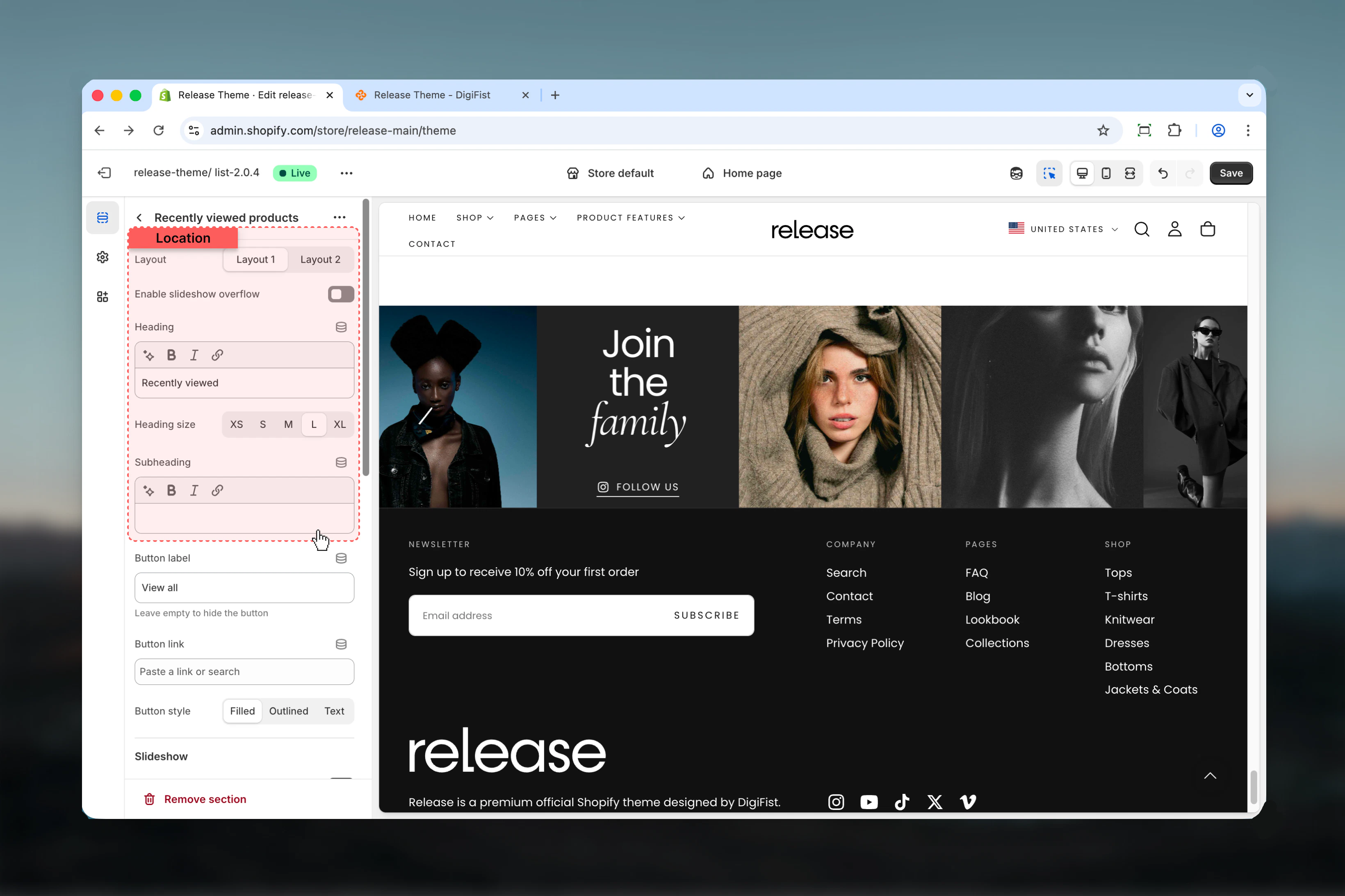 ### Button label
Text for optional section-level button.
* Leave empty to hide
* **Default:** "View all"
### Button link
Destination URL for section button.
* Shopify URL selector
### Button style
Visual style for section button.
**Available options:**
* **Filled:** Solid background
* **Outlined:** Border only
* **Text:** Text only
**Default:** Filled
### Show navigation arrows
Displays previous/next navigation arrows.
**Options:** True / False
**Default:** True
### Slideshow autoplay interval
Controls automatic slide advancement.
**Range:** 0 – 10 seconds
* Set to `0` to disable autoplay
* Default: 3 seconds
### Button label
Text for optional section-level button.
* Leave empty to hide
* **Default:** "View all"
### Button link
Destination URL for section button.
* Shopify URL selector
### Button style
Visual style for section button.
**Available options:**
* **Filled:** Solid background
* **Outlined:** Border only
* **Text:** Text only
**Default:** Filled
### Show navigation arrows
Displays previous/next navigation arrows.
**Options:** True / False
**Default:** True
### Slideshow autoplay interval
Controls automatic slide advancement.
**Range:** 0 – 10 seconds
* Set to `0` to disable autoplay
* Default: 3 seconds
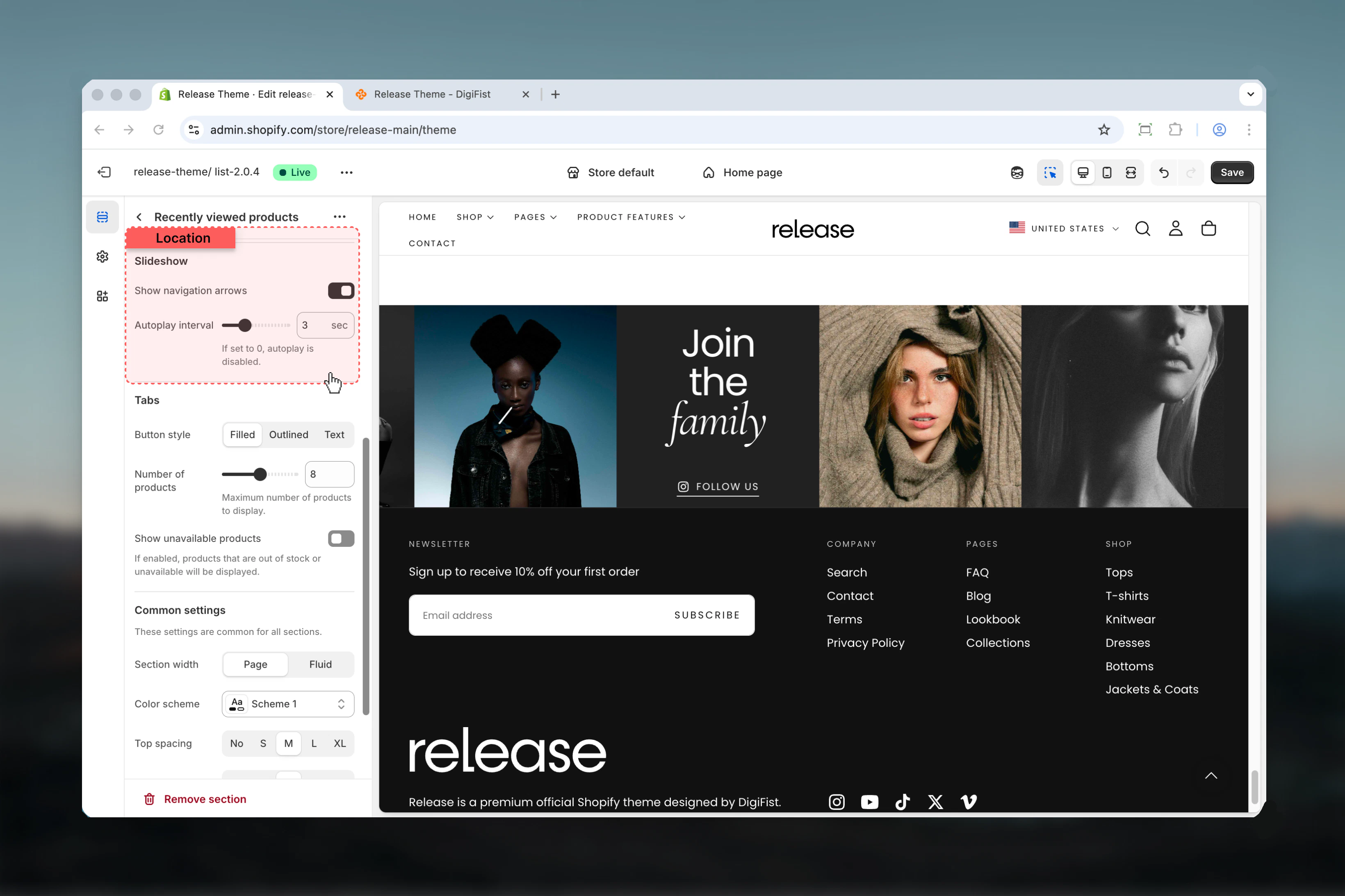 ### Tabs button style
Visual style for tab navigation buttons.
**Available options:**
* **Filled:** Solid background
* **Outlined:** Border only
* **Text:** Text only
**Default:** Filled
### Tabs button style
Visual style for tab navigation buttons.
**Available options:**
* **Filled:** Solid background
* **Outlined:** Border only
* **Text:** Text only
**Default:** Filled
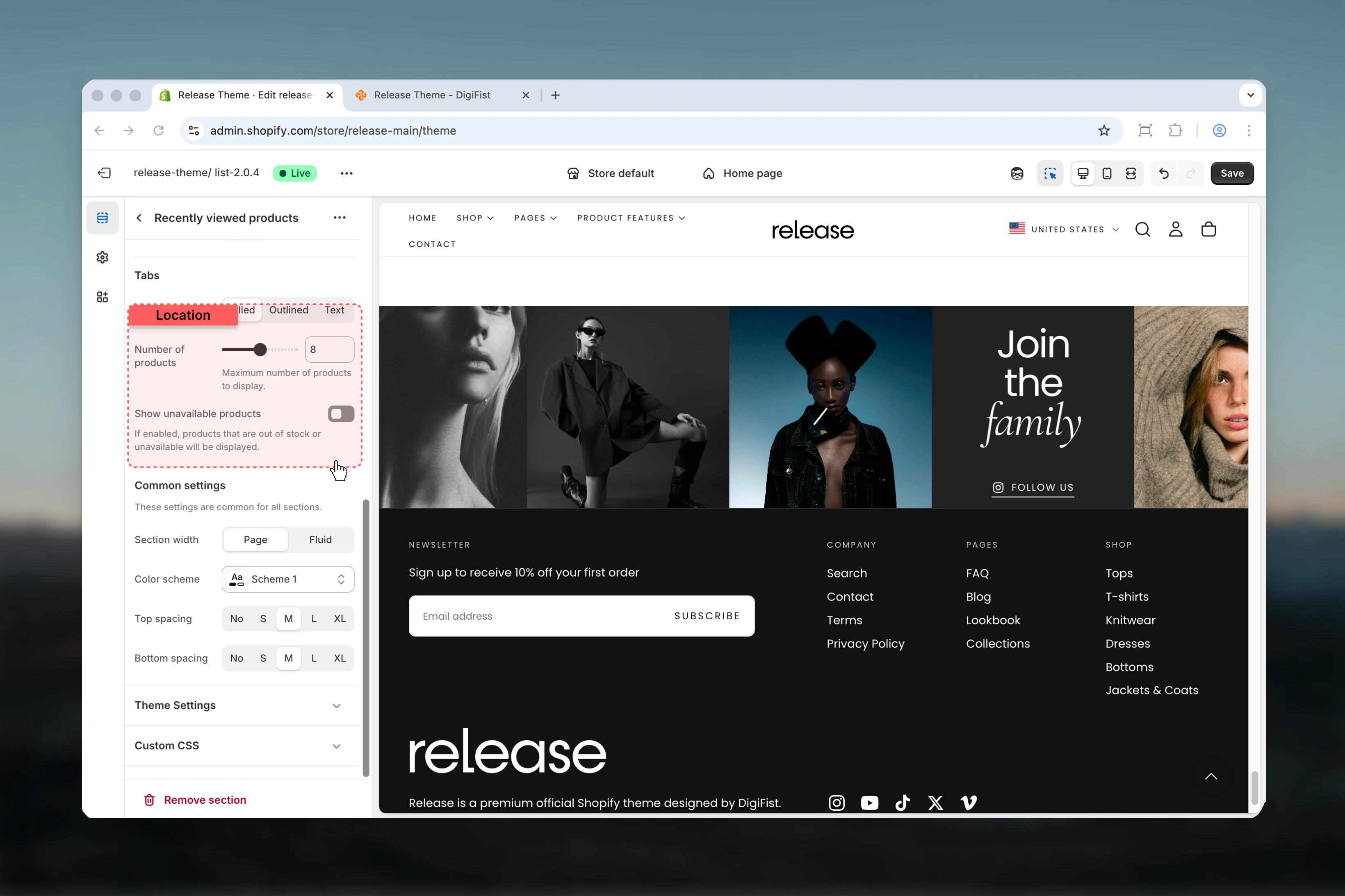
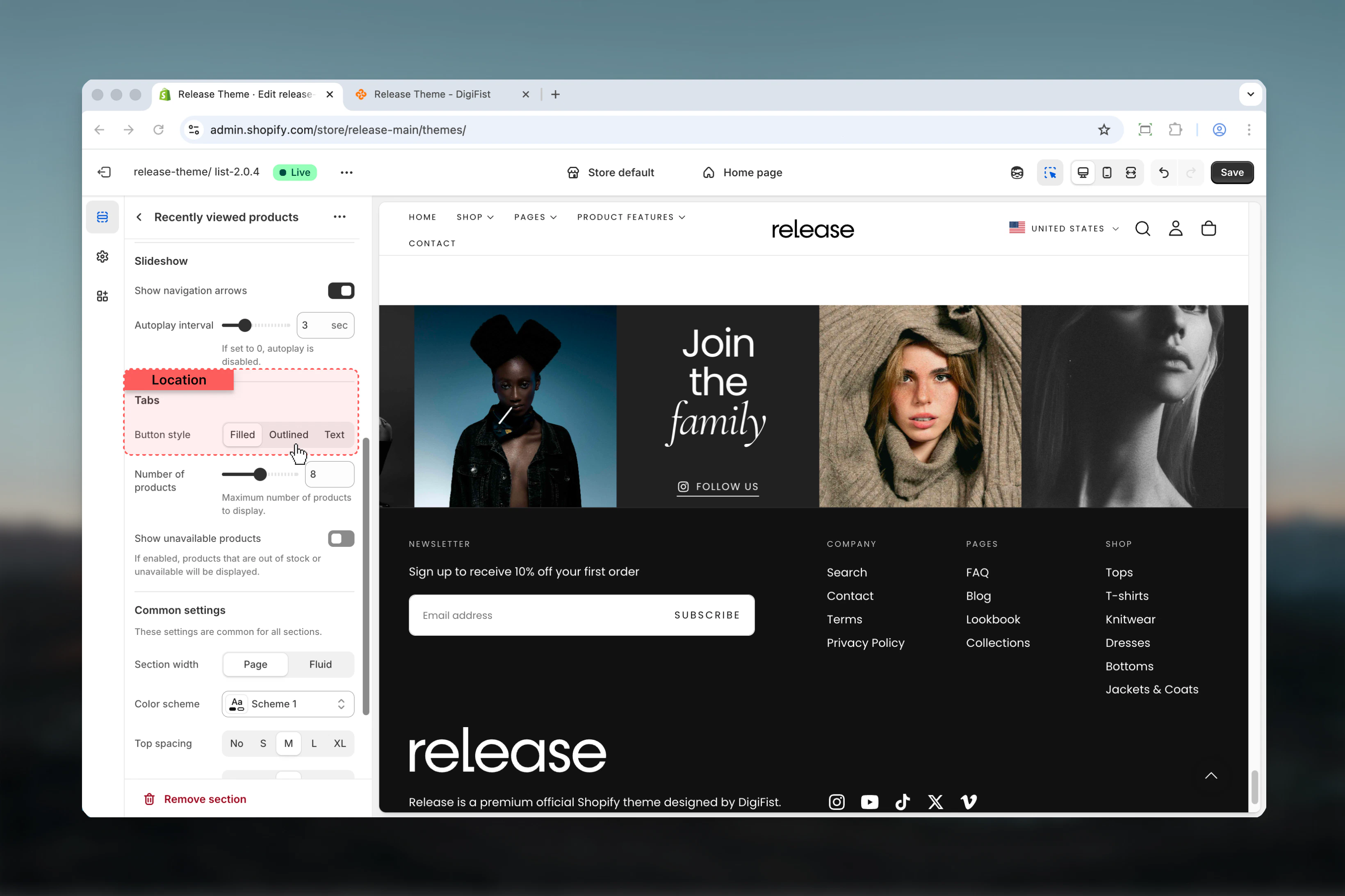 ### Max products
Maximum number of recently viewed products to display.
**Range:** 4 – 12 products
**Default:** 8
Shows the most recent products viewed by the customer.
### Show unavailable products
Display products that are out of stock.
**Options:** True / False
**Default:** False
Enable to show all recently viewed products regardless of stock status.
### Max products
Maximum number of recently viewed products to display.
**Range:** 4 – 12 products
**Default:** 8
Shows the most recent products viewed by the customer.
### Show unavailable products
Display products that are out of stock.
**Options:** True / False
**Default:** False
Enable to show all recently viewed products regardless of stock status.
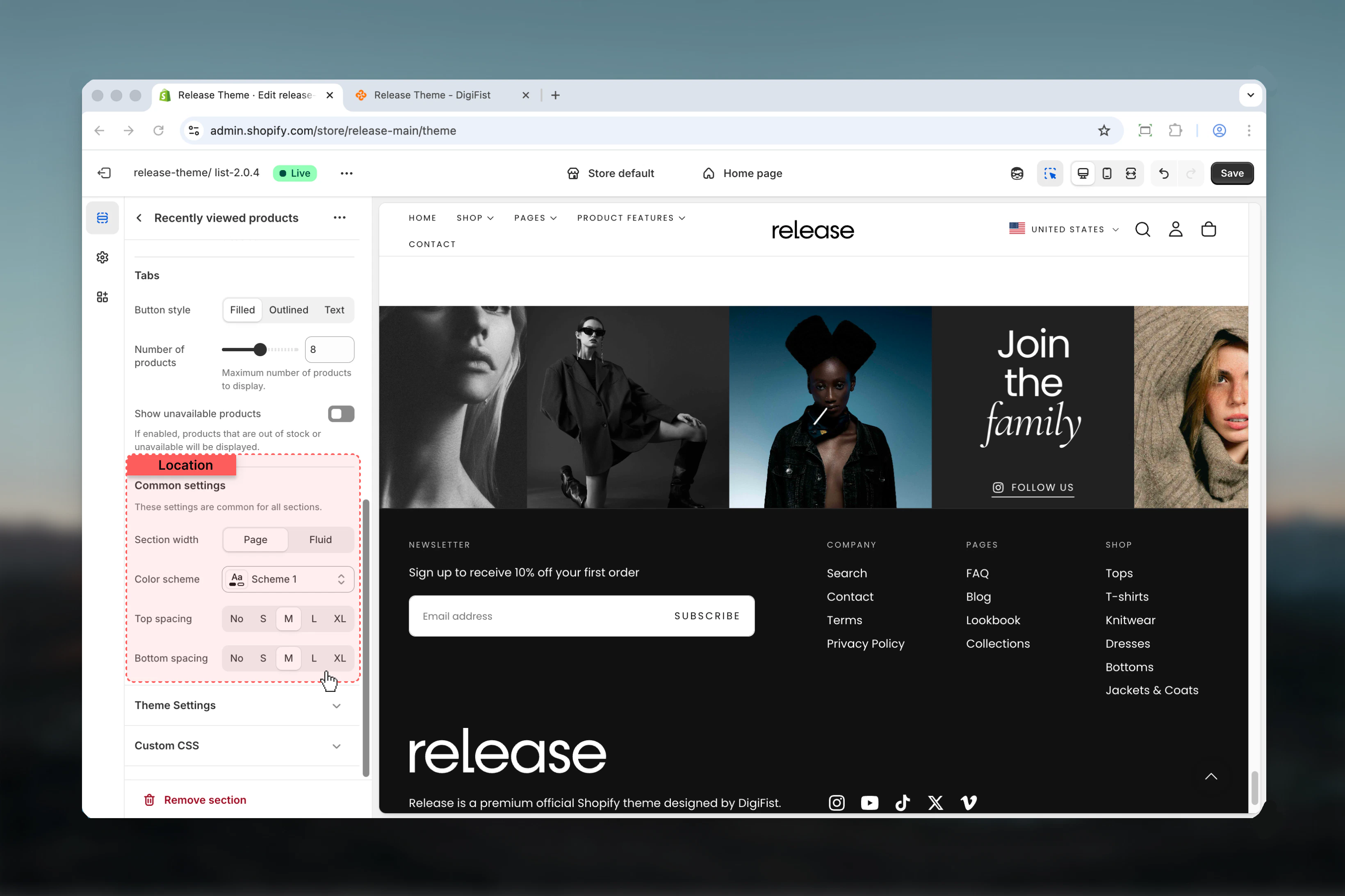
 ### Section width
Controls the maximum width of the section.
**Available options:**
* **Page:** Standard page width
* **Fluid:** Wider than page width
**Default:** Page
### Color scheme
Controls background and text colors for the section container.
* Shopify color scheme selector
* **Default:** Scheme 1
### Spacing top
Controls spacing above the section.
**Available options:** None, S, M, L, XL
**Default:** M
### Spacing bottom
Controls spacing below the section.
**Available options:** None, S, M, L, XL
**Default:** M
### Section width
Controls the maximum width of the section.
**Available options:**
* **Page:** Standard page width
* **Fluid:** Wider than page width
**Default:** Page
### Color scheme
Controls background and text colors for the section container.
* Shopify color scheme selector
* **Default:** Scheme 1
### Spacing top
Controls spacing above the section.
**Available options:** None, S, M, L, XL
**Default:** M
### Spacing bottom
Controls spacing below the section.
**Available options:** None, S, M, L, XL
**Default:** M
 ## Best practices
* Place on product pages to remind customers of previously viewed items
* Use on homepage or collection pages to personalize the returning visitor experience
* Set max products to 6-8 for clean presentation without overwhelming customers
* Consider hiding unavailable products to avoid customer frustration with out-of-stock items
* Use descriptive headings like "Continue Shopping", "You Recently Viewed", or "Your Browsing History"
* Test in private/incognito mode - section won't display without browsing history
* Section automatically hides when no products have been viewed (no empty state issues)
* Use autoplay sparingly to maintain user control and accessibility
* Consider placing below the fold to prioritize current product content
* Combine with product recommendations for comprehensive browsing and discovery suggestions
## Common use cases
* **Product page browsing history** - Help customers return to products they've considered purchasing
* **Homepage personalization** - Show returning customers their recent browsing activity for continuity
* **Collection page continuity** - Display recently viewed items while browsing new products
* **Abandoned browse recovery** - Remind customers of items they viewed but didn't add to cart
* **Cross-session memory** - Track browsing across multiple visits (stored in browser local storage)
* **Comparison shopping** - Make it easy for customers to revisit products for side-by-side comparison
## Related guides
Learn about common settings shared across sections
## Best practices
* Place on product pages to remind customers of previously viewed items
* Use on homepage or collection pages to personalize the returning visitor experience
* Set max products to 6-8 for clean presentation without overwhelming customers
* Consider hiding unavailable products to avoid customer frustration with out-of-stock items
* Use descriptive headings like "Continue Shopping", "You Recently Viewed", or "Your Browsing History"
* Test in private/incognito mode - section won't display without browsing history
* Section automatically hides when no products have been viewed (no empty state issues)
* Use autoplay sparingly to maintain user control and accessibility
* Consider placing below the fold to prioritize current product content
* Combine with product recommendations for comprehensive browsing and discovery suggestions
## Common use cases
* **Product page browsing history** - Help customers return to products they've considered purchasing
* **Homepage personalization** - Show returning customers their recent browsing activity for continuity
* **Collection page continuity** - Display recently viewed items while browsing new products
* **Abandoned browse recovery** - Remind customers of items they viewed but didn't add to cart
* **Cross-session memory** - Track browsing across multiple visits (stored in browser local storage)
* **Comparison shopping** - Make it easy for customers to revisit products for side-by-side comparison
## Related guides
Learn about common settings shared across sections