> ## Documentation Index
> Fetch the complete documentation index at: https://docs.digifist.com/llms.txt
> Use this file to discover all available pages before exploring further.
# Testimonials
> Showcase customer feedback, reviews, or quotes with ratings, images, and multiple layout options.
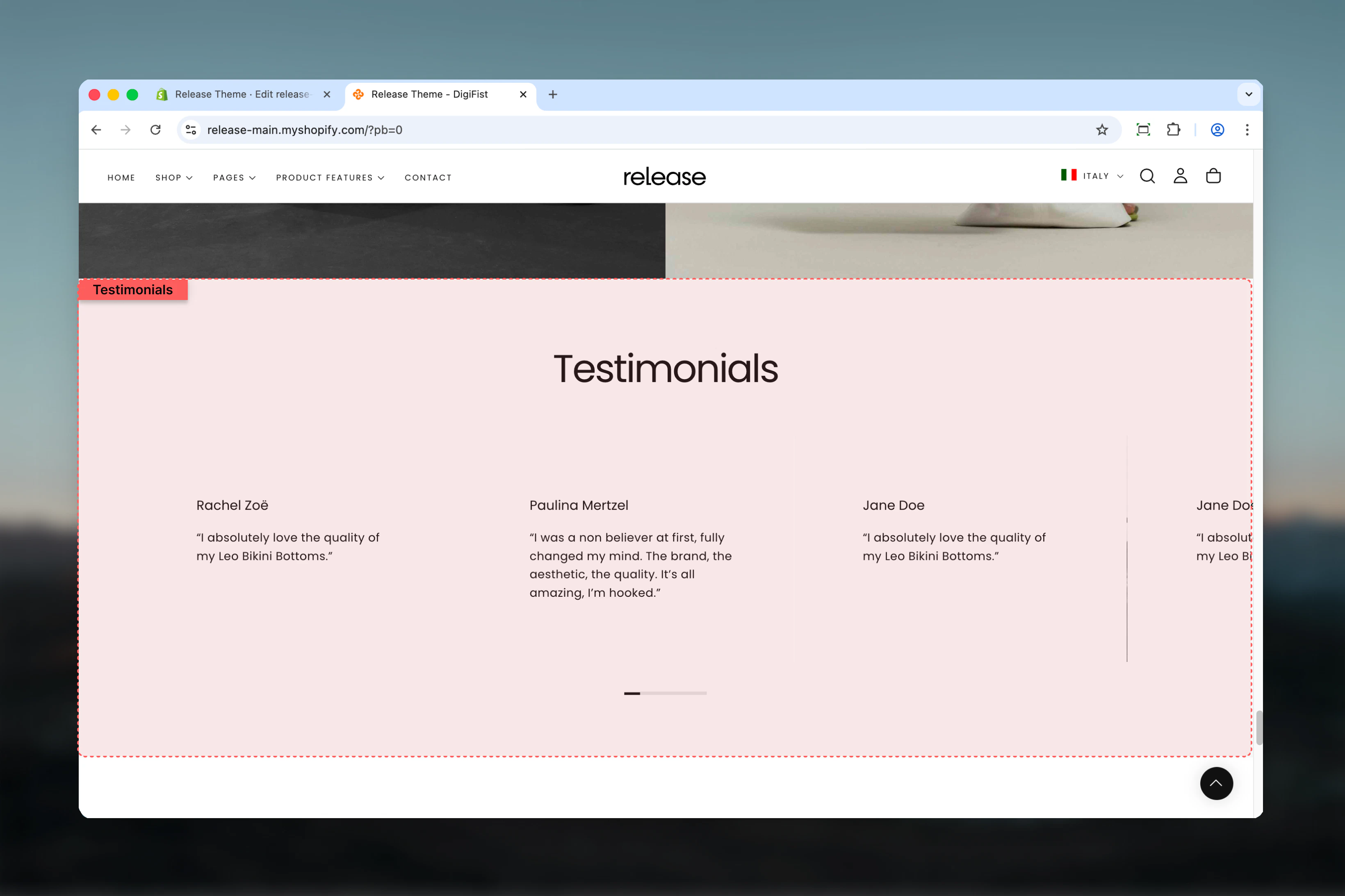
The Testimonials section showcases customer feedback, reviews, or quotes in a visually engaging format. It supports ratings, images, autoplay behavior, and multiple layout options for desktop and mobile.
Testimonials help build trust and credibility by displaying authentic customer experiences, making them essential for conversion optimization and social proof strategies.
 ## What this section controls
This section controls testimonial displays with the following capabilities:
* Multiple testimonial slides with customer feedback
* Star or circle rating styles
* Single, multi-slide, or carousel layout options
* Optional image display with flexible positioning
* Device-specific visibility controls
* Autoplay functionality for dynamic presentations
## How the Testimonials section works
The Testimonials section uses a block-based system:
* Displays customer testimonials as slides
* Supports star or circle rating styles
* Allows single, multi, or carousel layouts
* Each testimonial is added as a separate block
* Fully responsive with device-specific visibility controls
## Getting started
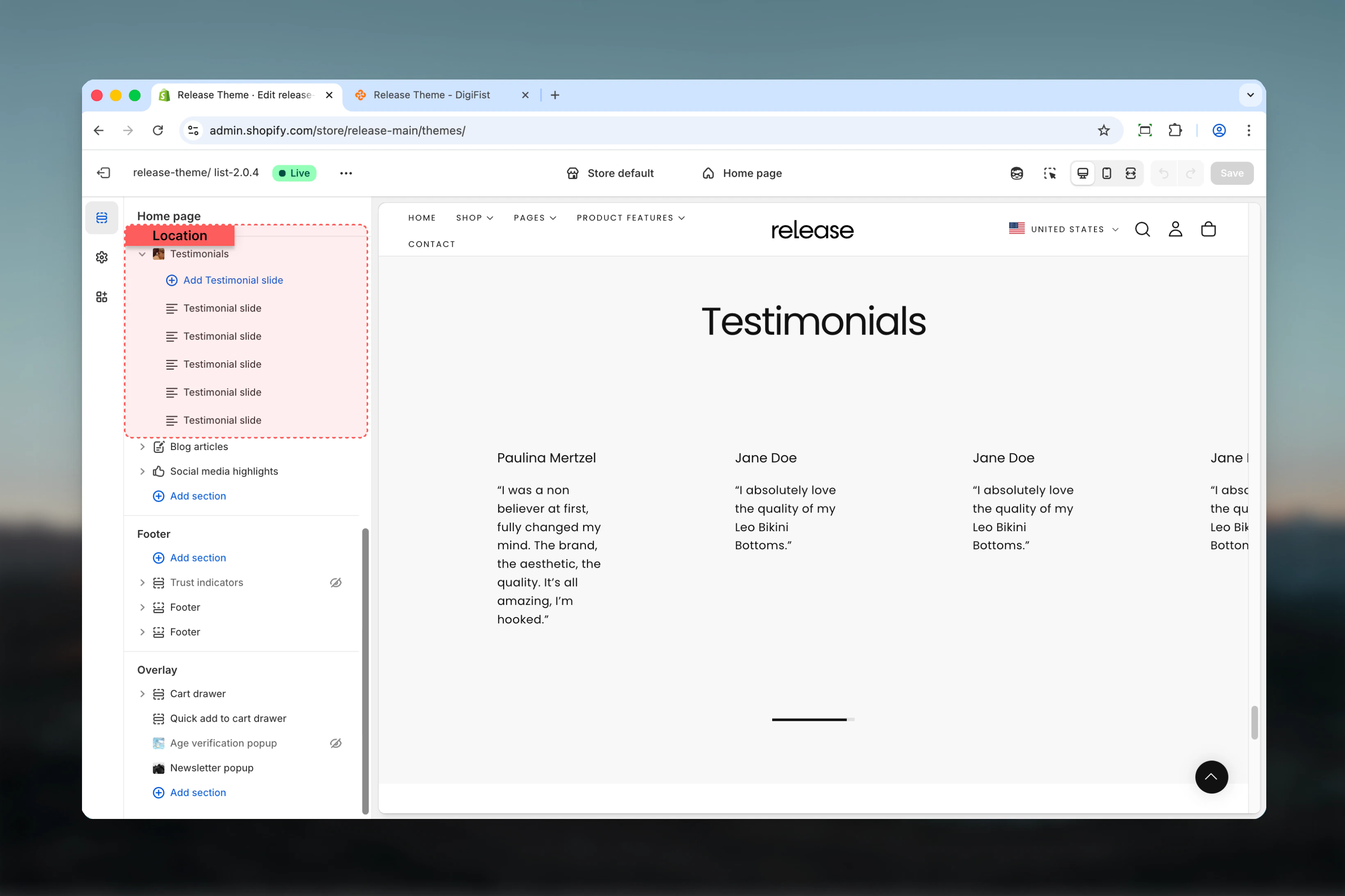
From Shopify admin, access the Theme Customizer.
Add the Testimonials section to your page or template.
Click **Add Testimonial slide** to add customer reviews.
Adjust layout, rating style, and autoplay settings.
## What this section controls
This section controls testimonial displays with the following capabilities:
* Multiple testimonial slides with customer feedback
* Star or circle rating styles
* Single, multi-slide, or carousel layout options
* Optional image display with flexible positioning
* Device-specific visibility controls
* Autoplay functionality for dynamic presentations
## How the Testimonials section works
The Testimonials section uses a block-based system:
* Displays customer testimonials as slides
* Supports star or circle rating styles
* Allows single, multi, or carousel layouts
* Each testimonial is added as a separate block
* Fully responsive with device-specific visibility controls
## Getting started
From Shopify admin, access the Theme Customizer.
Add the Testimonials section to your page or template.
Click **Add Testimonial slide** to add customer reviews.
Adjust layout, rating style, and autoplay settings.
 ## Section settings
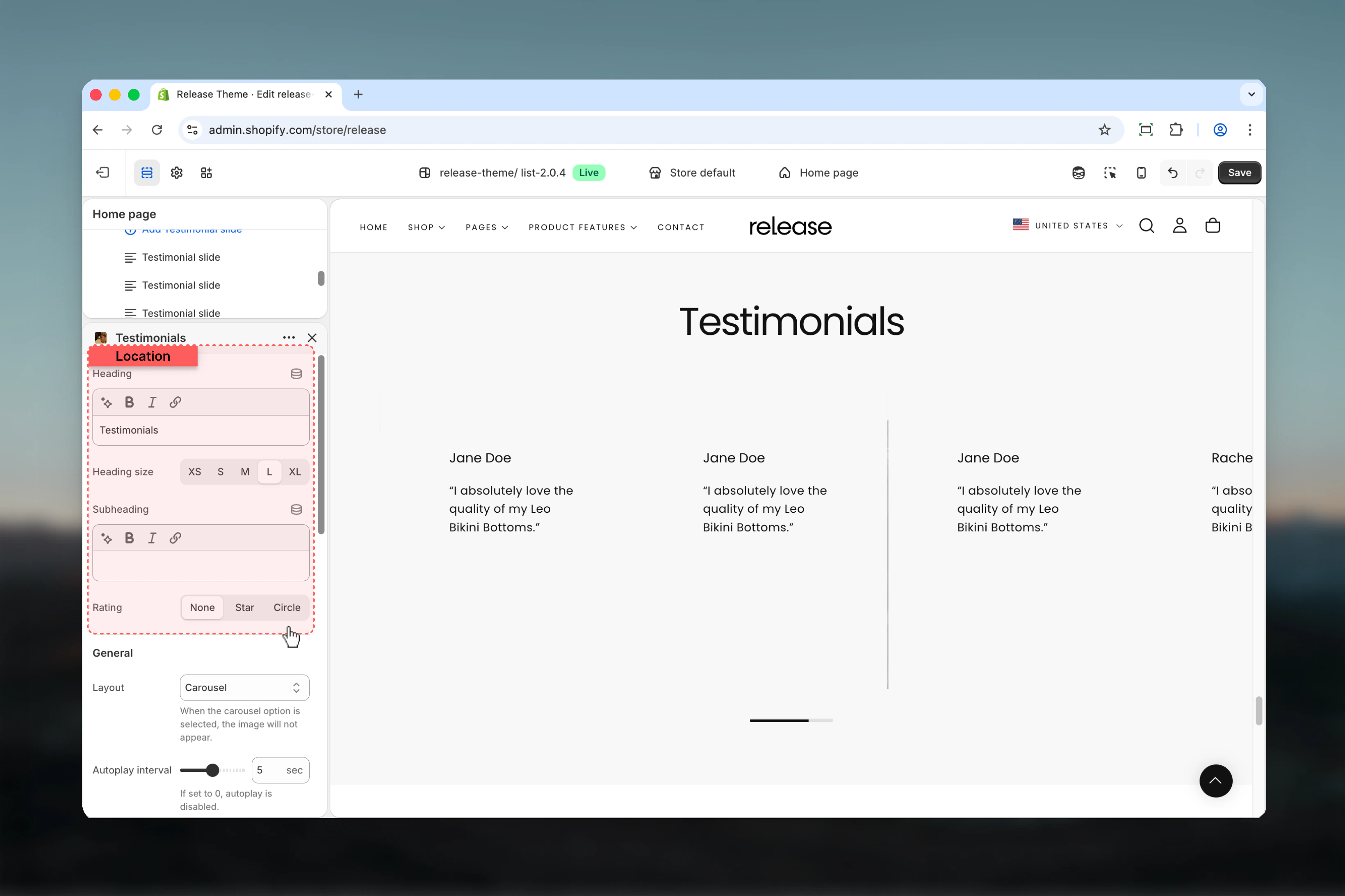
Section settings control the overall appearance, layout, and behavior of the testimonials.
### Heading
Main title of the testimonials section.
* Rich text supported (bold, italic, underline, links)
### Heading size
Controls the size of the heading.
**Available options:** S, M, L, XL
### Subheading
Optional subtitle displayed below the heading.
* Rich text supported (bold, italic, underline, links)
### Rating style
Controls how ratings are visually represented.
**Available options:**
* **None:** No rating indicator is shown
* **Star:** Displays star-based ratings
* **Circle:** Displays circular rating indicators
## Section settings
Section settings control the overall appearance, layout, and behavior of the testimonials.
### Heading
Main title of the testimonials section.
* Rich text supported (bold, italic, underline, links)
### Heading size
Controls the size of the heading.
**Available options:** S, M, L, XL
### Subheading
Optional subtitle displayed below the heading.
* Rich text supported (bold, italic, underline, links)
### Rating style
Controls how ratings are visually represented.
**Available options:**
* **None:** No rating indicator is shown
* **Star:** Displays star-based ratings
* **Circle:** Displays circular rating indicators
 ### Layout
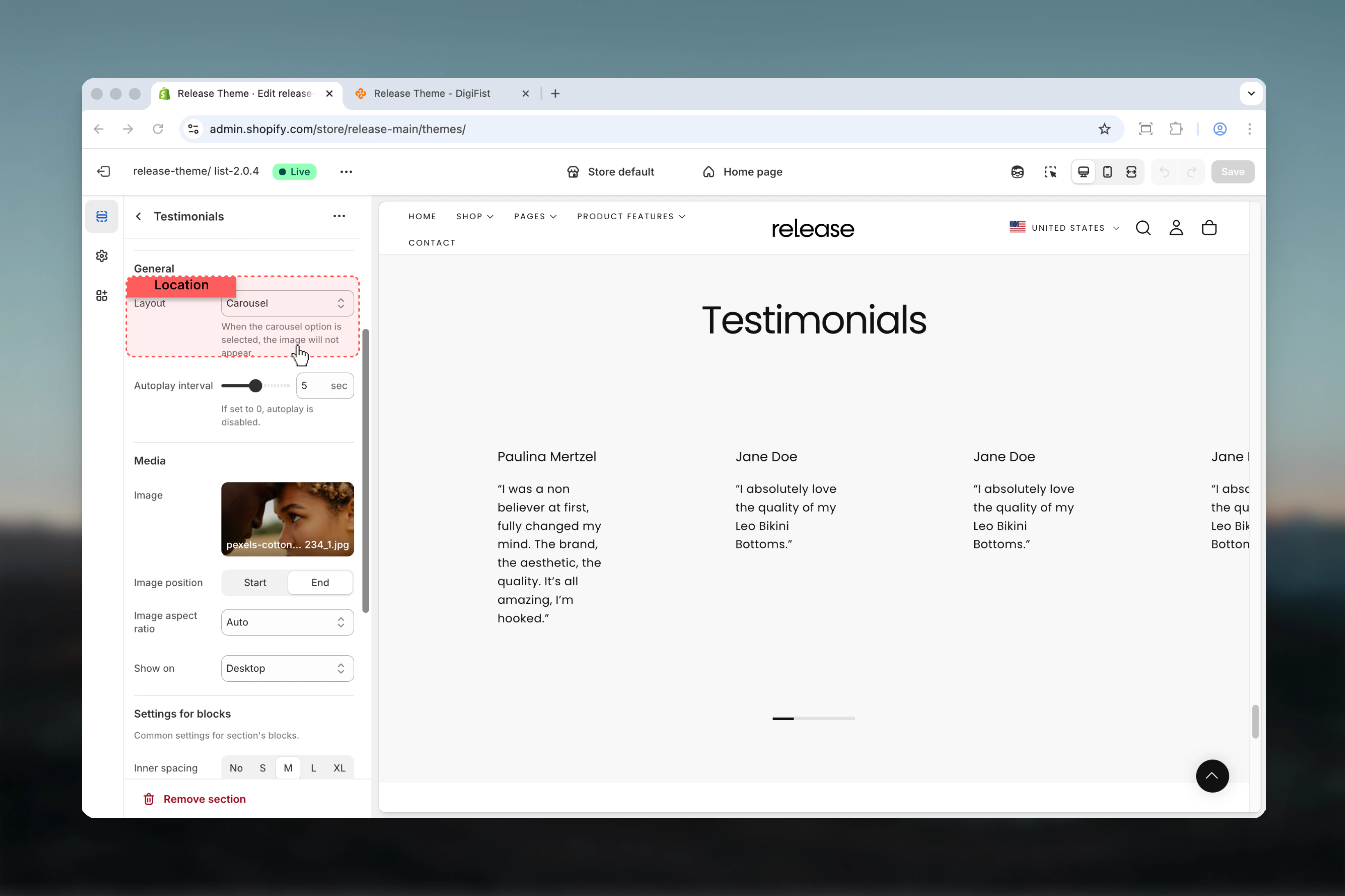
Defines how testimonial slides are displayed.
**Available options:**
* **Single slide:** One testimonial is shown at a time
* **Multi slide:** Multiple testimonials are visible at once
* **Carousel:** Testimonials slide automatically
When Carousel is selected, the image will not appear.
### Layout
Defines how testimonial slides are displayed.
**Available options:**
* **Single slide:** One testimonial is shown at a time
* **Multi slide:** Multiple testimonials are visible at once
* **Carousel:** Testimonials slide automatically
When Carousel is selected, the image will not appear.
 ### Autoplay interval
Controls how often slides change automatically.
**Range:** 0 – 5 seconds
* Set to `0` to disable autoplay
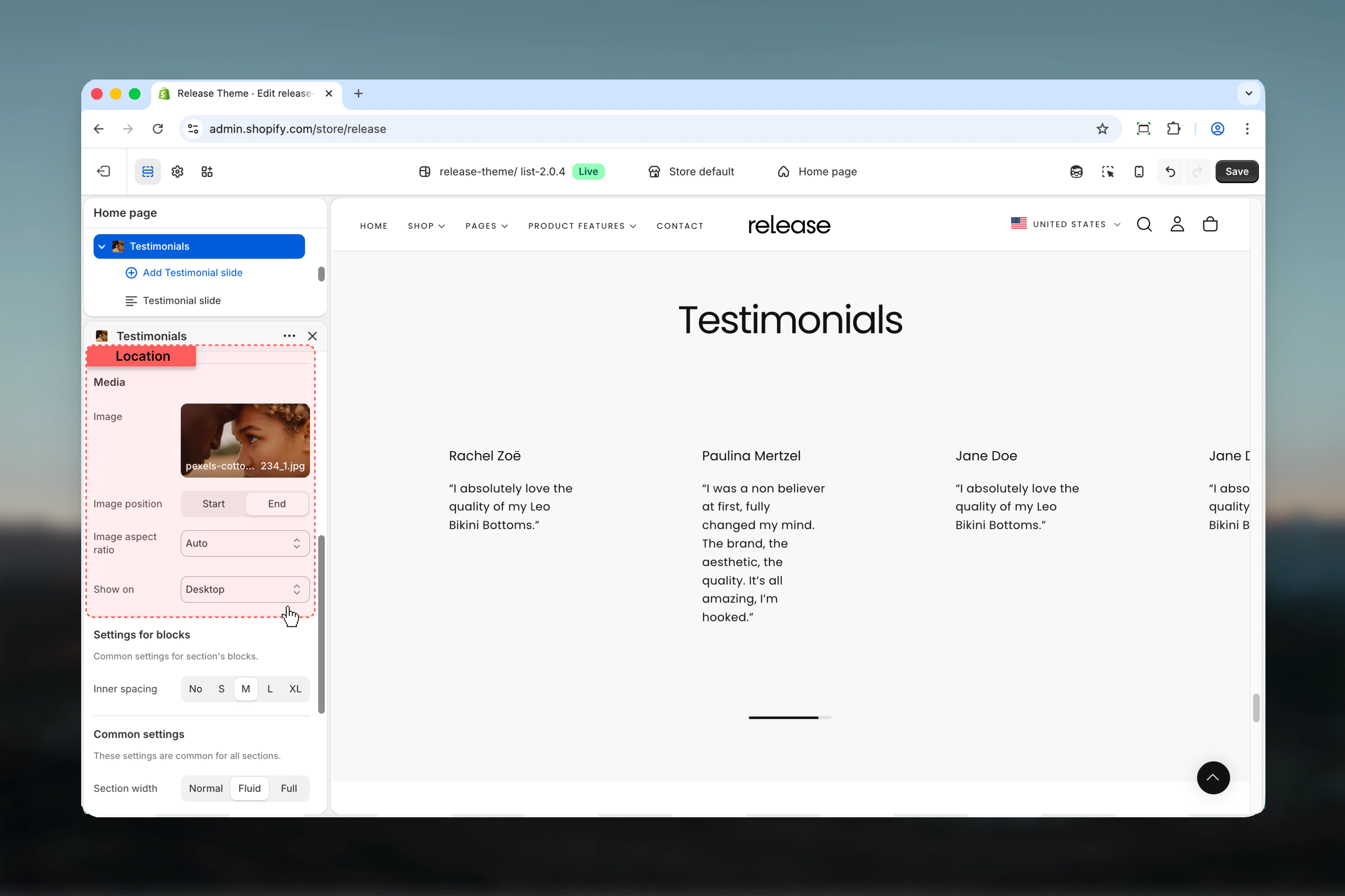
### Image
Optional image displayed alongside testimonials.
* Shopify image selector
### Image position
Controls where the image appears relative to the content.
**Available options:** Start, End
### Image aspect ratio
Controls the aspect ratio of the image.
**Available options:** Auto, 1:1, 4:3, 3:4, 9:16
### Show on
Controls which devices display the image.
**Available options:** Desktop, Mobile, Both
### Autoplay interval
Controls how often slides change automatically.
**Range:** 0 – 5 seconds
* Set to `0` to disable autoplay
### Image
Optional image displayed alongside testimonials.
* Shopify image selector
### Image position
Controls where the image appears relative to the content.
**Available options:** Start, End
### Image aspect ratio
Controls the aspect ratio of the image.
**Available options:** Auto, 1:1, 4:3, 3:4, 9:16
### Show on
Controls which devices display the image.
**Available options:** Desktop, Mobile, Both
 These settings apply to all testimonial blocks.
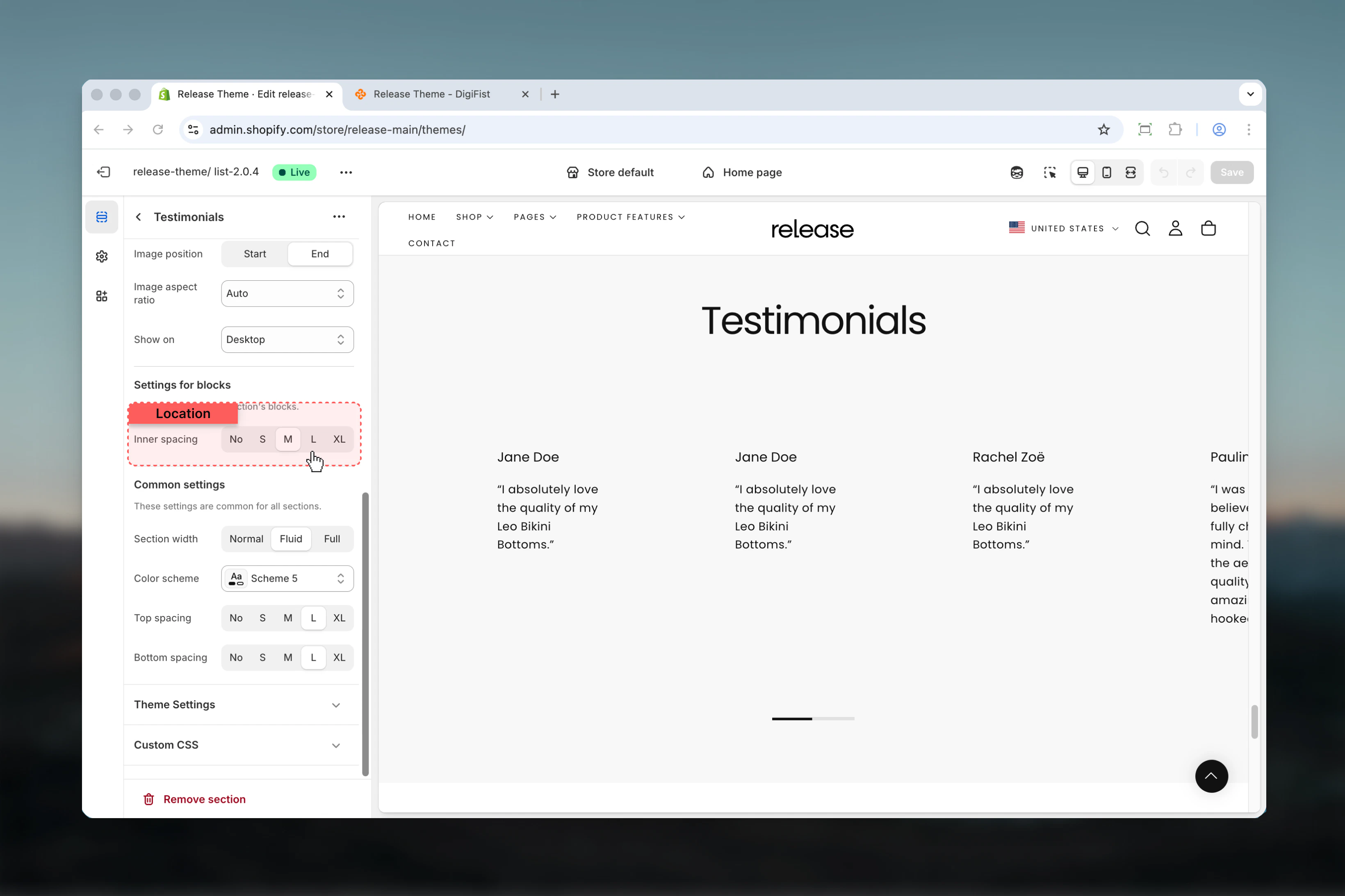
### Inner spacing
Controls the spacing inside each testimonial card.
**Available options:** No, S, M, L, XL
These settings apply to all testimonial blocks.
### Inner spacing
Controls the spacing inside each testimonial card.
**Available options:** No, S, M, L, XL
 ## Block settings
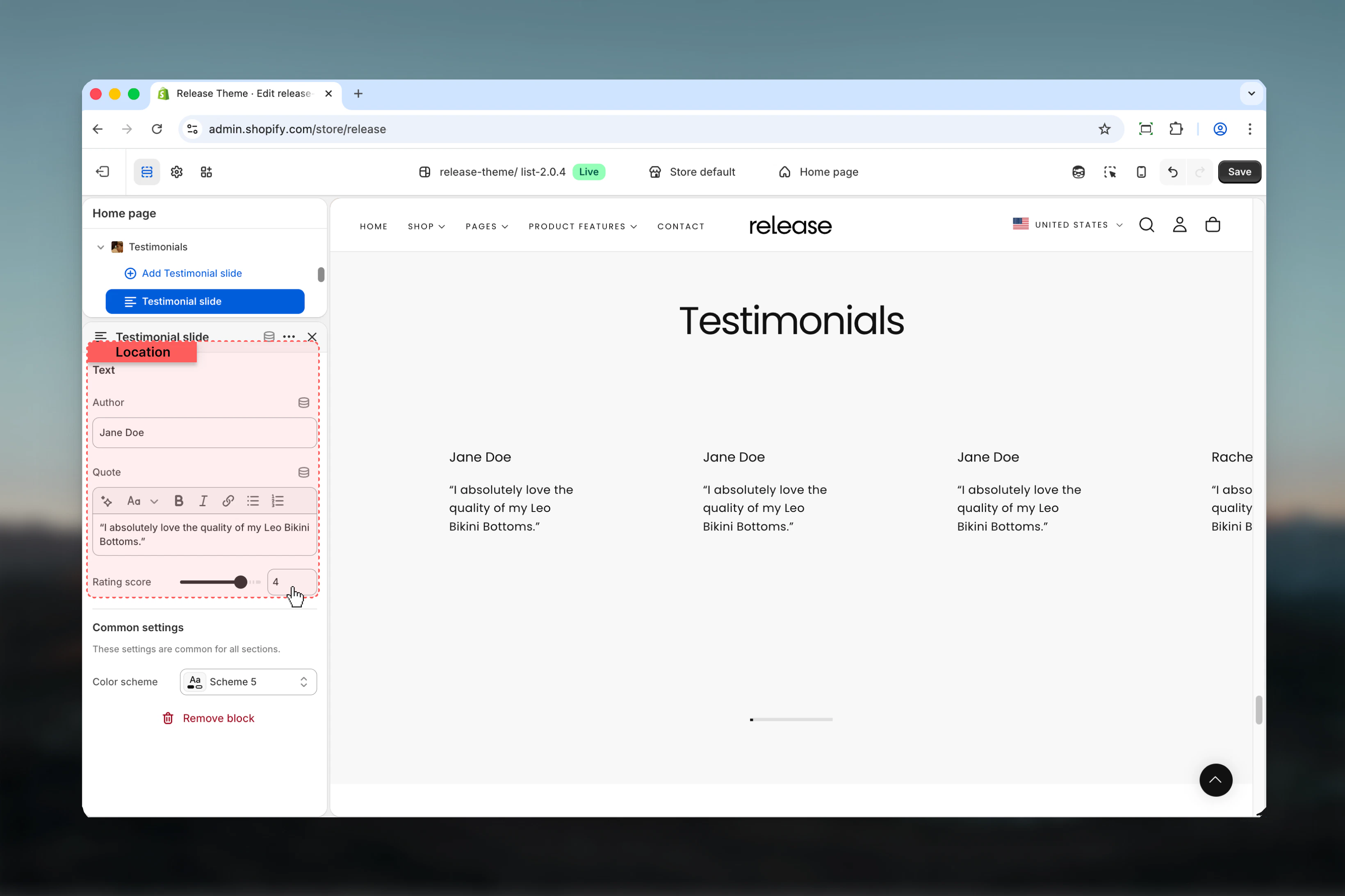
Block settings control individual testimonial slides. Each block represents a single testimonial.
### Author
Name of the person providing the testimonial.
* Text input
### Quote
Main testimonial content.
* Rich text supported (bold, italic, links)
### Rating score
Defines the rating value for the testimonial.
**Range:** 0 – 5
Displayed based on the selected rating style.
## Block settings
Block settings control individual testimonial slides. Each block represents a single testimonial.
### Author
Name of the person providing the testimonial.
* Text input
### Quote
Main testimonial content.
* Rich text supported (bold, italic, links)
### Rating score
Defines the rating value for the testimonial.
**Range:** 0 – 5
Displayed based on the selected rating style.
 ## Best practices
* Keep testimonials concise and authentic - aim for 2-3 sentences maximum
* Use consistent rating values for clarity and credibility
* Avoid carousel layout if images are important for visual storytelling
* Use autoplay sparingly (3-5 seconds minimum) for readability
* Ensure author names are real or brand-consistent to maintain trust
* Include a mix of specific product benefits and emotional responses
* Use high-quality images that complement but don't distract from testimonial text
* Test on mobile devices to ensure text remains readable
* Consider using 3-5 testimonials to provide sufficient social proof without overwhelming
## Common use cases
* **Customer reviews** - Display product or service feedback with ratings
* **Brand testimonials** - Showcase client success stories and experiences
* **Influencer quotes** - Feature endorsements from industry experts or personalities
* **Social proof sections** - Build trust with authentic customer voices
* **Post-purchase feedback highlights** - Share positive experiences to encourage conversions
## Related guides
Learn about common settings shared across sections
## Best practices
* Keep testimonials concise and authentic - aim for 2-3 sentences maximum
* Use consistent rating values for clarity and credibility
* Avoid carousel layout if images are important for visual storytelling
* Use autoplay sparingly (3-5 seconds minimum) for readability
* Ensure author names are real or brand-consistent to maintain trust
* Include a mix of specific product benefits and emotional responses
* Use high-quality images that complement but don't distract from testimonial text
* Test on mobile devices to ensure text remains readable
* Consider using 3-5 testimonials to provide sufficient social proof without overwhelming
## Common use cases
* **Customer reviews** - Display product or service feedback with ratings
* **Brand testimonials** - Showcase client success stories and experiences
* **Influencer quotes** - Feature endorsements from industry experts or personalities
* **Social proof sections** - Build trust with authentic customer voices
* **Post-purchase feedback highlights** - Share positive experiences to encourage conversions
## Related guides
Learn about common settings shared across sections