> ## Documentation Index
> Fetch the complete documentation index at: https://docs.digifist.com/llms.txt
> Use this file to discover all available pages before exploring further.
# Newsletter popup
> Display a timed popup modal to capture email subscriptions with customizable content, imagery, and delay controls.
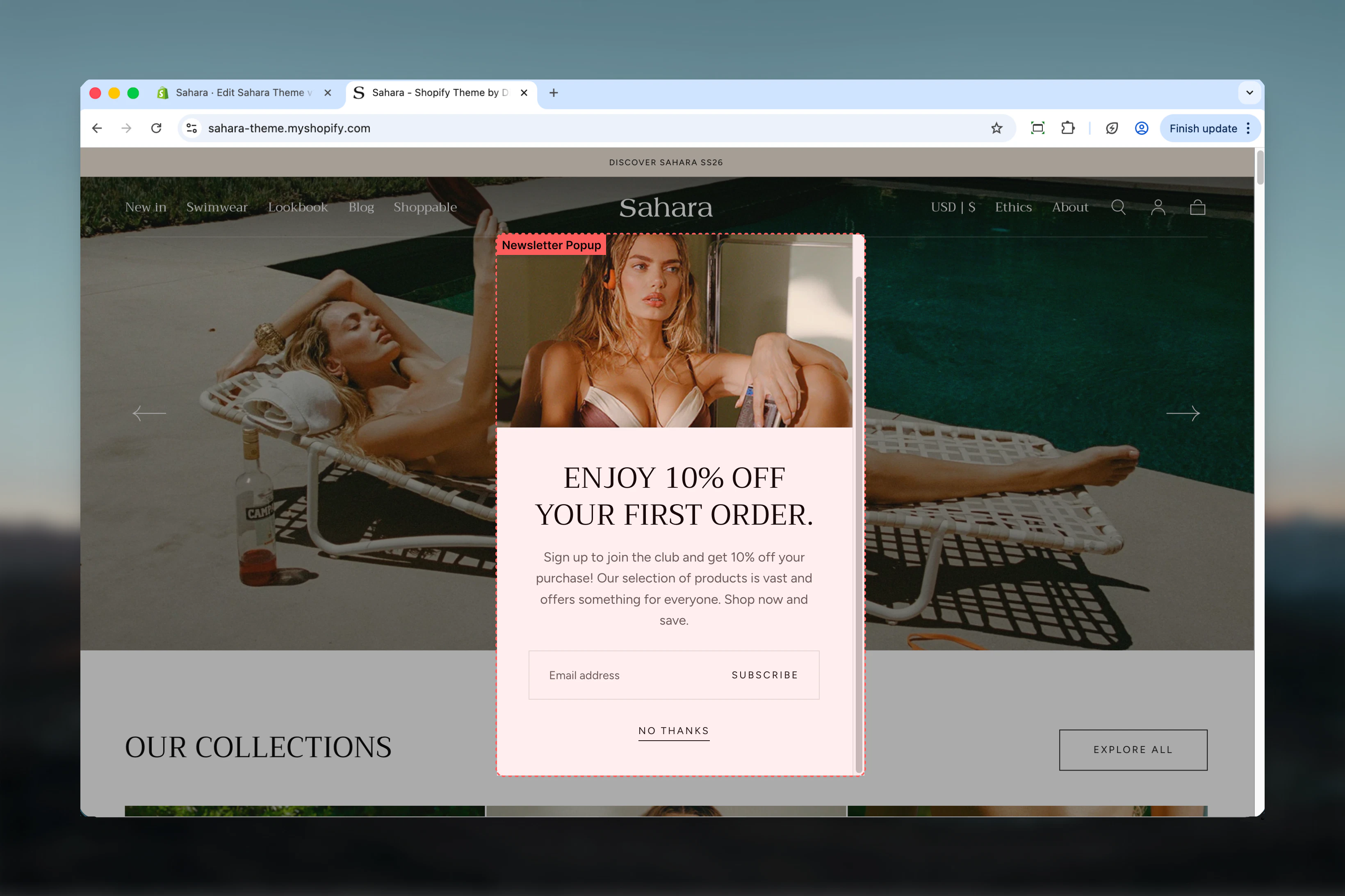
The Newsletter popup section creates a modal overlay that appears after a configurable delay to capture email subscriptions. It includes optional imagery, customizable heading and text, an integrated newsletter signup form, and a friendly dismissal option.
This section is essential for building your email list and engaging visitors with special offers, exclusive content, or product updates.
 ## What this section controls
This section controls newsletter popup displays with the following capabilities:
* Timed appearance after page load (4-30 seconds)
* Optional image for visual appeal and branding
* Customizable heading and descriptive text
* Integrated email signup form with validation
* Friendly close/dismiss button
* Theme Customizer preview mode
* Session-based dismissal tracking
## How the Newsletter popup works
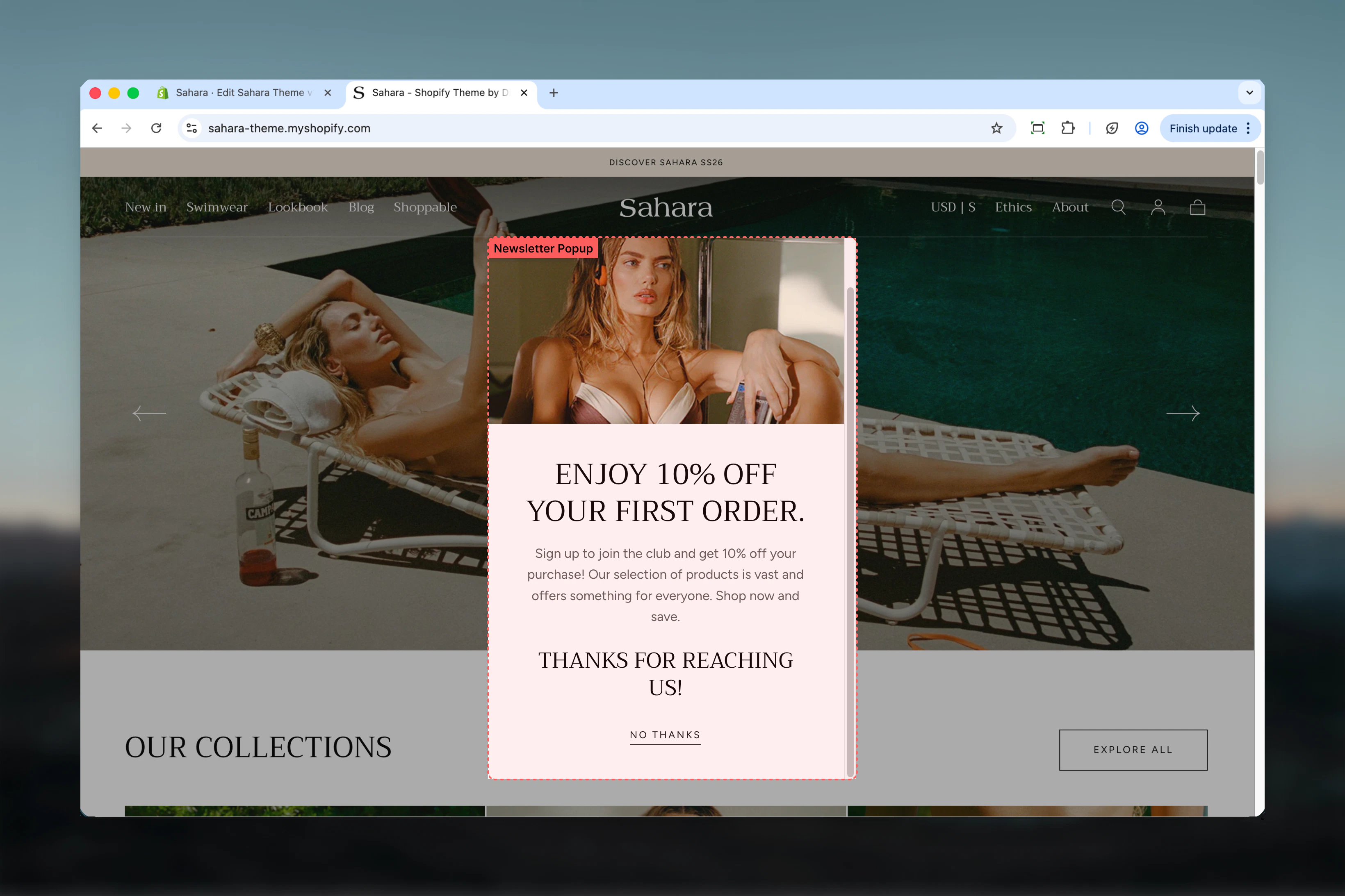
The Newsletter popup displays as a centered modal overlay:
* Appears automatically after the configured delay
* Shows optional image alongside form content
* Displays heading, supporting text, and email input field
* Users can submit their email or dismiss the popup
* Remembers dismissal for the browsing session (appears once per session)
* Mobile-responsive design adapts layout for small screens
## Getting started
From Shopify admin, access the Theme Customizer.
Add this section to your global theme sections (not page-specific).
Set heading, descriptive text, and optional image.
Set the delay to control when the popup appears (10-15 seconds recommended).
Update the close button text to match your brand voice.
## What this section controls
This section controls newsletter popup displays with the following capabilities:
* Timed appearance after page load (4-30 seconds)
* Optional image for visual appeal and branding
* Customizable heading and descriptive text
* Integrated email signup form with validation
* Friendly close/dismiss button
* Theme Customizer preview mode
* Session-based dismissal tracking
## How the Newsletter popup works
The Newsletter popup displays as a centered modal overlay:
* Appears automatically after the configured delay
* Shows optional image alongside form content
* Displays heading, supporting text, and email input field
* Users can submit their email or dismiss the popup
* Remembers dismissal for the browsing session (appears once per session)
* Mobile-responsive design adapts layout for small screens
## Getting started
From Shopify admin, access the Theme Customizer.
Add this section to your global theme sections (not page-specific).
Set heading, descriptive text, and optional image.
Set the delay to control when the popup appears (10-15 seconds recommended).
Update the close button text to match your brand voice.
 ## Section settings
### Delay
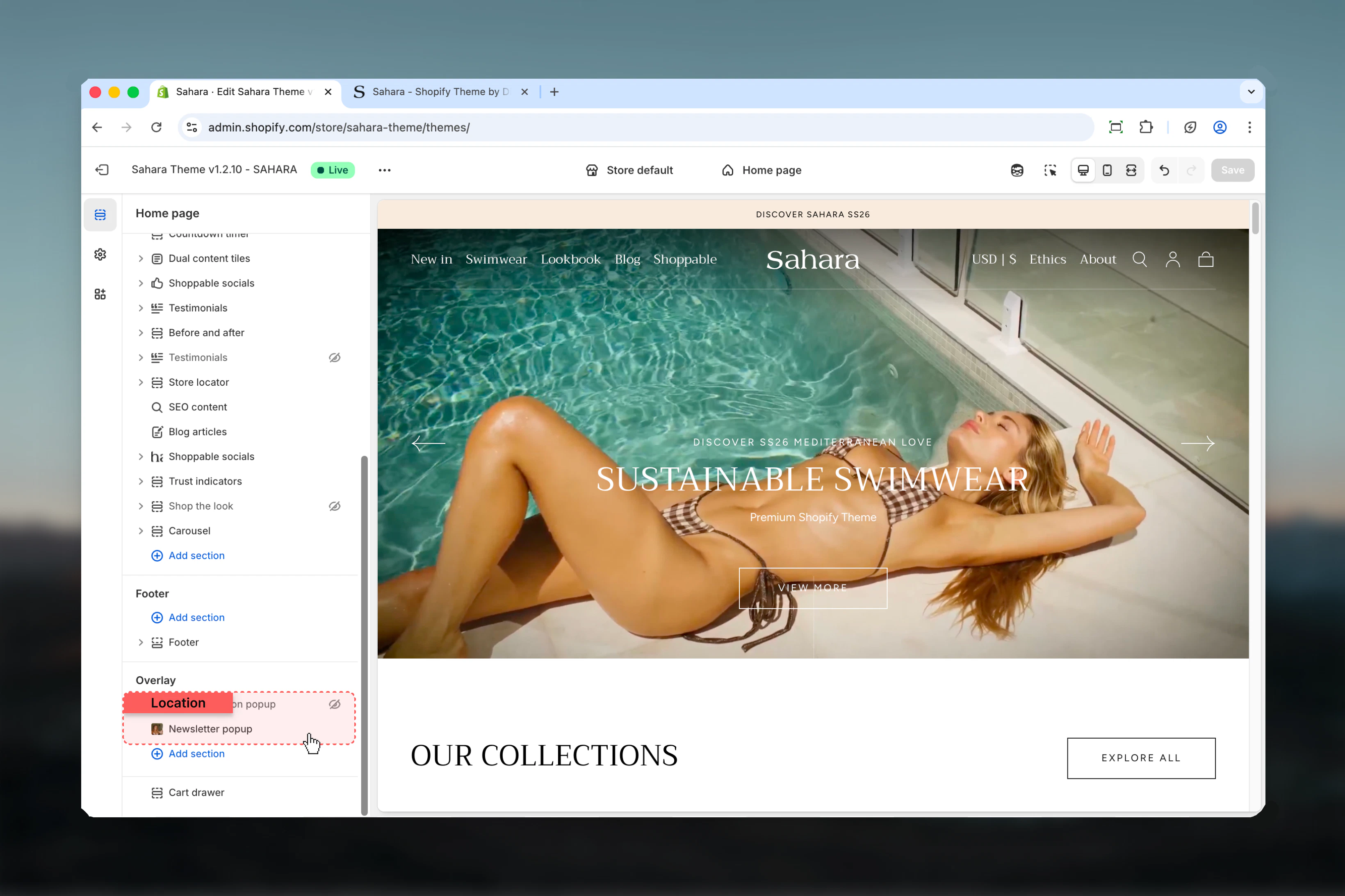
Controls when the popup appears after page load.
**Range:** 4 – 30 seconds (in 1-second increments)\
**Default:** 10 seconds
**4-7 seconds:**
* Very early appearance
* High urgency promotions
* Risk of interrupting users
**8-12 seconds:**
* Balanced timing (recommended)
* Allows initial page engagement
* Standard for most stores
**15-20 seconds:**
* Patient approach
* For engaged visitors
* Lower conversion but better UX
**25-30 seconds:**
* Minimal interruption
* Exit-intent alternative
* Blog or content-heavy sites
Setting delay too short (\< 8 seconds) may interrupt users before they engage with your content, creating a negative first impression.
A delay of 10-15 seconds balances conversion opportunity with positive user experience. Test different timings to find optimal performance for your audience.
## Section settings
### Delay
Controls when the popup appears after page load.
**Range:** 4 – 30 seconds (in 1-second increments)\
**Default:** 10 seconds
**4-7 seconds:**
* Very early appearance
* High urgency promotions
* Risk of interrupting users
**8-12 seconds:**
* Balanced timing (recommended)
* Allows initial page engagement
* Standard for most stores
**15-20 seconds:**
* Patient approach
* For engaged visitors
* Lower conversion but better UX
**25-30 seconds:**
* Minimal interruption
* Exit-intent alternative
* Blog or content-heavy sites
Setting delay too short (\< 8 seconds) may interrupt users before they engage with your content, creating a negative first impression.
A delay of 10-15 seconds balances conversion opportunity with positive user experience. Test different timings to find optimal performance for your audience.
 ### Image
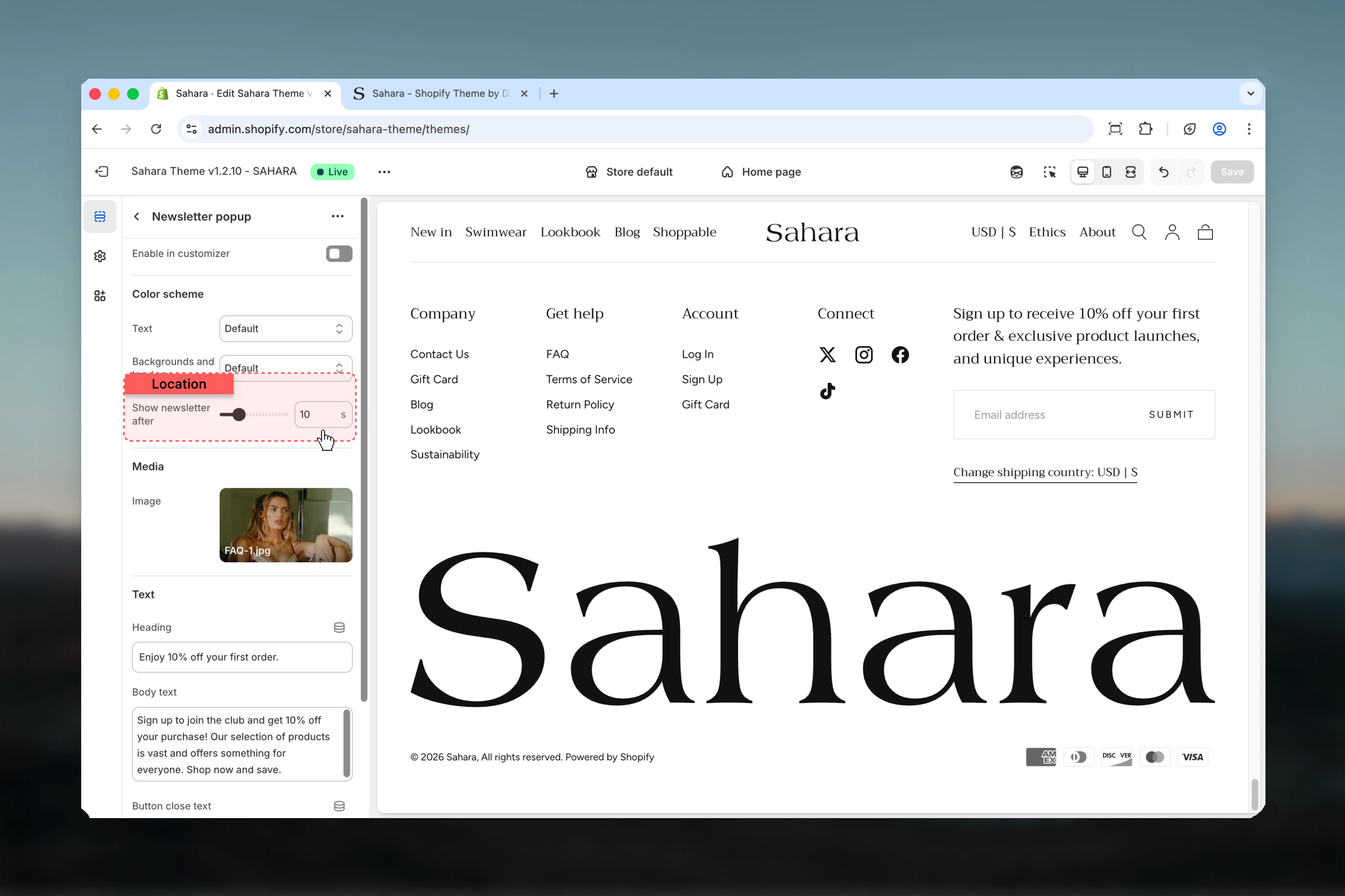
Optional image displayed within the popup.
* Displays on left side (desktop) or above content (mobile)
* Rendered at 550px width
* Leave empty to hide image
**Recommended subjects:**
* Brand logo or mascot
* Product highlights
* Lifestyle imagery matching your brand
* Promotional graphics (e.g., "10% off")
**Technical specs:**
* Recommended size: 550px × 550px
* Square or portrait orientation
* High contrast for visibility
* Optimized file size for fast loading
Image should support your value proposition without overwhelming the signup form.
### Heading
Main heading text for the popup.
* Inline rich text supported (bold, italic, links)
* **Default:** "Newsletter heading here"
Make heading value-focused and concise: "Get 10% Off", "Join Our VIP List", "Exclusive Access Awaits"
### Heading size
Controls the size of heading text.
**Options:** XS, S, M, L, XL\
**Default:** XL
### Text
Descriptive text displayed below the heading.
* Rich text editor with formatting support
* **Default:** "An example subheading for new subscribers."
* **Supports:**
* Bold, italic, underline
* Links
* Paragraphs
Keep text brief (1-2 sentences, 15-25 words) to maintain focus on the signup form. Explain the benefit clearly: "Sign up for exclusive deals and early access to new products."
### Image
Optional image displayed within the popup.
* Displays on left side (desktop) or above content (mobile)
* Rendered at 550px width
* Leave empty to hide image
**Recommended subjects:**
* Brand logo or mascot
* Product highlights
* Lifestyle imagery matching your brand
* Promotional graphics (e.g., "10% off")
**Technical specs:**
* Recommended size: 550px × 550px
* Square or portrait orientation
* High contrast for visibility
* Optimized file size for fast loading
Image should support your value proposition without overwhelming the signup form.
### Heading
Main heading text for the popup.
* Inline rich text supported (bold, italic, links)
* **Default:** "Newsletter heading here"
Make heading value-focused and concise: "Get 10% Off", "Join Our VIP List", "Exclusive Access Awaits"
### Heading size
Controls the size of heading text.
**Options:** XS, S, M, L, XL\
**Default:** XL
### Text
Descriptive text displayed below the heading.
* Rich text editor with formatting support
* **Default:** "An example subheading for new subscribers."
* **Supports:**
* Bold, italic, underline
* Links
* Paragraphs
Keep text brief (1-2 sentences, 15-25 words) to maintain focus on the signup form. Explain the benefit clearly: "Sign up for exclusive deals and early access to new products."
 ### Button close text
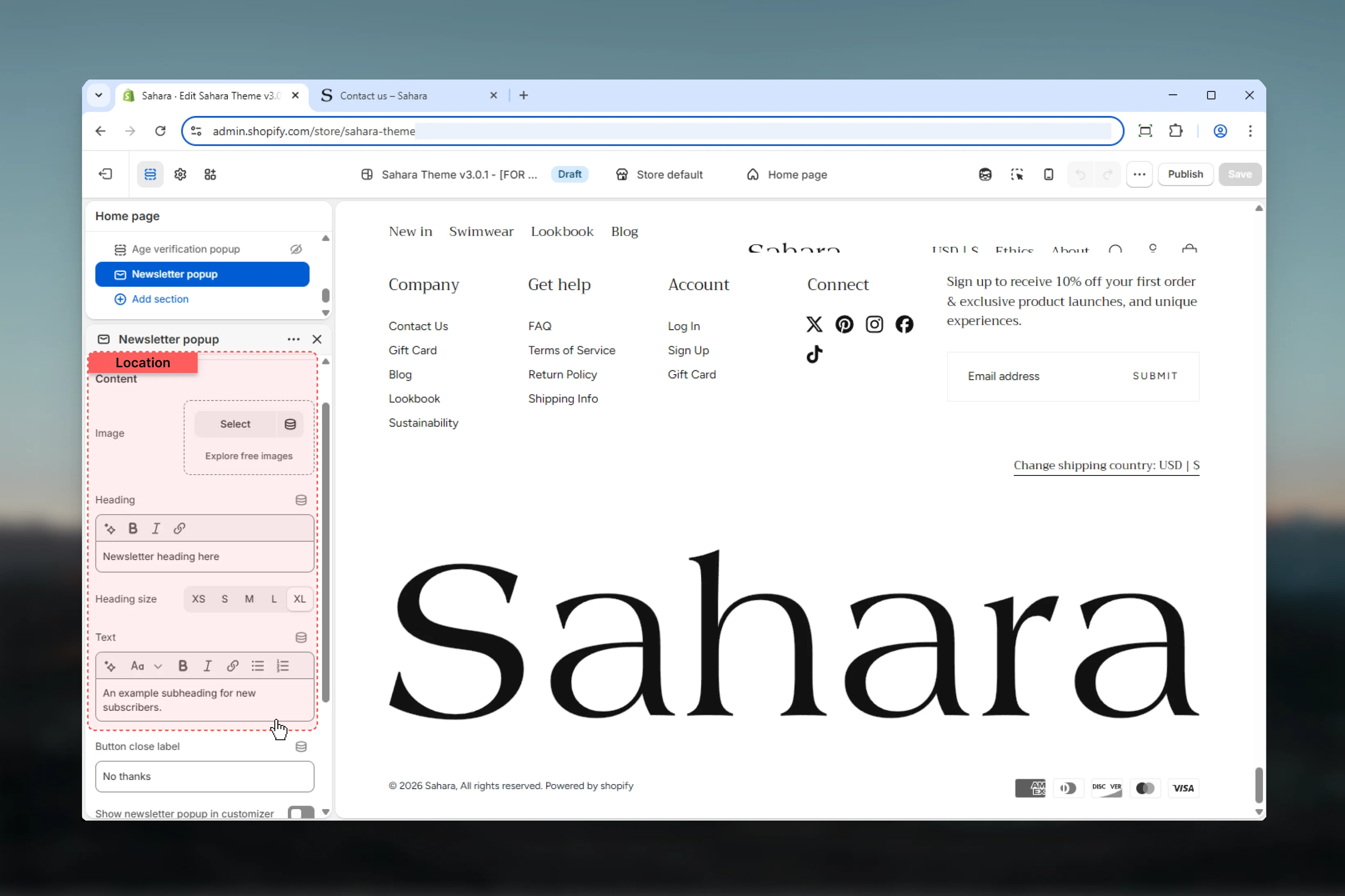
Label for the close/dismiss link.
* Plain text only
* **Default:** "No thanks"
Use friendly, non-pushy language:
**Good examples:**
* "No thanks"
* "Maybe later"
* "Not now"
* "Skip for now"
**Avoid:**
* "Close" (too direct)
* "I don't want discounts" (guilt-inducing)
* "Dismiss" (too formal)
Friendly dismissal language respects user choice and maintains positive brand perception.
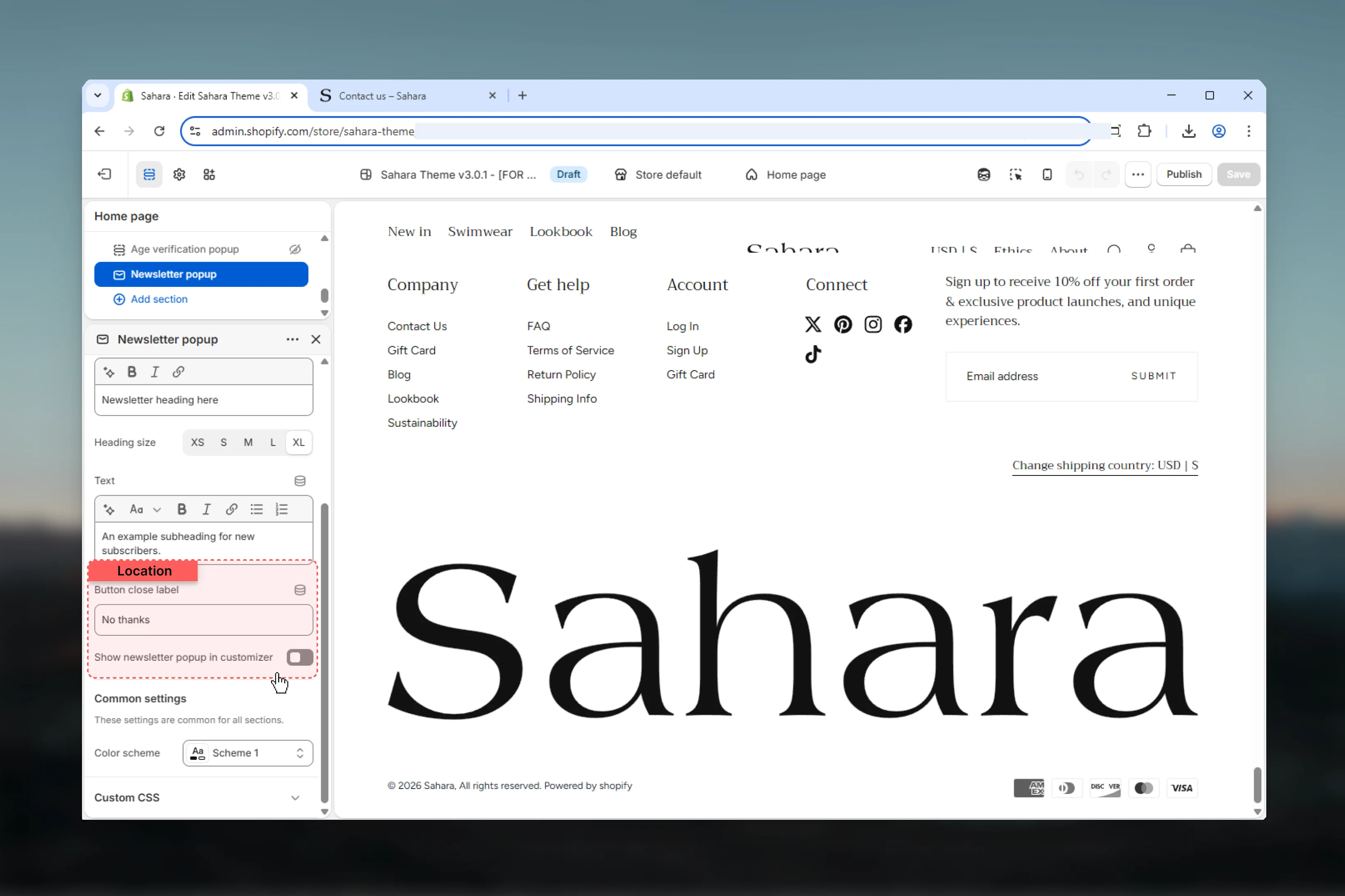
### Customizer visible
Controls whether popup displays immediately in the Theme Customizer.
**Options:** True / False\
**Default:** False
**Enable (True) when:**
* Designing the popup initially
* Testing content layout and styling
* Previewing color scheme changes
* Checking mobile responsiveness
**Disable (False) for:**
* Normal operation (default)
* Accurate delay testing
* Live site behavior
* When popup design is finalized
Enable temporarily to preview popup appearance and styling without waiting for the delay. Remember to disable before publishing.
### Button close text
Label for the close/dismiss link.
* Plain text only
* **Default:** "No thanks"
Use friendly, non-pushy language:
**Good examples:**
* "No thanks"
* "Maybe later"
* "Not now"
* "Skip for now"
**Avoid:**
* "Close" (too direct)
* "I don't want discounts" (guilt-inducing)
* "Dismiss" (too formal)
Friendly dismissal language respects user choice and maintains positive brand perception.
### Customizer visible
Controls whether popup displays immediately in the Theme Customizer.
**Options:** True / False\
**Default:** False
**Enable (True) when:**
* Designing the popup initially
* Testing content layout and styling
* Previewing color scheme changes
* Checking mobile responsiveness
**Disable (False) for:**
* Normal operation (default)
* Accurate delay testing
* Live site behavior
* When popup design is finalized
Enable temporarily to preview popup appearance and styling without waiting for the delay. Remember to disable before publishing.
 ### Color scheme
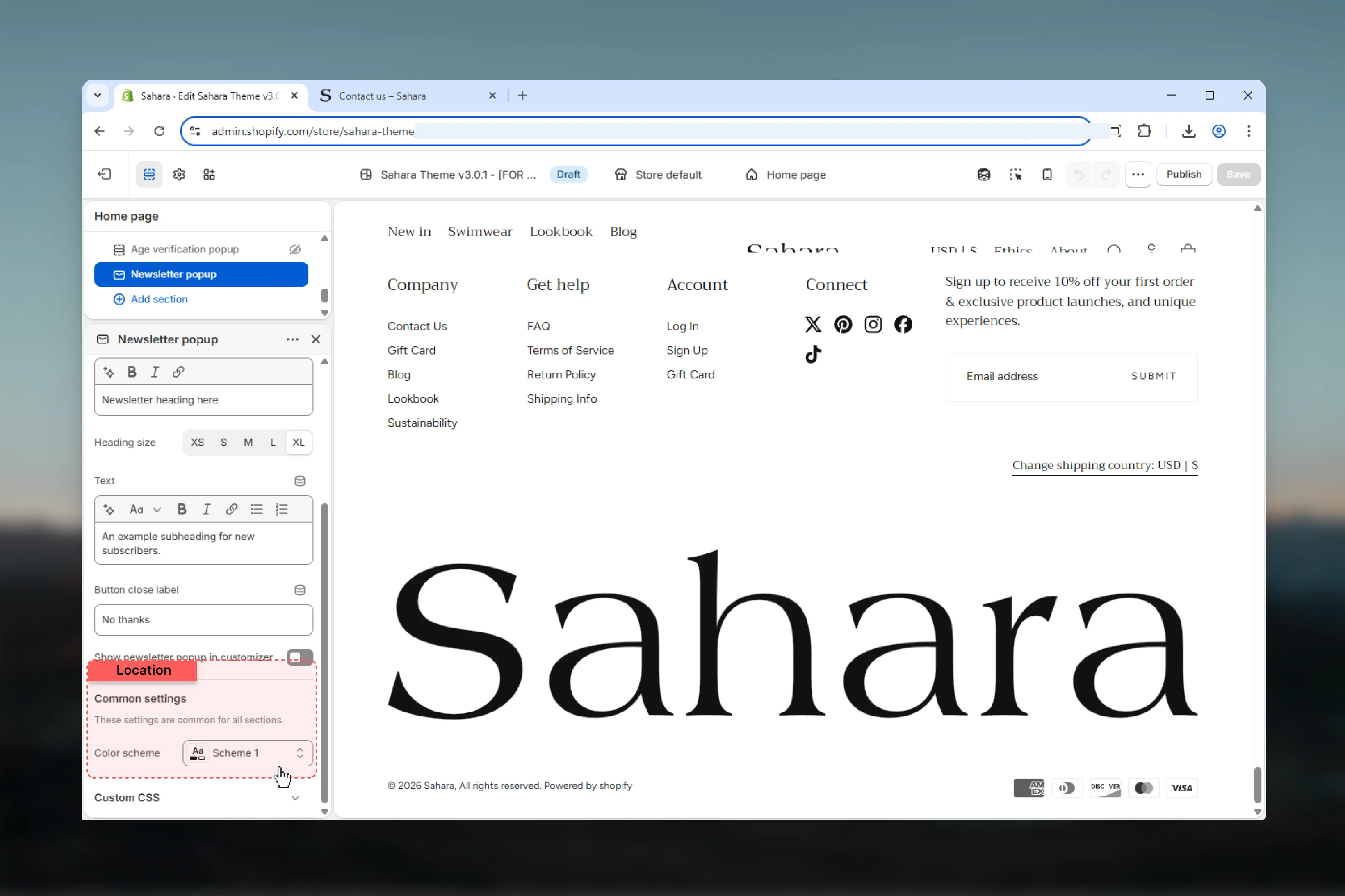
Select color scheme for popup background, text, and form elements.
Ensure your color scheme provides sufficient contrast between background and text for readability and accessibility compliance.
Choose a color scheme that makes the popup distinct from page content without being visually jarring.
### Color scheme
Select color scheme for popup background, text, and form elements.
Ensure your color scheme provides sufficient contrast between background and text for readability and accessibility compliance.
Choose a color scheme that makes the popup distinct from page content without being visually jarring.
 ## Newsletter form
The popup includes an integrated email signup form with the following features:
Standard email input with built-in validation.
* Placeholder text from theme translations
* Browser-level email format validation
* Required field
Call-to-action button to submit the form.
* Button text from theme translations ("Subscribe")
* Disabled state during submission
* Integrates with Shopify customer accounts
Backend integration with Shopify:
* Adds email to customer mailing list
* Sends double opt-in email if enabled
* Tracks newsletter consent
* GDPR compliant
Displays validation and server errors:
* Invalid email format
* Already subscribed
* Server connection issues
* User-friendly error messages
Confirmation after successful submission:
* Thank you message
* Auto-dismiss or manual close
* Session tracking prevents re-display
## Newsletter form
The popup includes an integrated email signup form with the following features:
Standard email input with built-in validation.
* Placeholder text from theme translations
* Browser-level email format validation
* Required field
Call-to-action button to submit the form.
* Button text from theme translations ("Subscribe")
* Disabled state during submission
* Integrates with Shopify customer accounts
Backend integration with Shopify:
* Adds email to customer mailing list
* Sends double opt-in email if enabled
* Tracks newsletter consent
* GDPR compliant
Displays validation and server errors:
* Invalid email format
* Already subscribed
* Server connection issues
* User-friendly error messages
Confirmation after successful submission:
* Thank you message
* Auto-dismiss or manual close
* Session tracking prevents re-display
 ## Best practices
Set delay to 10-15 seconds to allow users to engage with page content first before interruption.
Use clear, benefit-driven headings: "Get 10% Off", "Join Our VIP List", "Exclusive Early Access".
Choose high-quality brand imagery that reinforces your value proposition without overwhelming the form.
Use non-pushy close button text like "No thanks" or "Maybe later" to respect user choice.
Enable "Customizer visible" temporarily for testing appearance, then disable before publishing.
Don't set delay below 8 seconds—this interrupts users immediately and creates negative impressions.
Ensure color scheme provides strong contrast for text readability and meets accessibility standards.
Limit descriptive text to 1-2 sentences (15-25 words) for quick scanning and focus on form.
Test different delays, headlines, and images to optimize conversion rates for your specific audience.
Preview on mobile devices to ensure image and text remain readable on small screens.
## Common use cases
Set 10-12 second delay. Heading: "Welcome! Get 10% Off Your First Order". Text: "Join our newsletter for exclusive deals and early access." Image: Product highlight or brand logo. Close text: "No thanks".
Set 15 second delay. Heading: "Join Our VIP List". Text: "Be the first to know about new launches and member-only sales." Image: Lifestyle brand imagery. Close text: "Maybe later".
Set 20 second delay. Heading: "Stay Inspired". Text: "Get weekly tips, recipes, and exclusive content delivered to your inbox." No image. Close text: "Not now".
Set 8 second delay (urgent). Heading: "New Collection Drops Friday". Text: "Sign up now for exclusive early access 24 hours before public launch." Image: New product teaser. Close text: "Skip for now".
Set 12 second delay. Heading: "Holiday Gift Guide Inside". Text: "Subscribe to receive our curated gift guide and holiday shopping tips." Image: Seasonal themed graphic. Close text: "No thanks".
## Related sections
Inline newsletter signup forms for pages
Persistent top-of-page announcements
## Best practices
Set delay to 10-15 seconds to allow users to engage with page content first before interruption.
Use clear, benefit-driven headings: "Get 10% Off", "Join Our VIP List", "Exclusive Early Access".
Choose high-quality brand imagery that reinforces your value proposition without overwhelming the form.
Use non-pushy close button text like "No thanks" or "Maybe later" to respect user choice.
Enable "Customizer visible" temporarily for testing appearance, then disable before publishing.
Don't set delay below 8 seconds—this interrupts users immediately and creates negative impressions.
Ensure color scheme provides strong contrast for text readability and meets accessibility standards.
Limit descriptive text to 1-2 sentences (15-25 words) for quick scanning and focus on form.
Test different delays, headlines, and images to optimize conversion rates for your specific audience.
Preview on mobile devices to ensure image and text remain readable on small screens.
## Common use cases
Set 10-12 second delay. Heading: "Welcome! Get 10% Off Your First Order". Text: "Join our newsletter for exclusive deals and early access." Image: Product highlight or brand logo. Close text: "No thanks".
Set 15 second delay. Heading: "Join Our VIP List". Text: "Be the first to know about new launches and member-only sales." Image: Lifestyle brand imagery. Close text: "Maybe later".
Set 20 second delay. Heading: "Stay Inspired". Text: "Get weekly tips, recipes, and exclusive content delivered to your inbox." No image. Close text: "Not now".
Set 8 second delay (urgent). Heading: "New Collection Drops Friday". Text: "Sign up now for exclusive early access 24 hours before public launch." Image: New product teaser. Close text: "Skip for now".
Set 12 second delay. Heading: "Holiday Gift Guide Inside". Text: "Subscribe to receive our curated gift guide and holiday shopping tips." Image: Seasonal themed graphic. Close text: "No thanks".
## Related sections
Inline newsletter signup forms for pages
Persistent top-of-page announcements