> ## Documentation Index
> Fetch the complete documentation index at: https://docs.digifist.com/llms.txt
> Use this file to discover all available pages before exploring further.
# Testimonials
> Display customer reviews and feedback with images, flexible layouts, and autoplay carousel functionality.
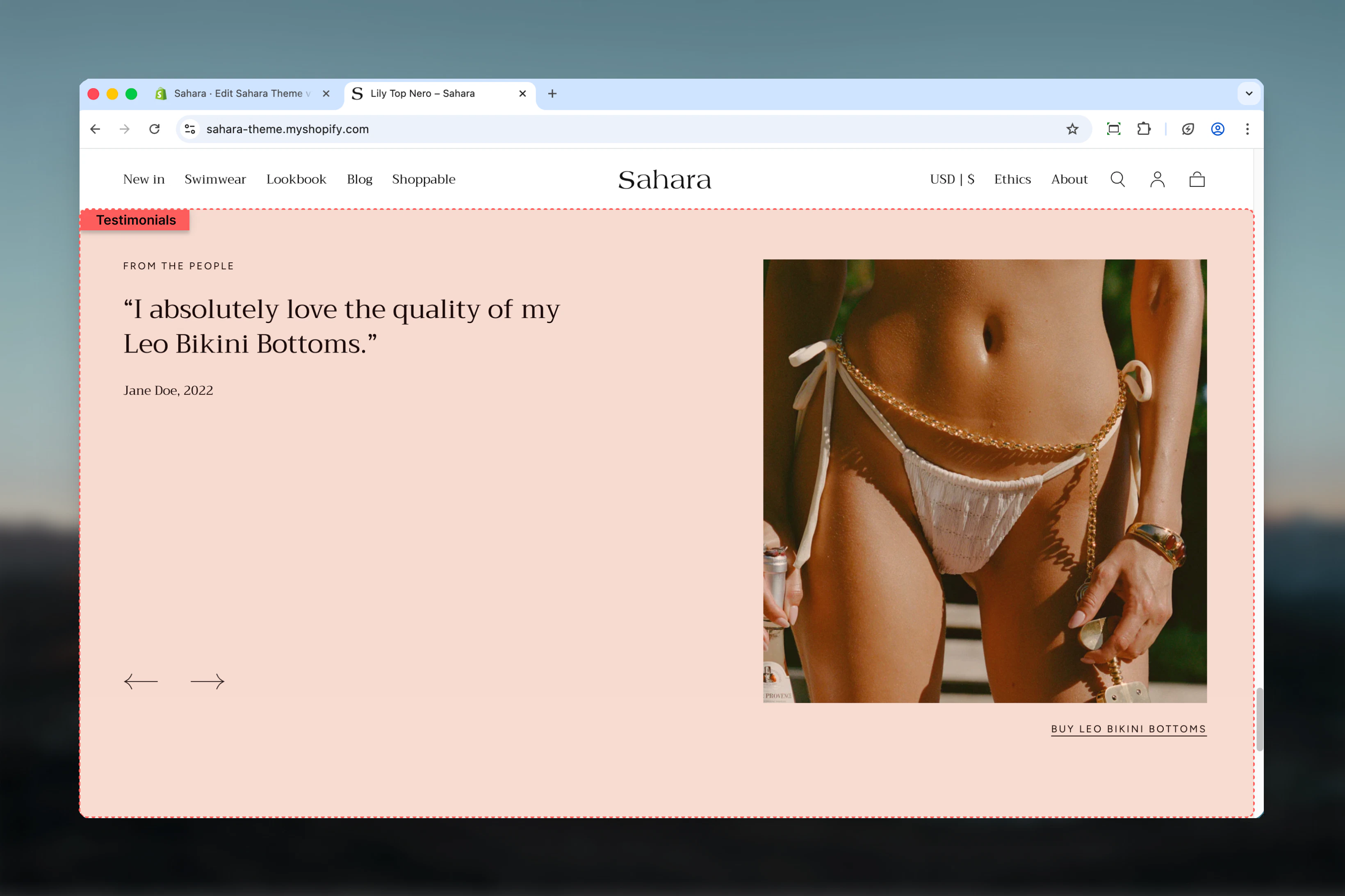
The Testimonials section showcases customer feedback and reviews in a visually engaging slideshow format. It features customizable layouts with optional images, autoplay functionality, and flexible content width options to build trust and social proof.
 ## What this section controls
This section controls customer testimonial displays with the following capabilities:
* Multiple testimonial slides with quotes and attribution
* Image positioning (left, right, or no image)
* Narrow or full-width content layouts
* Autoplay carousel functionality
* Optional clickable links on testimonials
* Section-level heading and styling
## How the Testimonials section works
The section uses testimonial blocks where each block represents one customer review. When multiple testimonials are added, they automatically form a carousel that can rotate manually or automatically. The image position setting determines whether a featured image appears alongside the testimonials.
## Getting started
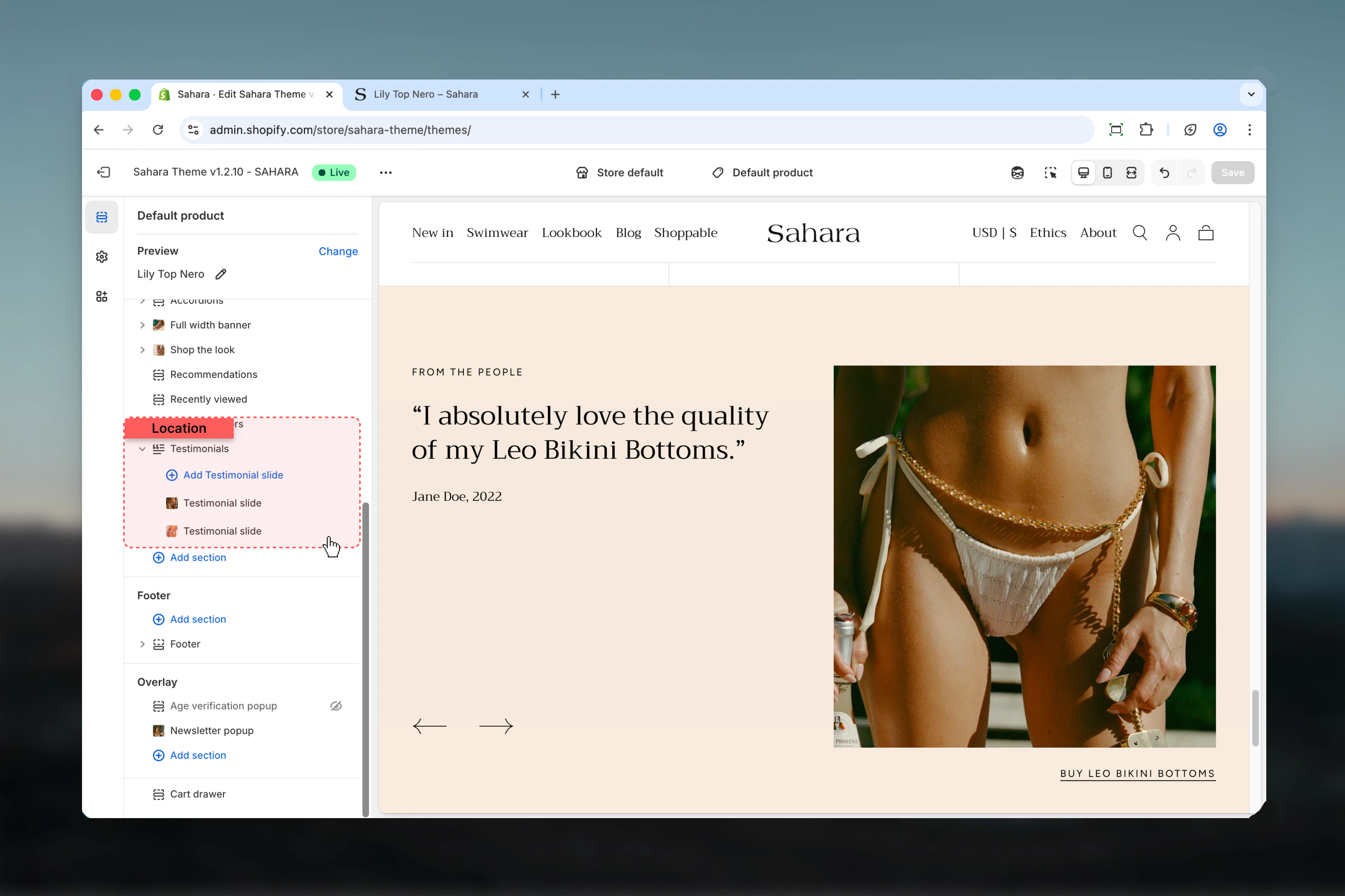
From Shopify admin, access the Theme Customizer.
Add the Testimonials section to your page or template.
Click "Add block" and select "Testimonial" to add customer reviews.
Add quotes, author names, and optional images for each testimonial.
## What this section controls
This section controls customer testimonial displays with the following capabilities:
* Multiple testimonial slides with quotes and attribution
* Image positioning (left, right, or no image)
* Narrow or full-width content layouts
* Autoplay carousel functionality
* Optional clickable links on testimonials
* Section-level heading and styling
## How the Testimonials section works
The section uses testimonial blocks where each block represents one customer review. When multiple testimonials are added, they automatically form a carousel that can rotate manually or automatically. The image position setting determines whether a featured image appears alongside the testimonials.
## Getting started
From Shopify admin, access the Theme Customizer.
Add the Testimonials section to your page or template.
Click "Add block" and select "Testimonial" to add customer reviews.
Add quotes, author names, and optional images for each testimonial.
 ## Section settings
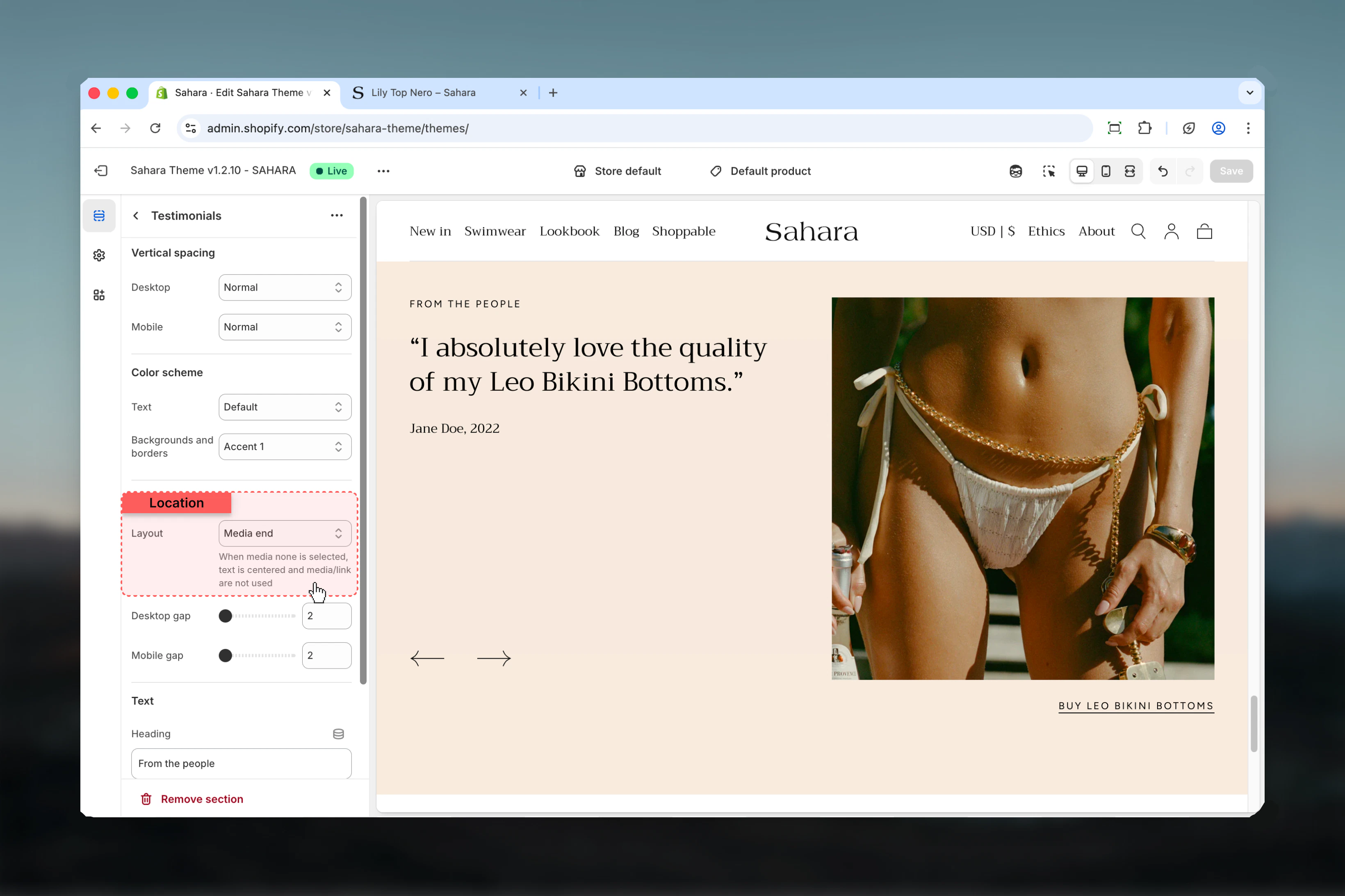
### Layout
Controls the position of the featured image relative to testimonial content.
Featured image appears on the left side, testimonials on the right.
**When to use:**
* When image is equally important as testimonials
* Left-to-right reading flow emphasis
* Desktop-friendly balanced layouts
Featured image appears on the right side, testimonials on the left (default).
**When to use:**
* Standard testimonial layouts
* When content should be read first
* Maintaining left-aligned text focus
No featured image displayed, testimonials use full width.
**When to use:**
* Text-focused testimonial sections
* When individual testimonial images are sufficient
* Minimal, clean designs
* Mobile-optimized displays
## Section settings
### Layout
Controls the position of the featured image relative to testimonial content.
Featured image appears on the left side, testimonials on the right.
**When to use:**
* When image is equally important as testimonials
* Left-to-right reading flow emphasis
* Desktop-friendly balanced layouts
Featured image appears on the right side, testimonials on the left (default).
**When to use:**
* Standard testimonial layouts
* When content should be read first
* Maintaining left-aligned text focus
No featured image displayed, testimonials use full width.
**When to use:**
* Text-focused testimonial sections
* When individual testimonial images are sufficient
* Minimal, clean designs
* Mobile-optimized displays
 ### Content width
Controls the maximum width of testimonial text content.
Content constrained to a narrow column for better readability (default).
**When to use:**
* Longer testimonial quotes
* Improving text readability
* Creating visual focus on content
Content uses the full available width.
**When to use:**
* Short, concise testimonials
* Maximizing screen space
* When using "No image" layout
Narrow content width typically provides better readability for testimonials, especially on large screens.
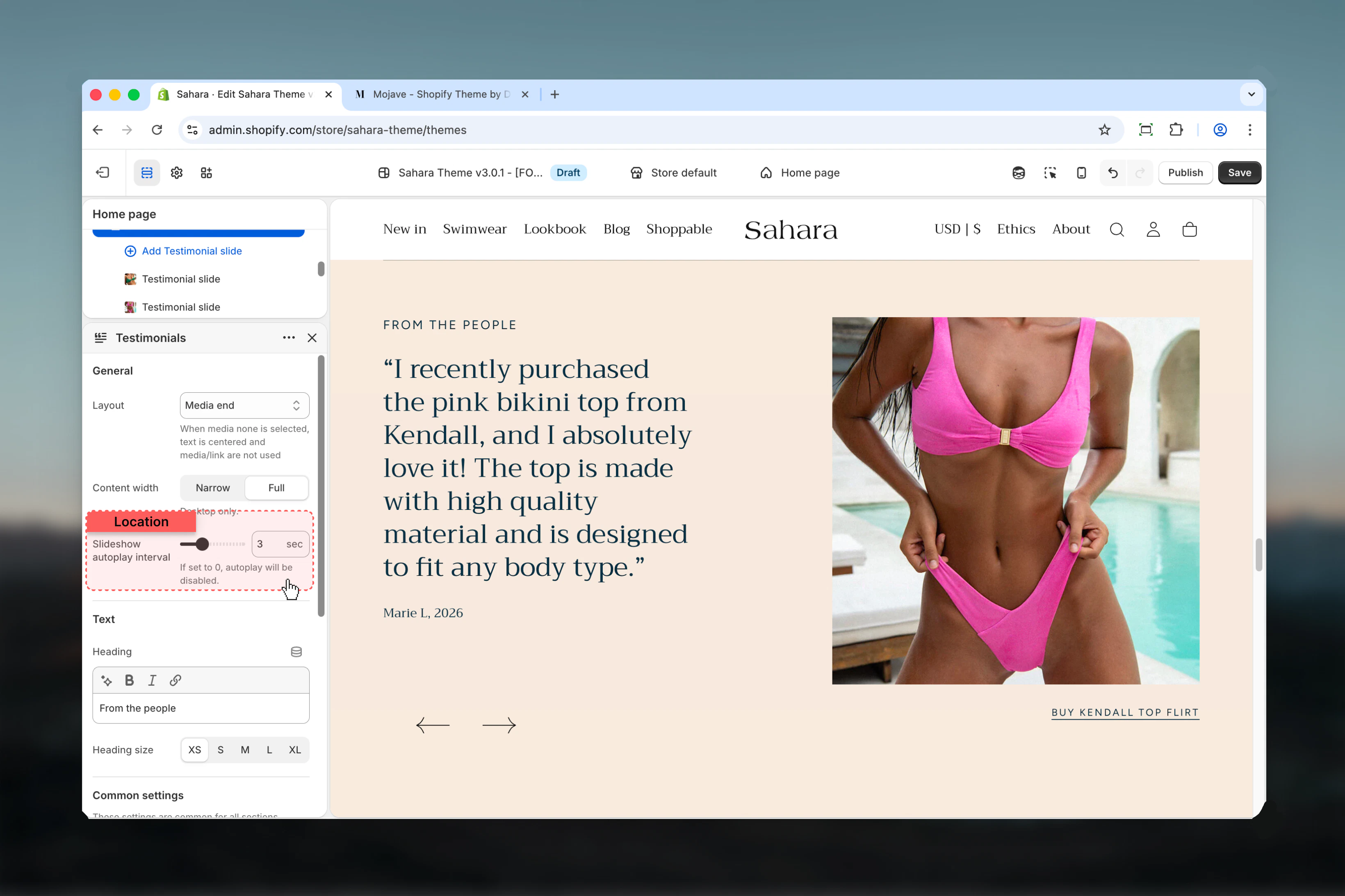
### Autoplay interval
Controls automatic slide rotation timing.
**Range:** 0 – 10 seconds (in 0.5 second increments)\
**Default:** 3 seconds
**Setting to 0 seconds:**
* Disables autoplay completely
* Users must manually navigate between testimonials
* Best for detailed reviews that need reading time
**Setting to 3-5 seconds:**
* Recommended for short testimonials
* Balanced between visibility and user control
* Keeps content dynamic without rushing
**Setting to 6-10 seconds:**
* Best for longer quotes
* Gives users time to read thoroughly
* Less frequent changes reduce distraction
Intervals under 3 seconds can frustrate users who are reading testimonials. Allow sufficient time for comprehension.
### Content width
Controls the maximum width of testimonial text content.
Content constrained to a narrow column for better readability (default).
**When to use:**
* Longer testimonial quotes
* Improving text readability
* Creating visual focus on content
Content uses the full available width.
**When to use:**
* Short, concise testimonials
* Maximizing screen space
* When using "No image" layout
Narrow content width typically provides better readability for testimonials, especially on large screens.
### Autoplay interval
Controls automatic slide rotation timing.
**Range:** 0 – 10 seconds (in 0.5 second increments)\
**Default:** 3 seconds
**Setting to 0 seconds:**
* Disables autoplay completely
* Users must manually navigate between testimonials
* Best for detailed reviews that need reading time
**Setting to 3-5 seconds:**
* Recommended for short testimonials
* Balanced between visibility and user control
* Keeps content dynamic without rushing
**Setting to 6-10 seconds:**
* Best for longer quotes
* Gives users time to read thoroughly
* Less frequent changes reduce distraction
Intervals under 3 seconds can frustrate users who are reading testimonials. Allow sufficient time for comprehension.
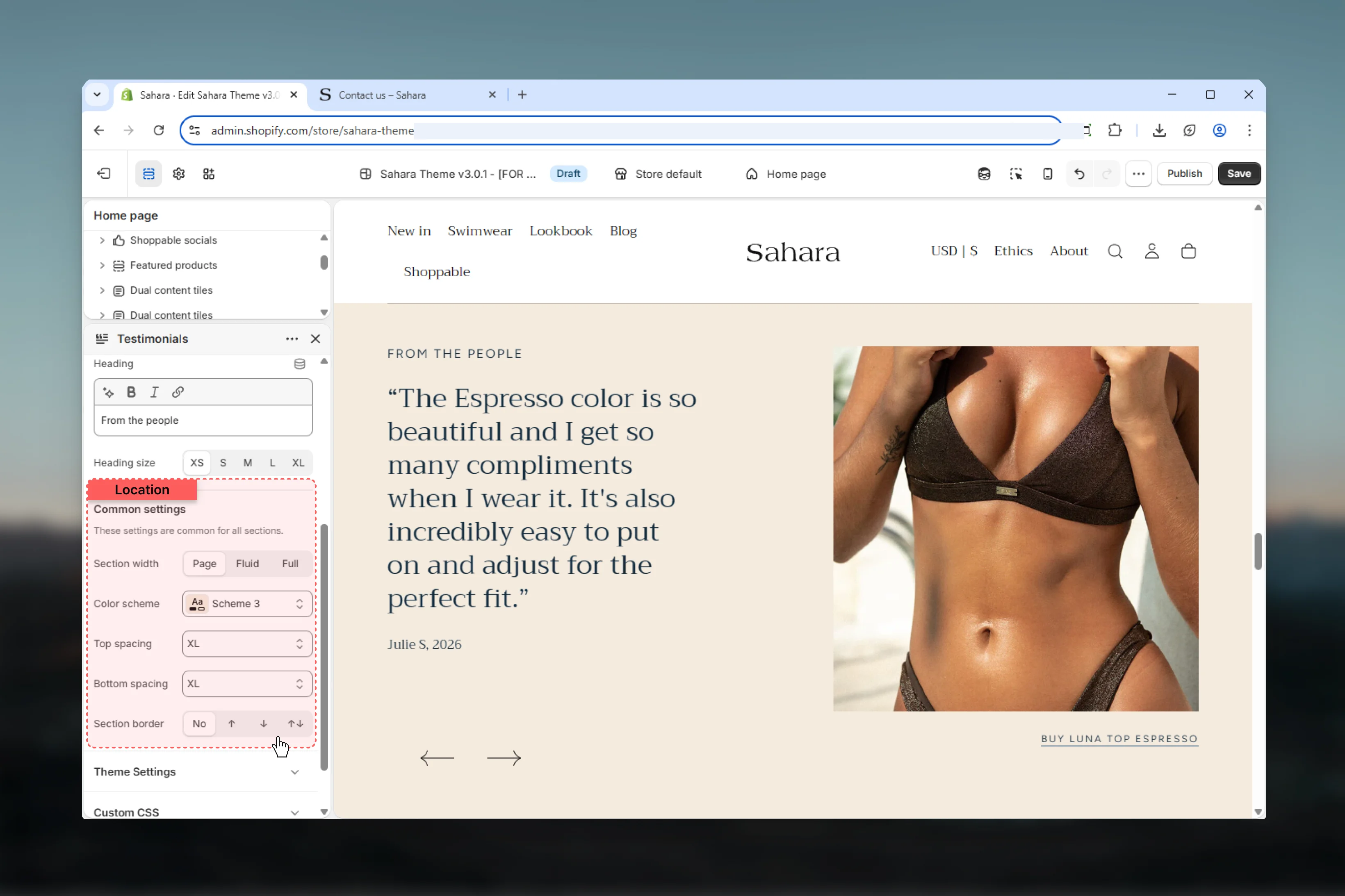
 ### Title (Heading)
Main section heading displayed above testimonials.
**Default:** "From the people"
Supports rich text formatting (bold, italic, links).
### Heading size
Controls the visual size of the section heading.
**Available options:** XS (default), S, M, L, XL
Use XS or S for testimonials to maintain focus on customer quotes rather than the heading.
### Section width
Controls the maximum width of the entire section container.
Content limited to theme's page width (default).
**When to use:** Standard sections that align with other page content.
Content extends wider but with some padding.
**When to use:** Emphasizing testimonials without full edge-to-edge.
Content extends to full browser width with no side padding.
**When to use:** Edge-to-edge designs, maximizing visual impact.
### Color scheme
Select the background and text color scheme for the section.
### Spacing
Control vertical spacing around the section:
* **Spacing top** - Margin above the section (None, S, M, L, XL)
* **Spacing bottom** - Margin below the section (None, S, M, L, XL)
Both default to M (medium spacing).
### Section border
Add decorative borders to the section.
**Available options:** None (default), Top, Bottom, Both
### Title (Heading)
Main section heading displayed above testimonials.
**Default:** "From the people"
Supports rich text formatting (bold, italic, links).
### Heading size
Controls the visual size of the section heading.
**Available options:** XS (default), S, M, L, XL
Use XS or S for testimonials to maintain focus on customer quotes rather than the heading.
### Section width
Controls the maximum width of the entire section container.
Content limited to theme's page width (default).
**When to use:** Standard sections that align with other page content.
Content extends wider but with some padding.
**When to use:** Emphasizing testimonials without full edge-to-edge.
Content extends to full browser width with no side padding.
**When to use:** Edge-to-edge designs, maximizing visual impact.
### Color scheme
Select the background and text color scheme for the section.
### Spacing
Control vertical spacing around the section:
* **Spacing top** - Margin above the section (None, S, M, L, XL)
* **Spacing bottom** - Margin below the section (None, S, M, L, XL)
Both default to M (medium spacing).
### Section border
Add decorative borders to the section.
**Available options:** None (default), Top, Bottom, Both
 ## Block settings
Each testimonial block represents one customer review or quote.
### Image
Upload an image for this specific testimonial.
**Common image uses:**
* Product photos related to the review
* Customer photos (with permission)
* Lifestyle imagery matching testimonial context
* Brand or logo images for B2B testimonials
**Image recommendations:**
* Square or portrait orientations work best
* High resolution (at least 500px)
* Consistent styling across all testimonials
* Properly optimized for web
This is the image shown in the carousel slide, separate from the section's featured image.
## Block settings
Each testimonial block represents one customer review or quote.
### Image
Upload an image for this specific testimonial.
**Common image uses:**
* Product photos related to the review
* Customer photos (with permission)
* Lifestyle imagery matching testimonial context
* Brand or logo images for B2B testimonials
**Image recommendations:**
* Square or portrait orientations work best
* High resolution (at least 500px)
* Consistent styling across all testimonials
* Properly optimized for web
This is the image shown in the carousel slide, separate from the section's featured image.
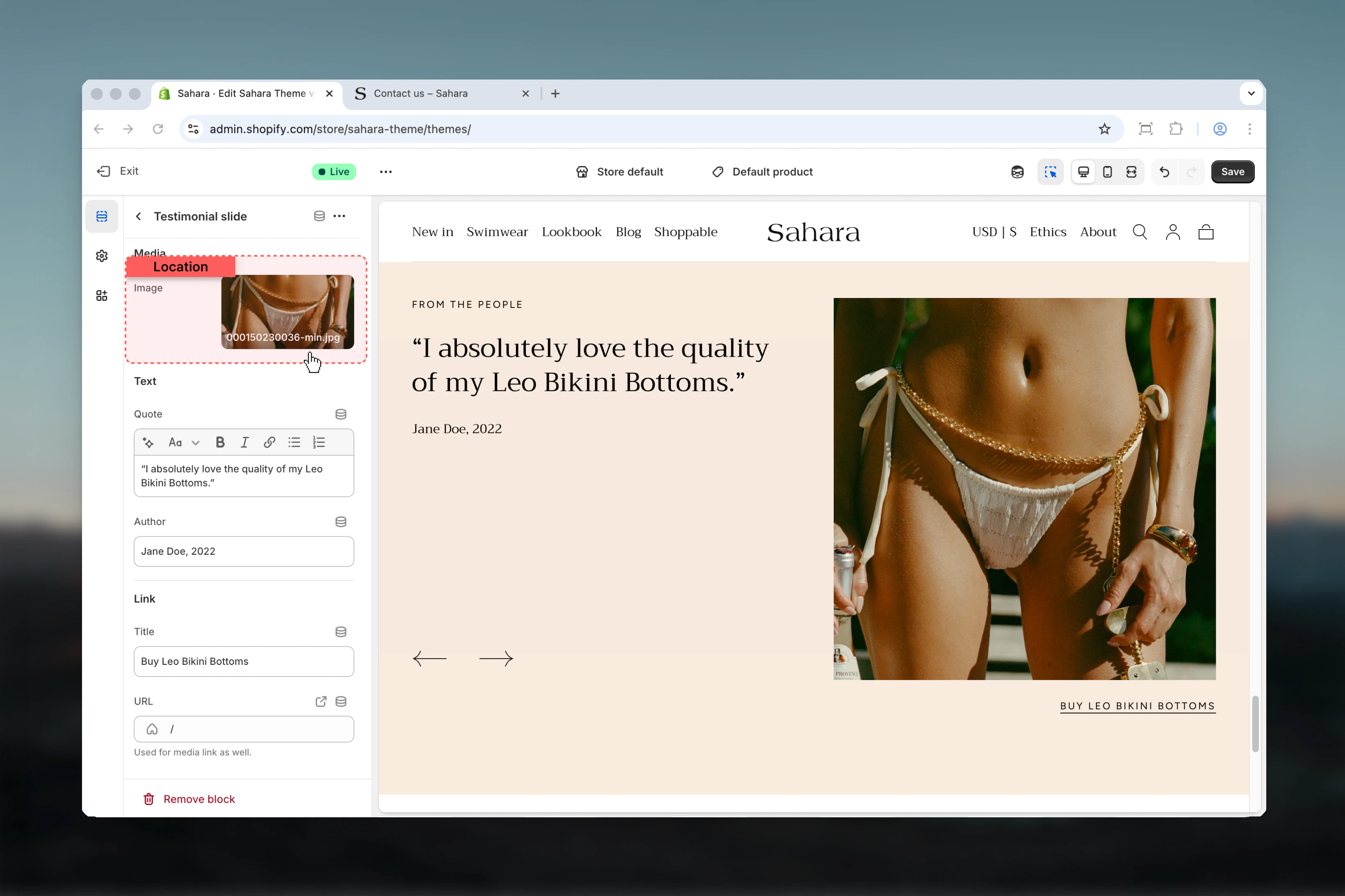 ### Quote
The main testimonial text or customer review.
**Best practices:**
* Keep testimonials authentic and unedited (or minimally edited)
* Aim for 20-50 words for optimal readability
* Include specific details (product names, features, benefits)
* Avoid generic praise ("Great product!") in favor of specific feedback
* Use rich text sparingly (emphasize key phrases only)
**Example:**
Good: "The Leo Bikini Bottoms fit perfectly and the fabric quality exceeded my expectations. I've worn them all summer!"
Too generic: "Great quality, highly recommend!"
**Default:** "I absolutely love the quality of my Leo Bikini Bottoms."
Supports rich text formatting.
### Author
Name of the person providing the testimonial, optionally with date or location.
**Format examples:**
* "Jane Doe"
* "Jane Doe, 2022"
* "Jane D., New York"
* "J.D., Verified Customer"
**Default:** "Jane Doe, 2022"
Adding dates or "Verified Customer" labels increases credibility and trustworthiness.
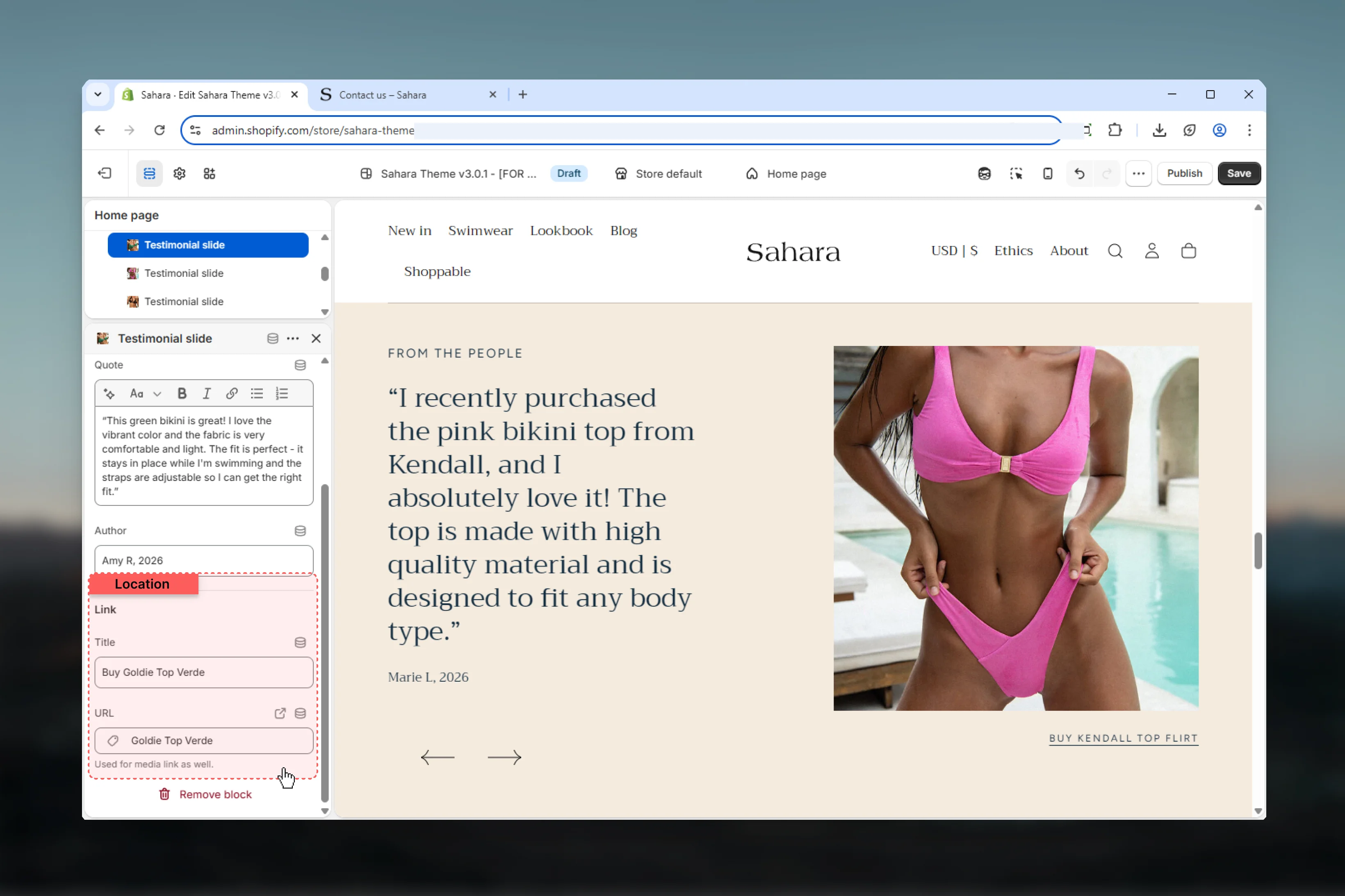
### Link title
Optional button or link text displayed with the testimonial.
**Use links to:**
* Direct to the reviewed product page
* Link to full review or case study
* Connect to customer's social profile (if permitted)
* Drive traffic to related collection
**Link text examples:**
* "Buy Leo Bikini Bottoms"
* "Read full review"
* "Shop this collection"
* "See more reviews"
Leave empty if testimonial doesn't need a call-to-action.
**Default:** "Buy Leo Bikini Bottoms"
### Link URL
Destination URL for the testimonial link.
**Common destinations:**
* Product page: `/products/product-handle`
* Collection page: `/collections/collection-handle`
* Full review page: `/pages/reviews`
* External review platform (Trustpilot, Google, etc.)
If link URL is empty, no link or button will display even if link title is set.
**Default:** "/"
### Quote
The main testimonial text or customer review.
**Best practices:**
* Keep testimonials authentic and unedited (or minimally edited)
* Aim for 20-50 words for optimal readability
* Include specific details (product names, features, benefits)
* Avoid generic praise ("Great product!") in favor of specific feedback
* Use rich text sparingly (emphasize key phrases only)
**Example:**
Good: "The Leo Bikini Bottoms fit perfectly and the fabric quality exceeded my expectations. I've worn them all summer!"
Too generic: "Great quality, highly recommend!"
**Default:** "I absolutely love the quality of my Leo Bikini Bottoms."
Supports rich text formatting.
### Author
Name of the person providing the testimonial, optionally with date or location.
**Format examples:**
* "Jane Doe"
* "Jane Doe, 2022"
* "Jane D., New York"
* "J.D., Verified Customer"
**Default:** "Jane Doe, 2022"
Adding dates or "Verified Customer" labels increases credibility and trustworthiness.
### Link title
Optional button or link text displayed with the testimonial.
**Use links to:**
* Direct to the reviewed product page
* Link to full review or case study
* Connect to customer's social profile (if permitted)
* Drive traffic to related collection
**Link text examples:**
* "Buy Leo Bikini Bottoms"
* "Read full review"
* "Shop this collection"
* "See more reviews"
Leave empty if testimonial doesn't need a call-to-action.
**Default:** "Buy Leo Bikini Bottoms"
### Link URL
Destination URL for the testimonial link.
**Common destinations:**
* Product page: `/products/product-handle`
* Collection page: `/collections/collection-handle`
* Full review page: `/pages/reviews`
* External review platform (Trustpilot, Google, etc.)
If link URL is empty, no link or button will display even if link title is set.
**Default:** "/"
 ## Best practices
Use real customer testimonials with permission. Authenticity builds trust more than polished marketing copy.
Display 3-6 testimonials for best results. Too few lacks credibility, too many reduces impact.
Choose testimonials that mention specific products, features, or benefits rather than generic praise.
Set autoplay to at least 4-5 seconds for testimonials with 30+ words to ensure readability.
Place testimonials near conversion points: product pages, checkout, or below hero sections.
Use consistent author format across all testimonials (Name + Year, Name + Location, etc.).
If using testimonial images, maintain consistent styling, sizing, and quality across all slides.
Consider using "No image" layout for mobile-heavy sites to maximize testimonial readability.
## Common use cases
Use 4-5 strong testimonials with "Image right" layout and narrow content width. Set autoplay to 5 seconds. Include product links to drive conversions. Place below hero section or featured products.
Display 2-3 testimonials specific to the product with "No image" layout. Use product photos as testimonial images. Link testimonials to full review page. Disable autoplay for reading control.
Show 3 testimonials with "Image left" layout and full section width. Use customer photos (with permission) or lifestyle imagery. Add verified customer labels to author names.
Use "No image" layout with narrow content width focusing entirely on quotes. Display 4-6 testimonials with longer, detailed feedback. Remove product links for cleaner presentation.
Select 3-4 testimonials related to specific campaign or collection. Use custom featured image matching campaign theme. Set autoplay to 4 seconds with product links.
## Related sections
Display trust badges and guarantees
Show recommended products based on behavior
## Best practices
Use real customer testimonials with permission. Authenticity builds trust more than polished marketing copy.
Display 3-6 testimonials for best results. Too few lacks credibility, too many reduces impact.
Choose testimonials that mention specific products, features, or benefits rather than generic praise.
Set autoplay to at least 4-5 seconds for testimonials with 30+ words to ensure readability.
Place testimonials near conversion points: product pages, checkout, or below hero sections.
Use consistent author format across all testimonials (Name + Year, Name + Location, etc.).
If using testimonial images, maintain consistent styling, sizing, and quality across all slides.
Consider using "No image" layout for mobile-heavy sites to maximize testimonial readability.
## Common use cases
Use 4-5 strong testimonials with "Image right" layout and narrow content width. Set autoplay to 5 seconds. Include product links to drive conversions. Place below hero section or featured products.
Display 2-3 testimonials specific to the product with "No image" layout. Use product photos as testimonial images. Link testimonials to full review page. Disable autoplay for reading control.
Show 3 testimonials with "Image left" layout and full section width. Use customer photos (with permission) or lifestyle imagery. Add verified customer labels to author names.
Use "No image" layout with narrow content width focusing entirely on quotes. Display 4-6 testimonials with longer, detailed feedback. Remove product links for cleaner presentation.
Select 3-4 testimonials related to specific campaign or collection. Use custom featured image matching campaign theme. Set autoplay to 4 seconds with product links.
## Related sections
Display trust badges and guarantees
Show recommended products based on behavior