> ## Documentation Index
> Fetch the complete documentation index at: https://docs.digifist.com/llms.txt
> Use this file to discover all available pages before exploring further.
# Cart
> Configure cart functionality including shipping notifications, checkout options, upsells, and order notes
Cart settings control global cart functionality across both cart page and cart drawer, including free shipping progress notifications, dynamic checkout buttons, AI-powered product upsells, and customer order notes. Optimized cart features can increase conversion rates by 20-30% and boost average order value through strategic upsells and motivational shipping thresholds. Configure these cart settings to reduce cart abandonment and maximize revenue from customers already engaged in the purchase process.
## What this controls
Cart settings control global cart functionality across both cart page and cart drawer, including free shipping progress notifications, terms and conditions acceptance, dynamic checkout buttons (Shop Pay, Apple Pay, Google Pay), AI-powered product upsells, and customer order notes.
Cart features directly impact conversion rates and average order value. Enable shipping notifications and upsells to increase revenue by 20-30%.
## How it works
Cart settings are organized into four functional areas:
1. **Shipping Progress:** Motivate customers toward free shipping threshold
2. **Checkout Options:** Dynamic payment buttons and terms acceptance
3. **Product Upsells:** AI-powered recommendations to increase order value
4. **Customer Notes:** Special instructions and gift messages
These features work together to optimize cart conversion while improving customer experience.
## Getting started
From Shopify admin → **Online Store** → **Themes** → **Customize**
Click **Theme settings** → Select **Cart**
Enable free shipping progress bar and set threshold amount
Keep dynamic checkout enabled, configure terms if required
Edit upsell heading to match your brand voice
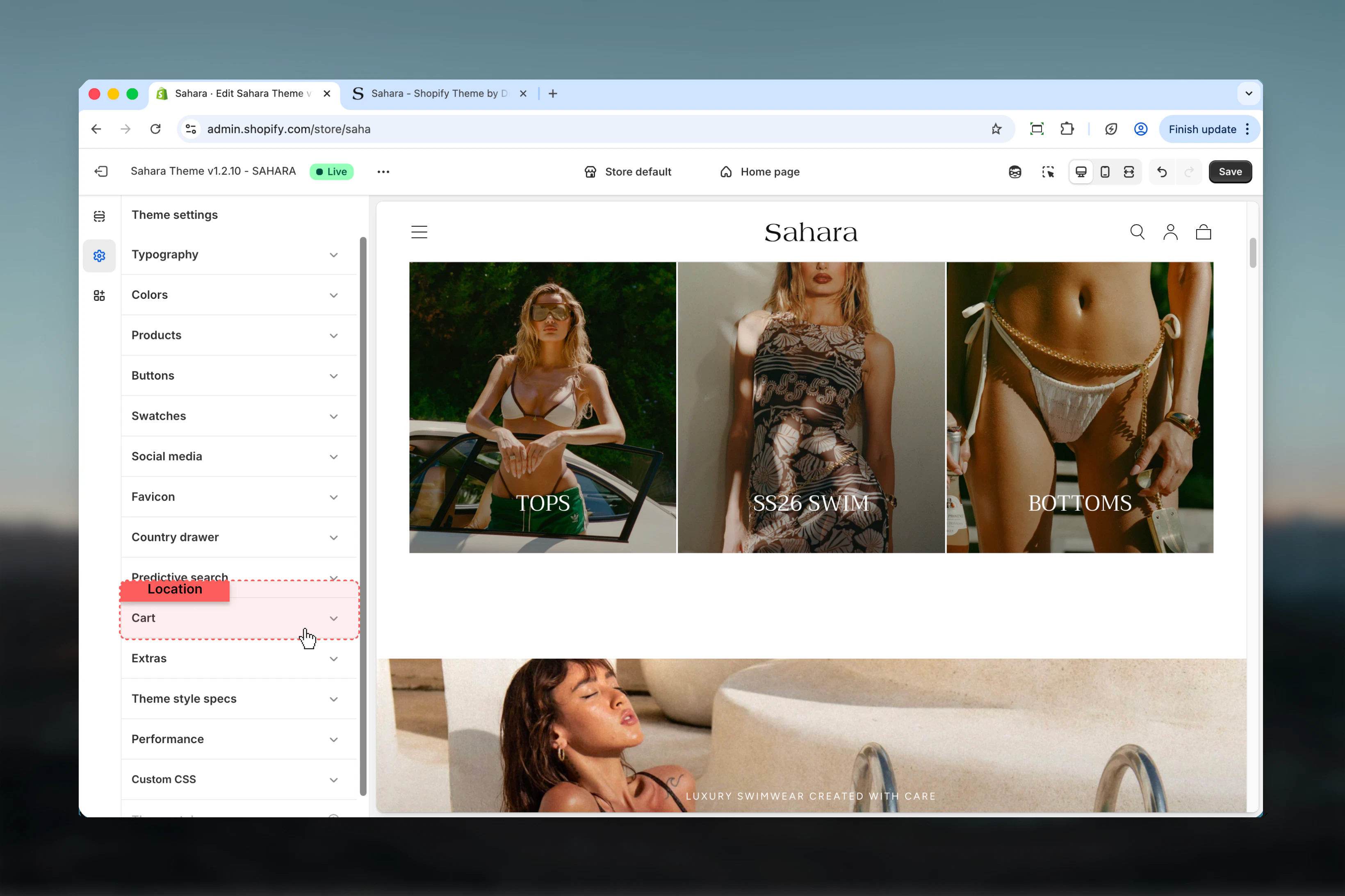
## Location
**Path:** Theme settings → Cart
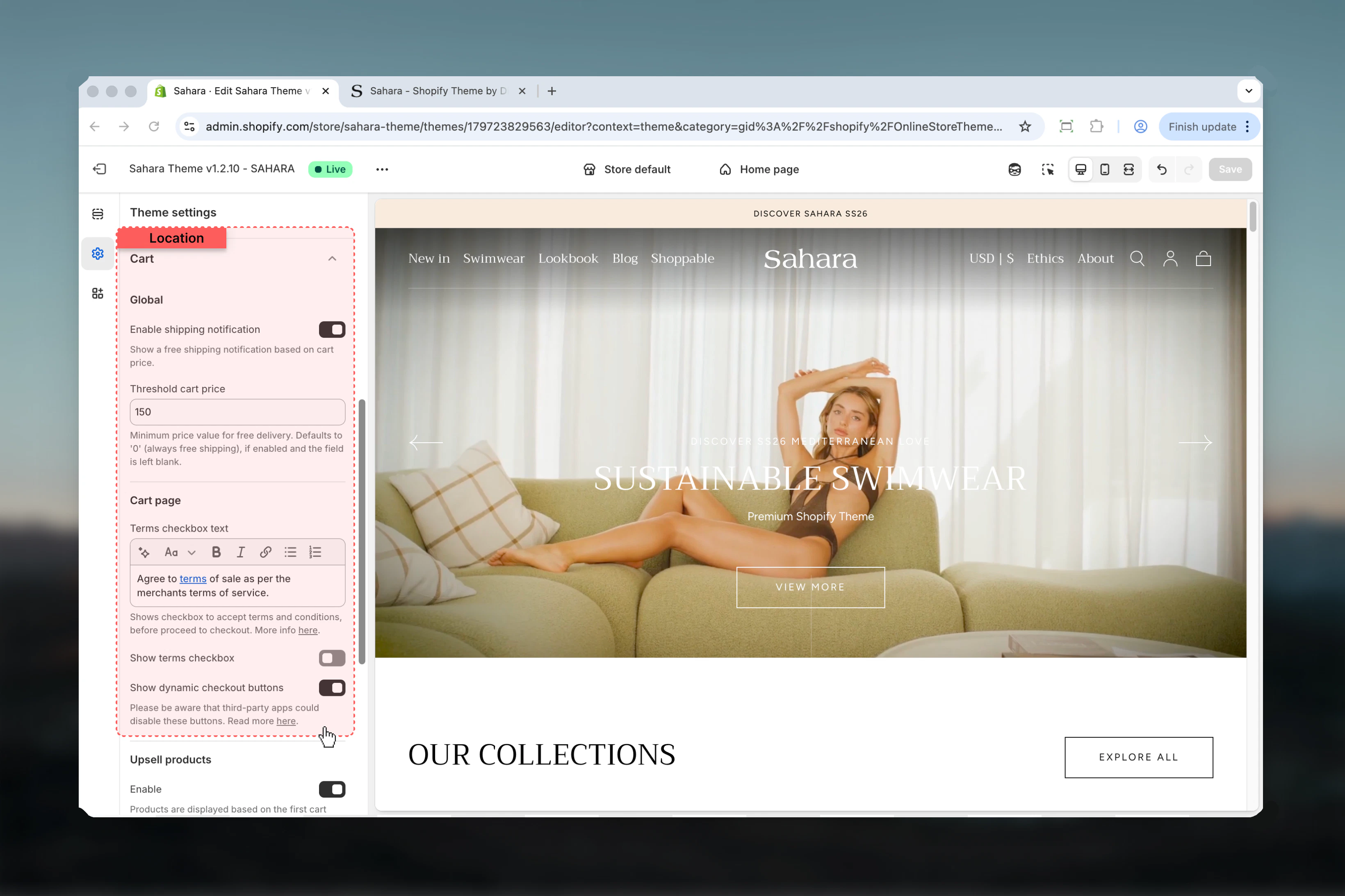
 ## Settings
### Enable Shipping Notification
Display progress bar showing how much more to spend for free shipping.
**Default:** Disabled
**Effect:**
* Shows: "Spend \$12 more for free shipping!" with progress bar
* When threshold reached: "You've unlocked free shipping!"
* Updates dynamically as cart value changes
Shipping notifications increase average order value by 10-15% by motivating customers to add items to reach free shipping.
### Threshold Cart Price
Minimum cart value required for free shipping.
**Format:** Numeric value without currency symbol (e.g., "50" not "\$50")
**Behavior:**
* Enter amount like "50" for \$50 threshold
* Leave empty or "0" for always free shipping
* Works with your store's currency
* Calculates: threshold - cart\_subtotal = amount remaining
**Default:** Empty (always free shipping if notification enabled)
**Strategic Threshold Calculation:**
**Formula:** Free Shipping Threshold = Average Order Value × 1.5
**Example Calculations:**
* AOV $35 → Set threshold at $50-60
* AOV $50 → Set threshold at $75-80
* AOV $75 → Set threshold at $100-110
**Why 1.5x AOV:**
* Achievable goal (customers believe they can reach it)
* Significant increase (20-50% AOV boost)
* Covers shipping cost (typically 10-15% of order)
* Psychological motivation (visible progress)
**Finding Your AOV:**
1. Shopify Admin → **Analytics** → **Reports**
2. View "Average Order Value" report
3. Use last 30 days average
4. Multiply by 1.5 for threshold
**Threshold by Store Type:**
* **Fashion/Apparel:** \$75-100 (medium items, multiple pieces)
* **Beauty/Cosmetics:** \$50-75 (smaller items, bundle easily)
* **Home Goods:** \$100-150 (larger items, higher value)
* **Jewelry:** \$150-200 (high value, premium positioning)
* **Books/Media:** \$35-50 (lower value, volume sales)
**Progress Messages (Automatic):**
**Below Threshold:**
**Threshold Reached:**
**Always Free (Threshold = 0):**
**Customization:**
* Theme automatically generates messages
* Progress bar fills based on cart/threshold ratio
* Celebration message when goal achieved
* Updates in real-time as items added/removed
**Best Practices:**
* Keep threshold visible and achievable
* Ensure free shipping actually offered at threshold
* Configure in Shopify: **Settings** → **Shipping** → Add free shipping rate
* Test cart at various amounts
**Revenue Impact:**
* **10-15% AOV increase:** Typical for well-set thresholds
* **20-30% add-to-cart rate increase:** Customers add more items
* **5-8% conversion rate increase:** Clear shipping expectation
**Customer Psychology:**
* **Goal-gradient effect:** Closer to goal = more motivated
* **Loss aversion:** Don't want to "lose" free shipping
* **Progress visualization:** Bar makes goal tangible
* **Immediate feedback:** Sees progress with each addition
**When It Works Best:**
* Stores with multiple low-price items
* Fashion/beauty (customers buy multiple pieces)
* Gift stores (add wrapping, cards to reach threshold)
* Impulse-purchase categories
**When to Skip:**
* Single high-value products (jewelry over \$500)
* Custom/made-to-order (shipping complexity)
* Local pickup only
* International only (shipping varies widely)
### Show Dynamic Checkout Buttons
Display accelerated checkout buttons (Shop Pay, Apple Pay, Google Pay, PayPal).
**Default:** Enabled
**Buttons Shown:**
* **Shop Pay:** Shopify's one-click checkout
* **Apple Pay:** iPhone/Safari users
* **Google Pay:** Android/Chrome users
* **PayPal:** PayPal account holders
* **Amazon Pay:** If configured in Shopify Payments
Third-party apps may conflict with dynamic checkout. If buttons don't appear, check app compatibility in Shopify settings.
**Conversion Impact:**
* **15-25% increase in conversion:** One-click checkout reduces friction
* **30-40% faster checkout:** Saved payment info, no form filling
* **50% better mobile conversion:** Native mobile payments (Apple/Google Pay)
**How Dynamic Checkout Works:**
1. Customer has payment method saved (Shop Pay, Apple Wallet, etc.)
2. Sees familiar button in cart
3. Clicks button → Authenticates (Face ID, Touch ID, password)
4. Order completed in seconds
**Which Buttons Appear:**
* **Device-specific:** iPhone shows Apple Pay, Android shows Google Pay
* **Browser-specific:** Safari prioritizes Apple Pay
* **Account-based:** PayPal if customer logged in
* **Availability-based:** Shop Pay if customer used it before
**Requirements:**
* Shopify Payments must be enabled (for most buttons)
* Customer must have payment method set up
* Browser/device must support the payment method
**Disable Dynamic Checkout If:**
**Custom Checkout Requirements:**
* Required custom fields before checkout
* Mandatory gift message or personalization
* Age verification needed
* Prescription upload required
**Legal/Compliance:**
* Must collect specific information
* License agreement must be shown
* Regional regulations require extra steps
**Business Model:**
* B2B store with quote process
* Pre-order with complex terms
* Subscription-only (custom flow)
**Technical Issues:**
* Third-party app conflicts
* Custom checkout modifications
* Testing custom integrations
**Keep Enabled For:**
* Standard e-commerce (99% of stores)
* Mobile-optimized experience
* Returning customer convenience
* Maximum conversion rates
### Terms Checkbox Text
Display terms and conditions text that customers must accept before checkout.
**Format:** Rich text (supports links and basic formatting)
**Example:**
### Show Terms Checkbox
Enable/disable the terms acceptance checkbox.
**Default:** Disabled
**Behavior:**
* Enabled + text provided: Checkbox appears, must be checked
* Disabled: No checkbox, checkout unrestricted
* Enforced: Cannot proceed to checkout without accepting
Terms checkboxes are legally required in some jurisdictions (EU/GDPR, Australia, etc.). Check local regulations.
**When Terms Are Required:**
**EU/EEA (GDPR):**
* Must obtain explicit consent for data processing
* Terms must be clear and accessible
* Cannot use pre-checked boxes
* Required for all EU customers
**California (CCPA):**
* Must disclose data collection
* Terms must include privacy rights
* Link to privacy policy required
**Australia (ACL):**
* Consumer guarantees must be stated
* Refund policy must be clear
* Terms cannot remove statutory rights
**General Best Practices:**
* Always link to full terms (don't embed long text)
* Use clear language: "I agree to..." not "I acknowledge..."
* Include both Terms & Conditions and Privacy Policy links
* Open links in new tab (don't interrupt checkout)
**Example Terms Text:**
**Creating Terms Pages:**
**1. Terms & Conditions:**
* Location: Shopify Admin → **Settings** → **Legal**
* Or: Create page manually at **Online Store** → **Pages**
* Include: Payment terms, shipping policy, product guarantees
**2. Privacy Policy:**
* Location: Shopify Admin → **Settings** → **Legal**
* Shopify provides template
* Include: Data collection, usage, third-party sharing
**3. Refund Policy:**
* Location: Shopify Admin → **Settings** → **Legal**
* Include: Return window, refund process, exceptions
**Linking in Checkbox:**
**Link Format:**
* Full URL: `https://yourstore.com/policies/terms`
* Relative URL: `/policies/terms` (recommended)
* Ensures links work on custom domains
### Enable Cart Upsell Products
Show AI-powered product recommendations in cart to increase order value.
**Default:** Enabled
**How It Works:**
* Uses Shopify's Recommendations API
* Based on first product in cart
* Shows complementary/frequently-bought-together items
* Machine learning improves recommendations over time
**Requires:**
* Shopify Search & Discovery app (free, included)
* Sufficient sales data for AI training
* Compatible theme (Sahara supports this)
Cart upsells can increase average order value by 20-30% with zero manual work. The AI learns from your store's sales patterns.
### Heading
Customize the heading text above upsell product recommendations.
**Default:** "Complete with..."
**Examples:**
* "Complete with..." (default, versatile)
* "You may also like"
* "Frequently bought together"
* "Pair it with"
* "Add these to your order"
* "Customers also purchased"
**How Shopify Recommendations Work:**
**Data Sources:**
* **Frequently bought together:** Products purchased in same order
* **Similar products:** Same category, tags, vendor
* **Complementary items:** Cross-category pairings
* **Trending products:** Popular items in your store
**Recommendation Logic:**
1. Customer adds Product A to cart
2. AI analyzes: What do customers who buy A also buy?
3. Shows 4-6 top recommendations
4. Updates if customer adds more products
**Machine Learning:**
* Learns from every order placed
* Improves accuracy over time
* Adapts to seasonal trends
* Personalizes based on cart contents
**Requirements for Good Recommendations:**
* **Minimum sales:** 50+ orders for accurate AI
* **Product variety:** Multiple products to recommend
* **Clear relationships:** Related products sell together
* **Good data:** Accurate product categories and tags
**Heading Selection Guide:**
**Professional/B2B:**
* "Recommended products"
* "Complete your order"
* "Add to your selection"
**Friendly/Casual:**
* "You'll love these too!"
* "Don't forget these"
* "Perfect pairs"
**Luxury/Premium:**
* "Complete the collection"
* "Curated for you"
* "Enhance your purchase"
**Action-Oriented:**
* "Add these now"
* "Get these too"
* "Upgrade your order"
**Social Proof:**
* "Customers also purchased"
* "Frequently bought together"
* "Popular additions"
**Gift/Seasonal:**
* "Complete the gift" (holidays)
* "Bundle and save" (if discounts offered)
* "Make it a set"
**Upsell Best Practices:**
**Product Selection:**
* Show 4-6 products (not too many, not too few)
* Price range: 20-50% of cart value
* Complementary, not competitive (don't show alternatives)
* Available stock only
**Presentation:**
* Clear product images
* Price visible
* One-click add to cart
* No navigation away from cart
**Timing:**
* Show immediately when cart opens
* Update when new products added
* Don't overwhelm with too many recommendations
**Performance Monitoring:**
* Track upsell click-through rate
* Measure AOV with/without upsells
* Test different heading text
* Monitor which products convert best
**When Upsells Work Best:**
* Fashion: Accessories with clothing
* Beauty: Full routine products
* Electronics: Cables, cases, accessories
* Food: Complementary items (chips + salsa)
* Home: Sets, matching items
### Enable Order Notes
Allow customers to add special instructions or messages to their order.
**Default:** Enabled
**Behavior:**
* Text area appears in cart
* Customer can enter free-form text
* Note passed to Shopify order
* Visible in order details for fulfillment
* Character limit: 500 characters (Shopify standard)
**Common Uses for Order Notes:**
**Gift Messages:**
* "Please include: Happy Birthday Sarah! Love, Mom"
* Most common use case (50%+ of notes)
* Gift stores should always enable
* Consider adding "Is this a gift?" checkbox elsewhere
**Delivery Instructions:**
* "Leave package at side door"
* "Ring doorbell, dog-friendly"
* "Apartment 3B, buzzer broken"
* Reduces delivery issues and redelivery costs
**Customization Requests:**
* "Please use blue thread instead of red"
* "Engrave: JM + SK"
* "Extra spicy, please!"
* Product-specific modifications
**Special Handling:**
* "This is a surprise, please use plain packaging"
* "Rush order if possible"
* "Include invoice for business expense"
**Timing Requests:**
* "Deliver after 5pm"
* "Hold for pickup Friday"
* "Send by Saturday for birthday"
**Disable Order Notes If:**
**Automated Fulfillment:**
* Fully automated dropshipping (no human review)
* Third-party fulfillment can't handle notes
* Warehouse system doesn't support notes
**Standardized Products:**
* No customization offered
* No gift services
* Digital products only (no shipping)
**Scale/Volume:**
* Very high order volume (notes slow fulfillment)
* Cannot review notes for every order
* Automated systems handle everything
**Keep Enabled For:**
* Gift stores (most important!)
* Custom/personalized products
* Small-medium volume stores
* Stores with human fulfillment
* Premium/personal service brands
**Alternative Solutions:**
* Custom product options for specific requests
* Gift message app for dedicated gift notes
* Contact form for complex requests
**Processing Order Notes:**
**In Shopify Admin:**
1. Open order
2. Notes appear in **Notes** section
3. Review before fulfillment
4. Add to packing slip if needed
**Best Practices:**
* Check notes before packing every order
* Flag orders with special requests
* Respond if request cannot be fulfilled
* Track common note types for process improvement
**Common Note Categories:**
* **Gift:** Include message card
* **Delivery:** Follow special instructions
* **Customization:** Apply requested changes
* **Timing:** Prioritize or hold as requested
**Communication:**
* Email customer if note unclear
* Confirm if request cannot be met
* Set expectations ("We'll do our best...")
**System Integration:**
* Most shipping apps show notes
* ERP systems can import notes field
* Packing slip apps include notes
* Fulfillment services may support notes
## Settings
### Enable Shipping Notification
Display progress bar showing how much more to spend for free shipping.
**Default:** Disabled
**Effect:**
* Shows: "Spend \$12 more for free shipping!" with progress bar
* When threshold reached: "You've unlocked free shipping!"
* Updates dynamically as cart value changes
Shipping notifications increase average order value by 10-15% by motivating customers to add items to reach free shipping.
### Threshold Cart Price
Minimum cart value required for free shipping.
**Format:** Numeric value without currency symbol (e.g., "50" not "\$50")
**Behavior:**
* Enter amount like "50" for \$50 threshold
* Leave empty or "0" for always free shipping
* Works with your store's currency
* Calculates: threshold - cart\_subtotal = amount remaining
**Default:** Empty (always free shipping if notification enabled)
**Strategic Threshold Calculation:**
**Formula:** Free Shipping Threshold = Average Order Value × 1.5
**Example Calculations:**
* AOV $35 → Set threshold at $50-60
* AOV $50 → Set threshold at $75-80
* AOV $75 → Set threshold at $100-110
**Why 1.5x AOV:**
* Achievable goal (customers believe they can reach it)
* Significant increase (20-50% AOV boost)
* Covers shipping cost (typically 10-15% of order)
* Psychological motivation (visible progress)
**Finding Your AOV:**
1. Shopify Admin → **Analytics** → **Reports**
2. View "Average Order Value" report
3. Use last 30 days average
4. Multiply by 1.5 for threshold
**Threshold by Store Type:**
* **Fashion/Apparel:** \$75-100 (medium items, multiple pieces)
* **Beauty/Cosmetics:** \$50-75 (smaller items, bundle easily)
* **Home Goods:** \$100-150 (larger items, higher value)
* **Jewelry:** \$150-200 (high value, premium positioning)
* **Books/Media:** \$35-50 (lower value, volume sales)
**Progress Messages (Automatic):**
**Below Threshold:**
**Threshold Reached:**
**Always Free (Threshold = 0):**
**Customization:**
* Theme automatically generates messages
* Progress bar fills based on cart/threshold ratio
* Celebration message when goal achieved
* Updates in real-time as items added/removed
**Best Practices:**
* Keep threshold visible and achievable
* Ensure free shipping actually offered at threshold
* Configure in Shopify: **Settings** → **Shipping** → Add free shipping rate
* Test cart at various amounts
**Revenue Impact:**
* **10-15% AOV increase:** Typical for well-set thresholds
* **20-30% add-to-cart rate increase:** Customers add more items
* **5-8% conversion rate increase:** Clear shipping expectation
**Customer Psychology:**
* **Goal-gradient effect:** Closer to goal = more motivated
* **Loss aversion:** Don't want to "lose" free shipping
* **Progress visualization:** Bar makes goal tangible
* **Immediate feedback:** Sees progress with each addition
**When It Works Best:**
* Stores with multiple low-price items
* Fashion/beauty (customers buy multiple pieces)
* Gift stores (add wrapping, cards to reach threshold)
* Impulse-purchase categories
**When to Skip:**
* Single high-value products (jewelry over \$500)
* Custom/made-to-order (shipping complexity)
* Local pickup only
* International only (shipping varies widely)
### Show Dynamic Checkout Buttons
Display accelerated checkout buttons (Shop Pay, Apple Pay, Google Pay, PayPal).
**Default:** Enabled
**Buttons Shown:**
* **Shop Pay:** Shopify's one-click checkout
* **Apple Pay:** iPhone/Safari users
* **Google Pay:** Android/Chrome users
* **PayPal:** PayPal account holders
* **Amazon Pay:** If configured in Shopify Payments
Third-party apps may conflict with dynamic checkout. If buttons don't appear, check app compatibility in Shopify settings.
**Conversion Impact:**
* **15-25% increase in conversion:** One-click checkout reduces friction
* **30-40% faster checkout:** Saved payment info, no form filling
* **50% better mobile conversion:** Native mobile payments (Apple/Google Pay)
**How Dynamic Checkout Works:**
1. Customer has payment method saved (Shop Pay, Apple Wallet, etc.)
2. Sees familiar button in cart
3. Clicks button → Authenticates (Face ID, Touch ID, password)
4. Order completed in seconds
**Which Buttons Appear:**
* **Device-specific:** iPhone shows Apple Pay, Android shows Google Pay
* **Browser-specific:** Safari prioritizes Apple Pay
* **Account-based:** PayPal if customer logged in
* **Availability-based:** Shop Pay if customer used it before
**Requirements:**
* Shopify Payments must be enabled (for most buttons)
* Customer must have payment method set up
* Browser/device must support the payment method
**Disable Dynamic Checkout If:**
**Custom Checkout Requirements:**
* Required custom fields before checkout
* Mandatory gift message or personalization
* Age verification needed
* Prescription upload required
**Legal/Compliance:**
* Must collect specific information
* License agreement must be shown
* Regional regulations require extra steps
**Business Model:**
* B2B store with quote process
* Pre-order with complex terms
* Subscription-only (custom flow)
**Technical Issues:**
* Third-party app conflicts
* Custom checkout modifications
* Testing custom integrations
**Keep Enabled For:**
* Standard e-commerce (99% of stores)
* Mobile-optimized experience
* Returning customer convenience
* Maximum conversion rates
### Terms Checkbox Text
Display terms and conditions text that customers must accept before checkout.
**Format:** Rich text (supports links and basic formatting)
**Example:**
### Show Terms Checkbox
Enable/disable the terms acceptance checkbox.
**Default:** Disabled
**Behavior:**
* Enabled + text provided: Checkbox appears, must be checked
* Disabled: No checkbox, checkout unrestricted
* Enforced: Cannot proceed to checkout without accepting
Terms checkboxes are legally required in some jurisdictions (EU/GDPR, Australia, etc.). Check local regulations.
**When Terms Are Required:**
**EU/EEA (GDPR):**
* Must obtain explicit consent for data processing
* Terms must be clear and accessible
* Cannot use pre-checked boxes
* Required for all EU customers
**California (CCPA):**
* Must disclose data collection
* Terms must include privacy rights
* Link to privacy policy required
**Australia (ACL):**
* Consumer guarantees must be stated
* Refund policy must be clear
* Terms cannot remove statutory rights
**General Best Practices:**
* Always link to full terms (don't embed long text)
* Use clear language: "I agree to..." not "I acknowledge..."
* Include both Terms & Conditions and Privacy Policy links
* Open links in new tab (don't interrupt checkout)
**Example Terms Text:**
**Creating Terms Pages:**
**1. Terms & Conditions:**
* Location: Shopify Admin → **Settings** → **Legal**
* Or: Create page manually at **Online Store** → **Pages**
* Include: Payment terms, shipping policy, product guarantees
**2. Privacy Policy:**
* Location: Shopify Admin → **Settings** → **Legal**
* Shopify provides template
* Include: Data collection, usage, third-party sharing
**3. Refund Policy:**
* Location: Shopify Admin → **Settings** → **Legal**
* Include: Return window, refund process, exceptions
**Linking in Checkbox:**
**Link Format:**
* Full URL: `https://yourstore.com/policies/terms`
* Relative URL: `/policies/terms` (recommended)
* Ensures links work on custom domains
### Enable Cart Upsell Products
Show AI-powered product recommendations in cart to increase order value.
**Default:** Enabled
**How It Works:**
* Uses Shopify's Recommendations API
* Based on first product in cart
* Shows complementary/frequently-bought-together items
* Machine learning improves recommendations over time
**Requires:**
* Shopify Search & Discovery app (free, included)
* Sufficient sales data for AI training
* Compatible theme (Sahara supports this)
Cart upsells can increase average order value by 20-30% with zero manual work. The AI learns from your store's sales patterns.
### Heading
Customize the heading text above upsell product recommendations.
**Default:** "Complete with..."
**Examples:**
* "Complete with..." (default, versatile)
* "You may also like"
* "Frequently bought together"
* "Pair it with"
* "Add these to your order"
* "Customers also purchased"
**How Shopify Recommendations Work:**
**Data Sources:**
* **Frequently bought together:** Products purchased in same order
* **Similar products:** Same category, tags, vendor
* **Complementary items:** Cross-category pairings
* **Trending products:** Popular items in your store
**Recommendation Logic:**
1. Customer adds Product A to cart
2. AI analyzes: What do customers who buy A also buy?
3. Shows 4-6 top recommendations
4. Updates if customer adds more products
**Machine Learning:**
* Learns from every order placed
* Improves accuracy over time
* Adapts to seasonal trends
* Personalizes based on cart contents
**Requirements for Good Recommendations:**
* **Minimum sales:** 50+ orders for accurate AI
* **Product variety:** Multiple products to recommend
* **Clear relationships:** Related products sell together
* **Good data:** Accurate product categories and tags
**Heading Selection Guide:**
**Professional/B2B:**
* "Recommended products"
* "Complete your order"
* "Add to your selection"
**Friendly/Casual:**
* "You'll love these too!"
* "Don't forget these"
* "Perfect pairs"
**Luxury/Premium:**
* "Complete the collection"
* "Curated for you"
* "Enhance your purchase"
**Action-Oriented:**
* "Add these now"
* "Get these too"
* "Upgrade your order"
**Social Proof:**
* "Customers also purchased"
* "Frequently bought together"
* "Popular additions"
**Gift/Seasonal:**
* "Complete the gift" (holidays)
* "Bundle and save" (if discounts offered)
* "Make it a set"
**Upsell Best Practices:**
**Product Selection:**
* Show 4-6 products (not too many, not too few)
* Price range: 20-50% of cart value
* Complementary, not competitive (don't show alternatives)
* Available stock only
**Presentation:**
* Clear product images
* Price visible
* One-click add to cart
* No navigation away from cart
**Timing:**
* Show immediately when cart opens
* Update when new products added
* Don't overwhelm with too many recommendations
**Performance Monitoring:**
* Track upsell click-through rate
* Measure AOV with/without upsells
* Test different heading text
* Monitor which products convert best
**When Upsells Work Best:**
* Fashion: Accessories with clothing
* Beauty: Full routine products
* Electronics: Cables, cases, accessories
* Food: Complementary items (chips + salsa)
* Home: Sets, matching items
### Enable Order Notes
Allow customers to add special instructions or messages to their order.
**Default:** Enabled
**Behavior:**
* Text area appears in cart
* Customer can enter free-form text
* Note passed to Shopify order
* Visible in order details for fulfillment
* Character limit: 500 characters (Shopify standard)
**Common Uses for Order Notes:**
**Gift Messages:**
* "Please include: Happy Birthday Sarah! Love, Mom"
* Most common use case (50%+ of notes)
* Gift stores should always enable
* Consider adding "Is this a gift?" checkbox elsewhere
**Delivery Instructions:**
* "Leave package at side door"
* "Ring doorbell, dog-friendly"
* "Apartment 3B, buzzer broken"
* Reduces delivery issues and redelivery costs
**Customization Requests:**
* "Please use blue thread instead of red"
* "Engrave: JM + SK"
* "Extra spicy, please!"
* Product-specific modifications
**Special Handling:**
* "This is a surprise, please use plain packaging"
* "Rush order if possible"
* "Include invoice for business expense"
**Timing Requests:**
* "Deliver after 5pm"
* "Hold for pickup Friday"
* "Send by Saturday for birthday"
**Disable Order Notes If:**
**Automated Fulfillment:**
* Fully automated dropshipping (no human review)
* Third-party fulfillment can't handle notes
* Warehouse system doesn't support notes
**Standardized Products:**
* No customization offered
* No gift services
* Digital products only (no shipping)
**Scale/Volume:**
* Very high order volume (notes slow fulfillment)
* Cannot review notes for every order
* Automated systems handle everything
**Keep Enabled For:**
* Gift stores (most important!)
* Custom/personalized products
* Small-medium volume stores
* Stores with human fulfillment
* Premium/personal service brands
**Alternative Solutions:**
* Custom product options for specific requests
* Gift message app for dedicated gift notes
* Contact form for complex requests
**Processing Order Notes:**
**In Shopify Admin:**
1. Open order
2. Notes appear in **Notes** section
3. Review before fulfillment
4. Add to packing slip if needed
**Best Practices:**
* Check notes before packing every order
* Flag orders with special requests
* Respond if request cannot be fulfilled
* Track common note types for process improvement
**Common Note Categories:**
* **Gift:** Include message card
* **Delivery:** Follow special instructions
* **Customization:** Apply requested changes
* **Timing:** Prioritize or hold as requested
**Communication:**
* Email customer if note unclear
* Confirm if request cannot be met
* Set expectations ("We'll do our best...")
**System Integration:**
* Most shipping apps show notes
* ERP systems can import notes field
* Packing slip apps include notes
* Fulfillment services may support notes
 ## Best practices
1. **Set strategic shipping threshold**\
Calculate 1.5x your average order value for optimal results. Too high = unreachable, too low = no motivation.
2. **Always enable dynamic checkout**\
Increases mobile conversion by 30-40%. Disable only if you have specific requirements.
3. **Use terms checkbox for legal compliance**\
Required in EU/GDPR regions. Link to actual terms pages, don't embed long text.
4. **Keep upsells enabled**\
AI-powered recommendations increase AOV by 20-30% with zero manual work. Customize heading to match brand voice.
5. **Customize upsell heading**\
"Complete with..." is generic. Use brand-specific language: "Perfect pairs", "Don't forget", etc.
6. **Enable order notes for gift stores**\
50%+ of notes are gift messages. Critical for gift-oriented businesses.
7. **Test shipping notification at various cart values**\
Ensure messages display correctly and free shipping actually applies at threshold.
8. **Monitor upsell performance**\
Track which products are recommended and convert. AI improves over time with more data.
9. **Keep order notes enabled unless automated**\
Disable only if fulfillment is fully automated. Human-reviewed orders benefit from notes.
10. **Link to real terms pages**\
Don't fake compliance. Create actual terms/privacy pages in Shopify Legal settings.
## Common use cases
**Settings:**
* Shipping notification: **Enabled**
* Threshold: **1.5x AOV** (e.g., $75 for $50 AOV)
* Dynamic checkout: **Enabled**
* Terms checkbox: **Disabled** (unless legally required)
* Cart upsells: **Enabled**
* Upsell heading: **"Complete with..."** or **"Frequently bought together"**
* Order notes: **Enabled**
**Why:**
* Shipping threshold drives additional purchases (+10-15% AOV)
* Dynamic checkout maximizes mobile conversion (+30% mobile)
* Upsells add complementary items (+20-30% AOV)
* Order notes allow gift messages (increases gift purchases)
* No terms checkbox friction unless legally required
**Best for:** Most e-commerce stores, fashion, beauty, home goods
**Settings:**
* Shipping notification: **Enabled**
* Threshold: **Set based on AOV**
* Dynamic checkout: **Enabled**
* Terms checkbox: **Enabled**
* Terms text: **"I agree to the [Terms](link) and [Privacy Policy](link)"**
* Cart upsells: **Enabled**
* Upsell heading: **Customized**
* Order notes: **Enabled**
**Why:**
* GDPR requires explicit consent for data processing
* Terms checkbox provides documented consent
* Links to actual terms/privacy pages (transparency)
* Dynamic checkout and upsells still optimize revenue
* Order notes support customer service
**Best for:** EU-based stores, international stores selling to EU, privacy-focused brands
**Settings:**
* Shipping notification: **Enabled or Disabled** (depends on strategy)
* Threshold: **Lower than usual** (gifts are impulse, easier threshold)
* Dynamic checkout: **Enabled**
* Terms checkbox: **Disabled** (unless required)
* Cart upsells: **Enabled**
* Upsell heading: **"Complete the gift"** or **"Perfect additions"**
* Order notes: **ENABLED (critical!)**
**Why:**
* Order notes essential for gift messages
* Lower shipping threshold (gift buyers less price-sensitive)
* Upsell heading references gifting
* Dynamic checkout for busy gift shoppers
* Cart note for "Is this a gift?" confirmation
**Best for:** Gift shops, flower delivery, holiday stores, personalized products
**Settings:**
* Shipping notification: **Enabled**
* Threshold: **Moderate** (balance volume and value)
* Dynamic checkout: **Enabled**
* Terms checkbox: **Enabled if required**
* Cart upsells: **Enabled**
* Upsell heading: **Social proof** ("Customers also purchased")
* Order notes: **Disabled**
**Why:**
* Fully automated fulfillment can't process notes
* Social proof heading validates purchase decisions
* Dynamic checkout speeds high-volume processing
* Shipping threshold optimizes per-order revenue
* Upsells automated through AI
**Best for:** Dropshipping, print-on-demand, high-volume warehouse fulfillment
**Settings:**
* Shipping notification: **Disabled** (always free shipping implied)
* Threshold: N/A
* Dynamic checkout: **Enabled** (convenience for premium customers)
* Terms checkbox: **Disabled** (unless required)
* Cart upsells: **Enabled**
* Upsell heading: **"Complete the collection"** or **"Curated for you"**
* Order notes: **Enabled** (personalized service)
**Why:**
* Premium brands offer free shipping (no threshold needed)
* Luxury language in upsell heading
* Order notes support white-glove service
* Dynamic checkout for convenience
* No friction (terms) unless legally necessary
**Best for:** Luxury goods, high-end fashion, jewelry, premium electronics
## Related settings
* [Products](/themes/sahara/theme-settings/products) - Product card appearance affects upsells
* [Buttons](/themes/sahara/theme-settings/buttons) - Checkout button styling
* [Colors](/themes/sahara/theme-settings/colors) - Cart UI color schemes
* [Features](/themes/sahara/theme-settings/features) - Currency codes shown in cart
***
**Need help?** Test cart features with real products at various price points. Add items, watch shipping notification update, try dynamic checkout buttons, review upsell recommendations.
## Best practices
1. **Set strategic shipping threshold**\
Calculate 1.5x your average order value for optimal results. Too high = unreachable, too low = no motivation.
2. **Always enable dynamic checkout**\
Increases mobile conversion by 30-40%. Disable only if you have specific requirements.
3. **Use terms checkbox for legal compliance**\
Required in EU/GDPR regions. Link to actual terms pages, don't embed long text.
4. **Keep upsells enabled**\
AI-powered recommendations increase AOV by 20-30% with zero manual work. Customize heading to match brand voice.
5. **Customize upsell heading**\
"Complete with..." is generic. Use brand-specific language: "Perfect pairs", "Don't forget", etc.
6. **Enable order notes for gift stores**\
50%+ of notes are gift messages. Critical for gift-oriented businesses.
7. **Test shipping notification at various cart values**\
Ensure messages display correctly and free shipping actually applies at threshold.
8. **Monitor upsell performance**\
Track which products are recommended and convert. AI improves over time with more data.
9. **Keep order notes enabled unless automated**\
Disable only if fulfillment is fully automated. Human-reviewed orders benefit from notes.
10. **Link to real terms pages**\
Don't fake compliance. Create actual terms/privacy pages in Shopify Legal settings.
## Common use cases
**Settings:**
* Shipping notification: **Enabled**
* Threshold: **1.5x AOV** (e.g., $75 for $50 AOV)
* Dynamic checkout: **Enabled**
* Terms checkbox: **Disabled** (unless legally required)
* Cart upsells: **Enabled**
* Upsell heading: **"Complete with..."** or **"Frequently bought together"**
* Order notes: **Enabled**
**Why:**
* Shipping threshold drives additional purchases (+10-15% AOV)
* Dynamic checkout maximizes mobile conversion (+30% mobile)
* Upsells add complementary items (+20-30% AOV)
* Order notes allow gift messages (increases gift purchases)
* No terms checkbox friction unless legally required
**Best for:** Most e-commerce stores, fashion, beauty, home goods
**Settings:**
* Shipping notification: **Enabled**
* Threshold: **Set based on AOV**
* Dynamic checkout: **Enabled**
* Terms checkbox: **Enabled**
* Terms text: **"I agree to the [Terms](link) and [Privacy Policy](link)"**
* Cart upsells: **Enabled**
* Upsell heading: **Customized**
* Order notes: **Enabled**
**Why:**
* GDPR requires explicit consent for data processing
* Terms checkbox provides documented consent
* Links to actual terms/privacy pages (transparency)
* Dynamic checkout and upsells still optimize revenue
* Order notes support customer service
**Best for:** EU-based stores, international stores selling to EU, privacy-focused brands
**Settings:**
* Shipping notification: **Enabled or Disabled** (depends on strategy)
* Threshold: **Lower than usual** (gifts are impulse, easier threshold)
* Dynamic checkout: **Enabled**
* Terms checkbox: **Disabled** (unless required)
* Cart upsells: **Enabled**
* Upsell heading: **"Complete the gift"** or **"Perfect additions"**
* Order notes: **ENABLED (critical!)**
**Why:**
* Order notes essential for gift messages
* Lower shipping threshold (gift buyers less price-sensitive)
* Upsell heading references gifting
* Dynamic checkout for busy gift shoppers
* Cart note for "Is this a gift?" confirmation
**Best for:** Gift shops, flower delivery, holiday stores, personalized products
**Settings:**
* Shipping notification: **Enabled**
* Threshold: **Moderate** (balance volume and value)
* Dynamic checkout: **Enabled**
* Terms checkbox: **Enabled if required**
* Cart upsells: **Enabled**
* Upsell heading: **Social proof** ("Customers also purchased")
* Order notes: **Disabled**
**Why:**
* Fully automated fulfillment can't process notes
* Social proof heading validates purchase decisions
* Dynamic checkout speeds high-volume processing
* Shipping threshold optimizes per-order revenue
* Upsells automated through AI
**Best for:** Dropshipping, print-on-demand, high-volume warehouse fulfillment
**Settings:**
* Shipping notification: **Disabled** (always free shipping implied)
* Threshold: N/A
* Dynamic checkout: **Enabled** (convenience for premium customers)
* Terms checkbox: **Disabled** (unless required)
* Cart upsells: **Enabled**
* Upsell heading: **"Complete the collection"** or **"Curated for you"**
* Order notes: **Enabled** (personalized service)
**Why:**
* Premium brands offer free shipping (no threshold needed)
* Luxury language in upsell heading
* Order notes support white-glove service
* Dynamic checkout for convenience
* No friction (terms) unless legally necessary
**Best for:** Luxury goods, high-end fashion, jewelry, premium electronics
## Related settings
* [Products](/themes/sahara/theme-settings/products) - Product card appearance affects upsells
* [Buttons](/themes/sahara/theme-settings/buttons) - Checkout button styling
* [Colors](/themes/sahara/theme-settings/colors) - Cart UI color schemes
* [Features](/themes/sahara/theme-settings/features) - Currency codes shown in cart
***
**Need help?** Test cart features with real products at various price points. Add items, watch shipping notification update, try dynamic checkout buttons, review upsell recommendations.