

What this section does
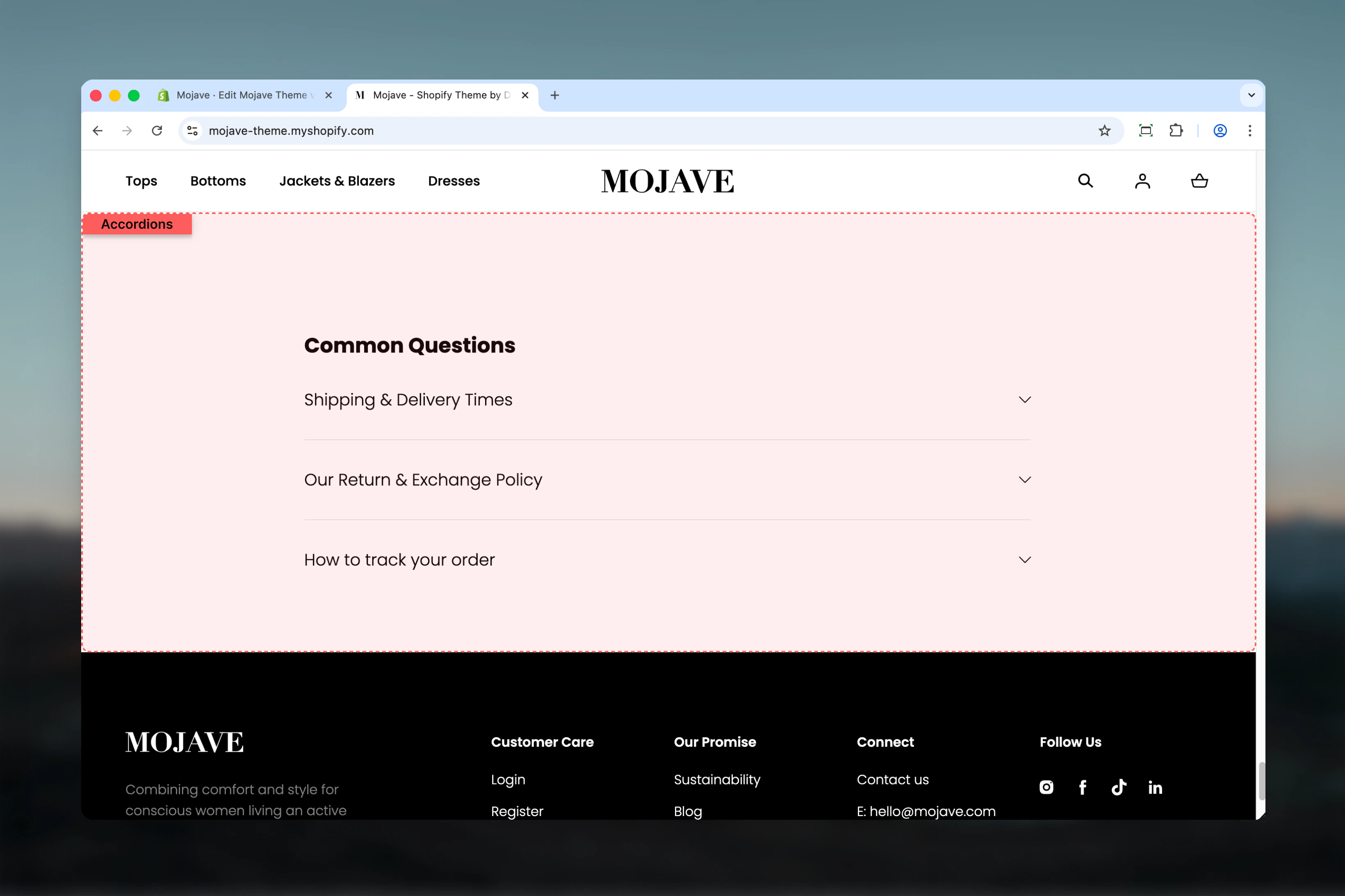
The Accordions section creates collapsible content panels perfect for FAQs, shipping information, product details, or any content that benefits from progressive disclosure. Features include:- Unlimited accordion items with individual expand/collapse
- Rich text content with formatting, links, images
- Page content integration: Pull content directly from a Shopify page
- Flexible section width: Narrower (default), Page, Narrow, or Fullwidth
- Section title/heading
- Only one panel opens at a time (mutual exclusivity)
Getting started
1
Add the section
From the Theme Customizer, click Add section and select Accordions
2
Set section title
Add a heading (e.g., “Frequently Asked Questions”, “Shipping Information”)
3
Add accordion items
Click Add accordion block. Each block creates one collapsible panel. Add as many as needed.
4
Configure each item
For each accordion: Add title, then either write content directly OR select a page to pull content from
Section settings
Title
Title
Text field (default: “Place title here”)Main heading displayed above all accordion items.Examples: “Frequently Asked Questions”, “Shipping & Returns”, “Product Care”, “Size Guide”Leave blank for no section heading.
Section width
Section width
Dropdown (default: Narrower)Controls the container width of the entire section:
- Narrower: Tightest width, optimal for readability (default)
- Page: Standard page width
- Narrow: Medium width
- Fullwidth: Edge-to-edge, full browser width
Block: Accordion
Type: accordion (unlimited blocks allowed) Each block creates one collapsible panel with a title and content area.Title
Title
Text field (default: “Place block title here”)The clickable heading for this accordion item:
- Always visible (never hidden)
- Clicking toggles the panel open/closed
- Should be a clear question or topic label
- “What is your return policy?”
- “How long does shipping take?”
- “What sizes do you offer?”
- “Care Instructions”
Content
Content
Rich text editor (default: “Use rich text for custom answers. Use page integration for reusable content (e.g., standard shipping policy used in multiple places).
Place block content here
”)The collapsible content displayed when panel is expanded:- Supports rich text formatting (bold, italic, lists, links)
- Can include paragraphs, headings, lists, images
- Hidden by default, revealed when user clicks item title
If a Page is selected (below), that page’s content will override this field.
Page
Page
Page picker (optional)Select a Shopify page to pull content from:
- Overwrites the Content field with selected page’s content
- Useful for maintaining consistent policies across multiple locations
- Updates automatically when page content changes
- Link to “Shipping Policy” page instead of duplicating text
- Pull content from “Returns” page
- Reference “Size Guide” page content
Best practices
Narrower width for readability
Use default “Narrower” width for FAQ sections. Optimal line length (50-75 characters) improves reading comprehension.
Question format for titles
For FAQs, phrase titles as questions customers actually ask. Use “How do I…?” and “What is…?” formats for clarity.
Prioritize top questions
Place most frequently asked questions first. Use analytics or customer service data to identify top concerns.
Keep answers concise
Aim for 2-4 paragraphs per answer. Long content defeats the purpose of progressive disclosure. Link to full pages if needed.
Use page integration wisely
Link to pages for policies that need legal accuracy (returns, privacy). Use manual content for quick FAQs.
5-10 items optimal
Too few (1-3) makes accordions unnecessary. Too many (15+) overwhelms users. Group into multiple sections if needed.
Descriptive section titles
“FAQs” is vague. Use “Shipping & Returns Questions” or “Product Care Guide” to set expectations.
Rich text formatting
Use bold for emphasis, lists for steps, and links for additional resources. Formatting improves content scannability.
Common use cases
Homepage FAQs — Answer common objections and questions before users reach PDP (shipping times, returns, materials) Product page FAQs — Product-specific questions below product info (size guide, care instructions, materials, dimensions) Shipping information — Detailed shipping methods, times, costs, and policies in collapsible format Return policy — Comprehensive return/exchange process broken into logical sections (eligibility, process, timeframes) Size guide — Expandable sizing information per product category (shirts, pants, shoes) with measurement instructions About/Company page — Company history, values, team info as collapsible sections for lengthy contentLayout behavior
Desktop:- All accordion items stacked vertically
- Section title centered above items (if present)
- One item opens at a time (clicking new item closes previous)
- Smooth expand/collapse animation
- Section width determined by Section width setting
- Same behavior as desktop (vertical stack)
- Full-width panels regardless of Section width setting
- Touch-optimized click targets for titles
- Content stays within mobile viewport
- Closed state: Only title visible
- Open state: Title + content visible
- Auto-close: Opening one item automatically closes others
- Default state: All items closed on page load
Accordion behavior
Opening/closing:- Click any title to expand that panel
- Click same title again to collapse
- Opening a new panel automatically closes the previously open panel
- Only one panel open at a time (mutual exclusivity)
- Closed: Title only (clickable)
- Open: Title + full content below
- Content appears with smooth slide-down animation
- Visual indicator (icon/chevron) shows open/closed state
- When Page is selected, Content field is ignored
- Page content rendered with full Shopify page formatting
- Updates automatically if page content changes
- No manual synchronization needed
Customization tips
For product FAQs (PLP/PDP):- Use “Narrower” or “Narrow” width
- Keep 5-8 questions focused on product specifics
- Place after product description on PDP
- Examples: sizing, materials, care, shipping time, warranty
- Use “Page” width or “Fullwidth” for prominence
- Link to official policy pages via Page picker
- Groups: Shipping, Returns, Privacy, Terms
- Section titles: “Shipping & Delivery”, “Return Policy Details”
- Place after hero/featured products
- 3-5 top questions that remove purchase barriers
- Section title: “Common Questions” or “Why Shop With Us”
- Focus on shipping speed, return ease, quality assurance
- Use “Narrower” for optimal reading
- Group related topics (e.g., “Care Instructions” with wash/dry/store)
- Use rich text formatting (lists, bold) for instructional steps
Related sections
- Rich Text — Alternative for non-collapsible content presentation
- Content Tiles — Grid-based content blocks for visual FAQ alternatives
- Multi Column Text — Side-by-side content organization without collapse
- Product Recommendations — Often paired with product FAQs on PDP