

What this section does
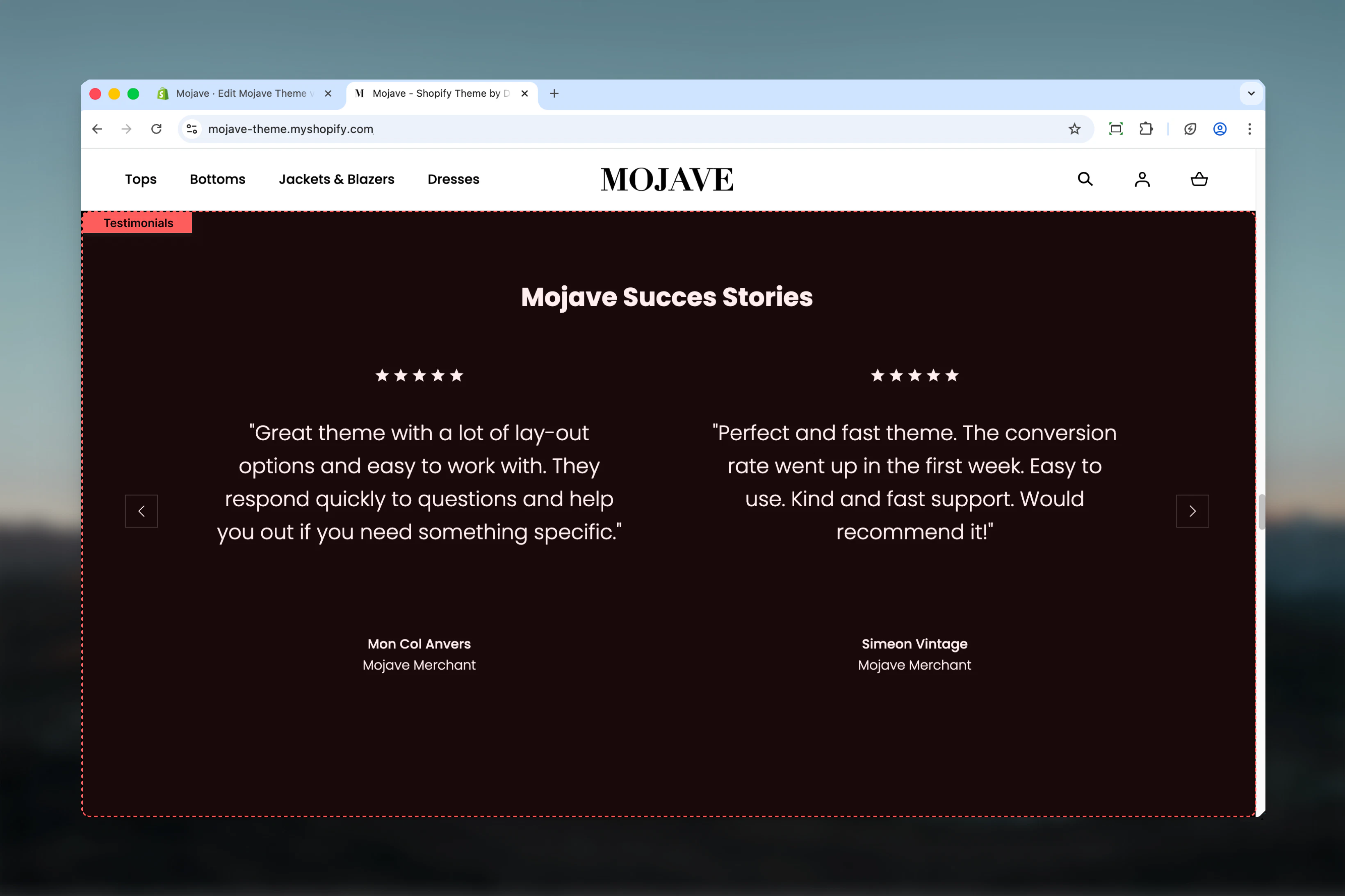
The Testimonials section showcases customer reviews and social proof with:- Carousel/slider displaying 1 or 2 reviews at once (desktop)
- Star ratings (1-5 stars)
- Author name and role/title
- Three style variations: Main, Light, or Dark
- Optional heading and CTA link
Getting started
1
Add the section
From the Theme Customizer, click Add section and select Testimonials
2
Add review blocks
Add multiple Review blocks (typically 3-6 reviews). Each block represents one customer testimonial.
3
Configure reviews
For each review, set star rating, add review text, and include author name and role
4
Choose style & layout
Select style (Main/Light/Dark), set reviews showing at once (1 or 2), and add optional heading/link
Section settings
Style
Style
Dropdown (default: Dark)Controls the color scheme and background of the testimonials section:
- Main: Uses primary theme colors with main background
- Light: Light background with dark text
- Dark: Dark background with light text (default)
Reviews showing at once
Reviews showing at once
Dropdown (default: Two) — Desktop onlyControls how many review cards display simultaneously on desktop:When to use One: Longer reviews, more prominent display, focused attentionWhen to use Two: Shorter reviews, show more social proof at once, dynamic layout
- One: Single review card (centered, focused)
- Two: Two review cards side-by-side (default)
Mobile always displays one review at a time regardless of this setting.
Heading
Heading
Text field (default: “Reviews heading”)Main heading displayed above the reviews carousel. Use to introduce testimonials section.Examples: “What Our Customers Say”, “Trusted by Thousands”, “Customer Reviews”
Link text & URL
Link text & URL
Link text (text, default: “Reviews link”)
- CTA text displayed below reviews
- Destination for the CTA link
Spacing - Desktop
Spacing - Desktop
Dropdown (default: Default)Controls vertical spacing above and below the section on desktop:
- Default: Standard spacing
- Medium: Moderate spacing
- Compact: Minimal spacing
Spacing - Mobile
Spacing - Mobile
Dropdown (default: Compact)Controls vertical spacing above and below the section on mobile:
- Default: Standard mobile spacing
- Compact: Reduced spacing (recommended)
Block types
Review block
No limit — Add as many review blocks as neededStar/s count
Star/s count
Range slider — 1 to 5 stars (default: 4)Number of stars to display for this review. Shows filled star icons based on rating.Recommendation: Mix ratings (mostly 4-5 stars with occasional 3 stars) for authenticity. All 5-star reviews can look fake.
Content
Content
Textarea (default: ""Lorem ipsum dolor sit amet consectetur adipisicing elit…"")The actual review text/testimonial content from the customer.Best practices:
- Keep to 2-4 sentences for readability
- Include specific details (product names, results, experiences)
- Use customer’s actual language (including minor grammar quirks adds authenticity)
- Highlight benefits, outcomes, or emotional responses
- Click Add block → Select Review
- Set star count, add review text, author name, and role
- Repeat for each testimonial (typically 3-6 reviews)
- Reviews rotate in carousel in the order blocks are arranged
Best practices
Use real reviews
Always use genuine customer feedback. Authenticity builds trust—fake reviews damage credibility and may violate regulations.
Mix star ratings
Include mostly 4-5 star reviews with occasional 3-star reviews for authenticity. All 5-star reviews appear suspicious.
Keep reviews concise
Limit reviews to 2-4 sentences (50-100 words). Shorter reviews are more readable and allow customers to scan multiple testimonials.
Show 3-6 reviews
Add 3-6 review blocks for optimal carousel length. Too few (1-2) lacks impact, too many (10+) becomes overwhelming.
Specific over generic
Prioritize reviews that mention specific products, features, or outcomes over vague praise like “Great product!”
Add context with role
Use author role to add credibility: “Verified Buyer”, location, or customer type. This builds trust and relatability.
Dark for contrast
Use Dark style (default) when placing testimonials between light sections to create visual separation and draw attention.
Link to more reviews
Always include a link to view all reviews (review platform, collection page, or dedicated reviews page) for customers wanting more social proof.
Common use cases
Homepage social proof — Place testimonials section on homepage (often near bottom) to build trust before visitors make purchase decisions Post-product sections — Add below product sections or featured products to reinforce purchase intent with social validation Landing page credibility — Include on campaign landing pages to overcome skepticism and increase conversion rates About page validation — Feature customer testimonials on About page to validate brand claims and build emotional connection Pre-footer trust builder — Position just before footer as final trust signal before visitors leave or make decisionLayout behavior
Desktop:- Reviews showing at once = Two: Two review cards side-by-side in carousel
- Reviews showing at once = One: Single centered review card in carousel
- Navigation arrows on left/right for manual browsing
- Dots/indicators at bottom showing position in carousel
- Always displays one review at a time regardless of desktop setting
- Full-width review card
- Swipeable carousel (touch gesture support)
- Navigation arrows and dots for browsing
- Auto-rotation: None (reviews do not auto-advance)
- Manual navigation: Click arrows or swipe
- Infinite loop: Carousel loops from last review back to first
Star rating display
Stars display as filled/unfilled icons based on rating:- 5 stars: 5 filled stars
- 4 stars: 4 filled, 1 unfilled
- 3 stars: 3 filled, 2 unfilled
- 2 stars: 2 filled, 3 unfilled
- 1 star: 1 filled, 4 unfilled
Content guidelines
Review text best practices:- Include specific product names or features mentioned
- Highlight concrete benefits or results experienced
- Keep emotional language authentic (not hyperbolic)
- Vary review length and tone across reviews
- Include minor imperfections for authenticity
- Use real names (full names or first name + last initial)
- Add location for geographic relevance
- Include “Verified Buyer” when applicable
- Show recency when relevant (“Recent Purchase”, “Long-time Customer”)
Related sections
- Trust Indicators — Static trust badges and certifications
- Featured Articles — Customer stories or long-form testimonials via blog
- Press — Media mentions and press coverage for additional social proof
- Multi Column Text — Text-based content that could include testimonials in alternative format