

What this section does
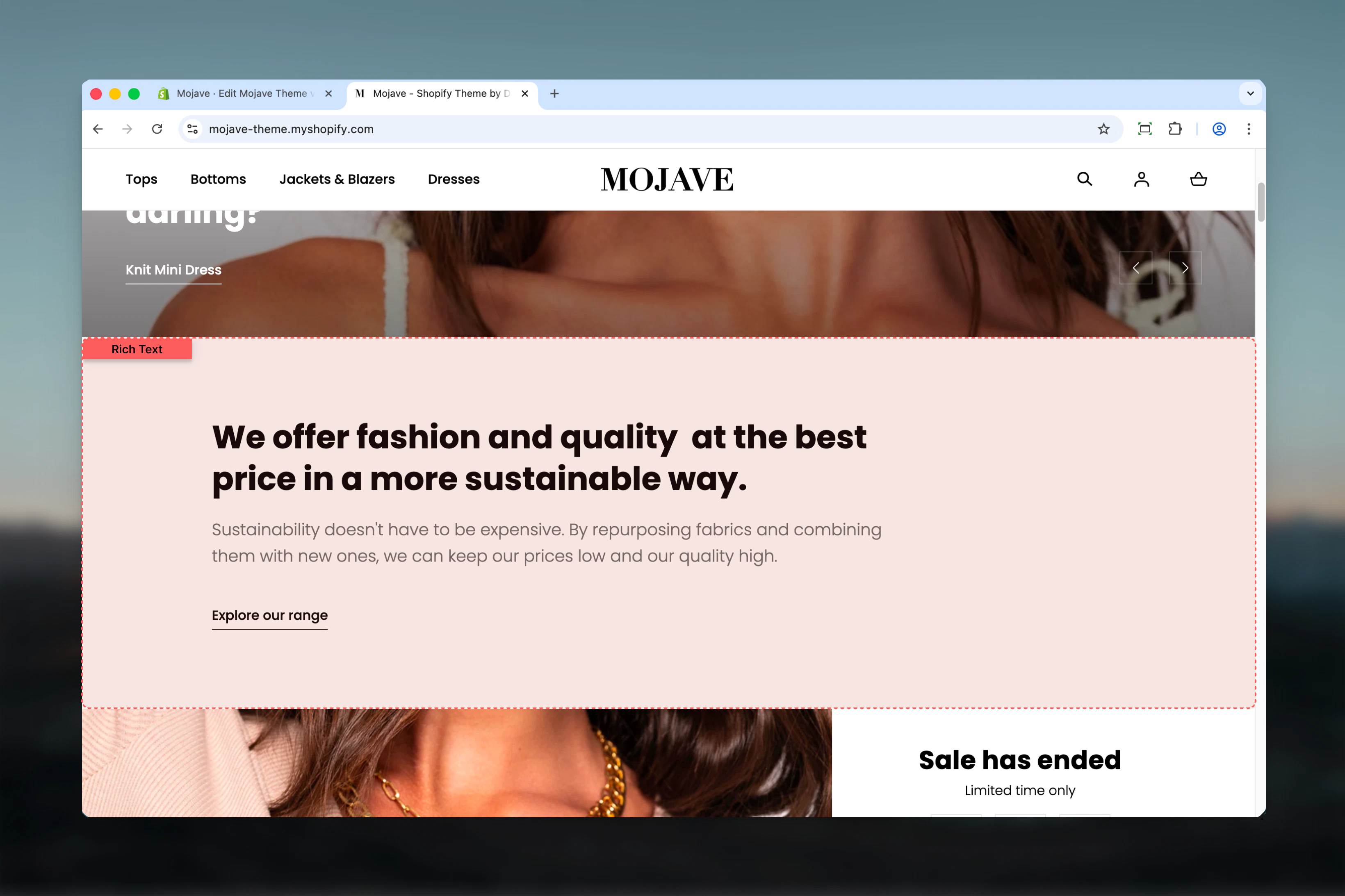
The Rich Text section creates clean, focused content blocks perfect for editorial content, brand storytelling, FAQs, or any text-heavy pages. It supports:- Heading (optional, limit 1)
- Rich text content with formatting (optional, limit 1)
- Link/CTA (optional, limit 1)
Getting started
1
Add the section
From the Theme Customizer, click Add section and select Richtext
2
Add content blocks
Add Heading, Content, and/or Link blocks as needed (each limited to 1 per section)
3
Configure layout
Set text alignment, adjust max width and section width, and configure spacing for your page design
Section settings
Text horizontal align
Text horizontal align
Dropdown (default: Center)Controls horizontal alignment of all text content in the section:
- Start (Left): Left-aligned text
- Center: Centered text (default, works well for focused content)
- End (Right): Right-aligned text
Max width
Max width
Dropdown (default: Wide)Controls the maximum width of the text content area:
- Default: Narrower, more focused reading width (optimal for readability)
- Wide: Wider content area for more expansive text
Section width
Section width
Dropdown (default: Full)Controls the overall section container width:
- Narrow: Tighter container (medium width)
- Full: Full-width container (edge-to-edge)
- Use Narrow with center alignment for focused, editorial content
- Use Full when Rich Text is part of a broader page layout
Add decoration
Add decoration
Checkbox (default: unchecked)Adds a decorative element (typically a small graphic or line) to enhance the visual appeal of the section.
Spacing - Desktop
Spacing - Desktop
Dropdown (default: Compact)Controls vertical spacing above and below the section on desktop:
- Default: Standard spacing
- Medium: Moderate spacing
- Compact: Minimal spacing (recommended for text sections)
- None: No spacing for seamless layouts
Spacing - Mobile
Spacing - Mobile
Dropdown (default: Default)Controls vertical spacing above and below the section on mobile:
- Default: Standard mobile spacing (recommended)
- Compact: Reduced spacing
- None: No spacing
Block types
Heading block
Limit: 1 per sectionHeading
Heading
Textarea (default: “Talk about your brand”)Main heading for the rich text section. Supports multiple lines.Keep concise (3-7 words) for section headings.
Content block
Limit: 1 per sectionContent
Content
Rich text editor (default: “Share information about your brand…”)Full-featured rich text content with formatting options:
- Bold and italic text
- Headings (H1-H6)
- Bullet and numbered lists
- Links
- Paragraphs
Link block
Limit: 1 per sectionLink text
Link text
Text field (default: “Shop all”)Text displayed for the call-to-action link.
Link URL
Link URL
URL field (default: /collections)Destination URL for the CTA link.Common destinations: collection pages, product pages, other content pages, external links.
Best practices
Optimal line length
Use Default max width (not Wide) for long-form content. Shorter line lengths (~60-80 characters) improve readability.
Center for focus
Center-aligned text works best for standalone rich text sections. Use left alignment when rich text is part of a larger layout.
One of each block
Add exactly one Heading, one Content, and one Link block for complete sections. Each block is optional but limited to 1.
Rich text formatting
Use Content block formatting (bold, lists, headings) to break up long text and guide readers through your content.
Narrow + Center
Combine Narrow section width with Center text alignment for highly focused, editorial-style content display.
Compact spacing
Use Compact spacing (default) for text sections that should flow naturally without excessive whitespace.
Skip the link
Not every rich text section needs a CTA link. Skip the Link block for pure informational content.
Decoration sparingly
Enable decoration for special sections (About, Brand Story) but keep it off for utilitarian content (Policies, FAQs).
Common use cases
About page — Tell your brand story with a heading, rich formatted content, and a link to learn more or shop Policy pages — Display shipping, return, or privacy policies in clean, readable format FAQ sections — Create question-and-answer content with rich text formatting Homepage brand story — Add editorial content blocks between product sections to build brand narrative Landing page copy — Provide detailed product, campaign, or collection information in formatted text Informational blocks — Add context, details, or instructions anywhere on your site with clean typographyLayout behavior
All screen sizes:- Content spans max width (Default or Wide) within section width (Narrow or Full)
- Text alignment (center/left/right) applies to all blocks
- Blocks stack vertically in this order: Heading → Content → Link
- Full rich text formatting visible
- Optimal line length maintained by max width setting
- Responsive text sizing for mobile readability
- Maintains alignment and max width proportionally
Content structure
Typical rich text section includes (all optional):- Heading block (1 max): Section title
- Content block (1 max): Formatted body text
- Link block (1 max): CTA link at bottom
Related sections
- Multi Column Text — Rich text content spread across multiple columns
- Accordions — Collapsible rich text content for FAQs or long content
- Images with Text — Rich text combined with images in layout