

What this section does
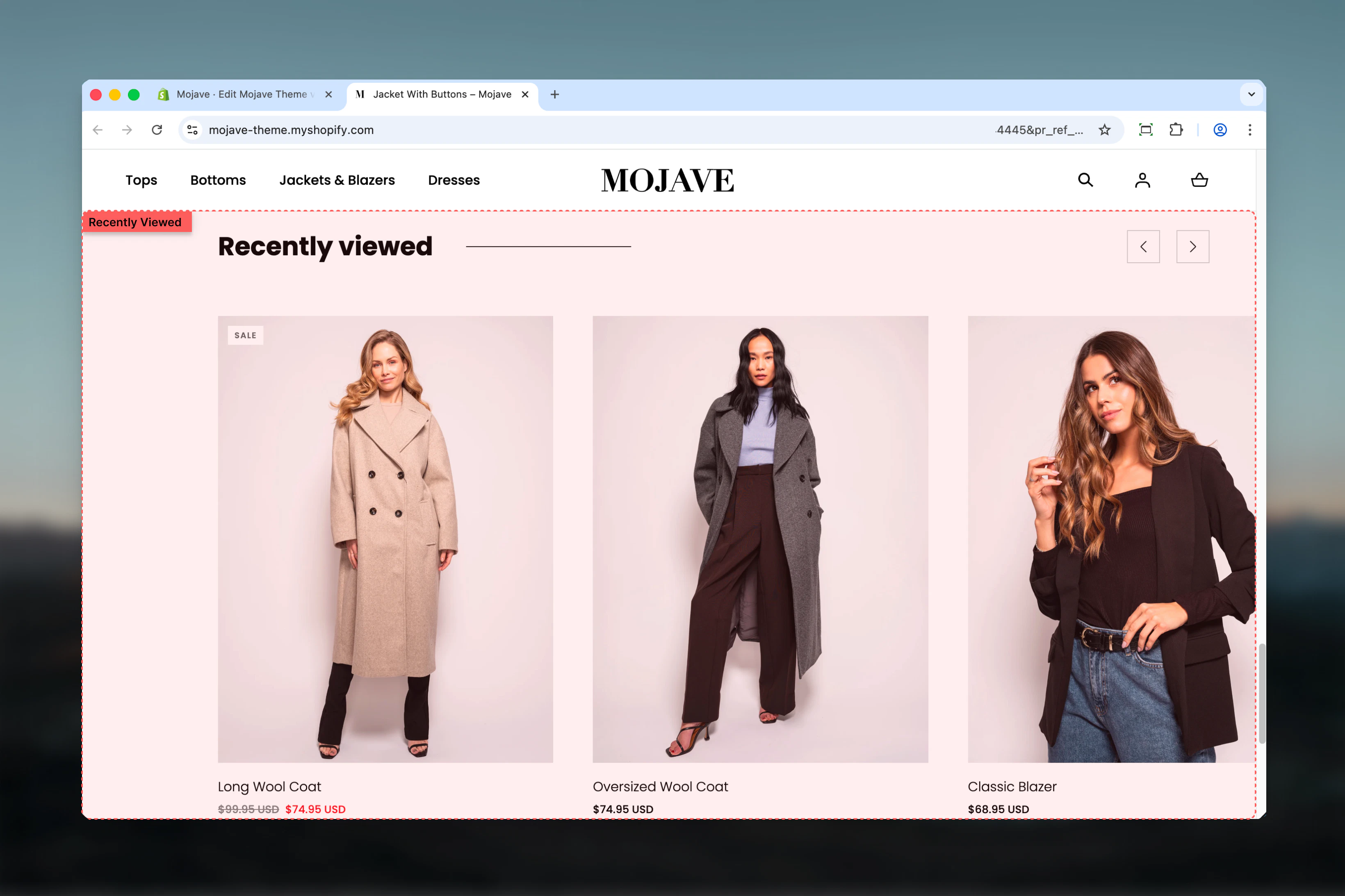
The Recently viewed section automatically tracks and displays products customers have recently browsed on your store, enabling easy return to previously viewed items. Features include:- Automatic tracking: Browser localStorage records viewed products (no cookies)
- Personalized display: Each visitor sees their own browsing history
- Persistent across sessions: Tracked products persist even after browser close (until cleared)
- Minimal configuration: Only heading customizable—tracking is automatic
- Works on any template
Getting started
1
Add the section
From Theme Customizer (any template), click Add section and select Recently viewed
2
Customize heading
Adjust heading text (default: “Recently viewed”) to match your brand voice
3
Position strategically
Common placements: bottom of PDP, homepage, cart page, or thank-you page for continued browsing
4
Browse products to test
View multiple products on your storefront. Return to page with section—recently viewed products now display.
Recently viewed tracking begins immediately. The section will be empty on first visit until customer browses products. Track persists across sessions via browser localStorage.
Section settings
Title
Title
Text field (default: “Recently viewed”)Section heading displayed above products.Alternative heading options:
- “Recently viewed” (default, clear)
- “You recently viewed”
- “Continue browsing”
- “Your browsing history”
- “Items you viewed”
- “Back to browsing”
This section has only one setting (title). All tracking, product display, and limits are handled automatically by theme JavaScript.
How it works
Automatic product tracking:- Customer views any product page (PDP)
- JavaScript records product ID to browser’s localStorage
- localStorage maintains list of recently viewed product IDs (typically 10-20 products)
- Recently Viewed section reads localStorage and displays products from that list
- localStorage (not cookies)—larger capacity, persists after browser close
- Client-side tracking—no server requests, instant updates
- Privacy-friendly—data stored locally in customer’s browser, not sent to servers
- Tracked products persist across browsing sessions
- Survives browser close/reopen
- Only clears when: customer clears browser data, localStorage quota exceeded, or manual script clearing
- Most recently viewed product appears first
- Older products appear after
- Chronological reverse order (newest → oldest)
Best practices
Bottom of PDP optimal
Place at bottom of product pages. Customers can easily return to previously viewed items for comparison after viewing details.
Homepage for retention
Add to homepage. Returning customers see personalized browsing history immediately—faster reengagement.
Cart page for decisions
Include on cart page. Customers comparing options can revisit viewed products before finalizing purchase.
Clear heading
Use descriptive heading. “Recently viewed” immediately signals personalized content vs generic product displays.
Test tracking behavior
Browse multiple products yourself. Verify section populates correctly and ordering makes sense (most recent first).
Empty state awareness
Section is empty for first-time visitors or after localStorage clear. Consider placing where empty state isn’t jarring.
Combine with recommendations
Stack with Product Recommendations or Featured Products. Recently Viewed (personalized) + Recommendations (algorithmic) = comprehensive discovery.
Mobile-friendly placement
Bottom-of-page placement works best on mobile. Doesn’t interrupt primary content, provides continued browsing after main content.
Common use cases
PDP bottom placement — After product details, show “Recently viewed” to enable easy comparison with just-viewed product Homepage personalization — Returning visitors see recent browsing history immediately, creating personalized homepage experience Cart page browsing — On cart page, show recently viewed items so customers can reconsider alternatives before checkout Collection page discovery — Bottom of collection pages, help customers revisit individual products from browsing session Thank-you page continuation — Post-purchase, show “Continue browsing” with recently viewed items for next order Search page support — Bottom of search results, remind customers of products viewed before searchingLayout behavior
Desktop:- Horizontal product grid (typically 4-5 products per row)
- Product cards: image, title, price, optional quick-view
- Section full-width or contained (theme-dependent)
- Heading centered or left-aligned
- Displays up to N products (theme defines limit, typically 8-12)
- Horizontal scrollable carousel OR 2-column grid (theme-dependent)
- Swipe to view more products
- Compact product cards
- Touch-optimized
- Typically shows 4-8 products
- Section hidden if no products in localStorage (no awkward empty display)
- Appears only after customer has viewed at least one product
- First-time visitors won’t see section at all
- Theme defines maximum products to display (e.g., 8, 10, 12)
- localStorage may track 20+ products, but section shows most recent N only
- Ensures section doesn’t become overwhelmingly long
Tracking behavior
What triggers tracking:- Product page view: Simply visiting any /products/[handle] page adds product to localStorage
- Automatic: No click, no add-to-cart required—just page load
- Collection page views (only individual product pages)
- Quick-view modal views (unless theme implements custom tracking)
- Product images clicked in other sections (unless they link to PDP)
- Product IDs (numerical Shopify product IDs)
- Possibly variant IDs (theme-specific)
- Timestamp (for ordering, theme-specific)
- localStorage capacity: ~5-10MB per origin (plenty for product IDs)
- Typical storage: 10-20 product IDs = few KB
- If quota exceeded: oldest entries removed (FIFO - first in, first out)
Technical details
JavaScript implementation:- Theme JavaScript listens for PDP page loads
- On load, extracts product ID from page or meta tags
- Writes product ID to localStorage array
- Recently Viewed section reads localStorage on page render
- Fetches product data via Shopify Ajax API
- Renders product cards dynamically
- Typically
theme.recentlyViewedor similar custom key - Stores JSON array of product IDs:
[12345, 67890, 24680]
- Section reads IDs from localStorage
- Makes Ajax API requests to
/products/[id].jsor GraphQL - Retrieves product title, price, images, URLs
- Renders product cards client-side
- Initial load: Section may be empty, filled after JS executes (async)
- Cache-friendly: Product data cached by browser for repeat views
- No server rendering: Products loaded client-side after page render
Privacy & data considerations
GDPR/privacy compliance:- localStorage is not a cookie—different regulations
- No personal data: Only product IDs stored, no customer identifiable information
- Local only: Data never transmitted to servers (unless deliberately implemented)
- User control: Users can clear localStorage via browser settings
- Disclose use of localStorage for product tracking
- Explain purpose: improve browsing experience, personalize content
- Provide instructions for clearing (standard browser methods)
- Some themes provide “Clear recently viewed” button
- Users can manually clear via browser: Developer Tools → Application → Local Storage → Clear
Customization tips
For PDP (product comparison):- Place at bottom of product page
- Heading: “Recently viewed”
- Allows quick return to previous products for comparison
- Place mid-page or bottom
- Heading: “Continue where you left off”, “Your recent browsing”
- Creates personalized homepage experience
- Place below cart items or after recommendations
- Heading: “Still deciding?”, “Compare these items”
- Helps indecisive customers revisit alternatives
- Place at bottom of post-purchase page
- Heading: “Continue browsing”, “Shop more items”
- Encourages next purchase or wishlist building
Related sections
- Product Recommendations — AI-powered product suggestions (algorithmic vs browsing history)
- Recommended Products — Manual or API-driven recommendations (curated vs personalized)
- Featured Products — Static curated product showcases (universal vs personalized)
- Collection Products — Collection-based product displays (category vs history)
Comparison: Recently Viewed vs Recommendations
When to use both:
- Stack Recently Viewed + Product Recommendations on PDP
- Recently Viewed: Helps comparison
- Recommendations: Encourages discovery
- Together: Maximum product exposure and engagement
Troubleshooting
Section not appearing:- No products viewed yet: Browse some products first
- JavaScript disabled: Tracking requires JavaScript enabled
- localStorage disabled: Browser may block localStorage (privacy settings)
- Theme compatibility: Ensure theme includes recently-viewed JavaScript
- Cache issue: Clear browser cache and localStorage
- Multiple stores: localStorage shared per domain—test on unique domain
- Product availability: Out-of-stock or deleted products may still appear (until localStorage cleared)
- Theme implementation: Check theme’s JS sorting logic
- Timestamp missing: Some themes don’t store timestamps, affecting order
- localStorage corruption: Clear and rebuild data
- Cache aggressive: Browser caching product data too long
- JS errors: Check browser console for JavaScript errors preventing updates
- Conflicting apps: Third-party apps may interfere with localStorage
- localStorage being cleared: Check browser settings (incognito mode clears on close)
- Theme using sessionStorage: sessionStorage clears on close (not localStorage)
- Privacy extensions: Browser extensions may auto-clear storage
Advanced implementation notes
Custom tracking:- Developers can extend tracking to capture variants, timestamps, scroll depth
- Custom events: Track clicks on recently viewed items for analytics
- External storage: Save to customer metafields for cross-device persistence (requires Shopify API)
- Theme may expose setting for max products (typically theme settings, not section settings)
- Check
theme settings > Product > Recently viewed limit - If not exposed, requires theme code modification
- CSS targets:
.recently-viewed,.recently-viewed__product-card(class names vary) - Adjust grid layout, card styling, hover effects via CSS
- Responsive breakpoints for mobile optimization
- Listen for
theme:recentlyviewed:updatedcustom events (theme-specific) - Track analytics when recently viewed products are clicked
- Implement “Remove from recently viewed” functionality