

What this section does
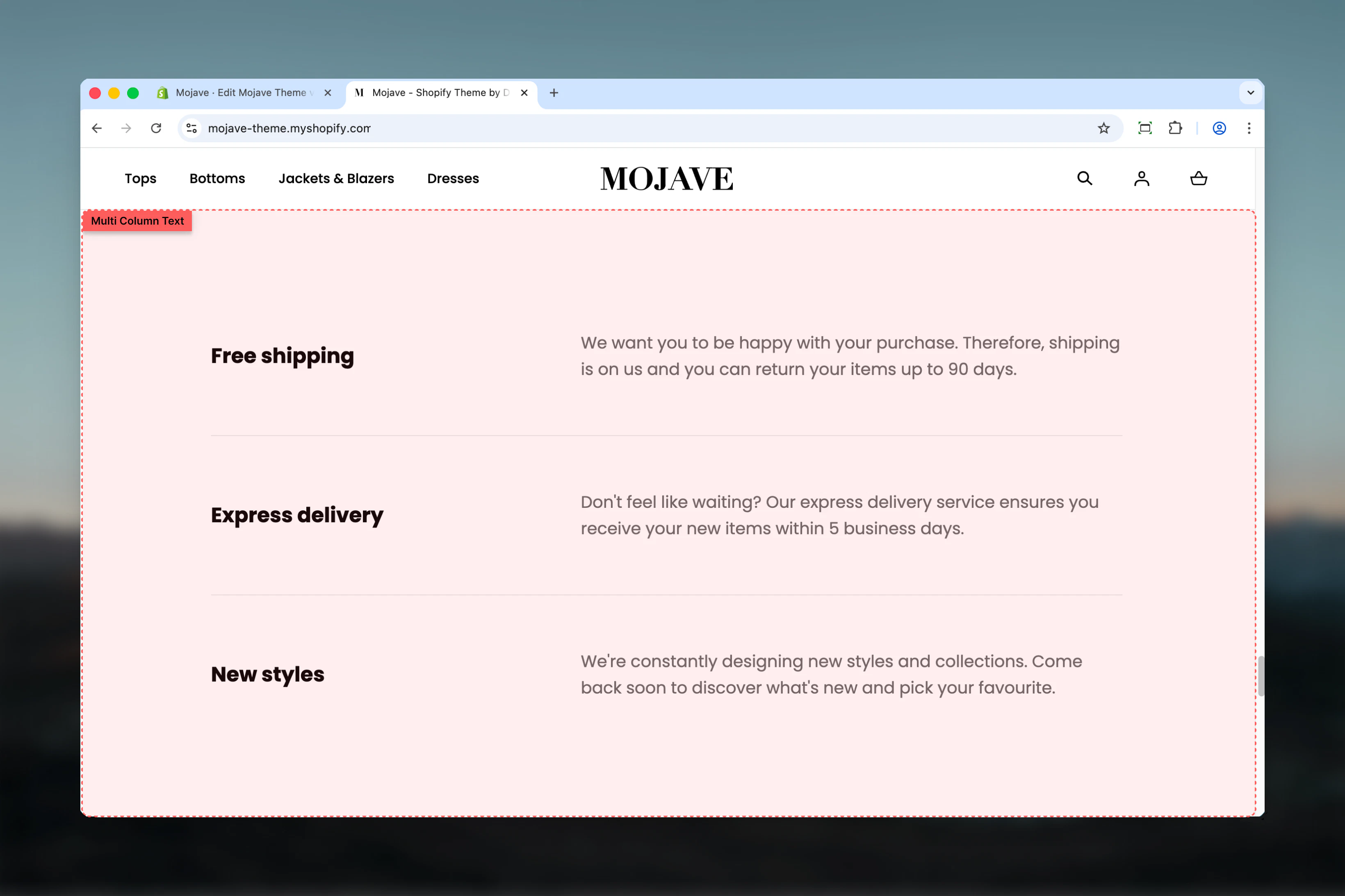
The Multi column text section organizes content into side-by-side columns, perfect for feature comparisons, benefits, services, or any content that benefits from visual organization. Features include:- Up to 4 content columns with independent text and links
- Three layout styles: List (stacked), Columns (equal-width side-by-side), Boxes (outlined cards)
- Section heading above all columns
- Optional fullwidth container
- Individual links per column
- Responsive design (stacks on mobile)
Getting started
1
Add the section
From the Theme Customizer, click Add section and select Multi column text
2
Set section heading
Add a heading that describes the content (e.g., “Why Choose Us”, “Our Services”)
3
Choose layout
Select layout style: List (vertical), Columns (side-by-side), or Boxes (card-style)
4
Add content blocks
Add 2-4 content blocks. Each becomes one column. Configure heading, text, and optional link per block.
Section settings
Enable full width
Enable full width
Checkbox (default: unchecked)Controls section container width:
- Unchecked: Section contained within standard page width
- Checked: Section spans full browser width (edge-to-edge)
Heading
Heading
Textarea (optional)Main section heading displayed above all columns.Examples: “Why Shop With Us”, “Our Core Services”, “What We Offer”, “Benefits”, “Features”Leave blank for no section heading.
Layout
Layout
Dropdown (default: List)Controls how columns are displayed:
- List: Columns stack vertically (one below the other) on all screen sizes
- Columns: Side-by-side equal-width columns on desktop, stack on mobile
- Boxes: Card-style layout with borders/backgrounds, side-by-side on desktop
Spacing - Desktop & Mobile
Spacing - Desktop & Mobile
Desktop (default: Default) and Mobile (default: Compact)Controls vertical spacing above and below the section:
- Default: Standard spacing
- Medium: Moderate spacing
- Compact: Minimal spacing
- None: No spacing
Block: Content
Type: content (limit: 4 blocks) Each block creates one column with heading, text, and optional link.Heading
Heading
Text field (default: “Column”)Column title/heading displayed prominently at top of each column.Examples: “Free Shipping”, “24/7 Support”, “Quality Guaranteed”, “Easy Returns”Keep concise (2-4 words) for quick scanning.
Text
Text
Textarea (default: “Pair text with an image to focus on your chosen product, collection, or blog post. Add details on availability, style, or even provide a review.”)Main body text for the column:
- Plain text only (no rich text formatting)
- 2-4 sentences recommended
- Describe feature, benefit, or service
Link text & URL
Link text & URL
Link text (text field, optional)
- Label for the link (e.g., “Learn more”, “View all”, “Shop now”)
- Destination for the link
Best practices
2-4 columns optimal
4 is the maximum. Use 3 columns for balanced design, 2 for detailed content, 4 for concise features. Avoid single column (use Rich Text instead).
Parallel structure
Keep all columns similar in length and structure. If one has 3 sentences, all should have ~3 sentences. Creates visual harmony.
Boxes for emphasis
Use “Boxes” layout for important, distinct features. The card-style design draws more attention than plain columns.
List for sequences
Use “List” layout when order matters (steps, processes, timelines). Side-by-side columns imply equal importance.
Benefit-focused text
Write about customer benefits, not company features. “Get support 24/7” instead of “We offer 24/7 support”.
Concise headings
Column headings should be 2-4 words. They’re not sentences. “Free Shipping” not “We Offer Free Shipping”.
Consistent link usage
Either all columns have links or none do. Inconsistent links create unbalanced design and confuse users.
Fullwidth for impact
Enable fullwidth for homepage features or hero content. Contained width works better for About pages or supporting content.
Common use cases
Homepage trust indicators — 3-4 columns highlighting key benefits: Free Shipping, Easy Returns, Secure Checkout, 24/7 Support About page services — Company services or specialties with brief descriptions and links to service pages Product features — Key product benefits or features on PDP or landing pages (3-4 main selling points) Process/How it works — Step-by-step process using List layout (1. Shop, 2. Customize, 3. Deliver, 4. Enjoy) Support options — Different support channels or resources (Live Chat, Email, Phone, Help Center) with links Content categories — Homepage content navigation (Shop, Collections, About, Blog) with descriptionsLayout behavior
Desktop - Columns layout:- 2 blocks: 2 equal-width columns side-by-side
- 3 blocks: 3 equal-width columns side-by-side
- 4 blocks: 4 equal-width columns side-by-side
- Even spacing between columns
- Section heading centered above columns (if present)
- Same column arrangement as Columns
- Each column has border/background (card appearance)
- More visual separation than Columns layout
- Slightly more padding inside each box
- All columns stack vertically (one below the other)
- Full width for each item
- Best for sequential/ordered content
- Always stacks vertically (List behavior)
- One column takes full width
- Order: First block → Second block → Third block → Fourth block
- Layout setting only affects desktop display
Content guidelines
Column heading:- 2-4 words ideal
- Front-load important keywords
- Use title case
- Examples: “Free Returns”, “Quality Assurance”, “Expert Support”
- 2-4 sentences (40-80 words)
- Start with the benefit
- Avoid jargon and complexity
- Focus on “you” language (customer-centric)
- Example: “Get your order in 2-3 business days with free standard shipping. No minimum purchase required.”
- Use descriptive link text: “View shipping policy” not “Click here”
- Link to relevant pages: policies, collections, product pages
- Consistent link text across columns if possible (“Learn more” for all)
Customization tips
For trust/credibility (homepage):- Layout: Columns or Boxes
- 3-4 blocks with icons or emoji in headings (optional)
- No links (just pure trust signals)
- Heading: “Why Shop With Us”, “Our Promise”, “Customer Benefits”
- Layout: Columns
- 2-3 blocks with detailed text (4-5 sentences)
- Links to dedicated service pages
- Heading: “What We Do”, “Our Services”, “Capabilities”
- Layout: List
- 3-4 blocks numbered in headings (“1. Choose”, “2. Customize”, “3. Receive”)
- No links needed
- Heading: “How It Works”, “Our Process”, “Easy as 1-2-3”
- Layout: Boxes
- 3-4 blocks highlighting distinct features
- Link to product pages or feature details
- Heading: “Feature Highlights”, “What’s Included”, “Benefits”
Related sections
- Content Tiles — Similar multi-column layout with image + text combinations
- Rich Text — Single-column alternative for non-divided content
- Accordions — Collapsible alternative for lengthy content in limited space
- Featured Collections Links — Visual multi-column with collection focus