

What this section does
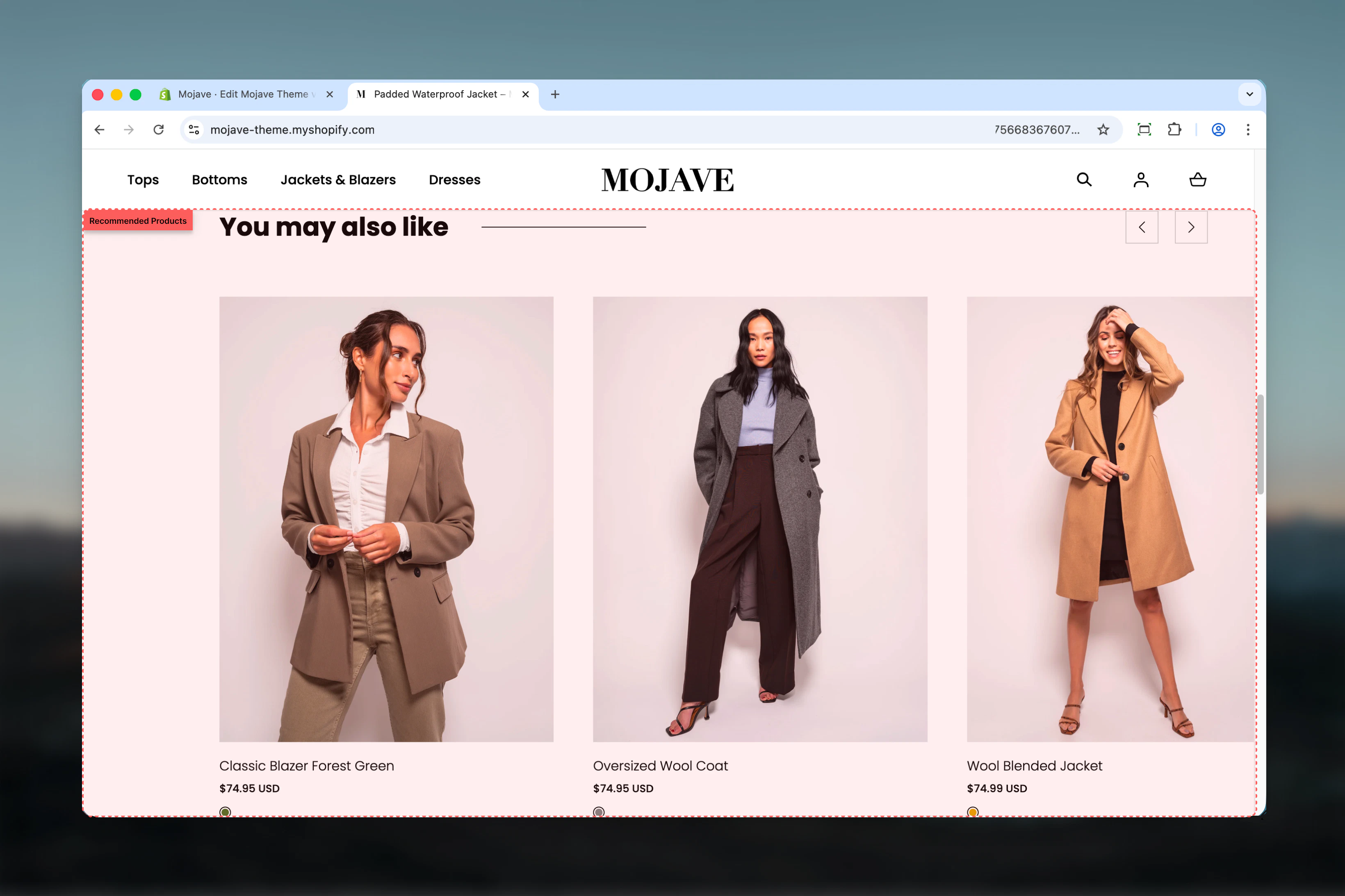
The Recommended products section showcases product suggestions with flexible sourcing: automatic Shopify recommendations OR manual product selection. Features include:- Two modes: Shopify recommendation API (automatic) or manual product blocks
- API mode: AI-powered recommendations based on first product added to cart
- Manual mode: Curate specific products via product blocks
- 1-10 product limit (configurable)
- Heading, link/CTA button
- Works on any template (not restricted to Product template)
Getting started
1
Add the section
From the Theme Customizer (any template), click Add section and select Recommended products
2
Choose mode
Enable recommended API (checked) = Automatic Shopify recommendations. Unchecked = Manual product blocks.
3
Configure settings
Set product limit (1-10), heading, link text/URL. If manual mode, add product blocks.
4
Position strategically
Common placements: cart page, post-purchase page, homepage, collection pages for cross-selling
Section settings
Enable recommended API
Enable recommended API
Checkbox (default: checked)Controls product sourcing method:
Manual mode = full control, curated selection.
- Checked (default): Uses Shopify recommendation API—automatic product suggestions
- Unchecked: Uses manual product blocks—you select specific products
Manual mode = full control, curated selection.
Recommended products limit
Recommended products limit
Range: 1-10 (default: 4)Maximum number of products to display:
- API mode: Requests this many recommendations from Shopify
- Manual mode: Limits how many product blocks are displayed (even if more blocks exist)
Heading
Heading
Textarea (default: “You may also like”)Section title above products.Context-specific suggestions:
- Cart page: “Complete your order”, “Don’t forget these”
- Homepage: “Trending now”, “Staff picks”
- Post-purchase: “Customers also bought”, “Recommended for you”
- Collection page: “You might also love”
Link text & URL
Link text & URL
Link text (text field, default: “Shop all”)
- CTA button text below products
- Button destination
Block: Product
Type: product (unlimited blocks, but limited by “Recommended products limit” setting) Only used when “Enable recommended API” is unchecked (manual mode).Product
Product
Product picker (required)Select specific product to feature in this block.Manual product blocks are ignored when API mode is enabled. When API is disabled, these blocks define which products display (up to the Products Limit).Example: Limit set to 4, but you add 6 product blocks → only first 4 blocks display.
Best practices
API for cart pages
Enable API mode on cart page. Shopify’s algorithm suggests products based on what’s already in cart—intelligent upselling.
Manual for curation
Use manual mode for curated selections: bestsellers, new arrivals, seasonal must-haves where you control exact products.
3-6 product limit
Display 3-6 products optimal. Provides choice without scroll fatigue. More products = diluted focus, lower conversion.
Context-specific heading
Match heading to page context. Cart: “Complete your order”. Homepage: “Trending now”. Makes intent clear.
Strategic link placement
Link button drives broader discovery. “Shop all” → full catalog. Use when recommendations serve as teaser, not complete selection.
Test both modes
A/B test API vs manual on same template. API learns from data, manual reflects your merchandising strategy.
Update manual regularly
If using manual mode, refresh product blocks seasonally or monthly. Stale recommendations reduce effectiveness.
Monitor API quality
API recommendations improve over time. New stores: manual mode initially, switch to API as data accumulates.
Common use cases
Cart page upsells — API mode enabled, heading “Complete your order”, 4 products based on cart contents Post-add-to-cart popup — After customer adds product, show “Customers also bought” with API recommendations (requires theme support) Homepage trending products — Manual mode, heading “Trending now”, hand-picked bestsellers or new arrivals (4-6 products) Collection page cross-sell — Manual mode, heading “You might also love”, complementary products from related collections Checkout page recommendations — API mode, “Don’t forget these”, last-chance upsell items based on order contents Thank-you page follow-up — Manual or API, “For your next order”, encourages repeat purchase with relevant productsAPI mode vs Manual mode
API Mode (Enable recommended API: checked)
How it works:- Shopify analyzes first product added to cart
- Generates recommendations based on purchase patterns, product relationships, browsing data
- Returns up to Products Limit products dynamically
- Hands-free—no manual product management
- Intelligent—learns from store data
- Contextual—relevant to cart contents
- Requires cart context (works best on cart/checkout pages)
- New stores have limited data = generic recommendations
- Less control over exact products shown
Manual Mode (Enable recommended API: unchecked)
How it works:- You add product blocks, selecting specific products
- Section displays products from blocks (up to Products Limit)
- Static—same products for all visitors
- Full control—handpick exact products
- Merchandising strategy—showcase what YOU want to sell
- Consistent—reliable product selection
- Manual maintenance—requires updating
- Not contextual—same for everyone
- No learning—doesn’t adapt to customer behavior
Layout behavior
Desktop:- Horizontal product grid (typically 3-4 products per row)
- Product cards: image, title, price, optional quick-add button
- Heading centered or left-aligned above grid
- Link button below grid (centered)
- Full-width or contained section (theme-dependent)
- 2-column grid OR horizontal scrollable carousel (theme-dependent)
- Compact product cards
- Heading above products
- Link button below products
- Touch-optimized interactions
- API mode: If no recommendations available, section hidden automatically
- Manual mode: If no product blocks added (or all hidden), section may show empty or hide
API mode behavior
Cart context requirement:- API returns recommendations based on first product in cart
- If cart is empty, recommendations may be generic or empty
- Works best on Cart template, Cart drawer, Checkout pages
- Shopify analyzes first cart item
- Finds products frequently bought together or viewed with that product
- Returns up to Products Limit recommendations
- Falls back to similar products if insufficient data
- New stores: Limited data = generic or empty recommendations
- Growing stores: Recommendations improve after 50-100 orders
- Mature stores: Accurate, intelligent suggestions based on patterns
- Customer adds “Blue Denim Jacket” to cart
- API recommends: “White T-Shirt”, “Black Jeans”, “Brown Boots” (items frequently bought with jackets)
Manual mode workflow
Setting up manual products:- Uncheck “Enable recommended API”
- Click “Add product” block
- Select product from picker
- Repeat for desired products (add more than limit for flexibility)
- Rearrange blocks to control display order
- Limit = 4, Blocks = 6: First 4 blocks display, last 2 ignored
- Limit = 8, Blocks = 3: All 3 display, section requests more but none available
- Seasonal refresh: Swap products every quarter
- Performance-based: Remove low-performers, add high-margin items
- Stock awareness: Hide/remove out-of-stock products
Customization tips
For cart page (API mode):- Enable API: Checked
- Products limit: 4-6
- Heading: “Complete your order”, “Customers also bought”
- Link: “Continue shopping” → /collections
- Enable API: Unchecked
- Products limit: 6
- Heading: “Trending now”, “Bestsellers”
- Link: “Shop all” → /collections/all
- Products: Hand-picked new arrivals, bestsellers, high-margin
- Enable API: Unchecked
- Products limit: 4
- Heading: “You might also love”
- Link: “View related” → complementary collection
- Products: Related products from other collections
- Enable API: Checked (recommendations based on order)
- Products limit: 4
- Heading: “For your next order”, “Recommended for you”
- Link: “Keep shopping” → /collections
Related sections
- Product Recommendations — Shopify’s native PDP-specific recommendation section
- Featured Products — Collection-based or manual product showcases
- Recently Viewed — Browser-based recently viewed tracking
- Cart Recommendations — Cart-drawer-specific product suggestions (theme-dependent)
Technical notes
API endpoint: Uses Shopify’s/recommendations/products API, same as Product Recommendations section. Difference: accepts cart context, not just single product.
Template flexibility: Unlike Product Recommendations (PDP only), this section works on ANY template—cart, homepage, collection, pages, etc.
Product block limit: Unlimited product blocks can be added, but only up to “Products limit” setting will display. Add extras for flexibility and A/B testing.
API vs blocks precedence: When API mode is enabled, product blocks are completely ignored—doesn’t matter if they exist. When API disabled, blocks take over.
Cart dependency (API mode): API mode effectiveness depends on cart state. Empty cart = no/generic recommendations. Single item in cart = recommendations for that item.
Manual block order: Product blocks display in the order they appear in Theme Customizer (top to bottom). Drag blocks to reorder.
Empty state handling: Theme determines empty state behavior—some hide section, others show “No recommendations” message.
Performance: API calls are server-side (fast). Manual mode has no API overhead (even faster).
Troubleshooting
API mode shows no products:- Empty cart: Add item to cart to trigger recommendations
- New store: Insufficient data for recommendations to generate
- Products limit too high: API returns fewer than requested
- Template mismatch: Some templates may not pass cart context properly
- API still enabled: Uncheck “Enable recommended API”
- No product blocks: Add at least one product block
- Products limit = 0 or very low: Increase limit to at least 3-4
- Blocks hidden: Check product block visibility settings
- Theme styling: Check theme’s product card CSS
- Product limit mismatch: Verify limit matches desired product count
- Responsive issues: Test on multiple devices, adjust theme layout settings
- Low order volume: New stores need 50-100+ orders for good data
- Product data quality: Improve product types, tags, collections
- Unrelated cart items: API struggles with very diverse cart contents
- Switch to manual: Temporarily use manual mode until data improves