

What this section does
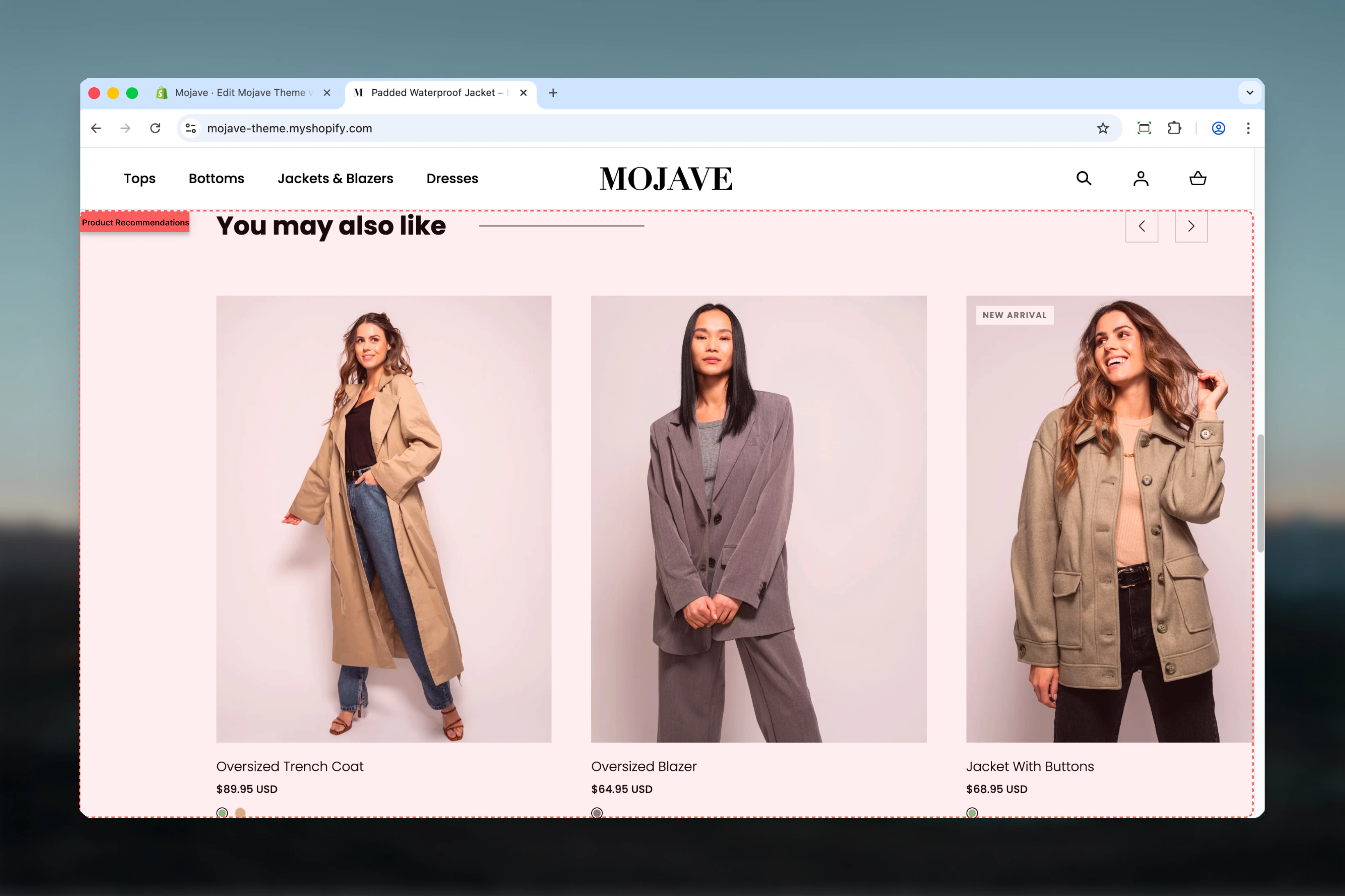
The Product recommendations section displays automatically-generated product suggestions powered by Shopify’s native recommendation engine. Features include:- AI-powered recommendations: Shopify analyzes product relationships, purchase patterns, and customer behavior
- Dynamic content: Recommendations change based on the current product being viewed
- Customizable display: 2-10 products, adjustable heading, heading size
- Automatic updates: No manual product selection—recommendations improve over time
- Template-only section (usable on Product page template only)
Getting started
1
Add to Product template
In Theme Customizer, navigate to Product template, then click Add section and select Product recommendations
2
Configure settings
Adjust heading text (e.g., “You may also like”, “Customers also bought”), heading size, and products to show (2-10)
3
Position the section
Typically placed below product details or at bottom of PDP for maximum visibility after viewing main product
This section only works on the Product template (main-product). It will not display on other templates as it requires a product context to generate recommendations.
Section settings
Heading
Heading
Text field (default: “You may also like”)Section title displayed above recommended products.Popular alternatives:
- “You may also like” (default, general)
- “Customers also bought”
- “Complete the look”
- “Recommended for you”
- “Similar products”
- “Pair with”
Heading size
Heading size
Dropdown (default: h4)Controls heading prominence:
- h4: Small/subtle (default)
- h3: Medium
- h2: Large
- h1: Extra large (rarely used for secondary sections)
Products to show
Products to show
Range: 2-10 (default: 10)Maximum number of recommended products to display:
- Shopify API returns up to this many recommendations
- If fewer recommendations available, section displays available count
- Grid layout adjusts to product count (typically 4-5 per row on desktop)
Customization info
Customization info
Paragraph content: “Recommendations are customizable. Read more.”Informational only—displayed in Theme Customizer for reference.Shopify’s recommendation algorithm considers:
- Products frequently bought together
- Products viewed in same session
- Similar product attributes (type, vendor, tags)
- Store-wide purchase patterns
Best practices
Below product details
Place after Add to Cart button and product description. Capitalizes on users ready to buy—suggests complementary items.
4-6 products optimal
Show 4-6 recommendations. Provides choice without decision paralysis. More products = more scrolling, lower engagement.
Let AI work
Don’t overthink heading text. Focus on product data quality (tags, types, collections) for better recommendations.
Clear heading
Use descriptive headings that set expectations: “You may also like” (general) vs “Complete the outfit” (specific).
Monitor performance
Track click-through rates and add-to-cart from recommendations. Adjust product count and heading based on data.
Product data quality
Improve recommendations by properly tagging products, setting product types, and organizing collections logically.
h4 heading size
Keep default h4 or h3. Recommendations are supplementary—dominant heading pulls focus from main product.
Complement main product
Recommendations work best when main product has sufficient history. New products may show generic suggestions initially.
Common use cases
Standard PDP cross-sell — Below product description, heading “You may also like”, 4-6 products for additional purchase suggestions Fashion/apparel completion — After “Add to Cart”, heading “Complete the look”, shows coordinating items (shoes with dress, belt with jeans) Electronics accessories — Bottom of PDP, heading “Customers also bought”, suggests cases, chargers, screen protectors for phones/laptops Home goods coordination — “Pairs well with”, suggests complementary decor items, matching furniture, coordinating colors Beauty product regimens — “Build your routine”, suggests complementary skincare steps, matching shades, full regimens Gift bundles — “Frequently bought together”, encourages multiple-item purchases for gifting or personal useHow recommendations work
Shopify’s recommendation engine:- Machine learning algorithm: Analyzes store-wide purchase patterns, view history, cart additions
- Product relationships: Identifies products frequently bought together or viewed in sequence
- Contextual relevance: Considers current product’s type, vendor, tags, collections, price range
- Real-time updates: Recommendations improve as more customer data accumulates
- Purchase history: Products bought together in past orders
- Browsing behavior: Products viewed in same browsing sessions
- Product similarity: Matching attributes (type, tags, vendor, collection)
- Fallback logic: If insufficient data, shows products from same collection or vendor
- New stores: Generic recommendations initially (same collection, random)
- Growing stores: Improves after 20-50 orders with those products
- Mature stores: Highly accurate after months of data collection
Layout behavior
Desktop:- Horizontal product grid (typically 4-5 products per row)
- Products displayed as cards: image, title, price, quick view/add button
- Section full-width or contained depending on theme defaults
- Heading centered or left-aligned above grid
- Horizontal scrollable carousel OR 2-column grid (theme-dependent)
- Swipe to see additional products
- Compact product cards optimized for touch
- Heading above grid/carousel
- If no recommendations available, section doesn’t display (hidden automatically)
- Common for brand-new products with no data
- Section remains in template but invisible to customers
Maximizing recommendation quality
Product data optimization:- Accurate product types: Set consistent product types (e.g., “Tops”, “Dresses”, not random text)
- Strategic tagging: Use tags for attributes (color, size, style, season)
- Logical collections: Group related products in collections (algorithm notices patterns)
- Vendor consistency: Standardize vendor names for brand-based recommendations
- Bundle suggestions: Create bundles/kits to train algorithm on complementary items
- Related products: Manually link products via “Related Products” apps to influence recommendations
- Order history: Encourage repeat purchases—more data = better recommendations
- Test different heading text to see what drives clicks (“You may also like” vs “Complete the look”)
- Experiment with product count (4 vs 6 vs 8) and track engagement
- Monitor which recommendations get clicked most—inform manual curation elsewhere
Related sections
- Recommended Products — Manual or API-powered recommendations (more control, custom products)
- Featured Products — Manually curated product showcases
- Recently Viewed — Browser-based recently viewed products section
- Complementary Products — Shopify Plus feature for curated complementary items
Technical notes
Shopify Recommendations API: This section uses Shopify’srecommendations/products API endpoint. Completely server-side, no merchant configuration needed beyond section settings.
Template requirement: Only functions on Product template (main-product.liquid or equivalent). Other templates lack product context for recommendations.
Recommendation limits: Shopify API can return 0-10 products per request. Empty response = section hidden automatically.
Performance: API call is server-side during page render. No client-side JavaScript delays. Recommendations rendered同步 with page load.
Intent types: Shopify’s API supports related (default, most common) and complementary intent types. This section typically uses related—products similar or frequently bought together.
Fallback behavior: If recommendations unavailable (new product, insufficient data), API returns empty array. Theme handles gracefully by hiding section.
No configuration required: Unlike apps, no backend setup, no manual product linking. Fully automatic based on store data.
Shopify Plus note: Shopify Plus stores have access to additional recommendation features and customization via App extensions and API customization.
Customization beyond settings
Liquid customization (for developers):- Adjust product card design (image ratio, show/hide elements)
- Change grid layout (products per row, gaps)
- Customize empty state messaging
- Add custom intent types (
relatedvscomplementary)
- Style product cards, hover states, buttons
- Adjust heading typography, colors, spacing
- Modify grid gaps, responsive breakpoints
- Add quick view modals for recommended products
- Track recommendation click analytics
- Implement custom product card interactions
Troubleshooting
No recommendations showing:- New product: Requires purchase/view history to generate recommendations
- Insufficient data: Store needs more orders for algorithm to identify patterns
- Product mismatch: No similar products in catalog for algorithm to match
- Template placement: Confirm section is on Product template, not other templates
- Improve product data: Add/fix product types, tags, collections
- Increase catalog: Larger catalogs provide more recommendation opportunities
- Wait for data: New stores need time to accumulate behavioral data
- Check related apps: Some apps interfere with Shopify’s recommendations
- Theme compatibility: Ensure theme supports native product recommendations
- Customization conflicts: Custom code may override section styling
- Product count: Try adjusting product count setting (some themes handle counts differently)