

What this controls
Icon settings control the visual appearance of ALL icon elements throughout your Sahara theme, including navigation icons, cart icons, wishlist, social media, and UI indicators. These global settings ensure consistent icon styling across your entire store.Despite appearing in theme settings, these controls affect icons everywhere - not just buttons. Every icon in your theme follows these settings.
How it works
Sahara uses SVG stroke-based icons that adapt to two key properties:- Stroke Width: Controls icon thickness (Light/Medium/Bold)
- Corner Shape: Controls whether icon corners are rounded or sharp
Getting started
1
Open Theme Customizer
From Shopify admin → Online Store → Themes → Customize
2
Access button settings
Click Theme settings → Select Buttons (icons settings are here)
3
Scroll to icon settings
Find Icon stroke width and Icon corner shape near bottom
4
Adjust stroke width
Choose Light (minimal), Medium (balanced), or Bold (prominent)
5
Set corner shape
Choose Rounded (soft) or Sharp (modern)
Location
Path: Theme settings → Buttons → Icon settings (bottom section)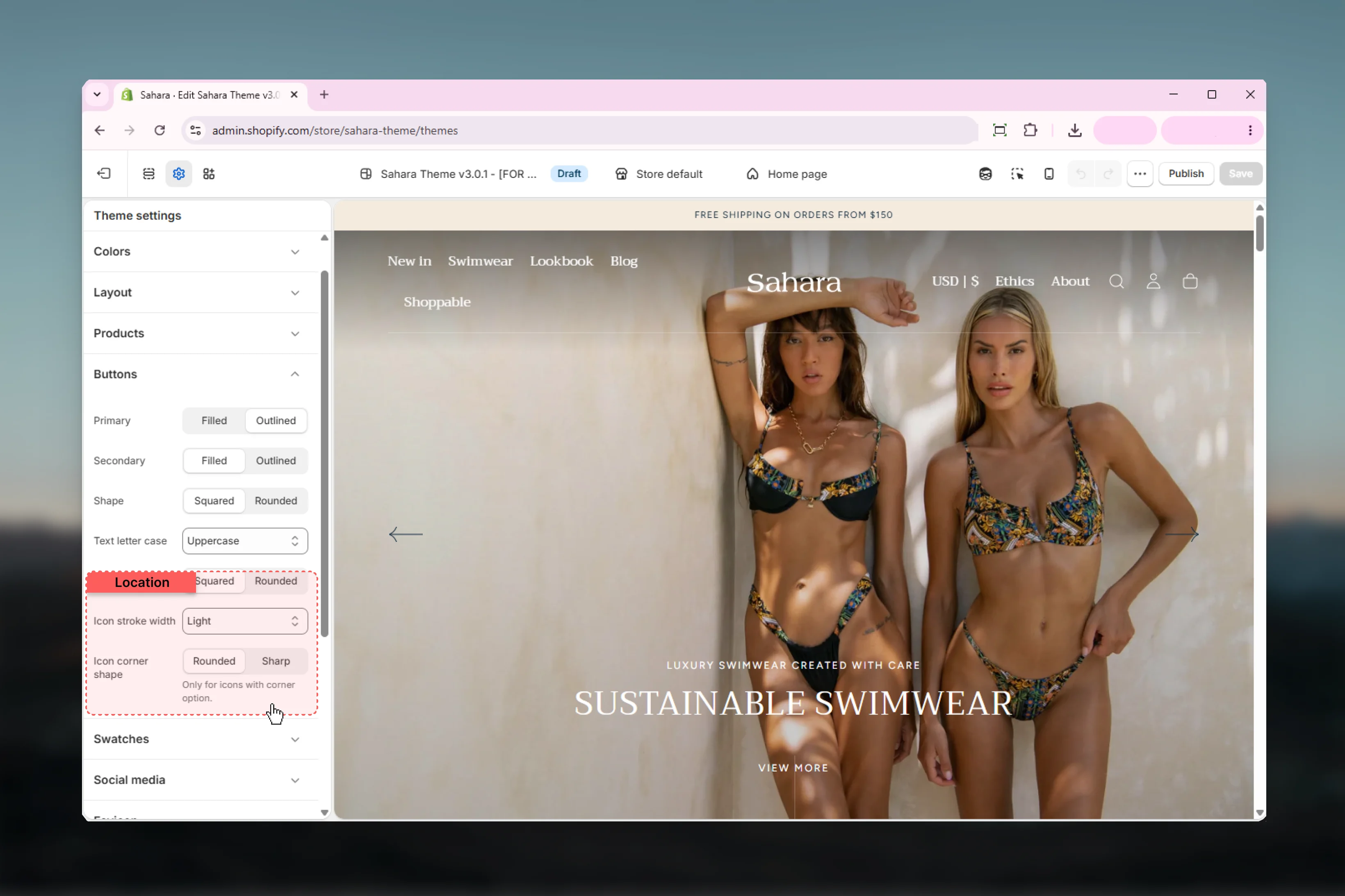
Settings
- Stroke Width
- Corner Shape
Icon Stroke Width
Controls the thickness of icon strokes throughout your theme.Options:- Light: Thin strokes (1px) - minimal, delicate
- Medium: Balanced strokes (1.5px) - default, versatile
- Bold: Thick strokes (2.5px) - prominent, accessible
Choosing the right stroke weight
Choosing the right stroke weight
Light Stroke (1px):
- Aesthetic: Minimal, elegant, refined
- Best for: Luxury brands, minimal designs, spacious layouts
- Pairs with: Light typography (font-weight 300-400), generous white space
- Visibility: Lower contrast, subtle presence
- Caution: May be hard to see on small screens or for users with visual impairments
- Aesthetic: Balanced, versatile, professional
- Best for: Most stores, general e-commerce, balanced designs
- Pairs with: Medium typography (font-weight 400-500), standard layouts
- Visibility: Good balance of subtlety and clarity
- Recommended: Safe default for most brands
- Aesthetic: Strong, dynamic, high-impact
- Best for: Energetic brands, accessibility-focused sites, bold designs
- Pairs with: Bold typography (font-weight 600-700), high-contrast designs
- Visibility: Maximum clarity, excellent accessibility
- Accessibility: Better for users with low vision
Stroke width by brand type
Stroke width by brand type
Luxury/Premium Brands:
- Recommended: Light
- Examples: Jewelry, high-end fashion, luxury goods
- Goal: Refined, understated elegance
- Recommended: Light or Medium
- Examples: Apparel, accessories, beauty
- Goal: Modern, approachable style
- Recommended: Medium
- Examples: Multi-category stores, marketplace sites
- Goal: Clear, professional, versatile
- Recommended: Medium or Bold
- Examples: Sportswear, outdoor gear, fitness
- Goal: Dynamic, energetic presence
- Recommended: Bold
- Any store prioritizing maximum visibility
- Goal: Clear, easy-to-see icons for all users
Coordinating with typography
Coordinating with typography
Match Icon Weight to Font Weight:Light Typography (300-400):
- Use: Light icon stroke
- Creates cohesive minimal aesthetic
- Example: “Garamond 300” font → Light icons
- Use: Medium icon stroke
- Balanced, professional appearance
- Example: “Figtree 400” font → Medium icons
- Use: Bold icon stroke
- Strong, impactful design
- Example: “Montserrat 700” headings → Bold icons
- Use Medium icons (compromise)
- Or match icons to your primary content font weight
Best practices
-
Coordinate with typography weight
Light fonts → Light icons. Bold fonts → Bold icons. Medium is safe default. -
Match button corner radius
Rounded buttons → Rounded icons. Square buttons → Sharp icons. Consistency matters. -
Consider accessibility
Bold stroke width improves visibility for users with visual impairments. Consider for inclusive design. -
Test across all locations
Check icons in navigation, cart, product cards, footer. Ensure they work everywhere. -
Mobile visibility check
Light icons may be hard to see on mobile. Test on actual devices. -
Don’t mix icon styles arbitrarily
Choose one stroke width and stick to it. Consistency creates professional appearance. -
Brand alignment
Luxury = Light + Rounded. Modern = Medium + Sharp. Bold = Bold + Sharp. -
Color contrast matters
Light stroke icons need good color contrast. Test with your color schemes. -
Coordinate with Sahara defaults
Sahara defaults: Light stroke + Rounded. If changing buttons to rounded, keep rounded icons. -
Preview before committing
Change settings in Theme Customizer, browse several pages, check all icon locations before saving.
Common use cases
Minimal luxury brand
Minimal luxury brand
Settings:
- Stroke width: Light
- Corner shape: Rounded
- Heading: Garamond, weight 300-400
- Body: Thin sans-serif, weight 300-400
- Primary: Outlined
- Border radius: 5rem (rounded)
- Text transform: None (sentence case)
Modern tech/minimalist
Modern tech/minimalist
Settings:
- Stroke width: Medium
- Corner shape: Sharp
- Heading: Sans-serif, weight 500-600
- Body: Sans-serif, weight 400
- Primary: Filled or Outlined
- Border radius: 0 (square)
- Text transform: Uppercase
Bold dynamic brand
Bold dynamic brand
Settings:
- Stroke width: Bold
- Corner shape: Sharp
- Heading: Bold sans-serif, weight 700-800
- Body: Medium sans-serif, weight 500
- Primary: Filled
- Border radius: 0 or 5rem
- Text transform: Uppercase
Friendly lifestyle brand
Friendly lifestyle brand
Settings:
- Stroke width: Medium
- Corner shape: Rounded
- Heading: Friendly sans-serif, weight 500
- Body: Readable sans-serif, weight 400
- Primary: Filled
- Border radius: 5rem (rounded)
- Text transform: Capitalize or None
Accessibility-focused
Accessibility-focused
Settings:
- Stroke width: Bold
- Corner shape: Rounded (softer for dyslexia)
- Heading: Clear sans-serif, weight 600
- Body: Readable sans-serif, weight 500 (heavier than normal)
- Primary: Filled (high contrast)
- Border radius: 5rem
- Large button size
Related settings
- Buttons - Icon settings located within button settings
- Typography - Coordinate icon weight with font weight
- Colors - Icon colors come from color schemes
- Layout - Icon visibility affected by spacing
Need help? Change icon settings and browse your entire site to see the effect. Icons appear everywhere - navigation, cart, product cards, footer - so check all locations before finalizing.