


What this section controls
This section manages the content, display behavior, and device visibility of messages shown at the top or bottom of your store.Getting started
1
Open Theme Customizer
From Shopify admin, access the Theme Customizer.
2
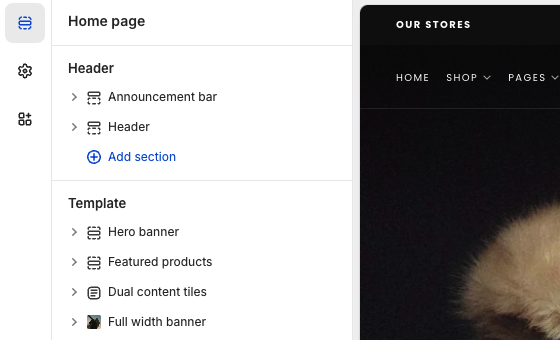
Locate Announcement bar
The section is pre-added under the Header in the left sidebar. If removed, you can re-add it using the “Add section” button.
Display behavior
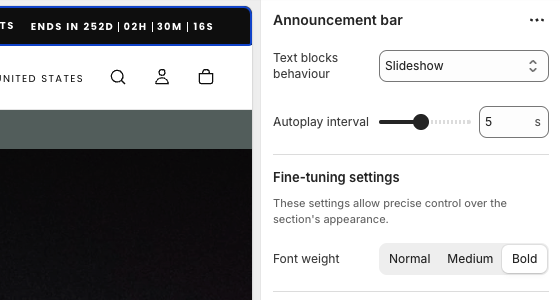
Control how announcement messages appear to visitors. This setting determines whether your text stays fixed, scrolls, or rotates through multiple messages.Static
Static
Text stays fixed. Best for single, important messages that need maximum readability.
Marquee
Marquee
Text scrolls horizontally. Useful for longer messages or creating visual movement.
Slideshow
Slideshow
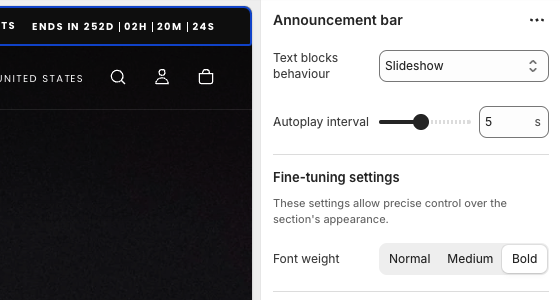
Multiple messages rotate automatically. Set the Autoplay interval to control timing between slides.
Key settings
- Content
- Styling
Adding messages
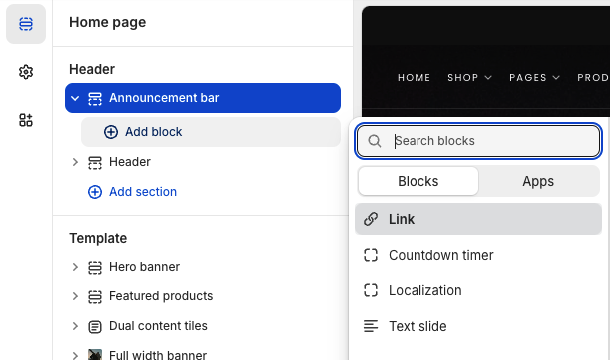
Click Add block and choose:- Text slide - Standard announcement with optional icon
- Localization - Display language and currency selectors
- Link - Standalone call-to-action button
- Countdown timer - Adds urgency with time-based display
Block settings
Each block type offers unique configuration options to control how content appears and behaves across your store.- Text slide
- Localization
- Link block
- Countdown timer
The most versatile block for displaying announcement messages with optional styling and links.
Available settings
Message content
Message content
Enter your announcement text. Keep it concise for better mobile display.
Icon
Icon
Add a visual icon before your text to draw attention. Leave blank for text-only display.
Link
Link
Add an optional destination URL to make the entire announcement clickable.
Link label
Link label
Display a button with custom text like “Shop now” or “Learn more” next to your message.


Best practices
Keep it brief
Aim for 2-5 words. Long messages get truncated on mobile.
Limit rotation
If using slideshow, keep it to 2-3 messages maximum. Too many reduces effectiveness.
Time urgency wisely
Only use countdown timers for genuine deadlines to maintain trust.
Test responsively
Always preview on mobile before publishing.
Related guides
Header section
Configure header settings and navigation options