

What these settings control
- Whether the header cart icon opens a slide-in cart drawer or navigates to the cart page
- What happens after a customer adds a product to the cart
- Whether a free shipping progress bar appears in the cart, and the order value it counts toward
How to access
1
Open the Theme Customizer
From your Shopify admin, go to Online Store, then Themes, and select Customize.
2
Open Theme settings
Select the Theme settings icon at the bottom of the left sidebar.
3
Select Cart
Expand the Cart group to see Cart type and Free shipping threshold.
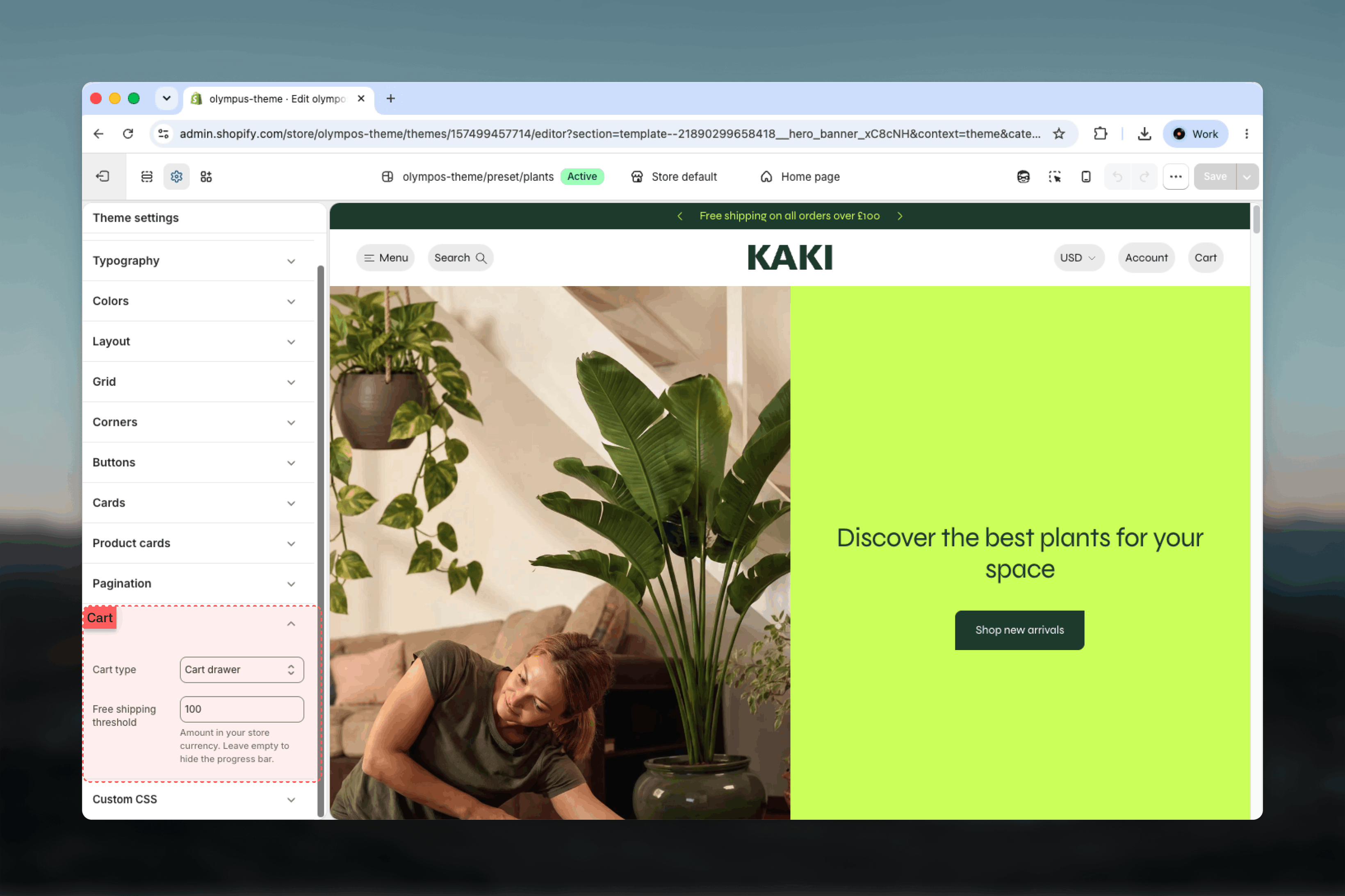
Settings
Cart type
Cart type: How the cart is presented, both after an add to cart and when a customer selects the cart icon in the header. Default: Cart drawer.- Cart drawer: A panel slides in over the current page with the line items, quantity controls, subtotal and checkout button. It opens automatically after every successful add to cart — from the Buy buttons block on the Product Page (PDP), from the quick add button on a product card, and from the Quick view drawer — and the header cart icon opens the same panel. Customers can review and edit their cart without leaving the product or collection they were browsing. The drawer is full width on mobile and has a configurable width from tablet up.
- Cart page: No drawer opens. The product is still added in the background without a page reload, and the only visible change is the cart count on the header icon, which updates in place. The header cart icon links straight to the dedicated cart page, which gives the cart the whole screen and suits stores with complex line items, cart notes or many upsells.
The Cart drawer is a section in the Modals & drawers group of the Theme Customizer. Its width and color scheme are set there, not in Theme settings.
Free shipping threshold
Free shipping threshold: The order value, in your store currency, at which shipping becomes free. When set, a progress bar appears in the cart drawer and on the cart page showing how far the current subtotal is from the threshold, with a message such as You’re 25 away from free shipping. Once the subtotal reaches the threshold the bar fills and the message changes to You have free shipping. Leave the field empty to hide the bar entirely. The bar recalculates every time the cart re-renders, so it updates immediately after a quantity change or a new item is added.Best practices
- Default to the drawer for most stores: Keeping customers on the page they were browsing shortens the path back to shopping, which typically helps average order value.
- Choose the cart page when the cart is complex: Line item properties, gift wrapping, order notes or several upsell blocks are easier to present with the full width of a page.
- Set a realistic threshold: A threshold slightly above your average order value encourages one more item; one far above it is discouraging and the bar barely moves.
- Match Shopify shipping rates exactly: The bar’s message and your checkout must agree, including for every market and currency you sell in.
- Preview both surfaces: The bar appears in the drawer and on the cart page, so check that it fits the drawer’s width and color scheme as well as the page layout.